Der Beitrag Real-Time EDI Tracking Isn’t Just for IT Anymore erschien zuerst auf ecosio.
]]>And all you can think is: Why didn’t we catch this sooner?
This isn’t just an operations hiccup, it’s a visibility issue. Without proper EDI tracking, you’re not in control. You’re reacting.
In simple terms, EDI tracking means knowing where your messages are at all times. From purchase orders to invoices, it shows whether a message was sent, received or failed. Instead of working in the dark, your teams share the same clear view of what’s happening.
If your system looks quiet, it isn’t necessarily healthy.
In the world of electronic data interchange, silence can be dangerous.
TL;DR summary
- Most businesses have EDI tracking, but only IT can access it
- Limited visibility slows teams down and leads to missed issues
- With ecosio Monitor, everyone can track messages in real time
- EDI insights are also available directly in your ERP system
- Shared visibility helps IT, finance and operations stay ahead
- Better tracking means better decisions, fewer delays and stronger partnerships
- ecosio doesn’t just provide visibility. We fully manage your EDI operations
- From onboarding to optimisation, our team handles the details so you don’t have to
The real problem is that EDI visibility is stuck in silos
Most businesses already have EDI tracking. The issue is that the visibility is often limited to IT. Everyone else, like operations, finance, sales, and procurement is left in the dark. If they want to confirm whether a message was sent, received, or failed, they have to go through someone technical. That adds delays, creates frustration, and increases the risk of missed problems.
When visibility lives with only one team, issues are easy to miss and partners may spot problems before you do.
Here’s what that might look like in practice:
- An order message fails due to a formatting issue
- The supplier assumes the order didn’t come through and holds off shipping
- You only find out three days later when your internal team checks in
- By then, the customer is frustrated and your team is behind
How do you know your EDI is working?
For many teams, the answer is simple. They don’t.
Signs your visibility isn’t what it should be:
- Sales and logistics teams rely on external partners to flag problems
- IT wastes hours tracing errors across disconnected systems
- Operations teams are constantly reacting instead of planning
- Business leaders assume “no news is good news” (until it isn’t)
When you’re depending on silence as a signal of success, you’re not managing your EDI. You’re crossing your fingers.
Why EDI visibility matters more than you think
It’s tempting to see an EDI error as a small IT detail. But one hidden failure can ripple outward, delaying shipments, blocking payments, and frustrating partners. By the time you notice, the damage is already done.
With true visibility, the story is different. Problems surface instantly, fixes are faster, and teams act with confidence instead of guesswork.
That’s why ecosio’s EDI as a Service solution puts visibility at the centre. We fully manage your operations and make every message, every format, every partner, clear and accessible.
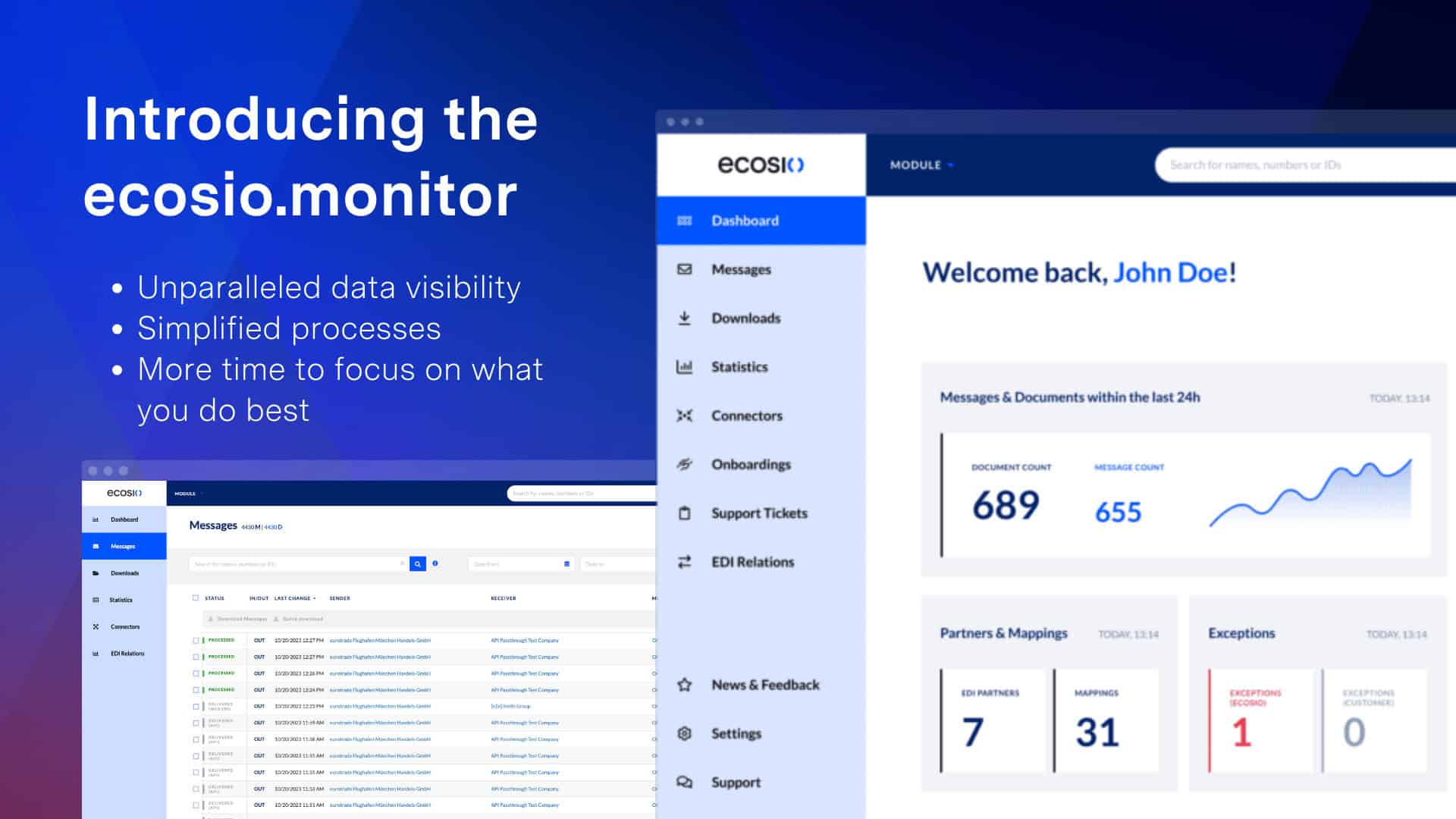
Real-time EDI tracking with Monitor
Visibility is powerful only when it’s practical. With ecosio’s dashboard inside the Monitor, even complex message traffic becomes easy to understand at a glance.
You don’t need to be a developer to use it. You don’t need to dig through logs. You just log in and see everything in one place.
Monitor enables:
- Live EDI tracking across all message types, protocols and partners
- Real-time alerts when disruptions occur
- Detailed error insights to help you resolve issues faster
- Access for any team, not just IT
- Traffic visualisation and filters to spot patterns early
Think of it like your very own EDI cockpit, from which you can not only send messages, but monitor the health of your entire digital supply chain.
Prefer to stay in your ERP? You can see it all there too!
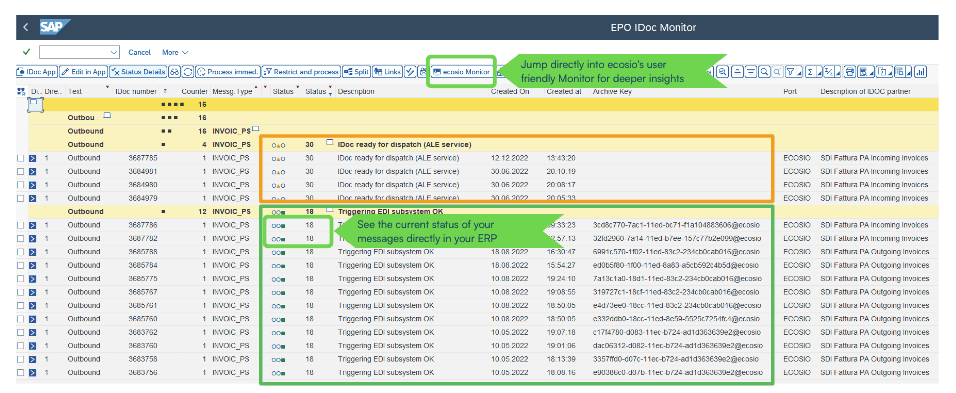
We get it. Most teams don’t want to switch between tools. They’d rather work where they already are, in the ERP.
That’s why with ecosio, real-time EDI tracking doesn’t just live in Monitor. It’s also available directly inside your ERP interface. You can view message statuses, validation results and delivery updates as part of your regular workflow, with no extra systems to log into.
This means:
- You know instantly when a message is received or fails
- You can troubleshoot without leaving your ERP
- You avoid delays and catch issues early, right from the source of truth
For teams who prefer working in their ERP, this kind of integrated EDI visibility is a game changer. And if you ever need more detail or broader context, you can jump straight from your ERP to the relevant message in Monitor, with no searching and no guesswork.
[Image CTA – Download our report, The Future of B2B Integration: Market Trends]
Why EDI tracking matters to more than just IT
Traditional EDI tools treat visibility as just a technical concern. But EDI impacts everyone, from the warehouse floor to the CFO’s desk.
With ecosio’s real-time EDI tracking, each team benefits
- IT can respond instantly to disruptions
- Operations and logistics know when messages land and when they don’t
- Finance can proactively follow up on missing invoices
- Leadership gets transparency and peace of mind
No more internal bottlenecks. No more “I’ll check with IT and get back to you”. Everyone has the same visibility. Everyone saves time.
Better EDI tracking leads to better decisions
It’s not just about catching issues. It’s about being able to:
- Optimise your partner relationships
- Improve lead times and delivery accuracy
- Minimise disruption and financial penalties
- Provide leadership with accurate operational metrics
When you can see your EDI processes clearly, you can improve them. You can adapt faster, build trust with partners, and free your team from repetitive admin.
A fully managed solution
Visibility is only part of the story. The real strength of ecosio’s EDI as a Service solution is that you’re not managing it alone. We handle your day-to-day operations, providing proactive support, clear processes and a team that knows your setup inside and out.
Here are just a few of the things you get with our fully managed approach:
- Dedicated EDI experts who guide onboarding, support scaling and resolve issues quickly
- Active message monitoring and error resolution, to ensure nothing slips through the cracks
- Automated validation and compliance monitoring, to catch problems before they impact operations
And that’s just the beginning. As your business grows, your EDI setup needs to grow with it. Whether you’re expanding your partner network, entering new markets or migrating to a new ERP system, we keep everything running smoothly while maintaining your valuable real-time visibility. From partner onboarding to long-term optimisation, our team works behind the scenes to ensure you can scale with confidence and focus on what matters most.
More than just a platform
Unlike providers who offer only tools or infrastructure, ecosio delivers a fully managed service built on three connected pillars: platform, service and network. At the centre of everything is service. This means not just ticket-based support, but a dedicated team that actively manages your integrations, resolves issues before they escalate and works directly with your partners when needed. The platform provides real-time visibility and deep ERP integration, while the network ensures seamless connection with all your trading partners, regardless of format or protocol.
Together, these pillars give you everything you need to scale EDI with confidence and clarity, without adding to your internal workload.
Ready to stop flying blind?
If you’ve ever been caught off guard by a message failure, or if you simply don’t know what happens after “Send,” then it’s time to rethink your EDI tracking.
ecosio’s fully managed solution ensures EDI is no longer a black box. You gain insight, control and the confidence that nothing is slipping through the cracks.
Get in touch with our EDI experts today and see how effortless visibility can be.
Der Beitrag Real-Time EDI Tracking Isn’t Just for IT Anymore erschien zuerst auf ecosio.
]]>Der Beitrag What Makes a Good EDI Dashboard? erschien zuerst auf ecosio.
]]>In short, an EDI dashboard is like your company’s B2B messaging cockpit, providing visibility of all automated exchanges and allowing relevant individuals to access and edit information easily. Without a good EDI dashboard, management of automated B2B communication can be complicated. With one, it’s a piece of cake!
In this article we’ll explore what makes an efficient EDI dashboard. Hopefully by the end you’ll know exactly what to look for when selecting a new solution.
Data visibility
The main job of any dashboard is to make information accessible and easily digestible. A good EDI dashboard can achieve this by providing…
1) Full transparency for all departments
Given the technical work involved in managing EDI connections, access to EDI data in companies is often limited to the IT team, or a small number of EDI specialists. But EDI data is relevant to many different teams, and providing access to relevant individuals such as those in Purchasing or Accounts can help to streamline processes and eliminate bottlenecks.
2) Full-text search functionality
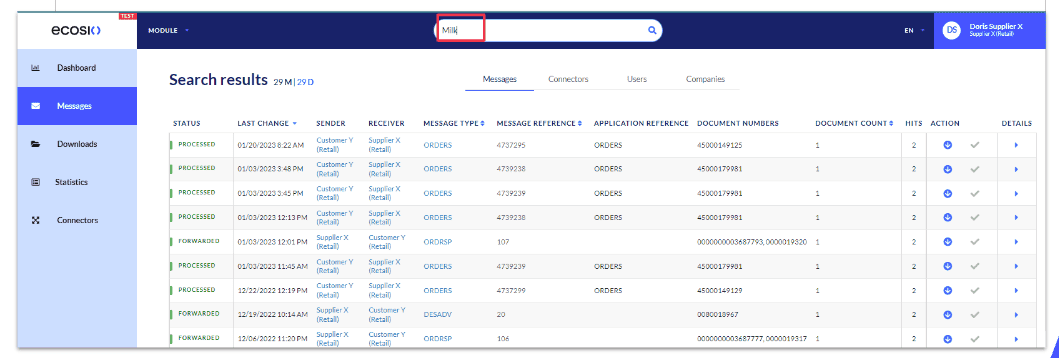
In a good EDI portal finding transactions and documents should be as quick and easy as possible. Given that not everyone looking for information in your portal will necessarily be an EDI expert (especially if several teams are granted access), it’s important that your EDI dashboard has an intelligent search functionality. Rather than requiring users to manually scroll through data or enter specific message identifiers, the best EDI portals will allow users to locate relevant data quickly using any relevant keywords.
 Message overview in the ecosio.monitor
3) Detailed EDI analytics
Just as the dashboard in your car displays all the key information you need in one place, so your EDI dashboard should too! When you’re exchanging high volumes of messages with partners, it’s important to be able to identify any issues quickly. A good EDI dashboard should make this possible via helpful real-time graphs and EDI analytics. When errors do occur, the error information should also be thorough, so as to facilitate swift resolution.

Example of ecosio.monitor dashboard analytics overview
Flexibility
Behind data visibility, the next most important attribute of any good EDI portal is flexibility. Although there are only so many ways to conduct EDI, every company’s EDI requirements are different. Plus requirements naturally change over time! As a result, it’s important that your EDI dashboard has sufficient flexibility to allow your EDI solution to continue to deliver no matter what your specific situation is.
Key things to look for here include…
Customisability
Ideally a good EDI portal should provide ways for individuals to tailor processes to meet their needs. For example, the ability to control notifications can be particularly useful, and help ensure you are only alerted about what’s important to you.
Extensibility
The ability to integrate your dashboard with other solutions, such as a Web EDI portal, will ensure you are able to adapt as needs evolve.
For example, in addition to being compatible with all ERP systems, ecosio’s EDI dashboard (the ecosio.monitor) can be integrated with all ecosio products, from our e-invoicing solution to our Web EDI portal.
Management tools
With any platform or software which is accessible to many individuals, being able to manage usage is important. There are two areas to consider here…
1) Management of internal teams
In order to manage internal teams efficiently, it’s extremely useful to be able to control access and edit user permissions.
Another feature that many EDI professionals find helpful is having real-time visibility of which users are active, as this can enable faster issue resolution.
2) Management of external partners
Depending on your partner and supplier landscape, it may also be helpful for your EDI dashboard to enable you to manage access and functionalities for external entities. For example, this can be a useful feature for businesses wishing to control the access of ERP partners, and for larger organisations with sub-companies.
Good support
As support is not technically a feature, it’s something that many people overlook when selecting an EDI dashboard. However, having reliable support is crucial – particularly for those businesses without substantial in-house EDI expertise.
With this in mind, it’s worth looking out for the following when considering your options…
Reachability of support
Most solutions will provide a support number and/or email address for users to contact when an issue arises. However, these methods of contacting support aren’t optimal. A much better method is being able to raise tickets within your dashboard. Not only does this allow your colleagues to see that a ticket has been raised, it also makes it easier for the expert to see the relevant information, leading to faster resolution and better transparency for all.

Example of support ticket functionality in the ecosio.monitor
Proactive EDI portal maintenance
If optimal system performance is to be maintained, updates need to be proactive rather than reactive. If maintenance is left to internal teams to handle, it’s easy for maintenance to be put off and performance to deteriorate over time.
Security
Given the significance and sensitivity of the data being exchanged via EDI, it’s important that your EDI dashboard is sufficiently secure. Features that can help bolster security include…
User authentication
Obviously, you don’t want anyone accessing your EDI data who shouldn’t be, and the easiest way to prevent this is through thorough implementing failsafes such as multi-factor authentication. Meanwhile, Single Sign-On (SSO) and editable user preference settings, including “remember me” functionality, can be used to enhance the user experience.
Secure archiving
Archiving is not only a legal requirement in many transactions, it’s also essential for maintaining data integrity. While all EDI solutions should offer archiving, a good EDI portal should make this as easy as possible by providing user-friendly management features.
 The ecosio.monitor offers the ability to create custom archives
Regular updates
Regular updates are essential for long-term efficiency and will prevent a gradual decline in performance and security. As mentioned previously, it is best if technical updates are handled proactively by external experts.
Have you considered the ecosio.monitor?
Now that you’ve got a clearer idea of what a good EDI dashboard can deliver, you should be better placed to decide on a suitable solution. And luckily you don’t have to look far to find one!
If you’re searching for an EDI portal that offers impressive data visibility, flexibility, robust management tools, good support and top-notch security, you need look no further than the ecosio.monitor.
Thanks to deep integration into your existing ERP system, the ecosio.monitor offers unparalleled usability and data visibility, allowing users to view real-time message statuses and find relevant data within seconds. Plus access can be extended to and adjusted as required, ensuring EDI never becomes a bottleneck.
Find out more!
For a detailed breakdown of the ecosio.monitor’s key features and how these can benefit you, please visit our dedicated feature page.
Alternatively, if you would like to schedule a call to see first hand what our EDI portal can do and how the ecosio.monitor can be integrated with your existing systems, contact us today. We’d love to show you how our solution can help you achieve maximum efficiency with minimum effort.
Frequently asked questions
Why is an EDI dashboard important?
An EDI dashboard is essentially your very own EDI control centre. An efficient dashboard makes keeping track of EDI message traffic and identifying and eliminating errors easy. For large businesses a comprehensive, flexible dashboard is an invaluable tool in helping to streamline key B2B processes and communication.
Is changing EDI dashboards difficult?
How much work it takes to upgrade your EDI dashboard depends on several factors, including what type of EDI solution you currently have, which dashboard you want to implement, and how much EDI expertise you have in-house. While some EDI migration projects can be lengthy and complicated, if a fully managed solution (such as ecosio’s) is opted for, all technical tasks are handled quickly and efficiently by external experts, and migration becomes simple.
How important is usability in an EDI portal?
Extremely important! EDI data is typically relevant to many different teams within a business. For some individuals interacting with EDI data may be something that is only required very rarely. As a result, your EDI portal shouldn’t require detailed technical knowledge or familiarity with a unique system. Ideally, the user interface should be in line with that of your existing ERP system. Features, folders and pages should be clearly labelled, and a flexible search function is crucial.
Can I see a demo of the ecosio.monitor in action?
Yes! We would be more than happy to show you what our EDI monitor looks like and how its many unique features can benefit your business. To arrange a demo please contact us.
Discover more about our updated product, ecosio.flow.
Der Beitrag What Makes a Good EDI Dashboard? erschien zuerst auf ecosio.
]]>Der Beitrag SAP® EDI Project Roles – A Breakdown erschien zuerst auf ecosio.
]]>Given the many different SAP systems available and the myriad ways in which EDI capability can be achieved, however, it can be difficult to know exactly how to go about integrating a new solution. To help, in this article we provide an overview of the different roles involved in a successful SAP EDI project and which tasks are handled by each role.
For the purposes of this article we will look specifically at the roles required to integrate fully managed EDI, as this constitutes the most comprehensive EDI solution available to SAP users – and crucially requires the least internal effort from you. In this approach to EDI integration in SAP, the roles and responsibilities are typically spread across four key players: your EDI provider (ecosio in this example), your business, your SAP consultancy and your partners (e.g. customers/suppliers/relevant governmental agencies)…
Your EDI Provider (ecosio)
Thanks to ecosio’s fully managed approach, it is ecosio, rather than your internal team, that handles the vast majority of EDI tasks (click here for a more detailed breakdown of the amount of internal effort required to setup and operate different EDI solutions).
ecosio’s team of EDI and SAP experts manages the EDI SAP integration process from setup and testing to maintenance and error handling. This way you are able to experience all the benefits of EDI with none of the hassle.
A key part of the success of the ecosio approach is the nature of the two roles involved…
1) Integration Engineer

Every ecosio customer is assigned a dedicated Integration Engineer. This ecosio Integration Engineer is your very own EDI hero and acts as a single point of contact for all things EDI.
As well as being an expert in EDI protocols and formats, they also understand the underlying IDoc structure and the correct data representation. More importantly, they know your company, are familiar with your needs and are easy to get hold of. Contrary to many other EDI support personnel, our Integration Engineers really care about every EDI message exchanged!
Their key responsibilities include (but are not limited to)…
- Managing the SAP EDI integration/migration process end-to-end
- Liaising directly with relevant parties so you don’t have to
- Handling industry-specific EDI issues within SAP
- Proactively identifying and resolving errors to ensure ongoing success
Main contacts: Your internal project manager, the ecosio Onboarding and Operations team, your SAP consultancy project manager, your partners’ EDI contact people
2) Onboarding and Operations Team

Working alongside and supporting your Integration Engineer is ecosio’s Onboarding and Operations team. The job of this team is to provide your ecosio Integration Engineer with support in regard to onboarding, document mappings, connection testing and any other EDI tasks whenever needed. Significantly, there is no need for your organisation to liaise with this team directly, as everything is handled via your Integration Engineer.
Main contacts: ecosio Integration Engineer, SAP consultancy project manager, your partners’ EDI contact people
Your Business
With ecosio’s fully managed EDI solution, there are three different EDI roles that must be filled by individuals in your business:
1) Project Manager

The first and most important role is that of the project manager. They are essential as they understand your business and what you want to achieve better than anyone.
Their responsibilities include…
- Developing the project strategy in line with your ecosio Integration Engineer
- Ensuring your project stays on time and on budget
- Collecting feedback from internal users
- Communicating regularly with your ecosio Integration Engineer and alerting them to any issues or changes in strategy (e.g. a change in the agreed order of partner onboarding)
Main contacts: ecosio Integration Engineer, key users, business users
2) Key Users

These users have the most comprehensive understanding of SAP/EDI. They are responsible for providing feedback during the mapping/testing phase and checking that messages are coming through as desired. They should also alert the project manager if any issues or opportunities for optimisation are spotted. Key users may also be used to help train business users.
Main contacts: Internal project manager, business users
3) Business Users

A business user is simply an employee who uses the final product. Their responsibilities are limited to using the product correctly and alerting the project manager should they spot any issues.
Main contacts: Internal project manager, key users
SAP Consultancy
When it comes to your SAP consultancy, there are four related roles:
1) Project Manager

The SAP consultancy project manager oversees all work done in relation to your project by that organisation. Their main task is to liaise with the ecosio Integration Engineer and pass any relevant information on to colleagues to ensure any SAP ERP issues are resolved as fast as possible. Their focus should be keeping your SAP system working and ensuring your project stays on time and on budget.
Main contacts: ecosio Integration Engineer, SD/MM/FI consultant, ABAP programmer, SAP basis administrator
2) SD/MM/FI Consultant

The SD/MM/FI consultant manages the necessary adjustments to your SAP system to enable seamless integration of your new EDI solution. This involves testing and carrying out acceptance. SD/MM/FI consultants are experts when it comes to SAP problem solving.
Main contacts: SAP consultancy project manager, ABAP programmer
3) ABAP Programmer

The ABAP programmer’s role is to realise custom code when the normal SAP means aren’t sufficient. Effectively, they step in when the SD/MM/FI consultant is unable to fix an issue.
Main contacts: SAP consultancy project manager, SD/MM/FI consultant
4) SAP Basis Administrator

The SAP basis administrator is like the SAP mechanic. They oversee SAP system operation and fix any issues relating to memory / processor use, network, etc.
Main contact: SAP consultancy project manager
Your Partners (Customers / Suppliers / Governmental Agencies)
For other partners, there is only one relevant EDI project role:
EDI Contact Person

This individual acts as the sole contact point for your ecosio Integration Engineer, who will liaise with them directly during onboarding to get them connected. Your ecosio Integration Engineer may also need to contact them post go-live to fix any subsequent message exchange issues.
Main contact: ecosio Integration Engineer
About ecosio and Connections That Work
At ecosio we are experts in providing EDI Connections That Work and have helped hundreds of businesses to experience the benefits of automated document exchange in SAP®.
Our expert Integration Engineers and Onboarding and Operations team takes care of everything from setup and testing to maintenance and error handling. With our solution virtually zero internal effort is required for you to experience successful EDI in SAP®.
To find out how you can experience streamlined, future-proof EDI in your SAP system, get in touch today. We are always happy to answer any questions you may have!
Want this information as a handy one-page infographic?
To help you visualise SAP EDI project roles, we’ve condensed the information in this article into a helpful, printable infographic.
Der Beitrag SAP® EDI Project Roles – A Breakdown erschien zuerst auf ecosio.
]]>Der Beitrag EDI Integration with Infor M3 erschien zuerst auf ecosio.
]]>- Infor M3 is a flexible ERP solution that can be operated both in the cloud and locally, popular with large and mid-sized companies managing complex supply chains
- Deep EDI integration is achieved via an API connection, allowing real-time message status tracking and full data transparency directly within the Infor M3 interface
- ecosio’s fully managed EDI service offers proactive monitoring, partner onboarding, and 24/7 support, eliminating the need for in-house EDI expertise
- ecosio’s cloud-based EDI solution ensures scalability, supporting current and future EDI and e-invoicing requirements
Today, more and more suppliers and customers are demanding a connection via EDI (electronic data interchange). If the chosen EDI solution is not deeply integrated into Infor M3, many of the advantages of such a connection are lost, however. In this article we explore what the advantages of a strong EDI connection are and how you can achieve deep EDI integration in Infor M3.
Infor M3 and EDI – stronger together
Infor M3 is a particularly flexible ERP solution that can be operated both in the cloud and locally. Thanks to its capacity to help users manage the requirements of complex supply chains, Infor M3 is particularly popular with large and mid-sized companies. For such companies, EDI – i.e. the automation of previously time-consuming and error-prone manual message exchange processes – is a key consideration.
However, in many companies EDI and ERP exist side by side rather than as a homogeneous whole. When a local EDI converter is used instead of a fully managed, cloud-based EDI solution, some essential advantages are lost, including:
- Full end-to-end message transparency from sender to recipient.
- Relief of internal teams, self service functionality for specialised teams, and the elimination of any need for internal EDI know-how.
- Support of national e-invoice requirements across various countries (Italy, Hungary, Spain, etc.).
- EDI solution flexibility/scalability.
- Round-the-clock monitoring of data exchange and proactive troubleshooting by a specialised service provider.
The key to experiencing these benefits lies in deep integration of an EDI solution in Infor M3. But what is the best way to achieve such integration? Together with our Infor partner BE-terna, we have designed a particularly flexible and future-proof solution for this…
API as the game-changer
The best method to achieve seamless EDI integration in Infor M3 is via an API connection. API connections are characterised by the fact that access to data between your ERP and EDI service provider (e.g. ecosio) takes place directly via an integrated interface (i.e. the API) of the EDI service provider. This makes the B2B platform with the associated B2B network of the EDI service provider and the ERP solution a homogeneous whole. This in turn means, among other things, that the status of each message can be queried automatically and viewed in real time in your existing ERP system user interface. The potential for errors along the B2B message exchange is thus drastically reduced.
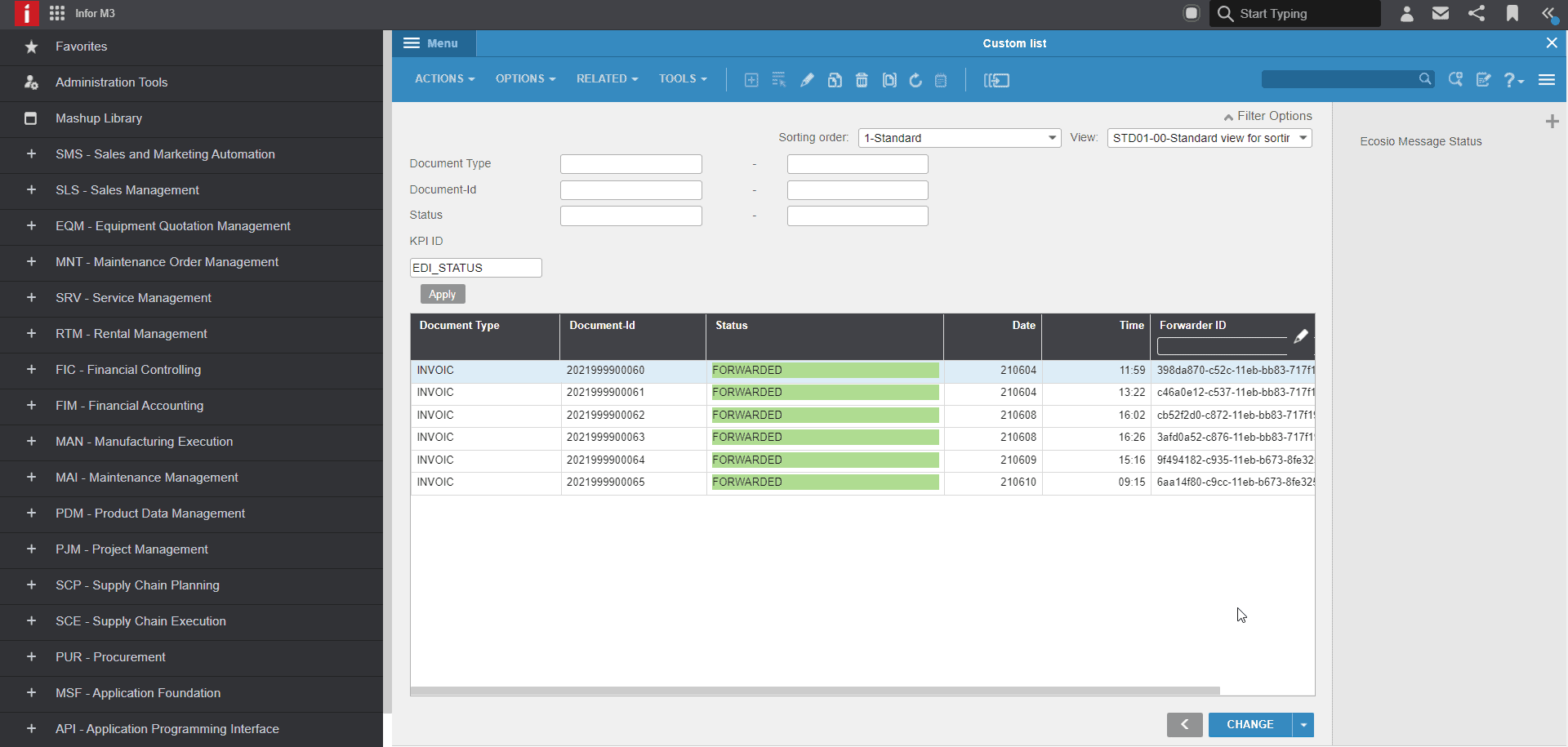
The status of each EDI message – directly viewable in the familiar user interface of Infor M3
EDI via API offers true end-to-end data transparency, making it extremely easy for users to identify and resolve any errors that occur. For example, suppose you are waiting for a response from a supplier regarding an order you sent… With EDI via API, you can immediately see directly in your ERP system if an order was not received from the supplier due to an error. Such visibility is not possible via an alternative connection, e.g. via SFTP.
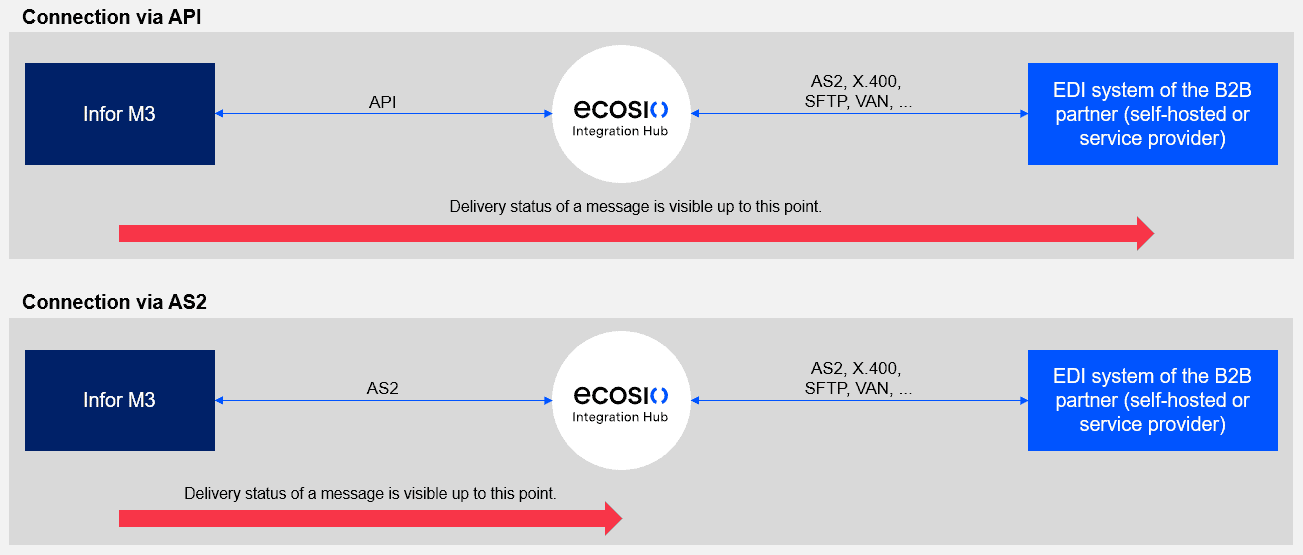
The delivery status can be viewed over the entire route of the message with an API connection
The use of EDI via API also offers the possibility of a full text search in Infor M3. This makes it much easier and faster to find documents when needed, as ecosio indexes all the content of a message as well as any associated metadata, such as AS2 message IDs, SFTP file name, etc. Furthermore, the newly updated ecosio Monitor (accessible via the familiar interface of Infor M3) allows users to track the history of any message.

The message history in the ecosio monitor, integrated in Infor M3
As the data exchange takes place via ecosio’s fully managed platform, all message traffic is continuously monitored. If there is a problem with a delivery, ecosio takes over the proactive troubleshooting and will carry out any required subsequent action, e.g. a new message dispatch. In the event that you need to intervene – for example, because something is missing from the message content – you will be proactively notified. No message is left stranded, meaning you can rest assured your message exchange is running smoothly and without errors.
An API connection makes EDI in Infor M3 more transparent, easier and, of course, more cost-efficient.
What do I have to do to achieve full EDI integration?
Not much – that’s the best part! The best fully managed EDI service providers (such as ecosio) offer API integration of all EDI functions (as well as Web EDI and e-invoicing) as a complete package. With ecosio, all this is delivered via just a single connection to the ecosio cloud-based EDI solution (our Integration Hub). This means that in addition to the benefits of seamless EDI integration in Infor M3, you also have the following advantages:
- ecosio takes over all EDI tasks, relieving internal teams and eliminating the need for in-house EDI expertise.
- The connection to the ecosio cloud-based EDI solution (our Integration Hub) enables the fulfilment of all current and future EDI or e-invoicing requirements in a flexible and scalable way.
- Dedicated ecosio Integration Engineers take care of all partner onboarding, monitor messages 24/7, and are always available as a clear point of contact for you.
- Future-proof EDI – the ecosio cloud-based EDI solution (our Integration Hub) is constantly updated and is thus always at the cutting edge of technology. ecosio’s multiple redundant server infrastructure enables updates to be installed during operation without affecting the uptime.
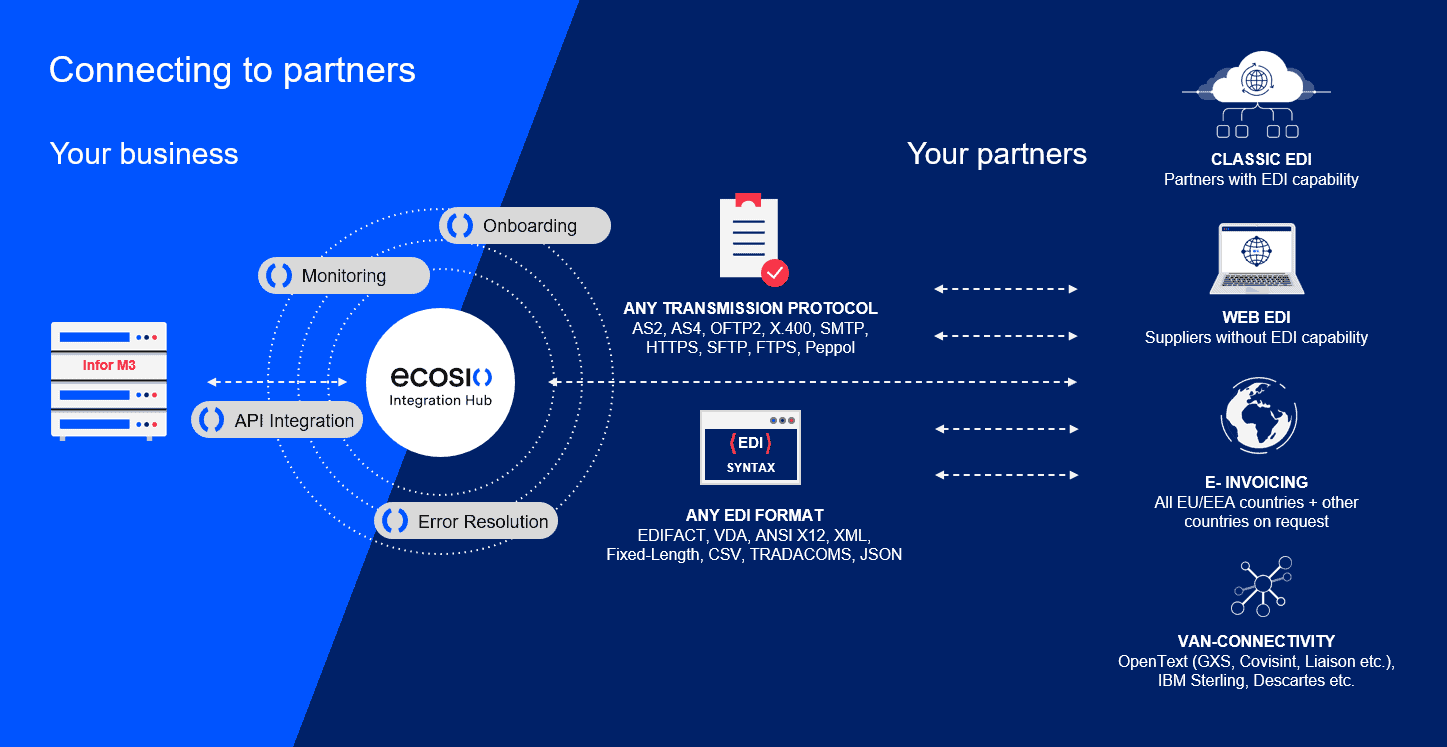
EDI made effortless with ecosio
The project implementation and EDI integration in Infor M3 is handled completely by ecosio – together with BE-terna as Infor M3 Customiser.
Still have questions about EDI, EDI integration and Infor M3?
ecosio is an exert when it comes to seamless integration of EDI and e-invoicing in ERP systems like Infor M3. If you are interested learning more about our unique EDI as a Service solution or have further questions, please contact us without obligation – we look forward to enabling you and your company to realise the full EDI potential in Infor M3!
Discover more about our updated product, ecosio.flow.
Der Beitrag EDI Integration with Infor M3 erschien zuerst auf ecosio.
]]>Der Beitrag Alternative Solutions for EDI Data Exchange with SAP PI erschien zuerst auf ecosio.
]]>SAP PI (Process Integration) is a software component offered by SAP, which allows data exchange between an SAP and an internal or external system. Therefore SAP PI is the SAP Exchange Infrastructure (SAP XI) successor. Technically speaking, SAP PI is part of SAP Netweaver, the technical platform on which the SAP ERP system runs.
The picture below illustrates the basic idea behind SAP PI using a typical EDI situation.
SAP PI can also be used to integrate internal systems (e.g. CRM system, HR systems, etc.), however, this aspect will not be discussed in this article.
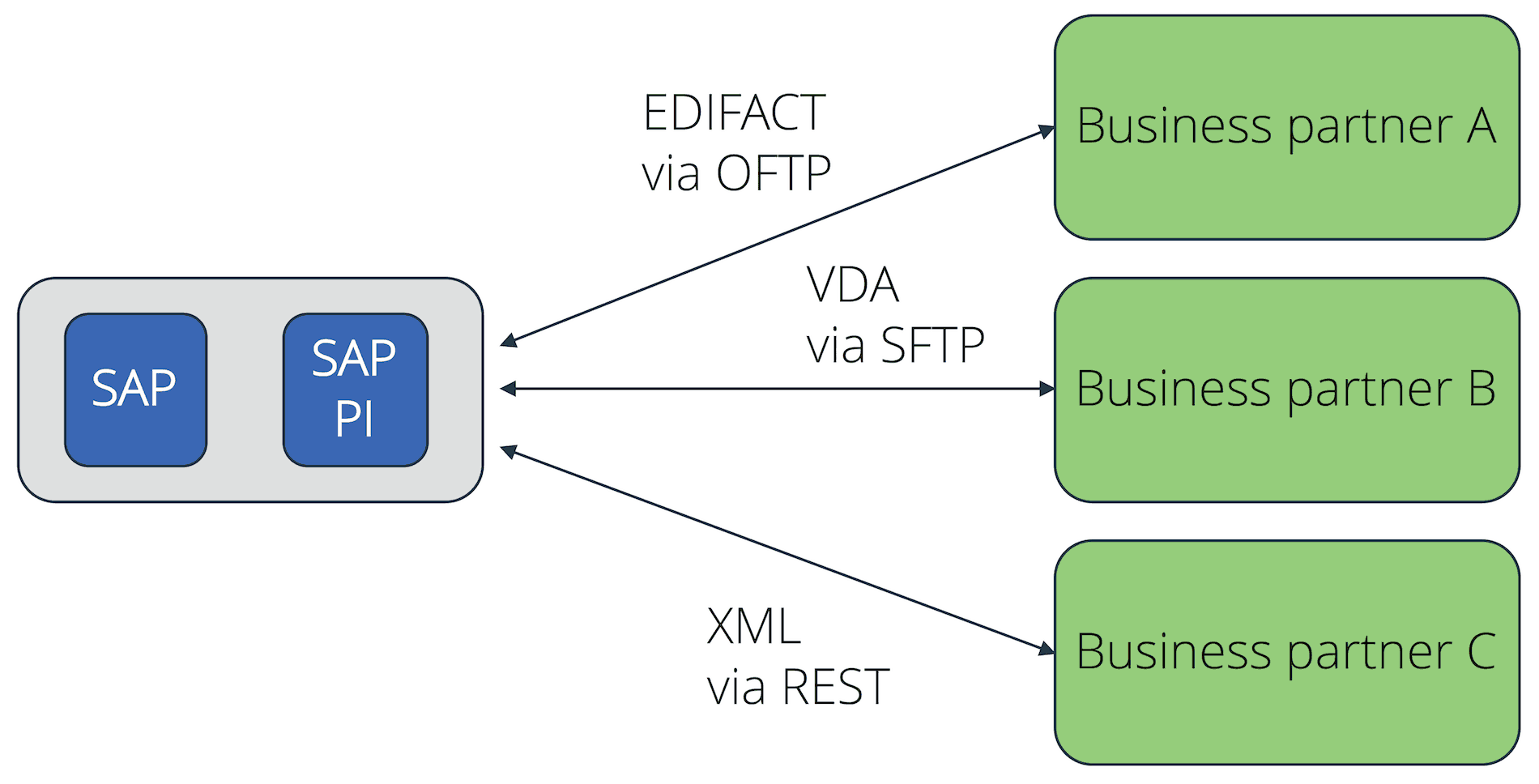
Ground Principles of SAP PI in a EDI Scenario
The core functions of SAP PI are:
- Connectivity
- Mapping
- Routing
The connectivity function allows SAP PI to offer a variety of adaptors for the various message transport protocols. This includes several protocols, which are needed for the electronic data interchange with external partners, such as AS2, X.400, OFTP, SFTP, RESTful Web Services, etc.
With the support of the relevant maps, SAP PI is also able to translate files from an internal SAP format (e.g. IDoc) to an external EDI format such as EDIFACT, XML, ANSI X.12, etc. The maps can be created using a graphic editor and deployed based on XSLT or with the help of an ABAP program.
The routing will then help to deliver the messages to different receivers, based on the information present within the file.

Challenges EDI businesses face with SAP PI
One of the main challenges when creating an EDI connection based on SAP PI is the complexity of the software. As a figure of speech, instead of being handed a hammer and nails, one needs to make do with a very comprehensive and complex toolset. Therefore a lot of know-how is needed to configure and operate SAP PI, which requires qualified employees. As EDI does not go home at 5pm, but is a 24/7 matter, the responsible employees constantly need to be available in the business for maintenance and to ensure a smooth EDI process.
Below is an outline of the many other challenges a company might encounter in its day-to-day operations.
Connection parameter maintenance
Despite the common belief, EDI connections are not entirely maintenance free. Connections using digital certificates (e.g. AS2 or OFTP2) need to have their certificates changed regularly, in unison with the partners in order to avoid connection disruptions. One could for example expect a medium-sized company in the production industry to have a few hundred clients or suppliers who are connected via EDI. For SAP PI, this implies the maintenance of a few hundred different connections. In most cases, the number of connections is considerably higher.
When new connections need to be established, this often does not go completely smoothly. For example, AS2 allows a number of settings, which are not necessarily uniformly implemented by all business partners. Therefore the set up of a new AS2 connection requires an adequate level of detailed technical know-how. The same can be said about OFTP2 or other protocols.
Difficulties when integrating exotic protocols
Even though SAP PI supports multiple EDI protocols, there are always connections for which standard protocols will not work. An example is the Peppol network, used to deliver electronic documents within Europe. Should a company want to implement this protocol in their SAP PI, they must create their own adaptors, which would require experienced employees or an external service provider.
Maintenance of mapping tables
Having document mappings created in-house for SAP PI requires detailed know-how of the EDI standards used. Depending on the number and type of clients and suppliers, a lot of different standards and formats have to be used. Pure IDoc know-how, which many SAP trained employees have, is not enough here.
However, the effort in regard to document mappings is not only in the initial creation of the mapping tables, but also in the consistent maintenance of the existing ones. This will also require trained employees, who can apply the necessary adjustments to the mappings when changes are needed.
In addition to the technical implementation of mappings, the professional evaluation of information in document standards is also important. For example, companies in the automotive industry have their own standards (e.g. VDA). However, there can be variations in how the different automotive manufacturers apply those standards.
Due to the large number of carried out projects and implemented mappings, this domain knowledge naturally exists with an EDI service provider. Therefore, should a company wish to create each connection in SAP by itself, employees would first have to go through the tedious process of learning this knowledge. It might even prove impossible at times, as the information is not available on the manufacturer’s website, but is only known by certain contact persons in the company. Part of the challenge is to know who those contact persons are.
Constant monitoring of the EDI data flow
Another important complication when connecting with SAP PI is the constant monitoring of the EDI data flow. EDI connections might not need much maintenance, but they still need to be constantly monitored. The need for constant monitoring is due to the fact that EDI takes place in a network. Within a network, nodes may fail at any time without warning, or nodes may not behave as expected.
During a network outage, the connection to a partner can be interrupted, thus preventing the delivery of receipt confirmations (e.g. MDN for AS2 or EERP for OFTP2). In this case one would have to personally contact their business partners to find out if they received the messages correctly. To do this, one would first need to find and align the message IDs, which is time consuming.
Even though EDI is a system-to-system type of communication, there are still people in front of each system, who may enter potentially incorrect data. This would cause message maps to fail, and would need to be corrected manually. This is another case where highly trained professionals are needed, as they would need to quickly solve this issue.
X.400 cost topic
When using a paid third party network for the message exchange, such as X.400, the costs can be quite high. A single business typically gets poor conditions from these providers, as the data volumes are too low. A central service provider is able to procure large data volumes at a better price than a single business unit.
Conclusion
SAP PI offers a wide range of functionality and flexibility. However, the configuration, operation, and maintenance require the employment of adequate staff, which needs to be taken into consideration when planning the total cost of ownership. The same applies when using a local EDI converter.
Alternatives based on EPO connectors
An alternative to creating in house EDI connections based on SAP PI is the use of a managed EDI solution. Below is an example of an EDI connection based on ecosio.EDI and the EPO connector.
One connection for all
The main difference to EDI connections with SAP PI is the concept of one connection for all. The following diagram illustrates how instead of having x different connections to one’s business partners, a company can only have one connection to a central EDI provider, ecosio in this case.
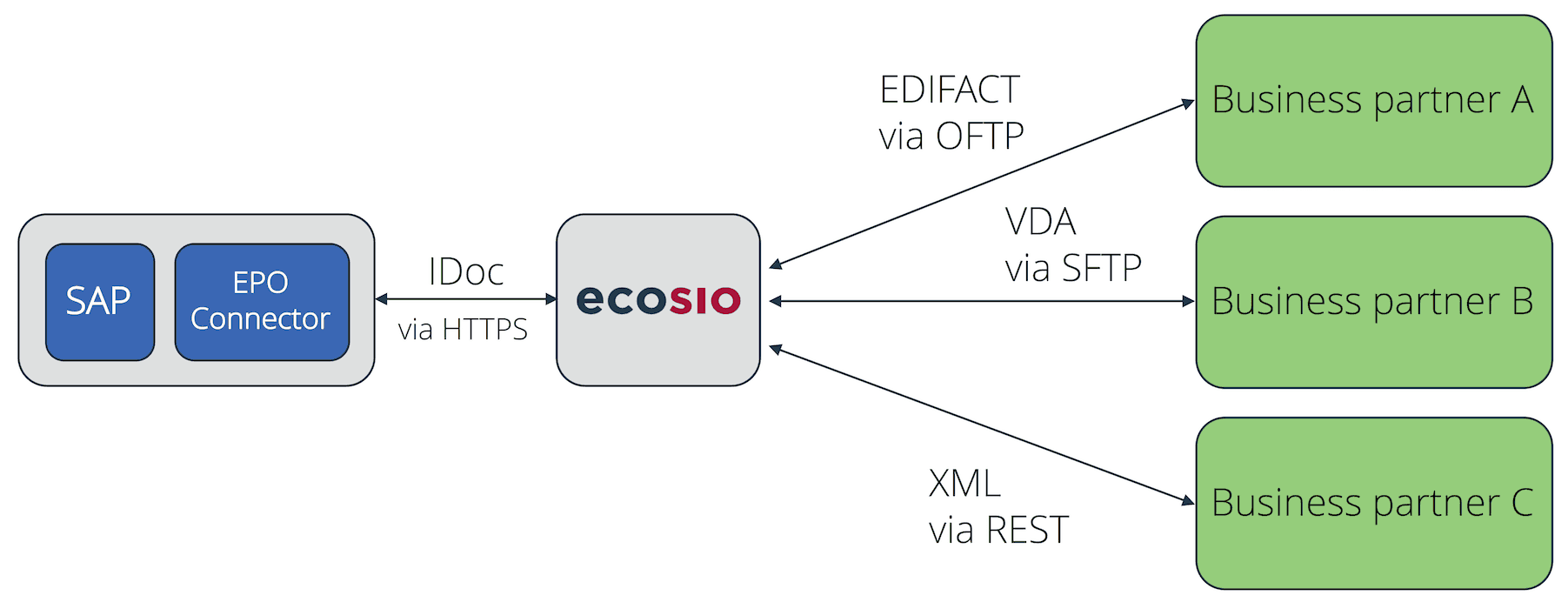
EDI Connection Using EPO Connector
The EDI provider takes over all tasks centrally – tasks which would be carried out in an in house solution with SAP PI. This includes the set up and maintenance of the EDI connections, setting up and maintaining document mappings, the correct routing of messagess, and the ongoing monitoring of the data flow.
Instead of maintaining x different connections and mappings in SAP, the SAP native document exchange format IDoc is used. Incoming IDocs are delivered to the EPO Connector by ecosio, and appear in SAP, directly in transaction BD87. The EPO connector will automatically accept outbound IDocs and deliver them to ecosio, who then converts them into the correct final format and delivers them to the receiver.
The only task that is left to the SAP system is to monitor transaction BD87, to get an overview of the inbound and outbound IDoc. The illustration below shows this overview.
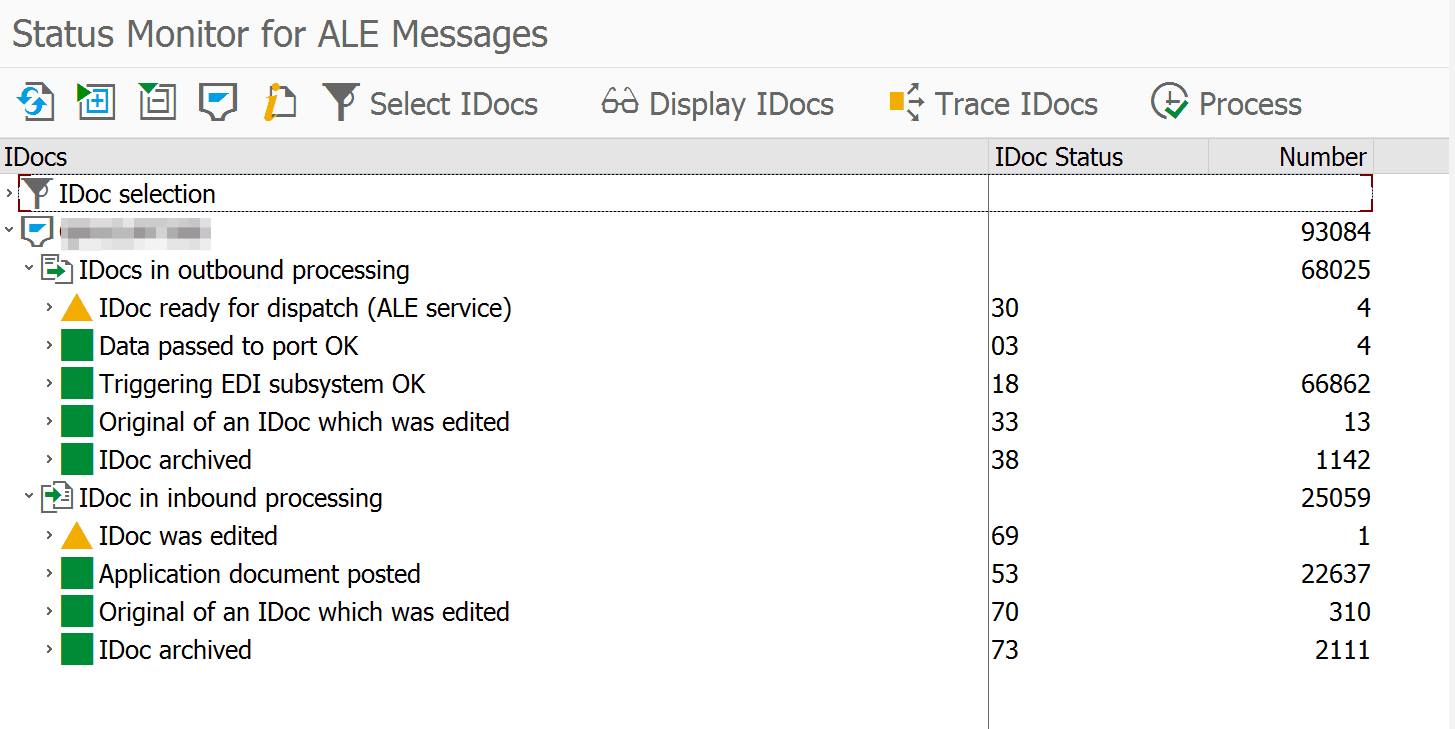
IDoc Overview of Transaction BD87
© 2020. SAP SE or an SAP affiliate company. All rights reserved. Used with permission of SAP SE.
Should a more detailed tracking of an inbound or outbound message be needed, the ecosio.Monitor can be used for this purpose as well. It provides an overview of all sent and received messages, and informs users about the delivery status of messages. With a sent message for example, it is possible to see if the receiver actually received the message (e.g. Daimler or BMW).
In order to view the ecosio.Monitor, it is not necessary to leave the SAP. On the contrary, the ecosio.Monitor can be opened directly in SAP with one click on the EDI message ID in the IDoc viewing page, as demonstrated below. A login using a single-sign-on solution is performed in the background. Thus, the user does not have to enter any login credentials for the ecosio.Monitor.
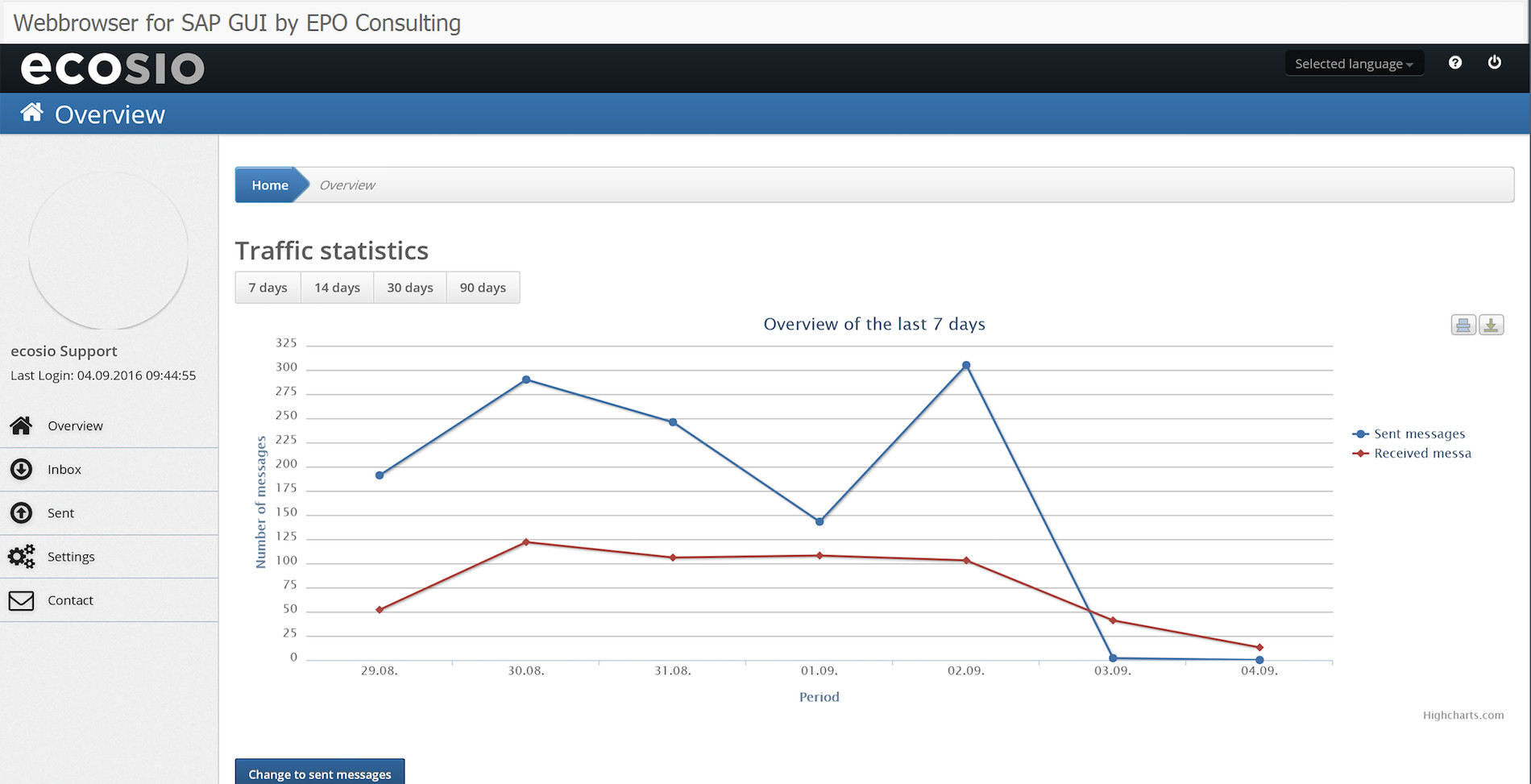
ecosio.Monitor directly accessible in SAP
In the ecosio Integration Hub SAP users can view the delivery state of a specific message, or check other sent or received messages.
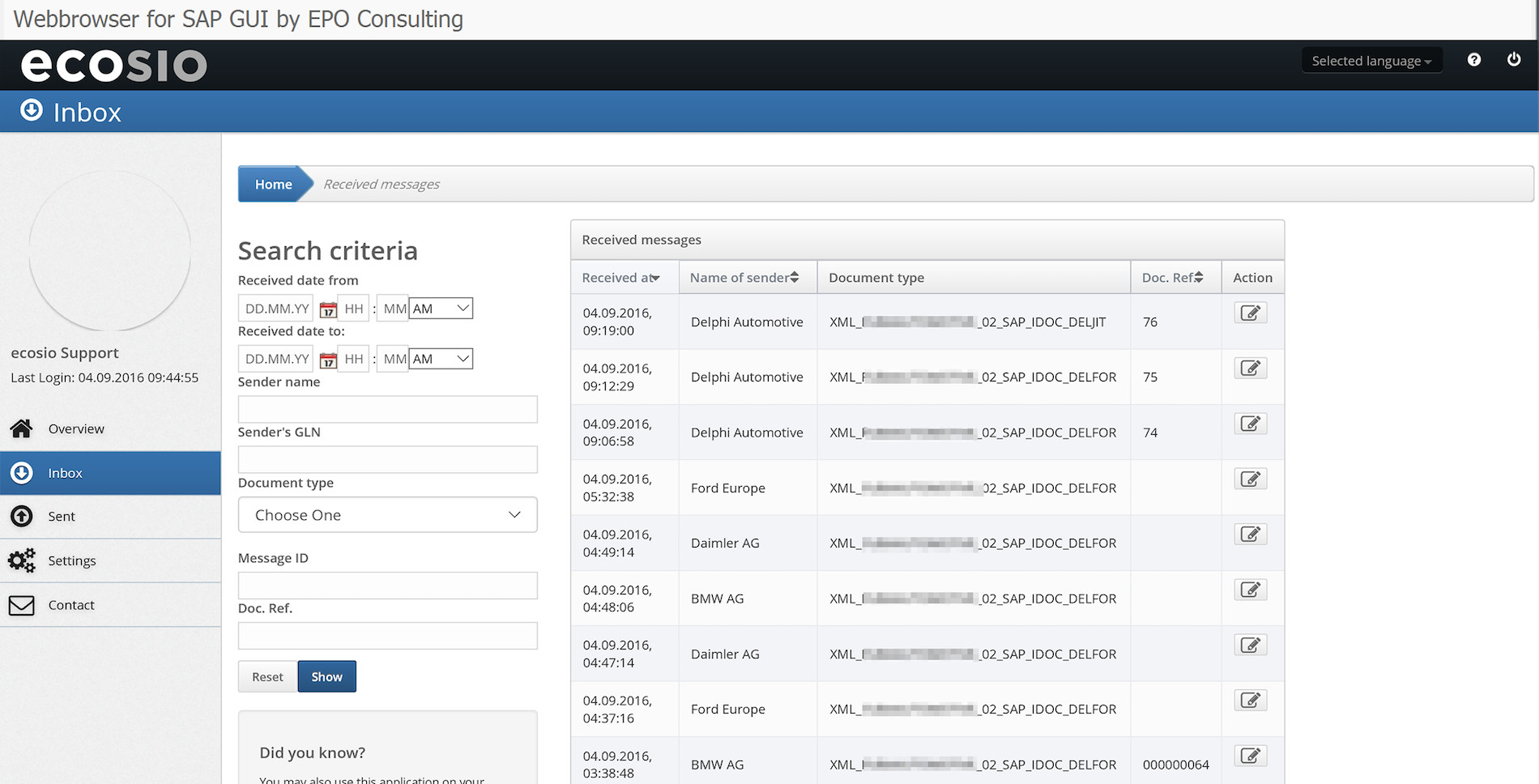
Detailed View of Messages in ecosio.Monitor
Ongoing monitoring by external professionals
If a company chooses ecosio to take care of its EDI processes, the ecosio operations team constantly monitors all of the EDI data flow. Should there be issues with the delivery of messages from and to business partners, the operations team will sort this out with their EDI contact person and the message delivery will resume as soon as the issue is resolved.
Since the operations team’s main task is to monitor EDI connections and solve issues, the phone numbers and email addresses of all EDI contacts of the different companies are stored. The team even knows some of the EDI contact persons personally, which reduces the communication effort and increases the speed at which issues are being solved.
24/7 Connection monitoring
EDI processes are time sensitive, especially in logistics. DESADVs (Dispatch Advice) need to be sent on time, DELJIT (delivery just in time) and production synchronous forecasts must be received on time etc. Therefore a connection breakdown would be disastrous, as it would prevent reaching SLAs and can lead to penalties on the business partner’s side.
All connections to and from ecosio are monitored 24/7. If a connection stops, an alerting mechanism kicks in, allowing the operations team to counteract quickly.
Set Up of any connection protocol
Thanks to their full focus on EDI topics, an EDI provider such as ecosio can implement even the more exotic protocols, Peppol being one example of these. From an SAP point of view, this means that no expensive or complicated special adaptors are needed for SAP PI data exchange.
Summary
SAP PI offers SAP users a wide range of possibilities and functions to create connections to internal and external systems. Especially when considering the total cost of ownership, an outsourced EDI solution with an external EDI service provider is cheaper than an in-house EDI solution.
Do you have any questions?
Do you still have questions about SAP PI data exchange or EDI with a SAP ERP system? Feel free to contact us, we would love to help you!
SAP ERP and SAP S/4HANA are the trademarks or registered trademarks of SAP SE or its affiliates in Germany and in several other countries.
Der Beitrag Alternative Solutions for EDI Data Exchange with SAP PI erschien zuerst auf ecosio.
]]>Der Beitrag What is Master Data and Why Does it Matter? erschien zuerst auf ecosio.
]]>The answer to these problems lies in ensuring your business has reliable master data. But what is this exactly, how can accurate it impact your B2B processes, and what does a good master data system look like? Let’s explore…
What is master data?
Master data, as the name suggests, is the most important data held by a business. Typically this data is information that is high level and non-transactional, and therefore likely to be more stable, used more frequently, and most useful for reporting and informing future strategy. While different industries and individual companies may treat different data elements as master data, common examples of master data elements include basic information such as the name of a supplier/customer and product reference numbers.
Given the nature of master data, this information is often used across multiple platforms and software programs in a business. To avoid inconsistencies and confusion, it is important that the exact same identifiers are used for master data elements – whatever these identifiers are (numbers, letters, words, codes etc.). Good master data management therefore involves ensuring that there is a single central record of certain data elements (e.g. supplier name), which data is pulled directly from when used in transactions and messages etc. This way, when information needs to be changed, all that is required to ensure that the new, correct data is used across the business is for the master data element to be updated.
The problems with having poor master data and processes
Although every supply chain business depends on the successful exchange of data to/from partners, many do not have reliable master data lists. This can be caused by a number of factors, such as the existence of multiple data lists that need to be consolidated (common after mergers and acquisitions), or simply a lack of prioritisation of data management by IT teams. Similarly, some companies may have well-maintained master data lists, but lack the necessary processes to ensure that data is used correctly.
Whatever the reason behind a company experiencing issues with master data, however, the resultant issues are the same. These fall into three main categories:
1) Errors
First and foremost, the most apparent issue relating to poor or inconsistent master data is the increased capacity for errors. An incorrect address, for example, can lead to delays and frustration on both ends of a transaction as messages/orders do not reach the intended recipient. Similarly, erroneous item prices and account numbers can cause huge repercussions for the company and individuals at fault.
2) Reduced capacity for performance analysis
With poor data management, seemingly simple tasks, such as identifying which customers are most valuable to your business or which products are most popular, become difficult. Without the ability to pull reliable reports on B2B information and KPIs (key performance indicators), it becomes tricky to identify both how you are currently performing and what can be done to improve moving forward.
3) Inefficiency
With reliable data, data entry and data processing are fast and simple. Sadly this is not the case in businesses without good data processes. In businesses with messy data, automation is extremely difficult; information in individual transactions typically needs to be checked, interpreted and inputted manually if costly errors are to be avoided. Manual data processing is not a viable long term solution for growing businesses, however, as human errors are unavoidable – plus staffing costs will quickly eclipse the cost of investing in an automated system.
Master data: a crucial first step towards wider automation
Over recent decades automation has grown from being a “nice to have” to an essential part of modern supply chains. From internal system automation to the exchange of structured electronic messages between partners (known as electronic data interchange, or EDI), virtually every stage of the trading cycle can now be improved by intelligent technology. The pace of business today is such that manual processes are simply unable to compete in terms of efficiency and cost effectiveness
Without reliable master data it is difficult for any level of supply chain automation to be implemented. Think of your ideal, cost- and time-effective business processes as a house you want to build. In such a scenario your master data elements are the bricks. If they are inconsistent or poorly cast, this will have an impact on the stability of the whole structure.
As a result, for any supply business looking to move towards automation of any kind, taking the time to build a reliable master data list and accompanying processes is an important first step. Unfortunately, as building master data and conducting master data synchronisations can be time consuming, many businesses put these tasks off until they are absolutely necessary. When they then come to implement an EDI solution this leads to unnecessarily time-consuming migrations and customer onboardings.
Once I have sorted my master data – what next?
If you would like to find out more about what kind of automation it is possible once you have cleaned up your master data, why not read our article What is Electronic Data Interchange and What are the Benefits of EDI? If you would like to know more about what implementing an EDI system entails, you may also be interested in this article, where we explore this process in detail.
Alternatively, if you have any other questions regarding this topic or anything relating to B2B integration please do feel free to get in touch.
Der Beitrag What is Master Data and Why Does it Matter? erschien zuerst auf ecosio.
]]>Der Beitrag Four Tips to Ensure Your EDI Integration Project is a Success erschien zuerst auf ecosio.
]]>To help those unsure of how best to approach an upcoming EDI integration project, in this article we’ll cover four key things you can do to ensure your project is a success.
1 – Consider your options
Given the far-reaching effects of B2B data exchange and the extent to which it can impact a business’s bottom line, it follows that due care should be taken to select a suitable solution. Unfortunately, as EDI capability is often sought reactively rather than as part of a long term strategy, however, many businesses fail to consider the numerous available solutions properly as part of a well-planned EDI intgration project.
A common example of such a situation might be:
A supplier is faced with an immediate request to enable the receipt of electronic purchase orders and the transmission of invoices over EDI. This customer is very important and therefore needs to be satisfied or will look for a different supplier.
The supplier tries to fulfill this need with minimal effort and in the minimum time. The decision process therefore does not involve a true internal discussion of the real needs and capabilities of internal teams such as current IT backend systems, the sales department, logistics etc.
Due to this, often the lowest bidder wins the race. Issues are not identified before the solution is purchased, resulting in more problems down the line when an ill-fitting EDI solution needs to be implemented.
As a result, EDI stakeholders are unhappy about the speed and quality of the implementation, encounter problems with its capability and ease of use and are
faced with additional charges to improve the EDI solution.
By taking the time to conduct a thorough internal requirement and capability audit, and using this information to select a suitable selection, all of the above issues can be avoided.
2 – Match your solution to available resources
Regardless of the breadth of your trading partner network, establishing, operating and maintaining a successful EDI system takes effort and expertise. Many businesses learn this the hard way, having attempted to implement and run a solution in-house and struggled to do so effectively without significant further investment.
Although on-premise EDI systems can work for those businesses that have a wealth of expertise and large IT teams, a much more sensible route for those not in this position and starting an EDI integration project is to opt for a fully managed provider that is able to greatly reduce the strain on internal resources (see our infographic for a detailed comparison of how much help EDI solution providers really offer). Whether it’s setting up new mappings for suppliers, ensuring compliance with ever-evolving e-invoicing regulations or implementing changes to existing protocols (e.g. moving from AS2 to AS4 in regard to Peppol), a fully managed EDI solution provider removes the need for considerable internal EDI resources. In turn, in-house teams are able to focus on more value-adding tasks.
Unlike on-premise solutions, fully integrated, managed solutions also offer much more flexibility. With a cloud-based system changes can be implemented quickly by the service provider, with minimum disturbance to day-to-day business operations. By selecting such a solution, businesses are therefore well positioned to deal with future changes and the potential for growth isn’t hampered by limited in-house EDI knowledge.
3 – Plan for post go-live
Many businesses focus so much on the technical aspects of the EDI integration project that they neglect to agree on important responsibilities and processes regarding the ongoing operation of the new solution.
Given the large amount of work that is required to operate and maintain on-premise EDI solutions, having efficient processes in place is particularly important for those businesses who choose to deal with EDI in-house. Unlike with managed solutions, where crucial tasks such as message monitoring, error handling and implementation of relevant updates are handled by the service provider, with on-premise solutions all of these tasks (and more) must be allocated to experienced individuals/teams.
By agreeing operational responsibilities at an early stage you will avoid potentially costly confusion later on. Moreover, early consideration of what resources are available to handle EDI tasks post-go-live may well influence your choice of solution.
4 – Don’t neglect future needs
As we have just mentioned, planning for the future is important when it comes to operational responsibilities. However, just as important is considering what your business’s future EDI needs are likely to be more generally.
Whether you have a well-defined plan for the growth of your business or not, failing to select a solution that can cope with a change in your EDI needs can prove very costly. Despite the fact that activation of new functionalities (such as exchanging via AS2) often requires little effort on the part of the EDI software vendor or EDI service provider, licensing costs can be associated with new protocols with some providers. These licensing costs add up to thousands of pounds with some solutions! With other solutions, additional protocols are included free of charge. With this in mind, it makes sense to select a flexible, modular solution that can be easily adapted to suit changing requirements at minimal expense. In particular, the solution’s extension capabilities must be precisely evaluated before a purchase decision is made and a potentially unfortunate lock-in effect has been created.
Want more information?
This article is taken from our white paper Unlocking the Secrets to Successful EDI Integration. This detailed white paper explores the development of ERP systems, how EDI fits into today’s systems, the benefits of a comprehensive and well-planned EDI integration project, and how to avoid common integration headaches.
Download your free copy of “Unlocking the Secrets to EDI / ERP Integration Success” and improve your chances of securing a solution that fulfills all your requirements whilst reducing internal effort,
Alternatively, if you have any questions about your unique situation or anything else relating to B2B integration, please do get in touch! We are always happy to help!
Der Beitrag Four Tips to Ensure Your EDI Integration Project is a Success erschien zuerst auf ecosio.
]]>Der Beitrag Integrating an XML Checker into Your ERP System erschien zuerst auf ecosio.
]]>In this article we’ll explore the importance of XML document validity and how simple it is to integrate an XML checker into your system to enable you to start experiencing more of the benefits of supply chain document exchange automation.
Why is validity of e-documents so important?
As XML is machine-readable rather than human readable (see the example UBL order below), it is difficult to tell without the aid of a validation tool whether an XML document has been structured and populated correctly.
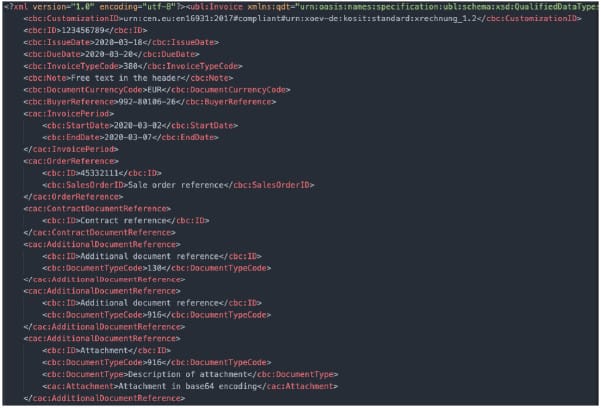
Those who want to delve deeper into the logic behind XML validation can find a useful tutorial series here.
Without a system for checking that XML documents are valid, the structured documents exchanged with partners may well contain errors.
In turn, these errors can prove both time-consuming and costly to fix. Even if the error is immediately spotted, simply getting hold of the relevant person at the other end can be a challenge, while pinpointing exactly what needs to be amended in order to resubmit the message successfully can also be tricky. Worse still, the error may not initially be spotted if validation systems are not in place, which can lead to more complex issues requiring even longer and labour-intensive resolutions. This can end up costing a business dearly, not only in terms of the resource cost, but also through damaging partner relations.
Further, over the last decade many countries (particularly those in Europe) have begun to introduce strict regulations concerning the exchange of structured business documents. As many of these new regulations concern B2G e-invoicing and the digitisation of tax reporting, the consequences for non-compliance can be significant. For example, in Ireland, companies can be fined over €1,500 for each incorrect invoice, plus an additional personal fine of €950. Meanwhile in Sweden, non-compliance with e-invoicing regulations (deliberate or not) can result in up to two years in prison! Even in countries with less severe penalties, however, simple errors such as the incorrect VAT number on an invoice/invoices can result in massive financial repercussions, as such a mistake will make the recipient ineligible for VAT for the relevant transactions.
So what is validation?
XML validation is a process whereby XML documents can be checked instantly by software to confirm that they have been constructed and populated correctly.
Validity of an XML document means:
- Logical formatting
An XML document is well formed if it adheres to the XML syntax rules. E.g. it only contains valid Unicode characters, elements are property closed, etc. - Schema-conformant
An XML document is schema-conformant if all rules in the associated XML Schema (e.g, a UBL invoice Schema) are fulfilled. - Schematron-conformant
An XML document is schematron-conformant if all rules of the associated Schemtatron file are fulfilled.
This is particularly useful in two scenarios:
- When connecting to new partners: Without a validation tool, a constant back and forth is required between the two businesses wishing to establish an EDI connection to ensure that messages are coming through correctly during testing. With an integrated XML checker, however, it is possible to remove the dependence on the other party for feedback during the testing phase. Instead, the sender sees instantly if their document is formatted correctly and can make the necessary adjustments straight away, saving both parties time, money and stress.
- During ongoing EDI operation: In addition to proving useful during the testing stage of partner onboarding, validation should ideally be the final step in every XML document creation process. As changes are constantly being made to live IT environments – both systems and processes – it is important to ensure that this doesn’t disrupt the accuracy of the XML documents generated. The only reliable and efficient way to ensure this is by integrating an XML checker as a final internal step. This way you can be sure that you never send an incorrectly formatted document – which as we have explored can have significant consequences.
What does a comprehensive XML checker provide?
While the exact monetary value of integrating an XML validator is hard to quantify, as it is impossible to predict how many errors you would experience without one, and how costly they would be, the benefits an XML checker can provide are clear. ecosio’s XML validation tool, for example, offers the following key advantages:
- Simple error descriptions – Non-technical and easy-to-understand error messages allow issues to be resolved by non-experts, minimising the chance of bottlenecks.
- Shareable test report – For those who wish to share test reports with colleagues etc., ecosio’s validator generates a concise, downloadable report.
- Zero maintenance – As the tool is maintained by ecosio, there is no need to install any updates or adjust the tool in-house. All necessary changes will be made to the tool directly by ecosio, with zero disruption to your business.
- Simplification of message exchange testing – Both parties save valuable time and money during onboarding as the need for bilateral testing is reduced.
- All major XML document types covered – From Cross Industry Invoice (CII) to Universal Business Language (UBL) file formats, ecosio’s tool covers all common XML file types.
- One click for all formats – The validation tool is as easy to use for complex XML file types as for the most basic ones. All that is required is a single click!
- Clear and unambiguous versioning
The full list of the XML document types that ecosio’s validator tool can check is located on the online tool page.
Before and after implementation – a comparison
Let’s look at how the installation of a validation tool can optimise EDI processes in practice by considering the same example with and without an XML checker. Imagine you wish to send an invoice to one of your partners using the European e-Invoice standard EN 16931 (let’s assume that you sent a Universal Business Document file, though a Cross Industry Invoice would also be feasible).
Without an integrated XML checker:
- Invalid characters could “sneak” into the document. This is typically a master data issue, if for example the business copy and pastes something in a header text or an item description.
- A change in one of the generating routines in the ERP could alter the namespace string, leading to an invalid XML.
- A missing master data entry could lead to a VAT-ID being missing in the XML document, which leads to non-VAT-deduction – depending on the invoice amount.
With an integrated XML checker:
- It is still possible for the things above to occur, but at least you will notice them before your business partner does.
How do I implement a validation tool into my system?
As with many software adjustments, there are two main options for companies looking to integrate an XML checker into their system – A) handle integration in-house, or B) outsource to the experts. The second of these options offers the far simpler option, not least because the first is likely to require the construction of the tool itself as well as its integration into your system.
At ecosio (as with our wider EDI solution) we offer integration of our comprehensive tool via an API connection. This way the tool is embedded directly in your existing ERP system. There is no requirement to navigate to another platform etc. Further, with such a connection you do not need to install updates when the tool is adjusted. Instead, the tool is updated centrally, meaning your validator is always up-to-date and reflects the most recent XML rule sets.
For more information on how to integrate ecosio’s XML checker into your system, or to find out more about the benefits this tool could offer your business in particular, contact us today. We are more than happy to answer any questions you have!
Der Beitrag Integrating an XML Checker into Your ERP System erschien zuerst auf ecosio.
]]>Der Beitrag Alternative Solutions for EDI in SAP PI and SAP PO erschien zuerst auf ecosio.
]]>- Managing EDI with SAP PI or SAP PO internally yourself
- Installing a local EDI converter and connecting to SAP PI or SAP PO
- Outsourcing to a fully managed EDI service provider
We will show you which EDI functionalities you can implement in your company with the respective solution and which questions decision-makers can use to help themselves in choosing the right solution.
EDI and B2B integration with SAP PI or SAP PO – What do I need to know?
SAP Process Integration (SAP PI) is a comprehensive software component that enables data exchange between the SAP system and internal and external systems. SAP PI uses various Java-based routing and integration mechanisms as well as various adapters that can be used to implement transport protocols and format conversions.
SAP Process Orchestration (PO) is an SAP PI installation variant (with different license models) that has been enhanced to include functionality in the area of “business process modeling and implementation”. In addition to the classic SAP PI capabilities of message routing, mapping and connectivity, PO also includes parts of SAP Business Process Management and SAP Business Rules Management.
In terms of EDI, the core technical functionalities of SAP PI and SAP PO are:
- Connectivity
- Mapping
- Routing
Under Connectivity, SAP PI offers a range of adapters that can be used to convert various message transport protocols. These include many protocols that are required for electronic message exchange with external partners, such as AS2, X.400, OFTP2, SFTP, RESTful Web Services, and so on. Mappings can be used to implement translations between SAP internal formats (for example, IDoc) and external EDI formats such as EDIFACT, XML, ANSI ASC X.12, and so on. Mappings can be converted using a graphical editor, based on XSLT, or using a Java program. Routing controls message delivery to different recipients based on information in the message.
All three solutions presented in the same way are based on these core functionalities of SAP PI or SAP PO, but differ essentially in the following factors in EDI operation or in the following questions that the decision-maker can ask himself:
- How much internal EDI capacity (i.e. personnel & EDI expertise) can I use for mapping, routing, 24/7 monitoring, troubleshooting and maintenance of the connections? Do I want to manage EDI completely internally or do I want to relieve my internal teams and outsource EDI?
- Which technical requirements does my EDI solution have to meet? Which document types, protocols, formats and legal requirements regarding electronic invoicing (e.g. XRechnung in Germany or FatturaPA in Italy) do I need for my B2B network?
- What EDI capabilities does my B2B network require? Do I need access to Value Added Networks (VANs)? Do I want or need to connect to Peppol? Do I have suppliers without EDI capabilities that I still want to connect to automated message exchange (with Web EDI?)
- How flexible or scalable do I want to design my EDI solution? Can I rely on a rigid implementation in the long term or do I want to become more resilient and future-proof with regard to the technical requirements?
If you know the answer to all these questions for your company, you will be able to make the right choice for your business. Keeping the questions in mind, we will now look at the three technical approaches for an EDI implementation in SAP PI and SAP PO.
1. Managing EDI with SAP PI or SAP PO internally
SAP PI and SAP PO are extremely complex and extensive software components that allow for internal implementation of some EDI functionalities. According to the point-to-point principle, automated EDI connections to individual partners can be established by appropriately qualified personnel.
However, one of the main challenges during implementation is precisely the complexity of the software. One does not get the proverbial hammer and nail in the hand, but a very extensive toolset. For the independent configuration and the ongoing operation of EDI connections via SAP PI or SAP PO, highly qualified employees with corresponding EDI expertise are therefore required. If smooth EDI operation is to be guaranteed 24/7, these employees must be available on a continuing basis.
Furthermore, not all required EDI functionalities (current and future) may be supported or require the use of additional solutions, as shown in the graphic:
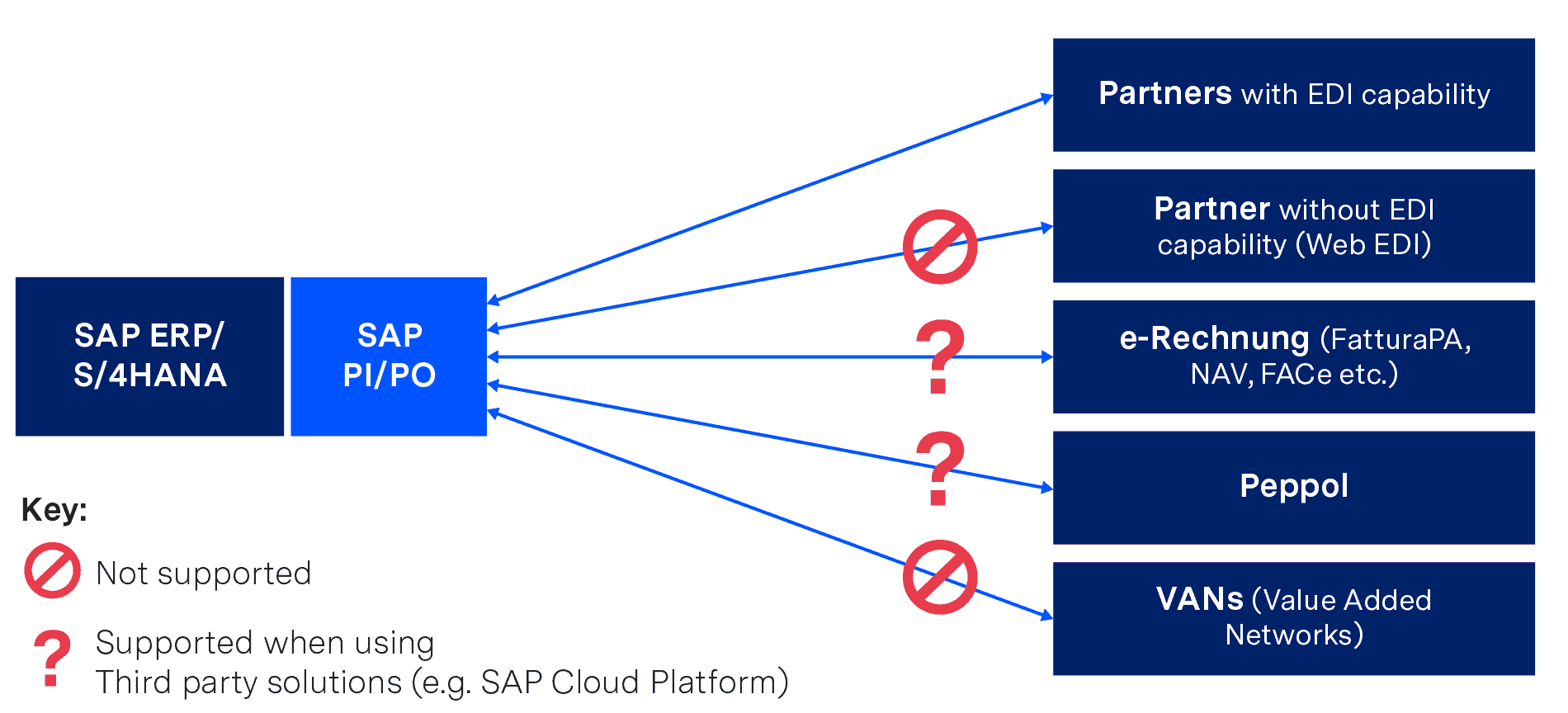
If you want to implement EDI internally purely with SAP PI or SAP PO, you will therefore have to do without some functions (or implement them as a third-party solution), but you will also need highly qualified personnel, EDI know-how and sufficient resources to cope with:
- Mapping and routing of all necessary connections
- Ongoing maintenance of the connection parameters and regular renewal of certificates
- Ongoing maintenance of mapping tables and industry internal practical knowledge about the implementation of special formats (e.g. VDA)
- Ongoing coordination with the B2B partners and procurement of all necessary information (especially in the onboarding process)
- 24/7 monitoring and troubleshooting
Incidentally, those who only want to work with SAP PI have to accept a major restriction – this only allows flat file formats via SFTP/SOAP/REST/HTTP protocols. If you want to use “classic” EDI formats (such as EDIFACT or ANSI ASC X12) and protocols (such as AS2 or X.400), you must have either a special package from a third-party manufacturer or the “B2B Add-on” from SAP – but this is only available with the SAP PO license (even if no other SAP PO functions are required).
The issue of X.400 costs should also be mentioned. If messages have to be transmitted to third-party networks that are subject to charges, these costs can be quite high. As an individual company, often only poor rates are available due to the relatively small amount of data being exchanged.
Internal implementation of EDI with SAP PI and SAP PO offers you a very high degree of functionality and flexibility. However, configuration, operation and maintenance also require the use of appropriate resources, which must be included in the total cost of ownership analysis. These costs must also be taken into account when using a local EDI converter, the option we present next…
2. Installing a local EDI converter and connecting to SAP PI or SAP PO
Another possibility is the acquisition and operation of a local EDI converter, which is connected to SAP PI or SAP PO. This is a software to be installed locally that converts documents from SAP internal IDoc format to partner format and vice versa.
Converter solutions are individually adaptable, but are potentially cost-intensive due to individually payable license costs for various functionalities, formats and upgrades in combination with long-term maintenance contracts. For example, support for protocols such as X.400 or services such as VAN connectivity must be purchased separately.
Local converter solutions must also be operated completely by internal teams, just as in the previous solution (implementing and operating EDI in SAP PI or SAP PO internally). This includes particularly time-consuming processes such as mapping, testing and 24/7 monitoring. This again requires appropriately trained employees.
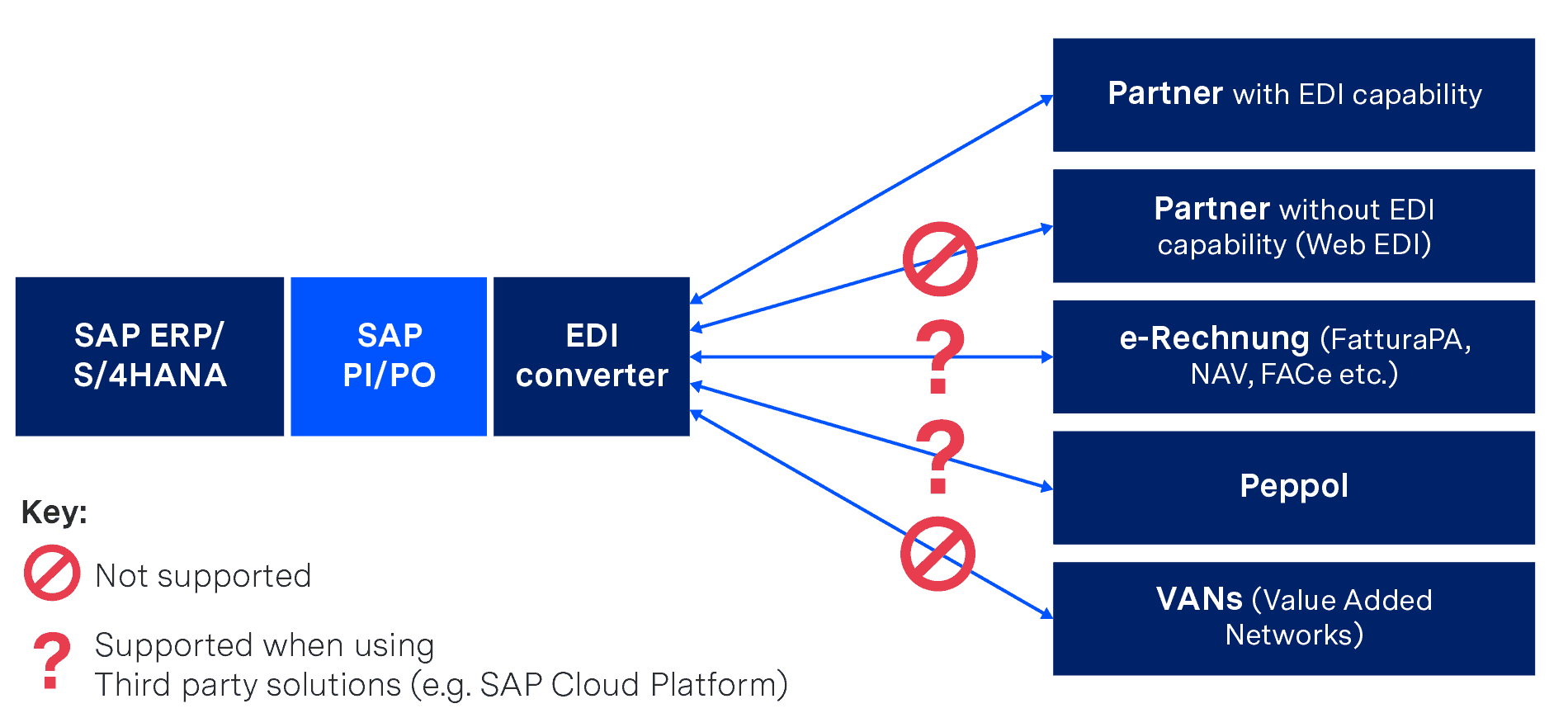
SAP PI/PO with local EDI converter
It should also be considered that both the software itself and the individual mappings age. In other words, over time new releases of the converter will be published, which do not necessarily allow an upgrade from the existing version and mappings. This results in corresponding migration projects that have to be realised internally or with the help of an external consulting company.
3. Outsourcing to a fully managed EDI service provider
Fully managed EDI is a cloud-based EDI solution where a company is connected to a specialised EDI service provider via a single connection. This service provider then takes over all EDI functions and processes, depending on your company’s requirements.
If your company uses SAP PI or SAP PO, all you need for a successful connection to ecosio as your EDI service provider is the snap ecosio Bridge for SAP and its turnkey integration flows in SAP PI or SAP PO, which was especially created by SNAP Consulting.
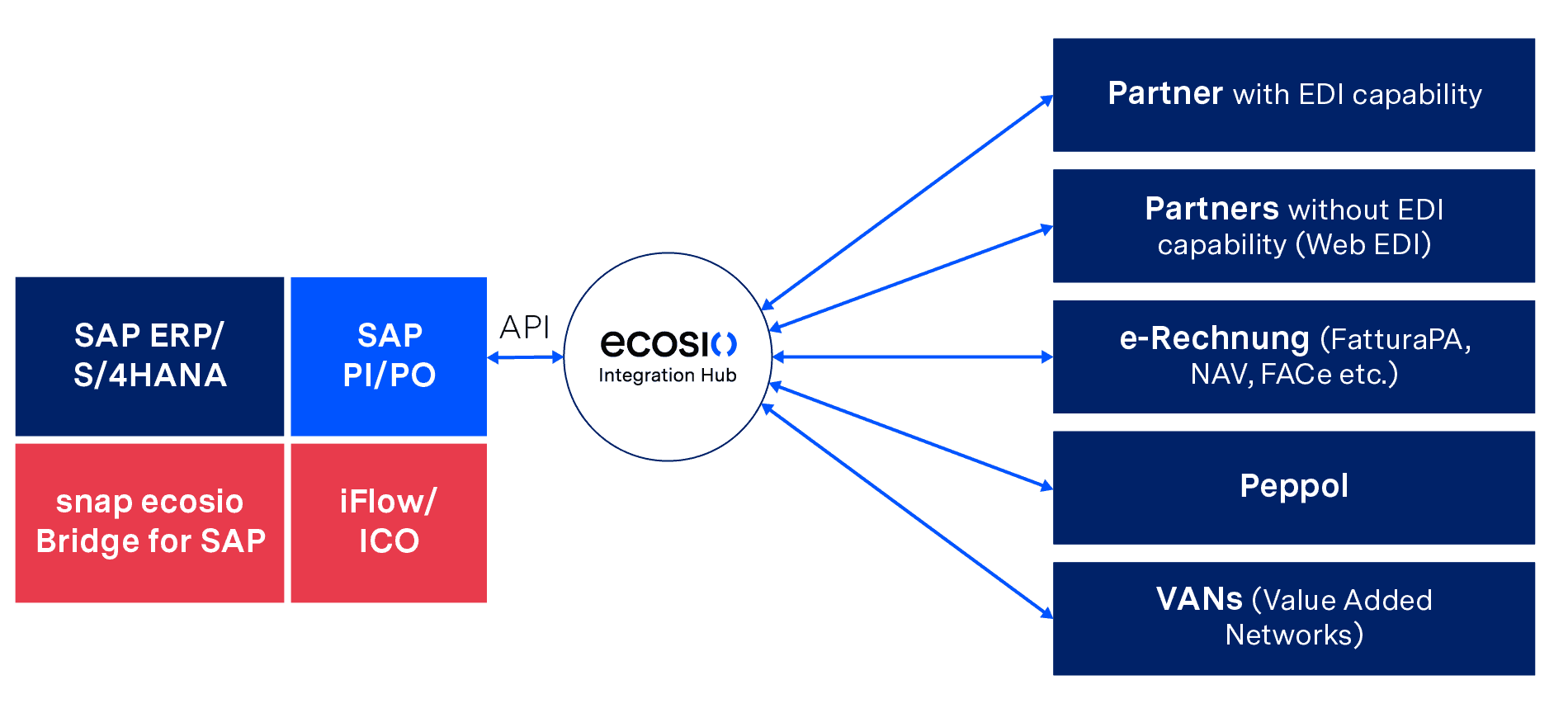
Deep EDI Integration in SAP with snap ecosio Bridge for SAP and iFlow/ICO
In this solution the EDI service provider creates and ensures all technically desired EDI prerequisites, such as routing via various protocols, VANs and Peppol or conversion into all common and necessary formats, including legal requirements in the field of e-invoicing. Further, operation, 24/7 monitoring and partner onboarding (including partner communication) are also handled by the service provider.
The deep integration of the EDI functionalities into the SAP system also enables your business department to:
- Jump to the original EDI message for incoming messages, directly in SAP – without need for an extra login
- Jump to the generated EDI message for outgoing messages – again without extra login
- Track the EDI message status directly in SAP by changing the IDoc status of sent EDI messages to status 40 or 41 – depending on whether the recipient received the message or not
- Conduct a full text search of all messages and documents
- Benefit from automatic alerts/notification if messages are incorrect or could not be delivered
Updates, the ongoing certification of protocols and new SAP versions (such as SAP S/4HANA) are easily adopted and supported. Fully managed EDI offers companies the possibility to use all EDI functions without an expiration date – providing maximum EDI efficiency with minimum internal effort.
Summary
You now know the three possible technical approaches for implementing EDI on the basis of SAP PI or SAP PO and which criteria and questions you should use to select the most suitable one for your company. Essentially, you need to assess how much capacity you have internally to cope with implementing and operating an EDI solution.
Independent EDI implementation or the use of a local EDI converter enables a company to send and receive EDI messages, but requires a high level of internal effort, and highly qualified personnel. In addition, some functionalities may have to be purchased externally.
Outsourcing to a fully managed EDI service provider offers you all the EDI functionalities available with SAP PI and SAP PO but in a flexible and freely scalable way. The entire effort, from mapping and routing to monitoring and troubleshooting, is taken over by the EDI service provider, relieving internal teams.
Want more information?
Discover more about our updated product, ecosio.flow.
Do you still have questions about SAP PI data exchange or EDI with an SAP ERP system? Feel free to contact us, we would love to help you!
SAP ERP and SAP S/4HANA are the trademarks or registered trademarks of SAP SE or its affiliates in Germany and in several other countries.
Der Beitrag Alternative Solutions for EDI in SAP PI and SAP PO erschien zuerst auf ecosio.
]]>Der Beitrag Integrating an XML Checker into Your ERP System erschien zuerst auf ecosio.
]]>In this article we’ll explore the importance of XML document validity and how simple it is to integrate an XML checker into your system to enable you to start experiencing more of the benefits of supply chain document exchange automation.
Why is validity of e-documents so important?
As XML is machine-readable rather than human readable (see the example UBL order below), it is difficult to tell without the aid of a validation tool whether an XML document has been structured and populated correctly.
Those who want to delve deeper into the logic behind XML validation can find a useful tutorial series here.
Without a system for checking that XML documents are valid, the structured documents exchanged with partners may well contain errors.
In turn, these errors can prove both time-consuming and costly to fix. Even if the error is immediately spotted, simply getting hold of the relevant person at the other end can be a challenge, while pinpointing exactly what needs to be amended in order to resubmit the message successfully can also be tricky. Worse still, the error may not initially be spotted if validation systems are not in place, which can lead to more complex issues requiring even longer and labour-intensive resolutions. This can end up costing a business dearly, not only in terms of the resource cost, but also through damaging partner relations.
Further, over the last decade many countries (particularly those in Europe) have begun to introduce strict regulations concerning the exchange of structured business documents. As many of these new regulations concern B2G e-invoicing and the digitisation of tax reporting, the consequences for non-compliance can be significant. For example, in Ireland, companies can be fined over €1,500 for each incorrect invoice, plus an additional personal fine of €950. Meanwhile in Sweden, non-compliance with e-invoicing regulations (deliberate or not) can result in up to two years in prison! Even in countries with less severe penalties, however, simple errors such as the incorrect VAT number on an invoice/invoices can result in massive financial repercussions, as such a mistake will make the recipient ineligible for VAT for the relevant transactions.
So what is validation?
XML validation is a process whereby XML documents can be checked instantly by software to confirm that they have been constructed and populated correctly.
Validity of an XML document means:
- Logical formatting
An XML document is well formed if it adheres to the XML syntax rules. E.g. it only contains valid Unicode characters, elements are property closed, etc. - Schema-conformant
An XML document is schema-conformant if all rules in the associated XML Schema (e.g, a UBL invoice Schema) are fulfilled. - Schematron-conformant
An XML document is schematron-conformant if all rules of the associated Schemtatron file are fulfilled.
This is particularly useful in two scenarios:
- When connecting to new partners: Without a validation tool, a constant back and forth is required between the two businesses wishing to establish an EDI connection to ensure that messages are coming through correctly during testing. With an integrated XML checker, however, it is possible to remove the dependence on the other party for feedback during the testing phase. Instead, the sender sees instantly if their document is formatted correctly and can make the necessary adjustments straight away, saving both parties time, money and stress.
- During ongoing EDI operation: In addition to proving useful during the testing stage of partner onboarding, validation should ideally be the final step in every XML document creation process. As changes are constantly being made to live IT environments – both systems and processes – it is important to ensure that this doesn’t disrupt the accuracy of the XML documents generated. The only reliable and efficient way to ensure this is by integrating an XML checker as a final internal step. This way you can be sure that you never send an incorrectly formatted document – which as we have explored can have significant consequences.
What does a comprehensive XML checker provide?
While the exact monetary value of integrating an XML validator is hard to quantify, as it is impossible to predict how many errors you would experience without one, and how costly they would be, the benefits an XML checker can provide are clear. ecosio’s XML validation tool, for example, offers the following key advantages:
- Simple error descriptions – Non-technical and easy-to-understand error messages allow issues to be resolved by non-experts, minimising the chance of bottlenecks.
- Shareable test report – For those who wish to share test reports with colleagues etc., ecosio’s validator generates a concise, downloadable report.
- Zero maintenance – As the tool is maintained by ecosio, there is no need to install any updates or adjust the tool in-house. All necessary changes will be made to the tool directly by ecosio, with zero disruption to your business.
- Simplification of message exchange testing – Both parties save valuable time and money during onboarding as the need for bilateral testing is reduced.
- All major XML document types covered – From Cross Industry Invoice (CII) to Universal Business Language (UBL) file formats, ecosio’s tool covers all common XML file types.
- One click for all formats – The validation tool is as easy to use for complex XML file types as for the most basic ones. All that is required is a single click!
- Clear and unambiguous versioning
The full list of the XML document types that ecosio’s validator tool can check is located on the online tool page.
Before and after implementation – a comparison
Let’s look at how the installation of a validation tool can optimise EDI processes in practice by considering the same example with and without an XML checker. Imagine you wish to send an invoice to one of your partners using the European e-Invoice standard EN 16931 (let’s assume that you sent a Universal Business Document file, though a Cross Industry Invoice would also be feasible).
Without an integrated XML checker:
- Invalid characters could “sneak” into the document. This is typically a master data issue, if for example the business copy and pastes something in a header text or an item description.
- A change in one of the generating routines in the ERP could alter the namespace string, leading to an invalid XML.
- A missing master data entry could lead to a VAT-ID being missing in the XML document, which leads to non-VAT-deduction – depending on the invoice amount.
With an integrated XML checker:
- It is still possible for the things above to occur, but at least you will notice them before your business partner does.
How do I implement a validation tool into my system?
As with many software adjustments, there are two main options for companies looking to integrate an XML checker into their system – A) handle integration in-house, or B) outsource to the experts. The second of these options offers the far simpler option, not least because the first is likely to require the construction of the tool itself as well as its integration into your system.
At ecosio (as with our wider EDI solution) we offer integration of our comprehensive tool via an API connection. This way the tool is embedded directly in your existing ERP system. There is no requirement to navigate to another platform etc. Further, with such a connection you do not need to install updates when the tool is adjusted. Instead, the tool is updated centrally, meaning your validator is always up-to-date and reflects the most recent XML rule sets.
For more information on how to integrate ecosio’s XML checker into your system, or to find out more about the benefits this tool could offer your business in particular, contact us today. We are more than happy to answer any questions you have!
Der Beitrag Integrating an XML Checker into Your ERP System erschien zuerst auf ecosio.
]]>