Der Beitrag EDI file formats explained: key standards and differences erschien zuerst auf ecosio.
]]>- EDI file formats standardise how B2B documents are structured for automated exchange
- Popular formats include EDIFACT, TRADACOMS, X12, VDA, and UBL, each suited to specific industries
- Each format follows different rules, like delimiters or fixed-length fields
- When partners use different formats, conversion is essential and often handled by a managed EDI provider
Document standards are an essential part of electronic data interchange (EDI). In short, EDI standards (aka EDI file formats) are the specific guidelines that govern the content and format of B2B documents such as orders, invoices and order responses. These documents are then sent via EDI protocols to the service provider / business partner.
For more information on ecosio EDI as a Service solution and to find out how we could help your business move to the next step, get in touch today or chat with our Sales team now!

How EDI file formats work
Sending documents according to an EDI standard ensures that the machine receiving the message is able to interpret the information correctly as each data element is in its expected place. Without such standards the receiver’s system will be unable to identify what part of the message is what, making automated data exchange impossible.
Although EDI documents may seem like a random mix of letters and symbols, all EDI messages conform to very strict rules. Typically EDI standards are based on the following four principles:
Syntax
Syntax rules determine what characters can be used and in what order.
Codes
Codes are used to identify common information such as currencies, country names or date formats.
Message designs
The message design defines how a particular message type (e.g. invoice or purchase order) is structured and what subset of rules from the prescribed syntax it uses.
Identification values
The means by which values in an EDI file are identified, e.g. by its position in the file or via the use of separators. These changes from standard to standard.
Most EDI standards also include the following three components:
- Elements – The smallest part of a message, providing submitted values (e.g. “50” or “KGM” or “Potatoes”)
- Segments – A collection of elements or values logically combined to provide an information (e.g. Quantity 50 kilograms of potatoes)
- Transaction sets – A collection of segments, composing a message (e.g. an Invoice for the sale of 50 kilogram of potatoes)
Essentially different formats are like different languages, with the elements and segments of a certain standard mirroring the words and sentences of a regular language.
A brief history of EDI document standards
In the very early days of EDI it quickly became evident that document standards were required to avoid confusion and improve the efficiency of even paper-based supply chain communication. Following the advent of file transfer between computers (FTP) becoming possible, in 1975 the very first EDI standards were published by the Transportation Data Coordinating Committee (an organisation formed by US automotive transport organisations in 1968). In 1981 the American National Standards Institute then published the first multi-industry national standard, X12. In turn this was followed by the creation by the UN of a global standard, EDIFACT, in 1985.
No one attempt to unify standards has ever been completely successful, however. As technology has evolved and industry specific needs have become increasingly disparate, new standards have steadily been introduced over the decades. Somewhat counterintuitively, therefore, today there is no such thing as a single all-encompassing EDI standard for every document type. Instead, businesses choose their preferred document standard from a number of options (usually opting for the one most widely used in their industry). When trading with partners using different standards, businesses then have to ensure that their messages are correctly converted to the recipient’s required format. This process is called mapping.
The 5 most used EDI file format standards:
1) UN/EDIFACT
The most popular EDI file format standard today outside North America is UN/EDIFACT, which stands for United Nations rules for Electronic Data Interchange for Administration, Commerce and Transport. These international B2B message guidelines are extremely widely used across many industries.
In fact, given the scope of EDIFACT’s adoption, several industries have developed subsets of the main standard which allow for automation of industry-specific information. One well-known subset is EANCOM, for example, which is used in the retail industry.
EDIFACT document file types are identified by a six letter reference. For example, three of the most common of these references are:
- ORDERS (for purchase orders)
- INVOIC (for invoices)
- DESADV (for despatch advice)
All of these EDIFACT messages have the same basic structure, consisting of a sequence of segments:
- UNA – separators, delimiters and special characters are defined for the interpreting software
- UNB – file header (with the file end UNZ this makes up the envelope, containing basic information)
- UNG – group start
- UNH – message header
- UNT – message end
- UNE – group end
- UNZ – file end
Example EDIFACT order

[segment tags shown in bold]
As well as transmission format, the EDIFACT standard also defines delivery requirements. EDIFACT provides set guidelines, for example, concerning the exact structure of specific message exchanges, which might themselves contain several individual EDIFACT files.
For a more detailed look at the structure of an EDIFACT file, see our blog post “EDI Standards Overview – Structure of an EDIFACT File” on this topic.
2) TRADACOMS
Despite being less widely-used than EDIFACT, the TRADACOMS standard was released several years before the UN standard. Designed primarily for UK domestic trade (and particularly popular in the retail industry), TRADACOMS is made up of a hierarchy of 26 messages. Like EDIFACT, each message is also given a six letter reference.
TRADACOMS does not use a single message format. Instead, a transmission to a trading partner will consist of a number of messages. For example, one purchase order will often contain an Order Header (ORDHDR), several Orders (ORDERS) and an Order Trailer (ORDTLR). Multiple individual order messages can repeat between the ORDHDR and the ORDTLR.
As with EDIFACT standards, the TRADACOMS standard uses segments for ease of translation. Below are four of the most common segments:
- STX – Start of Interchange
- MHD – Message start
- MTR – Message end
- END – End of Interchange
Example TRADACOMS order
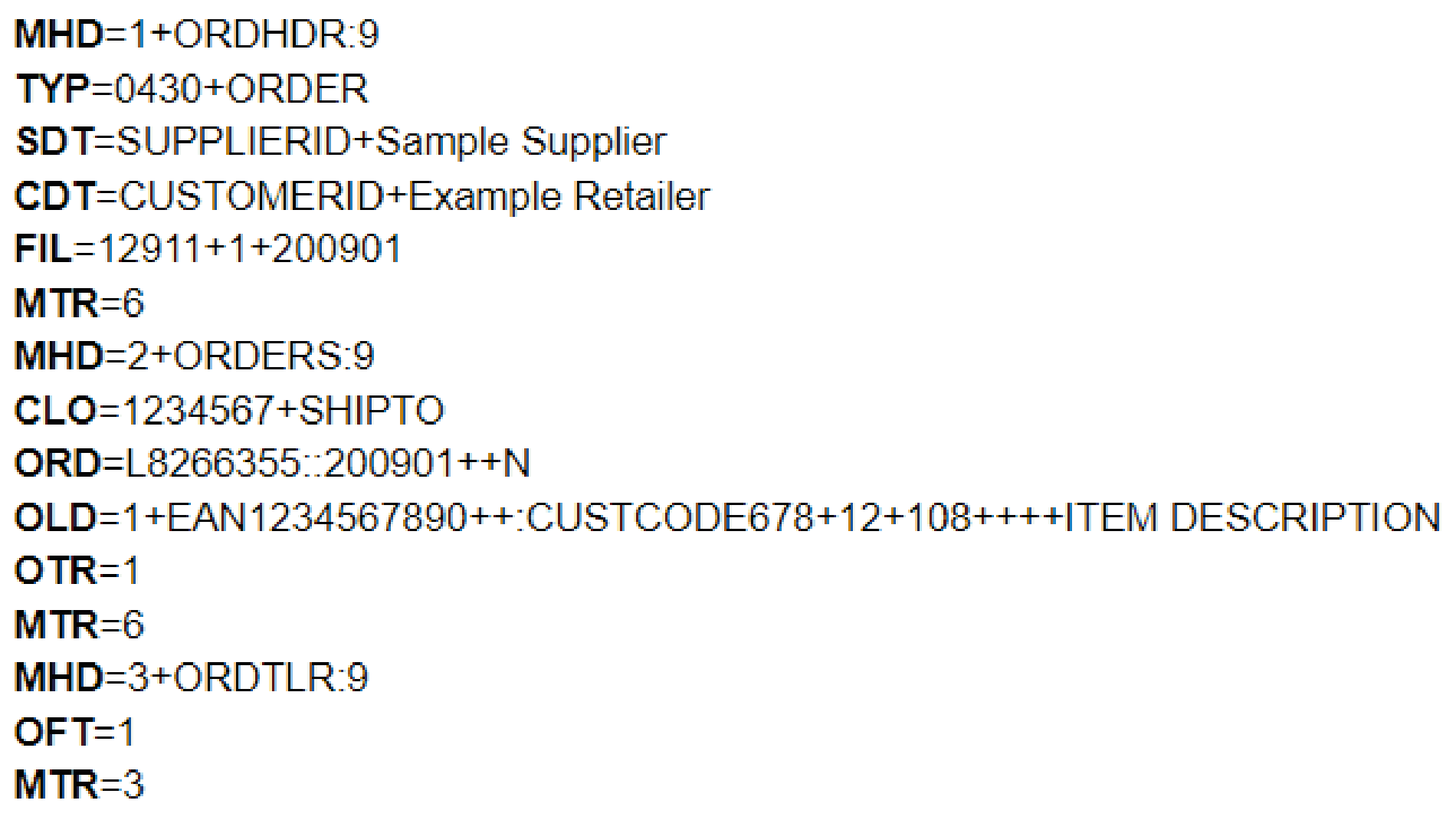
[segment tags shown in bold]
3) ANSI ASC X12
ANSI ASC X12 stands for American National Standards (ANSI) Accredited Standards Committee (ASC) X12, though (for obvious reasons) this is often abbreviated to just X12.
Though initially developed in 1979 to help achieve EDI document standardisation across North America, X12 has been adopted as the preferred standard by approaching half a million businesses worldwide.
Compared to other EDI standards organisations, X12 has a particularly comprehensive transaction set. There are over 300 X12 standards, all of which are identified by a three digit number (e.g. 810 for invoices) rather than the six letter code system used by EDIFACT and TRADACOMS. These EDI file format standards fall under X12’s different industry-based subsets:
- AIAG – Automotive Industry Action Group
- CIDX – Chemical Industry Data Exchange
- EIDX – Electronics Industry Data Exchange Group (CompTIA)
- HIPAA – Health Insurance Portability and Accountability Act
- PIDX – American Petroleum Institute
- UCS – Uniform Communication Standard
- VICS – Voluntary Interindustry Commerce Standards
With each containing slight variations, these subsets are used by different industries as appropriate (apparel retail businesses use VICS for example).
In addition, the hundreds of document types are divided into 16 helpful message series, from ‘order’ to ‘transportation’, with each containing the relevant individual message types.
As with Documents conforming to X12 standards are made up of several segments, some of which are optional and some mandatory. Below is a list of the mandatory segments:
- ISA – Start of interchange
- GS – Start of functional group
- ST – Start of transaction set
- SE – End of transaction set
- GE – End of functional group
- IEA – End of Interchange
As with all EDI documents, these segments in turn are comprised of elements, as can be seen in the example X12 document below:
Example X12 order
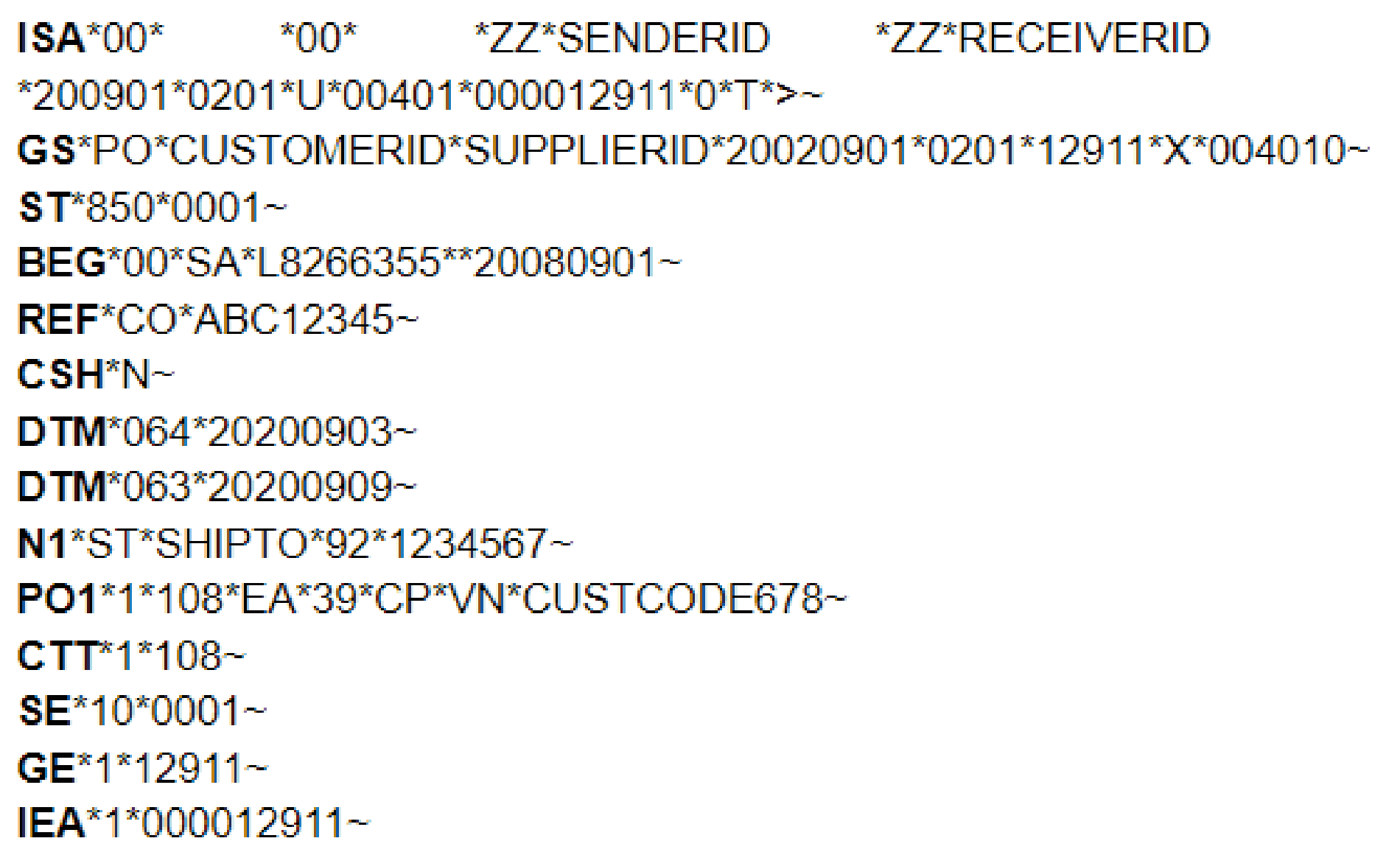
[segment tags shown in bold]
For more information on the X12 format, please see our more recent article “EDI Standards Overview – Structure of an EDIFACT File”.
4) VDA
The Association of the Automotive Industry (Verband der Deutschen Automobilindustrie in German, or VDA for short) was established in 1901 by German automobile businesses.
The VDA was one of the first associations to develop EDI file formats in 1977, making VDA standards even older than EDIFACT.
Like X12 standards, every VDA message standard has a unique identification number (four digits long in this case). For example, VDA EDI file format 4905 is a delivery forecast.
As worldwide use was not expected when the standards were developed, all VDA standards were published in German – something that continues to this day. This can make interpretation difficult, particularly concerning German business terms. Likewise, as VDA also does not use a naming convention for each element, knowledge of German is required to identify them.
Unlike EDIFACT and X12 standards, VDA standards do not use segments or separators. Instead data elements with a constant length, known as fixed length format elements, are used. When the data to be transmitted is shorter than the required length, spaces are used to fill the gaps. Unfortunately, this fixed length format means that the amount of data that can be transmitted is limited, meaning conversion to/from other EDI standards can be difficult.
Because of these issues, VDA fixed length document standards are slowly being replaced by EDIFACT document types. Today, VDA standards are effectively a subset of the EDIFACT standards used extensively by the automotive industry (much like the EDIFACT subset CEFACT is used by retail businesses).
To aid those using their standards, the VDA have published suggestions regarding transition to EDIFACT.
Example VDA delivery forecast
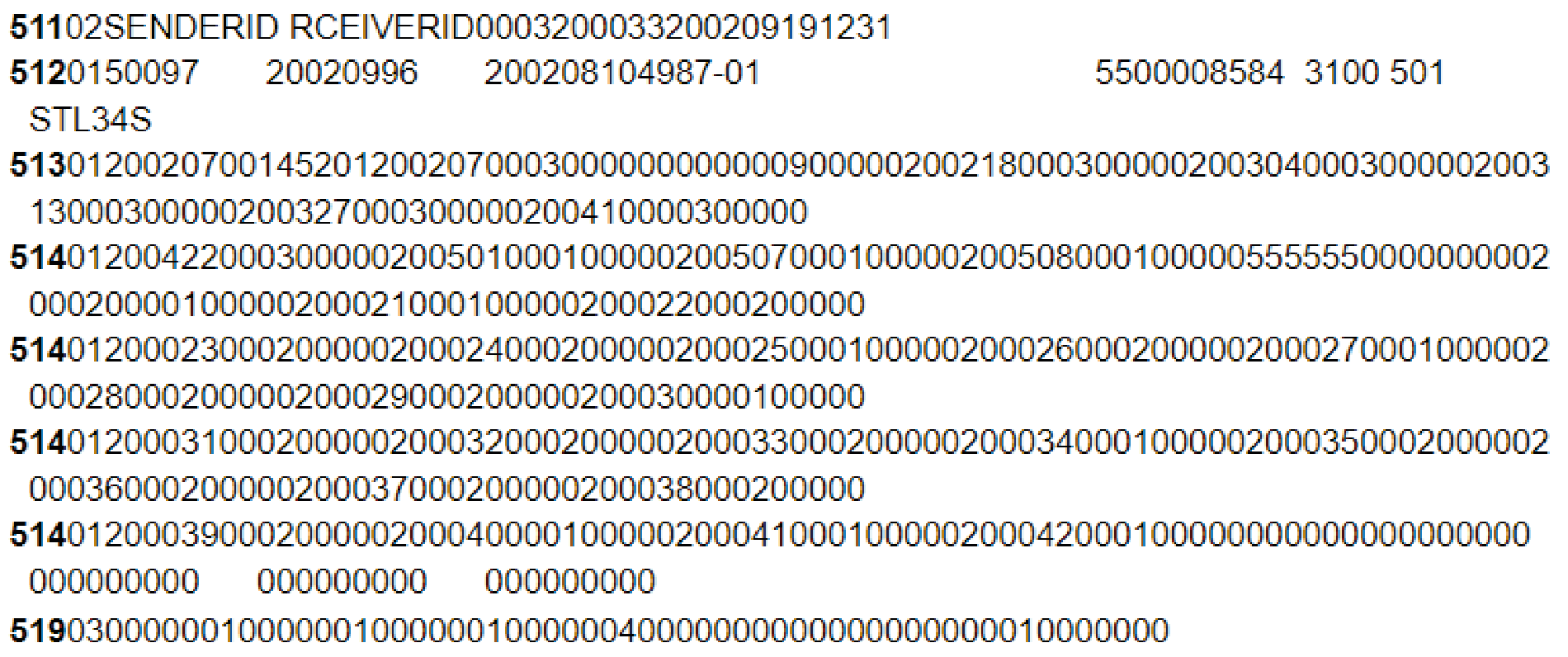
[segment tags shown in bold]
For more information on VDA standards, please see our dedicated VDA blog post for a more comprehensive explanation.
5) UBL
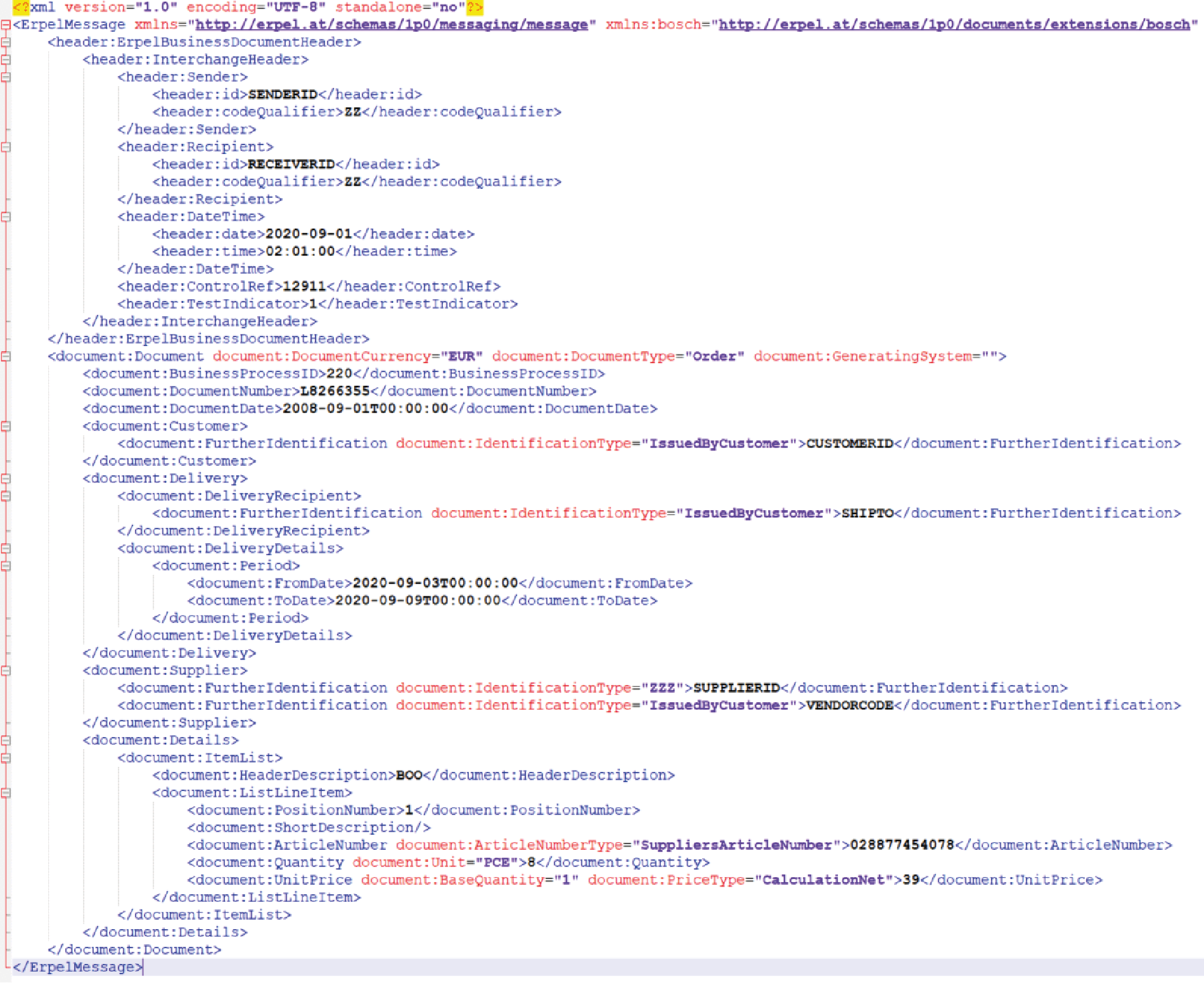
The Universal Business Language, or UBL, is a library of standard XML-based business document formats. UBL is owned by Organisation for the Advancement of Structured Information Standards (OASIS), who have made it available to all businesses for free.
As UBL uses an XML structure it differs from other more traditional EDI document formats. Perhaps the biggest difference is the fact that XML-based transmissions are easier to read than other EDI file formats. However, XML file sizes are considerably larger than those of other EDI file formats, though this is no longer a problem following the advent of broadband internet.
When first established in 2003, UBL had seven EDI file format standards. By the time version 2.1 was released over a decade later this number had increased to 65, and the release of version 2.2 in 2018 further increased the number of document types to over 80.
Significantly CEN/TC434 recently named UBL as one of two EDI syntaxes which comply with new EU regulations regarding e-invoicing. As such, as the use of PEPPOL grows, so the use of UBL is also likely to increase.
Like X12, UBL message types are split into higher level categories. These categories include pre-award sourcing, post-award sourcing, procurement and transportation. UBL messages themselves, meanwhile, include validators, generators, parsers and authoring software.
Example XML order (ecosio ERPEL)
How to exchange different EDI file formats with your trading partners
Whilst each of the above document standards is widely used, particularly within certain industries, unfortunately no one set of document standards is universally used by all supply chain businesses. As a result, if you wish to grow your business and to automate B2B data exchange with your partner network to achieve the cost benefits of automation you will need the ability to translate data between numerous formats.
Given the amount of technical expertise EDI file format translation requires, the fastest and most efficient way to gain this capability is to enlist the help of a managed EDI solution provider such as ecosio. In addition to enabling you to transfer documents in any required format and over any EDI protocol via a single connection to the ecosio cloud-based EDI solution (our Integration Hub), ecosio’s managed services remove virtually all internal effort concerning EDI. For example, new onboardings are handled by a dedicated project manager who is experienced in liaising between both sides to achieve fast, hassle-free and successful connections. Similarly, ecosio’s unique API ensures users are able to send and receive data directly from their ERP’s existing user interface.
For more information on ecosio EDI as a Service solution and to find out how we could help your business move to the next step, get in touch today or chat with our Sales team now!
Der Beitrag EDI file formats explained: key standards and differences erschien zuerst auf ecosio.
]]>Der Beitrag EDI with Iceland – What You Need to Know erschien zuerst auf ecosio.
]]>Iceland at a glance
- Founded in 1970
- Over 800 UK locations
- Stores in 3 continents (Europe, Africa and South America)
- Over 20,000 employees
Three key aspects to doing EDI with Iceland
Before being able to trade EDI messages with Iceland, suppliers must understand Iceland’s onboarding process, the document formats they prefer and what exchange protocol they use.
Iceland’s supplier onboarding process
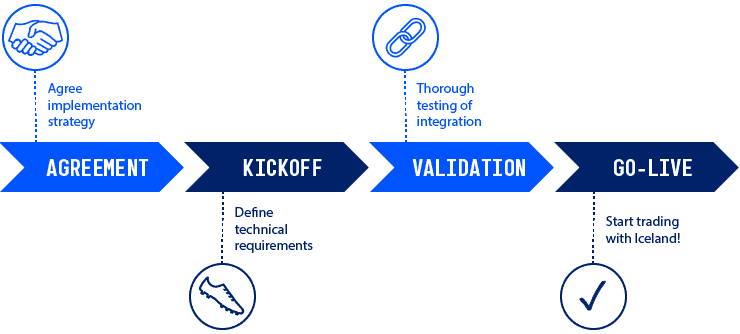
- Your in-house team (or EDI partner) will make contact with Iceland’s EDI team to set up the EDI connection.
- After setting up the necessary EDI mappings, Iceland will exchange test EDI documents with you via a test connection. It is important during this stage to make sure that all relevant types of document and delivery are tested.
- After successful completion of the test phase the connection will go live and you will be able to exchange EDI messages with Iceland for real.
What standards and document types does Iceland use?
Although Iceland previously used the TRADACOMS standard, they now exchange orders and invoices over EDIFACT. Iceland’s preferred document types for suppliers to use are EDIFACT ORDERS D96A and INVOICE D96A.
Starting EDI with Iceland
The first step in connecting to Iceland is setting up an exchange channel using an EDI protocol.
With their EDI provider, suppliers should establish two connections: a test connection and a productive connection. To be able to trade EDI messages with Iceland suppliers have to be able to communicate with OpenText’s Business Network. Thankfully, as ecosio’s Integration Hub offers integration with Business Network, one connection to ecosio can satisfy all document exchange requirements.
Connection timeline
As no two companies have the same requirements, it is difficult to say how long setting up a connection will take exactly. This depends principally on the mapping and routing that needs to be done.
The simplest and fastest way to establish a secure and reliable connection to Iceland is to use a service provider that offers a dedicated project manager to take ownership of the process.
Below is a diagram of the steps involved.
How ecosio can help
Ecosio has a wealth of experience in facilitating EDI connections to large retailers. Our EDI experts will ensure you benefit from an efficient and reliable connection as quickly as possible.
Our one-of-a-kind Integration Hub supports all EDI formats and protocols. As a result, a single connection to ecosio will enable your business to trade EDI messages with Iceland (and other retailers) with minimum effort.
Unlike other solutions, ecosio’s EDI solution is embedded directly in your ERP system as a native feature. This deep integration allows for important processes to be accessed via your existing user interface and allows for useful end-to-end message visibility.
Benefits at a glance
- All EDI requirements met via a single connection to ecosio’s Integration Hub
- No existing EDI knowledge required
- Simple and fast partner onboarding
- End-to-end data visibility
Do you have any questions?
If you have any questions about doing EDI with Iceland feel free to contact us, we’d love to help!
Please also see our other articles for the EDI requirements of similar retailers including ASDA, Boots, M&S, Morrisons, Ocado, Sainsbury’s, Tesco and Waitrose.
Der Beitrag EDI with Iceland – What You Need to Know erschien zuerst auf ecosio.
]]>Der Beitrag Waitrose EDI – Where to Start erschien zuerst auf ecosio.
]]>Waitrose at a glance
- Founded in 1904
- Around 350 UK locations today
- Export food to over 50 countries worldwide
- Annual revenue of over £5 billion
Waitrose EDI – three key things to understand
In order to start EDI with Waitrose, suppliers must first understand Waitrose’s onboarding process, what document formats they use and what their preferred exchange protocol is.
Waitrose’s supplier onboarding process
- Waitrose will supply prospective suppliers with document format guides and an EDI questionnaire.
- Suppliers return questionnaire, confirm start date and verify product master data.
- A test connection is established via testbox.
- Test invoices are sent to Waitrose. It is a requirement to send EDI invoices within a maximum of 3 months. A charge will be levied for any paper invoices received after that date.
- Feedback is received from Waitrose and adjustments made if necessary until invoices are transmitted correctly.
- Parallel phase starts. Both EDI invoices (with test qualifiers) and paper copies are transmitted to Waitrose.
- After a successful parallel phase, the connection is put live and you are officially a Waitrose EDI partner.
What EDI standards and document types does Waitrose use?
Waitrose exchanges invoices [INVFIL] and orders [ORDHDR] via the TRADACOMS standard.
Setting up EDI with Waitrose
Before being able to exchange EDI documents with Waitrose, an exchange channel using an EDI protocol must exist.
With its EDI provider, Waitrose will establish two connections: one test and one productive.
Specifically, suppliers require a connection to OpenText’s Business Network to exchange automated messages with Waitrose. As ecosio’s cloud-based EDI solution (our Integration Hub) already offers integration with Business Network, all document exchange requirements will be satisfied via a single connection between ecosio and your ERP system.
Connection timeline
As the amount of mapping and routing required will differ from one supplier to the next, it is tough to say exactly how long it will take to set up a connection, though, as mentioned earlier, Waitrose will charge any suppliers unable to set up EDI within three months.
The easiest and most efficient way to set up a connection to Waitrose is to use an expert managed service provider that is able to offer a dedicated project manager to oversee the process.
Below is a summary of the steps involved in the connection process.
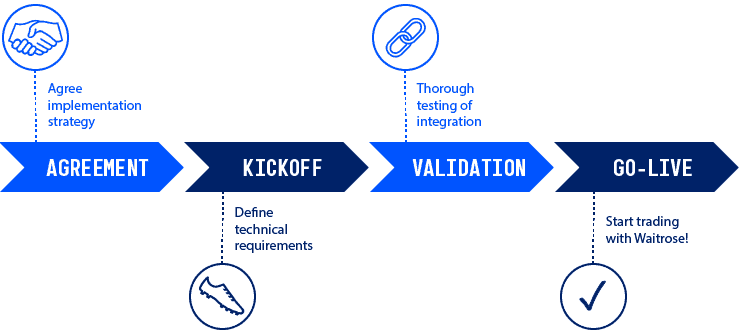
How ecosio can help
Ecosio has years of experience connecting suppliers to large retailers including Waitrose. We can make sure an efficient and reliable connection is established quickly and with minimum fuss.
Our unique Integration Hub supports all secure EDI protocols and formats, meaning one connection to ecosio will allow you to trade messages with Waitrose (and other retailers) in the correct format and over the correct protocol with minimum effort.
Unlike other providers’ solutions, ecosio’s is embedded directly in the user’s ERP system as a native feature. As a result, important processes are integrated into the existing user interface, producing useful end-to-end message visibility.
Benefits at a glance
- All testing, mapping and routing achieved via a single connection to ecosio’s cloud-based EDI solution (our Integration Hub)
- Zero internal EDI knowledge needed
- Hassle-free partner onboarding
- Unparalleled end-to-end data visibility thanks to deep ERP integration
Do you have any questions?
If you have any additional questions about EDI with Waitrose feel free to contact us, we’d love to help!
Please also see our other articles for the EDI requirements of similar retailers including ASDA, Boots, Iceland, M&S, Morrisons, Ocado, Sainsbury’s, Tesco.
Der Beitrag Waitrose EDI – Where to Start erschien zuerst auf ecosio.
]]>Der Beitrag Doing EDI with Boots: A Supplier’s Guide erschien zuerst auf ecosio.
]]>Boots at a glance
- Founded in 1849, Boots recently celebrated its 170 year anniversary
- The UK’s largest chain of pharmacies
- Merged with Walgreens in late 2014
- Presence in Asia and the West Indies
- Over 2,500 stores in the UK and Ireland
EDI with Boots
Before being able to trade with Boots via EDI, you will first need to understand their partner onboarding process and know the exchange protocols and document types they use…
Boots supplier onboarding process
- A connection is setup through a VAN mailbox or directly through Boots’ EDI providers.
- The connection is tested by sending generic files between the supplier and Boots.
- Test documents for all relevant message types are exchanged and verified via the connection.
- Before full go-live EDI orders will be exchanged in parallel with those sent via email to ensure everything is working correctly.
- Following successful testing your connection will go live. The exact date will be agreed between you and your Boots contact.
What EDI standards and document types do Boots use?
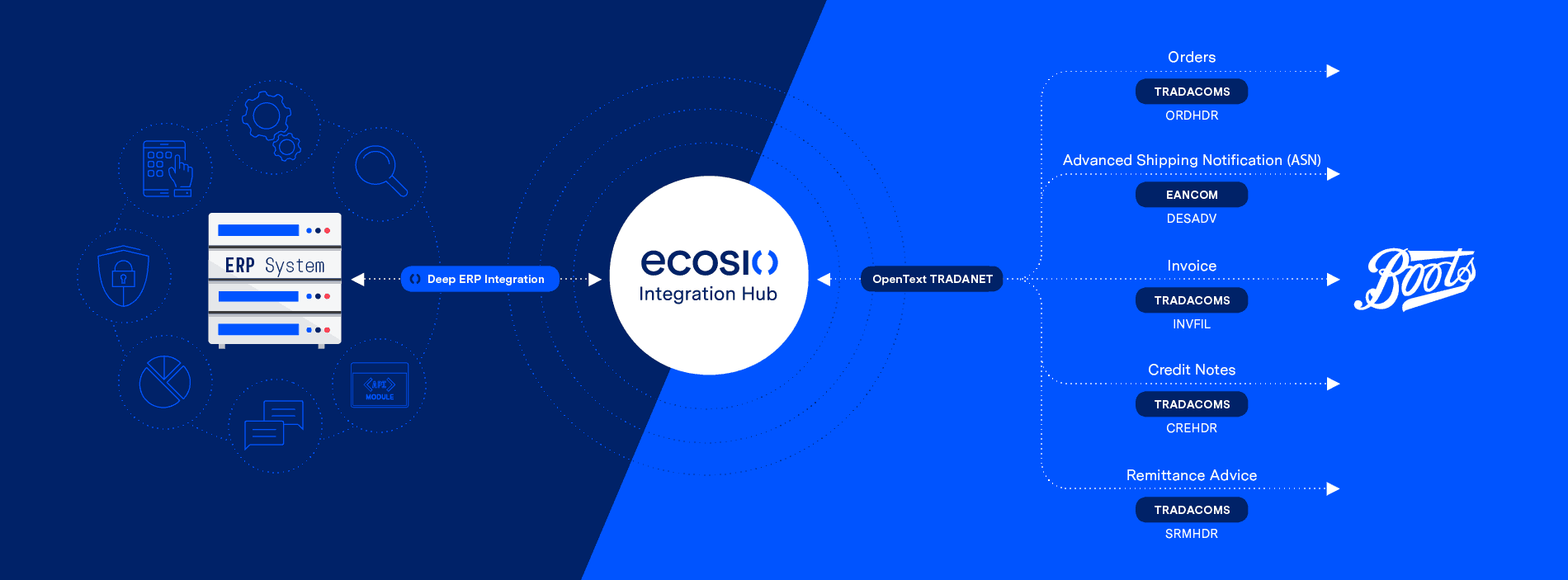
As illustrated below, Boots requires partners to be able to exchange orders, advanced shipping notifications, invoices, credit notes and remittance advice messages via EANCOM and TRADACOM standards.
Suppliers should be aware that there is a difference in the mappings required for retail and pharmacy mappings, whilst credit notes are only necessary for pharmacy suppliers.
Setting up an EDI connection to Boots
In order to exchange commerce critical data with Boots via EDI an exchange channel using the necessary EDI protocol first needs to be set up.
Boots uses OpenText as its EDI provider, meaning a connection to their platform TRADANET must be set up in order for you to exchange EDI messages with Boots. ecosio already offers integration with TRADANET, meaning a single connection from your ERP system to ecosio’s cloud-based EDI solution (our Integration Hub) will fulfil all exchange protocol requirements.
Our decision guide compares on-premise v cloud managed EDI services in detail
Connection timeline
Whilst Boots aims for all connections to go live within two months, they acknowledge that this process may take longer if issues are encountered during testing.
Generally speaking it is hard to predict exactly how long establishing a secure connection will take, as every business is different and will have different routing and mapping requirements.
Undoubtedly the fastest way to connect to Boots is to enlist the help of a managed EDI provider, and ideally one that is able to provide a dedicated project manager to oversee the onboarding from start to go-live. A good managed EDI service should also include 24/7 monitoring to ensure any errors are caught and resolved as soon as possible.
Below is a simple diagram showing the connection process.
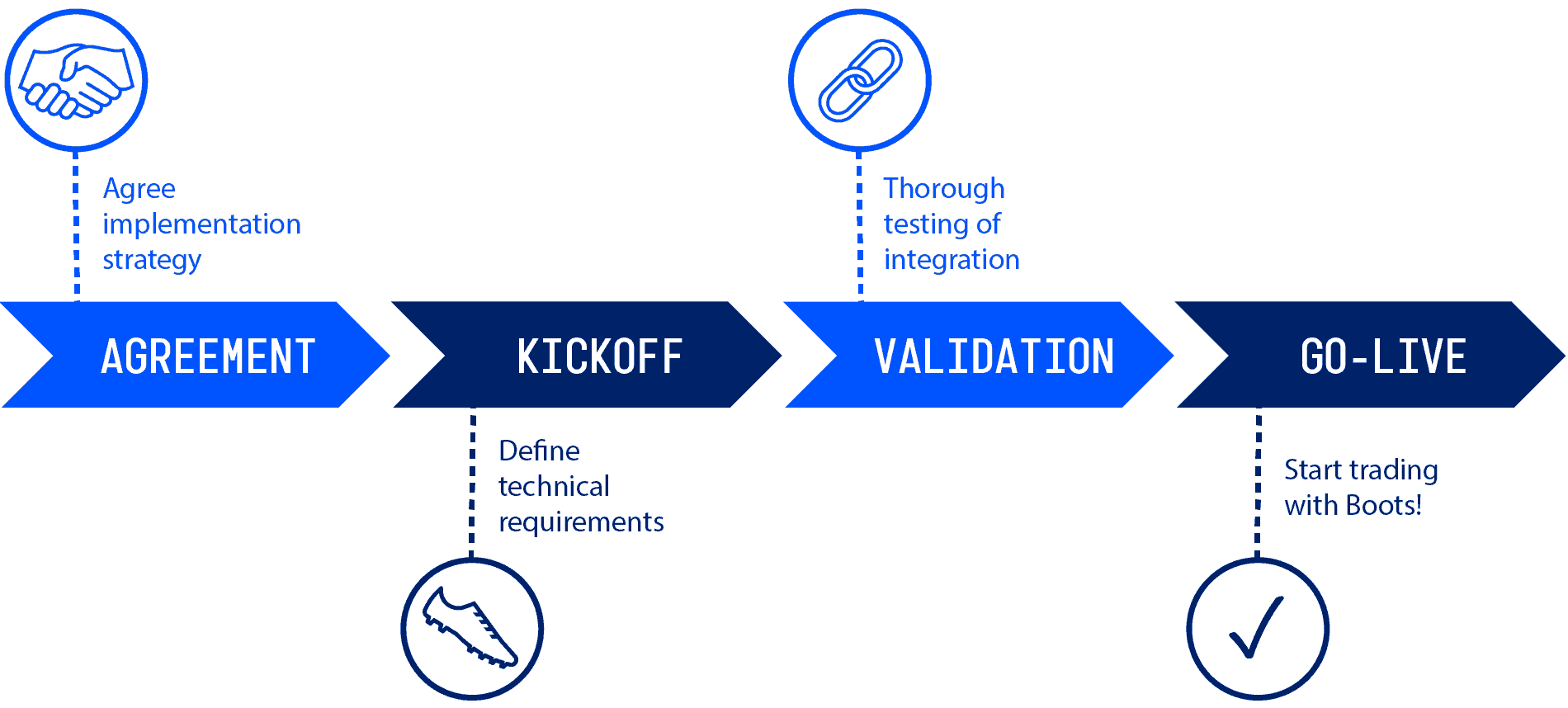
How ecosio can help
ecosio can ensure your business is doing EDI with Boots in no time!
With our flexible managed EDI services there’s no need to worry about time-consuming and resource-heavy mapping, routing and monitoring of data. Achieve peace of mind regarding critical data exchange with a single connection to our unique Integration Hub.
Benefits at a glance
- All EDI needs handled via one managed connection
- No need for EDI experience
- Translation to all common EDI formats and via all protocols
- Fast onboarding of trading partners
- End-to-end data monitoring in your ERP system

Get in touch!
Still have questions about doing EDI with Boots? Feel free to contact us, we’d love to help!
Please also see our other articles for the EDI requirements of similar retailers including ASDA, Iceland, M&S, Morrisons, Ocado, Sainsbury’s, Tesco and Waitrose.
Der Beitrag Doing EDI with Boots: A Supplier’s Guide erschien zuerst auf ecosio.
]]>Der Beitrag How to do EDI with ASDA erschien zuerst auf ecosio.
]]>ASDA at a glance
Founded in 1949, ASDA is currently the UK’s second largest supermarket chain, with over 600 locations and 160,000 staff. In 2018 a proposed merger with Sainsbury’s (which would have given the company control of almost a third of the market) was blocked by UK regulators. Today, however ASDA alone holds over a 15% share in the supermarket sector and thus represents an exciting connection for suppliers.
Starting EDI with ASDA as a supplier
In order to set up an EDI connection with ASDA, it is first necessary to consider the following three things: ASDA’s onboarding process, their preferred document formats and what exchange protocols they use.
Our decision guide compares on-premise v cloud managed EDI services in detail
ASDA’s supplier setup process
- ASDA’s EDI representatives will send over a supplier form which should be completed and returned.
- Once a mailbox has been set up, ASDA’s implementation team will grant you access to their web self-testing portal ‘Retail Link’. On this portal you will be able to upload relevant documents to test transmission accuracy. If you are handling this without any external help, it is very important to test all possible EDI interactions between ASDA and your business (e.g. invoices with surcharges, allowances, and including and excluding tax etc.).
- Following the testing phase, the connection will go live and your business will be prepared for EDI with ASDA.
ASDA’S preferred EDI standards and document types
ASDA supports the TRADACOMS standard and requires suppliers to be able to exchange orders, invoices/credit notes and remittance advices over the AS2 communication protocol, as illustrated below.
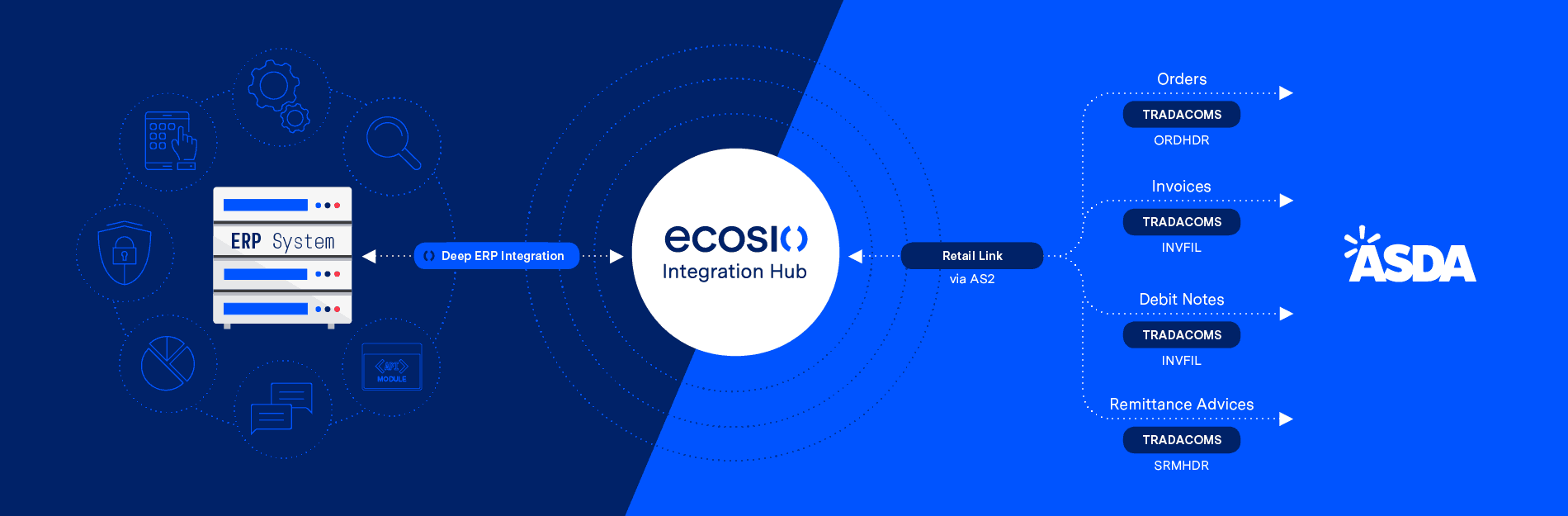
Click to enlarge
Setting up an EDI connection to ASDA
In order to be able to do EDI with ASDA, an exchange channel using an EDI protocol must first be set up.
As ASDA was acquired by Walmart in 1999, they use Walmart’s EDI supplier platform Retail Link. Via Retail Link suppliers can apply for an AS2 connection. To trade with ASDA suppliers are expected to maintain a consistent AS2 connection and provide notifications regarding document transmission status.
As ecosio’s cloud-based EDI solution (our Integration Hub) is compatible with Retail Link, all exchange protocol requirements can be fulfilled via a connection between ecosio and your ERP system.
EDI connection timeline
It is difficult to say exactly how long connection will take, as this is dependent on your business’s specific situation and how much mapping and routing is required. However, ASDA does require testing to take less than six weeks (and predict testing should take around two weeks for most companies with sufficient in-house EDI capability). If this stage takes longer than six weeks “the supplier may be removed from EDI testing for non-compliance”.
To ensure a smooth and efficient connection it is advisable to use an experienced B2B integration partner. Ideally, they should be able to provide a dedicated person to oversee the connection process from start to finish. They may also be able to handle monitoring after go-live too.
Below is a summary of the steps involved.
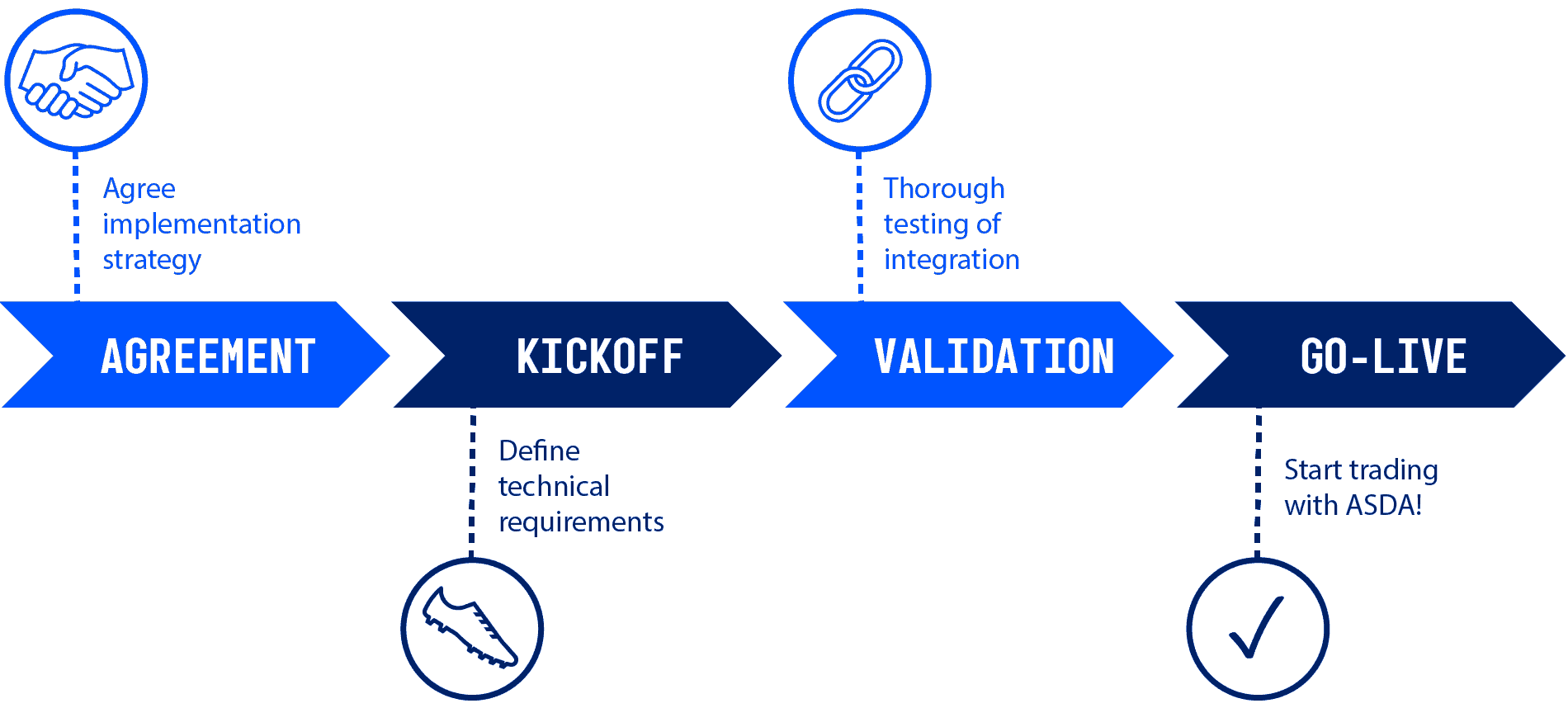
How ecosio can help
Setting up an EDI connection with ASDA is simple with ecosio.
ecosio’s cloud-based EDI service supports all EDI formats and protocols. We handle all routing and mapping so you can focus on what your business does best! Via one connection to our Integration Hub information will be automatically exchanged with ASDA via the correct exchange protocol and in the desired format.
Unlike other providers, ecosio offers a uniquely deep ERP connection. Following our API being embedded directly into their ERP system, users benefit from improved visibility, as EDI processes are seamlessly integrated into your system’s user interface.
Benefits at a glance
- All your EDI needs met via a single connection to the ecosio cloud-based EDI solution (our Integration Hub)
- No internal EDI experience required
- Supports all common EDI formats and protocols
- Hassle-free partner onboarding
- Increased visibility thanks to deep API-ERP integration
Get in touch!
Still have questions concerning setting up an EDI connection with ASDA? Feel free to contact us, we’d love to help!
Der Beitrag How to do EDI with ASDA erschien zuerst auf ecosio.
]]>Der Beitrag Tesco EDI Partner Connection Guide erschien zuerst auf ecosio.
]]>Tesco at a glance
- Founded in 1919, Tesco recently celebrated its 100 year anniversary
- One of the UK’s largest supermarket chains
- A presence in several other countries across Europe and Asia
- Over 6,500 stores worldwide
- An expected centenary year revenue of over £60 billion
EDI with Tesco
Before you are able to start EDI with Tesco, the following three things should first be considered: Tesco’s partner/supplier onboarding process, what exchange protocols they use, and which document formats they require.
Our decision guide compares on-premise v cloud managed EDI services in detail
Tesco supplier onboarding process
- Tesco’s EDI team will work with your EDI partner to help you set up a connection.
- After you have been able to set up the required EDI document mappings, Tesco will provide you with documents to test and validate the formats and content of the files. You will then need to send back the relevant documents. Tesco’s EDI onboarding team should execute a variety of test cases, covering the specific message types required by your relationship with Tesco.
- After successful completion of testing, your EDI process will be put into production and your company will be able to enjoy an efficient trading relationship with Tesco.
What EDI standards and document types does Tesco use?
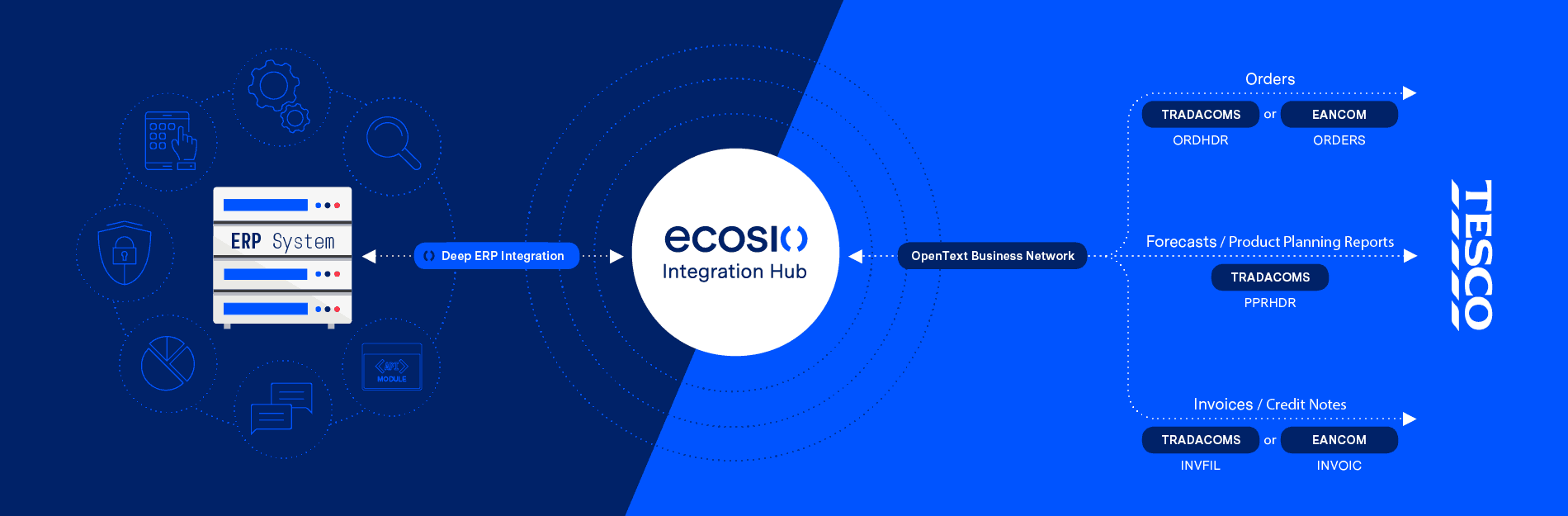
Tesco uses both TRADACOMS and EANCOM standards and requires suppliers to be able to exchange orders, forecasts (product planning reports) and invoices/credit notes, as illustrated below.
Setting up EDI with Tesco
Before your business can exchange documents with Tesco, an exchange channel using an EDI protocol must first be established.
Tesco uses GXS as its EDI provider, meaning a connection to GXS Trading Grid must be established to allow suppliers to exchange messages with the retailer. As ecosio cloud-based EDI solution (our Integration Hub) already offers integration with GXS Trading Grid, one link between your ERP system and our Integration Hub will fulfil all exchange protocol requirements.
Connection timeline
It is tough to determine exactly how long it will take your business to establish a secure EDI connection with Tesco as this will depend entirely on your organisation’s unique situation and how much mapping and routing is required. The simplest and fastest way to achieve a reliable connection is to use an experienced B2B integration partner. A good EDI service provider should be able to provide a dedicated expert to oversee the connection from start to finish, and even handle data monitoring after go-live.
A simple outline of the steps involved in setting up an EDI connection with Tesco can be found below.

How ecosio can help
With ecosio’s help your business could be enjoying a connection in no time!
At ecosio we allow you to concentrate on whatever it is that your business does best by taking care of all routing and mapping for you. All you need to enable your business to exchange messages with Tesco in the correct format and via the required protocol is one connection to the ecosio cloud-based EDI solution (our Integration Hub).
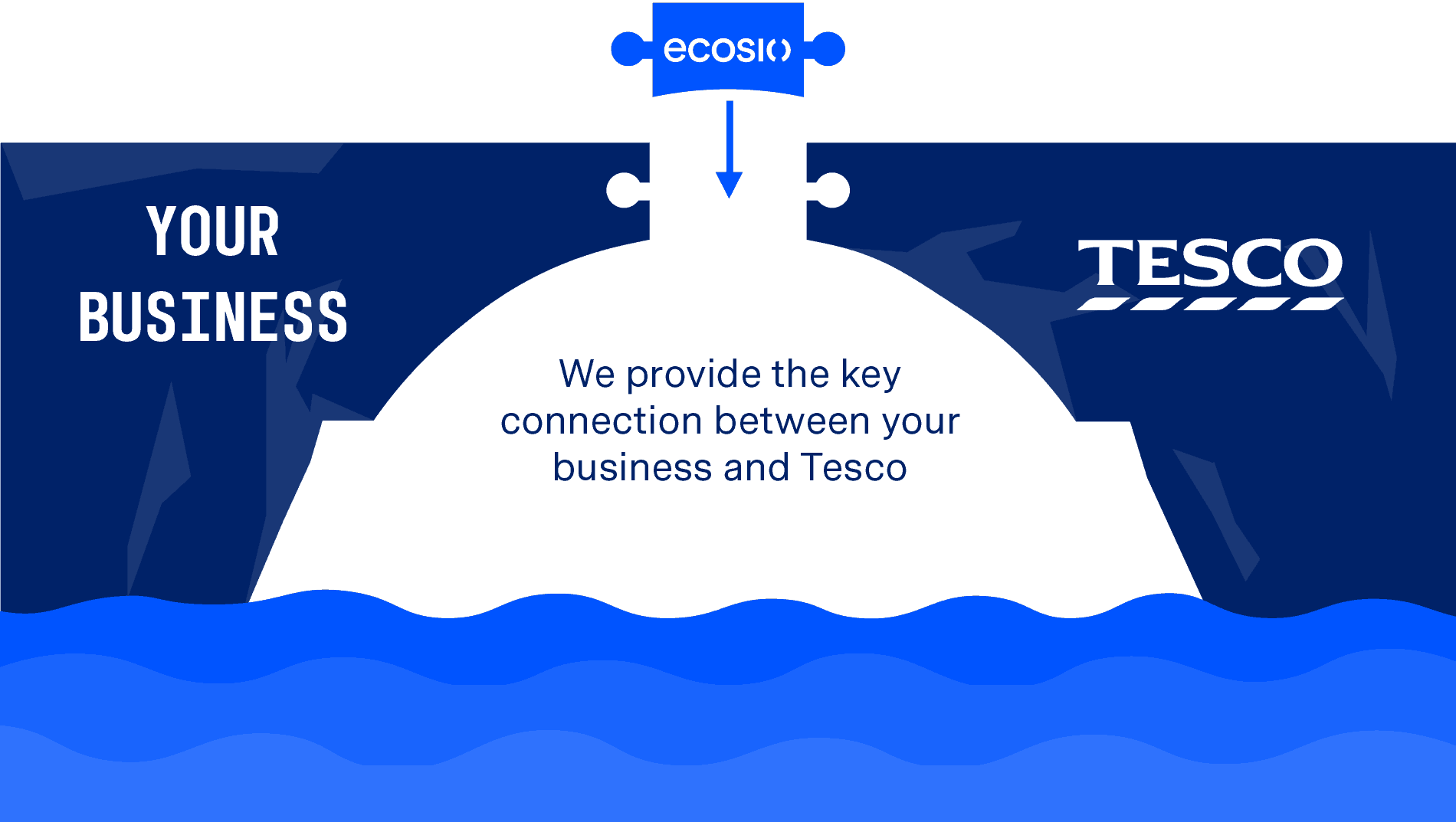
ecosio EDI as Service solution is different to those offered by other EDI service providers as ecosio’s API is embedded directly in the user’s ERP system. As a result of this deep API-ERP connection, visibility is hugely improved, with data processes seamlessly integrated into your ERP’s user interface.
Benefits at a glance
- All EDI needs met via one connection to the ecosio cloud-based EDI solution (our Integration Hub).
- No EDI expertise needed within your business
- All common EDI formats and protocols supported
- Hassle-free connection of partners
- Increased data visibility thanks to direct API-ERP integration
Get in touch!
Still have questions about doing EDI with Tesco? Feel free to contact us, we’d love to help!
Der Beitrag Tesco EDI Partner Connection Guide erschien zuerst auf ecosio.
]]>Der Beitrag An Introduction to Doing EDI with Sainsbury’s erschien zuerst auf ecosio.
]]>Sainsbury’s at a glance
Having been in existence now for a remarkable 150 years, Sainsbury’s is one of the UK’s largest supermarket chains, reporting over £28 billion in revenue in 2018. While a proposed merger with Asda in 2018 (which would have given the company control of almost a third of the market) was blocked by UK regulators, Sainsbury’s alone holds over a 15% share in the supermarket sector and represents an exciting connection for suppliers.
Setting up an EDI with Sainsbury’s as a supplier
Suppliers interested in doing EDI with Sainsbury’s need to consider all of the following: their onboarding process, which document formats they use and their preferred exchange protocols.
Sainsbury’s supplier onboarding process
- Sainsbury’s EDI team will work with your EDI supplier to help establish the EDI connection.
- After you have set up the required EDI document mappings, Sainsbury’s will send you test orders which you will be required to send back. Sainsbury’s EDI team will execute various test cases to ensure all possible EDI interactions between your business and Sainsbury’s are covered.
- After testing has been completed, your new EDI connection will go live and you will be able to exchange messages with Sainsbury’s.
What are Sainsbury’s preferred EDI standards and document types?
The different document types and formats used by Sainsbury’s can be found in the table below (outbound from Sainsbury’s unless specified):
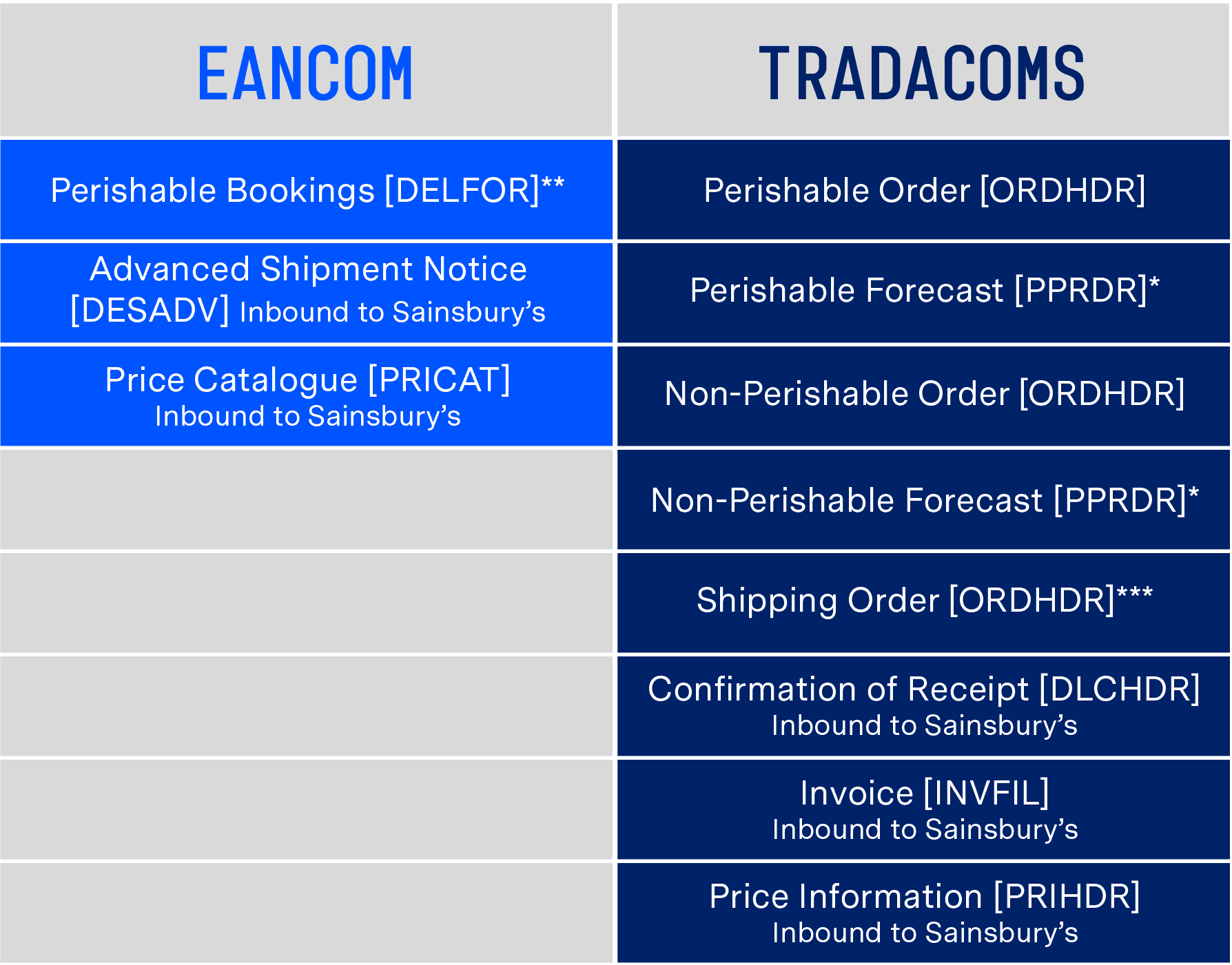
* Optional
** If supplier delivers direct to depot
*** If supplier delivers to second tier location, such as a bonded warehouse
Setting up an EDI connection to Sainsbury’s
To enable an exchange of relevant documents with Sainsbury’s via EDI, it is first necessary to set up an exchange channel using an EDI protocol.
Sainsbury’s uses several different EDI networks. Their EDI setup is such that prospective suppliers have the opportunity to connect via a direct AS2 connection or via multiple VAN providers. ecosio’s cloud-based EDI solution (our Integration Hub) provides a direct AS2 EDI connection to Sainsbury’s, fulfilling all exchange protocol requirements.
Connection timeline
Depending on each organisation’s individual situation and the extent of mapping and routing required, the time it will take to establish a secure EDI connection with Sainsbury’s will vary. The easiest and most effective way to achieve a connection is to use an experienced B2B integration partner. Ideally, they should be able to provide a project manager to ensure the success of the connection from start to finish. Ideally they will also be able to handle monitoring after go-live too.
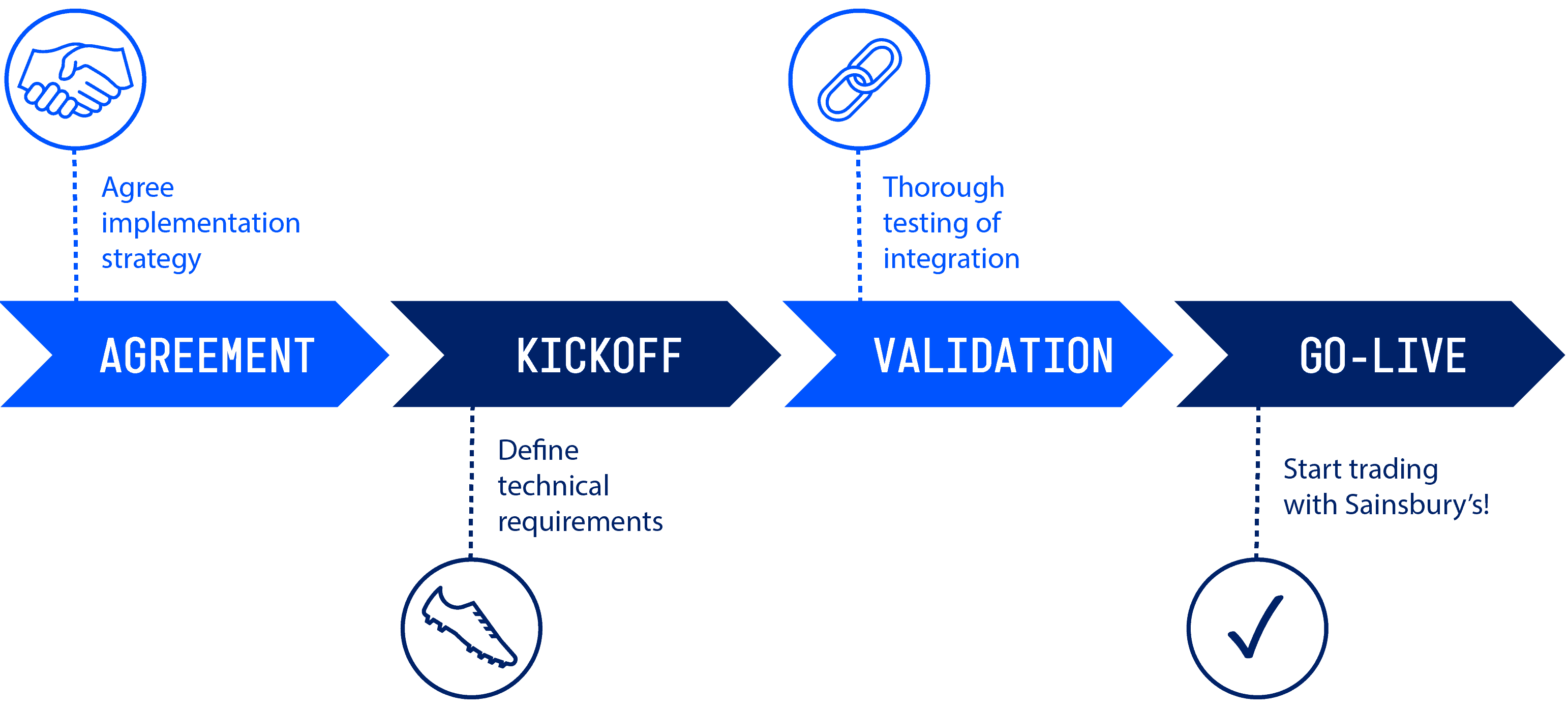
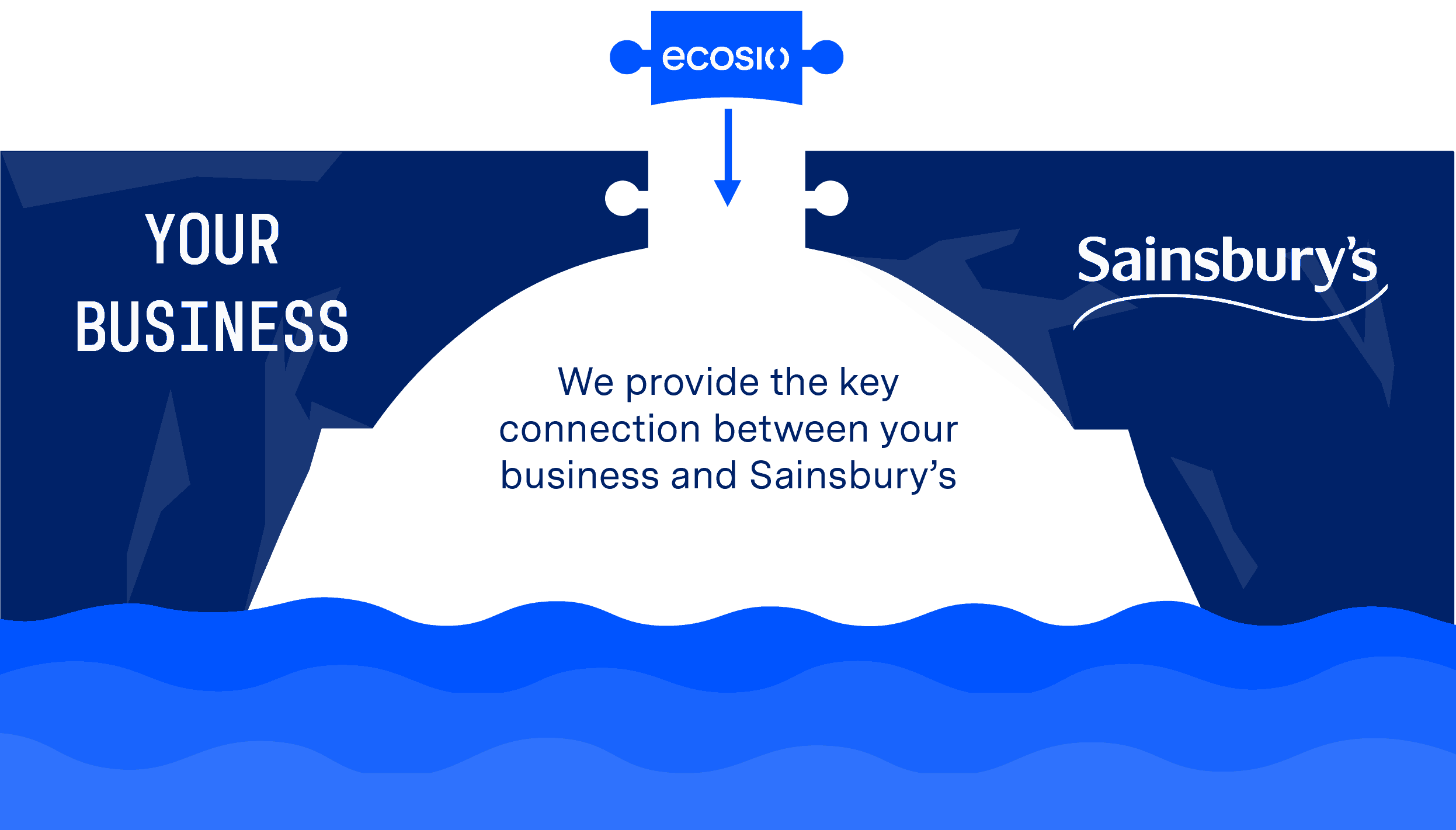
Below is a brief overview of the stages involved in setting up a connection with Sainsbury’s.
How ecosio can help
Setting up an EDI connection with Sainsbury’s is a simple process with ecosio.
ecosio’s managed EDI service supports all EDI formats and protocols. We take care of all routing and mapping so you can get on with what you do best! A single connection to ecosio’s cloud-based EDI solution (our Integration Hub) is all that is required to ensure information is automatically exchanged with Sainsbury’s via the correct exchange protocol and in the desired format.
ecosio EDI as a Service solution is different to the managed connections offered by many other providers in that our API is embedded directly in your ERP system. As a result, you benefit from improved visibility, as EDI processes are seamlessly integrated into your system’s user interface.
Our decision guide compares on-premise v cloud managed EDI services in detail
Benefits at a glance
- All EDI needs met via one connection to our Integration Hub
- No EDI expertise needed within your business
- All common EDI formats and protocols supported
- Hassle-free connection of partners
- Increased data visibility thanks to direct API-ERP integration
Do you have any questions?
Still have questions about doing EDI with Sainsbury’s? Feel free to contact us, we’d love to help!
Der Beitrag An Introduction to Doing EDI with Sainsbury’s erschien zuerst auf ecosio.
]]>Der Beitrag Setting up EDI with Ocado erschien zuerst auf ecosio.
]]>Ocado at a glance
Despite the company’s relative youth (it was founded in 2000) and lack of high street shops, Ocado is a big player Britain’s current retail landscape. Relying entirely on online sales, Ocado was one of the first grocery retailers to bypass physical stores. Thanks largely to the savings they have been able to make by delivering straight from warehouse to customer, Ocado reported over £1.5 billion in revenue in 2018.
EDI with Ocado as a supplier
Suppliers looking to start electronic data interchange (EDI) with Ocado should understand Ocado’s onboarding process, as well as what document formats and exchange protocols they use.
What is Ocado’s supplier onboarding process?
- Your EDI service provider (or in-house team) will be contacted by Ocado’s EDI team, who will help you set up the EDI connection.
- After you have set up the required EDI mappings, Ocado will send you EDI test orders over a test connection. You will then need to send various documents back in order to ensure all relevant types of delivery and message exchange are covered.
- Following a successful test phase, your connection will be put live and you and Ocado will be exchanging EDI messages.
What EDI standards and document types does Ocado use?
Ocado exchanges invoices [INVFIL] and orders [ORDHDR] via the TRADACOMS standard.
Ocado does not accept credit or debit notes via EDI.
Setting up EDI with Ocado
To allow for an exchange of EDI documents with Ocado, an exchange channel using an EDI protocol must be set up.
Along with its EDI service provider, Ocado will set up two connections: a test connection and a productive connection. During the onboarding phase, Ocado’s test system will receive documents sent by you via the test connection. After these documents have been validated, suppliers will be moved into a parallel phase. Go-live will then happen over the productive connection.
Ocado uses OpenText as its EDI provider, meaning that suppliers require a connection to Business Network from OpenText in order to exchange EDI messages with Ocado. As ecosio cloud-based EDI solution (our Integration Hub) already offers integration with Business Network, all exchange protocol requirements can be fulfilled via a connection between ecosio and your ERP system.
Our decision guide compares on-premise v cloud managed EDI services in detail
Connection timeline
The amount of time required to set up a connection with Ocado is directly tied to the amount and complexity of mapping and routing required. Those wanting a smooth and hassle-free connection should consider using an experienced B2B integration partner. They will provide an experienced project manager to manage the connection from start to go-live. Further, they will also be able to handle message monitoring following the connection.
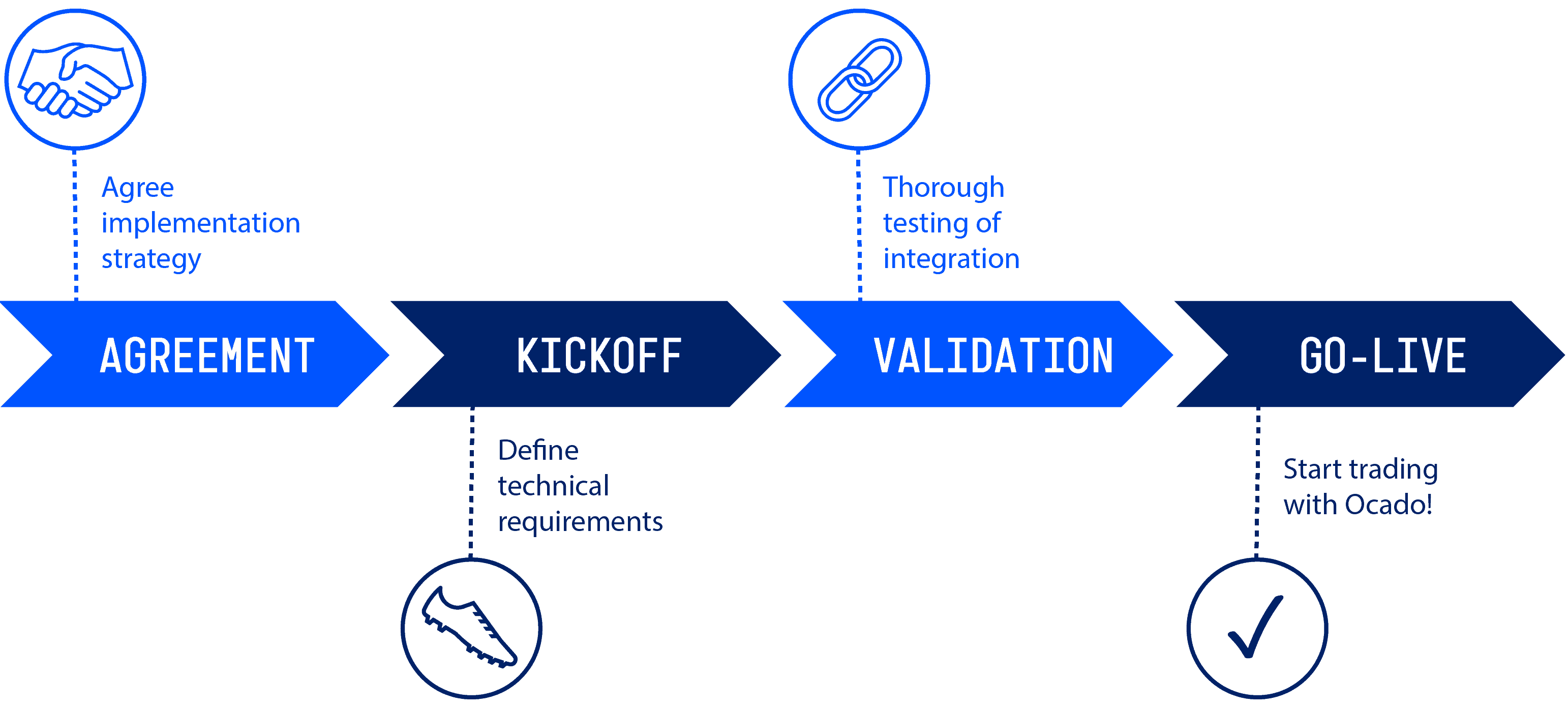
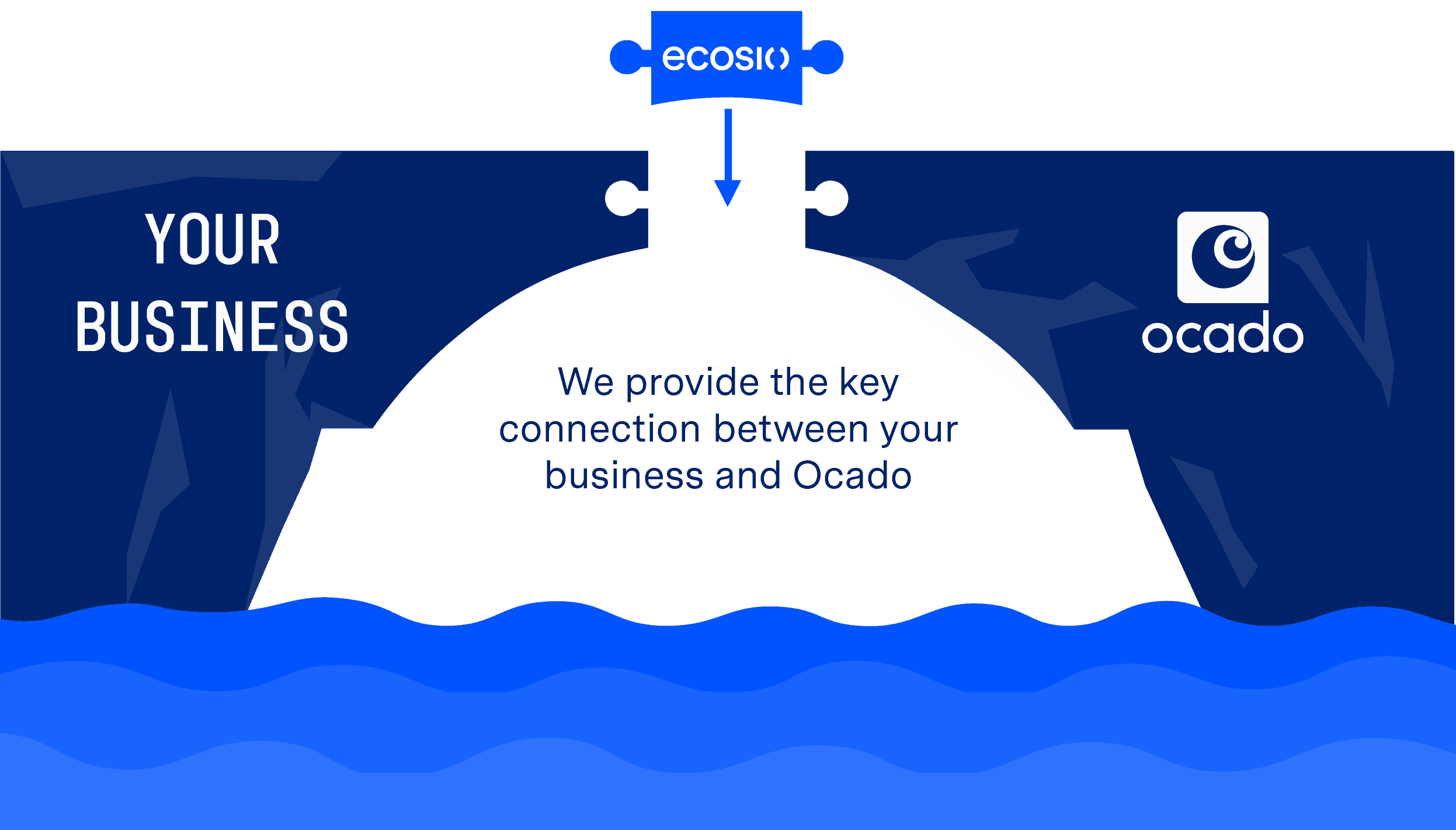
Below is a visualisation of the steps involved in setting up an EDI connection with Ocado.
How ecosio can help
We will ensure that setting up an EDI connection with Ocado is a quick and simple process.
As a managed service we support all commonly used, secure EDI protocols and formats. Via one connection to our Integration Hub you will be able to trade messages with Ocado in the right format and over the correct exchange protocol.
Unlike other managed EDI connections, ecosio EDI as a Service solution is embedded as a native feature in your ERP. As a result, key processes are integrated into the ERP’s user interface, granting users valuable data visibility.
Benefits at a glance
- One connection to meet all your EDI requirements via ecosio’s cloud-based EDI solution (our Integration Hub)
- No in-house EDI expertise required
- Automatic delivery over the right protocols and in the correct formats
- Easy EDI partner connection from start to finish
- Deep ERP integration, meaning easy visibility of message statuses
Do you have any questions?
If you have any additional questions about setting up an EDI connection with Ocado feel free to contact us, we’d love to help!
Der Beitrag Setting up EDI with Ocado erschien zuerst auf ecosio.
]]>Der Beitrag How to Set Up an EDI Connection with M&S erschien zuerst auf ecosio.
]]>M&S at a glance
For well over a century Marks & Spencer has been a staple of the UK high street. As well as being the first British retailer to make a pre-tax profit exceeding £1 billion in the late 90s, in 2007 M&S was one of the first large retailers to introduce a major sustainability plan. Despite a recent shift in the concentration of their business away from clothing and towards food, M&S remains a giant of the retail world with over 1,400 stores today.
Setting up an EDI connection with Marks & Spencer as a supplier
Suppliers looking to start electronic data interchange (EDI) with Marks & Spencer need to consider the following three important aspects: the onboarding process, document formats and exchange protocols…
M&S supplier onboarding process
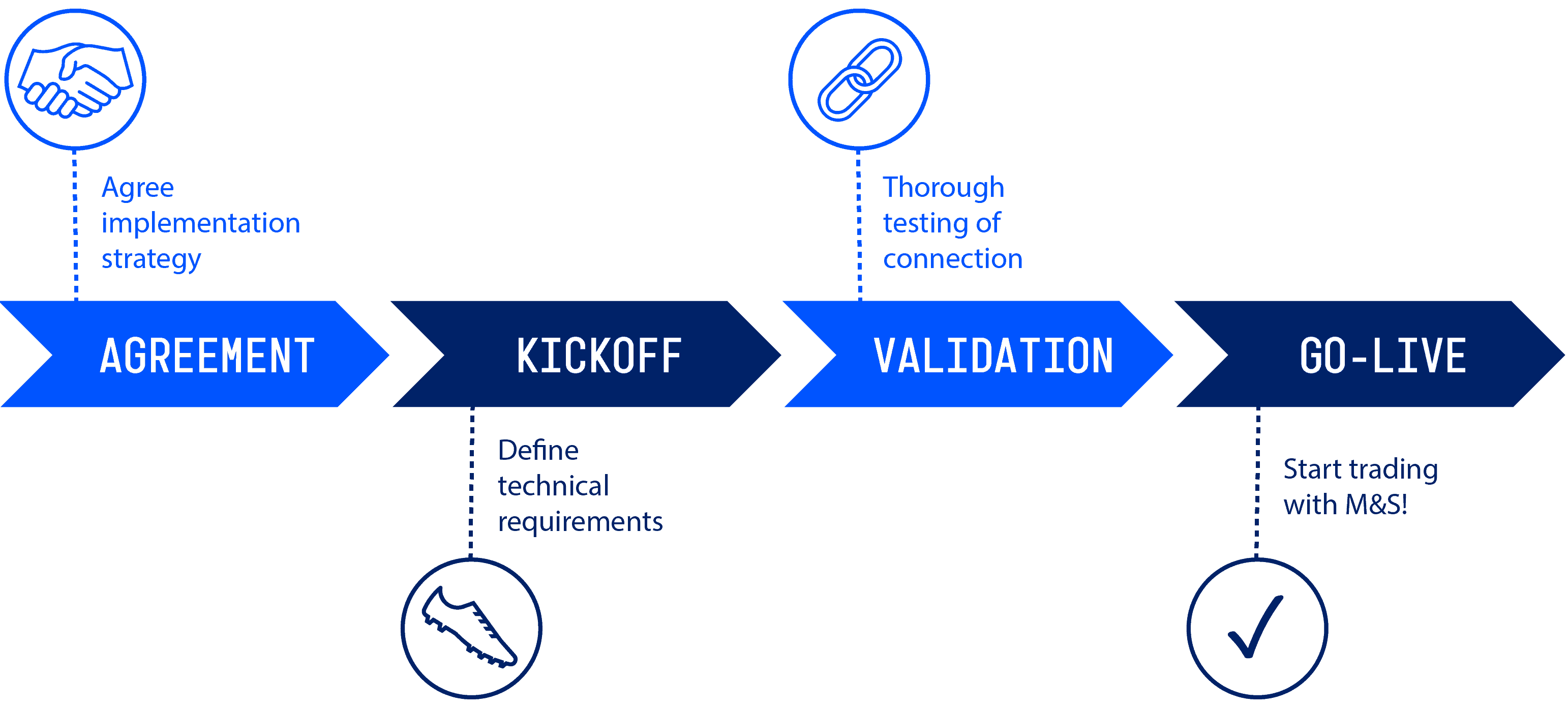
- Marks & Spencer’s EDI team will work with your EDI service provider to help you set up the EDI connection.
- After the necessary EDI document mappings have been set up on your side, Marks & Spencer will provide you with EDI test orders. You will then need to send back the necessary documents, e.g. order responses and invoices. Marks & Spencer’s onboarding team will also execute various test cases, covering the different aspects of your business relationship to Marks & Spencer, e.g., different types of deliveries.
- After the test phase has been completed successfully, your EDI process will be put into production and your company will start to exchange EDI messages with Marks & Spencer.
What EDI standards and document types does M&S use?
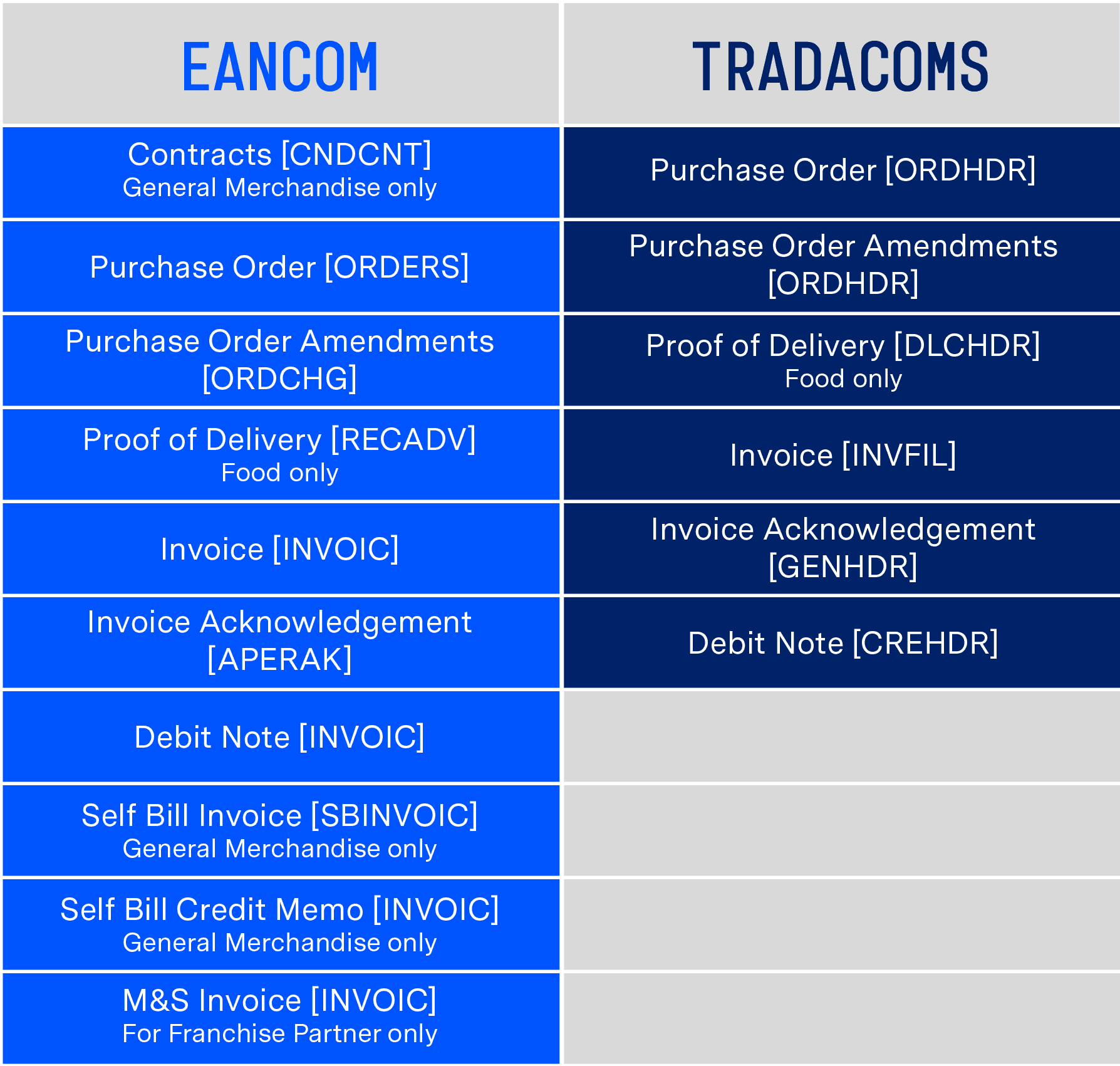
The below table shows the different document types and formats used by M&S:
Setting up the connection with M&S (exchange protocols)
To allow for an exchange of EDI documents with Marks & Spencer, an exchange channel using an EDI protocol must be set up.
As M&S uses OpenText as its EDI provider, prospective suppliers require a connection to OpenText Business Network to be able to exchange messages. ecosio cloud-based EDI solution (our Integration Hub) already offers integration with OpenText Business Network, meaning a connection from your ERP system to our Integration Hub would fulfil all exchange protocol requirements.
Our decision guide compares on-premise v cloud managed EDI services in detail
Connection timeline
The time needed to complete a connection to Marks & Spencer will depend entirely on your individual situation and the amount and complexity of mapping and routing required. The fastest and most efficient way to establish a connection with M&S is to use an experienced B2B integration partner who is able to provide a dedicated project manager to oversee the connection from first contact to go-live (and even handle monitoring afterwards).
Below is a view of the steps involved in setting up your connection to trade with M&S.
How ecosio can help
ecosio will ensure that setting up an EDI connection with M&S is a fast and hassle-free process.
As a managed service we support all commonly used, secure EDI protocols and EDI formats – there is no need to worry about document types or formats. With a connection to our Integration Hub messages will automatically be exchanged with M&S over the correct exchange protocol and received by both parties in the necessary format.
Unlike managed connections offered by other providers, ecosio EDI as a Service solution is embedded directly in your ERP system as a native feature. Through the integration of our API in your ERP system, EDI processes are seamlessly integrated into your system’s user interface, enabling end-to-end monitoring.
Benefits at a glance
- All your EDI requirements met via a central connection to ecosio cloud-based EDI solution (our Integration Hub)
- No special EDI know-how needed within your business
- All commonly used EDI protocols and EDI formats supported
- Worry-free EDI partner connection from first contact to monitoring
- Direct integration in your ERP system, so the delivery status of messages can be viewed via your ERP
Do you have any questions?
Still have questions about setting up an EDI connection with Marks & Spencer? Feel free to contact us, we’d love to help!
Der Beitrag How to Set Up an EDI Connection with M&S erschien zuerst auf ecosio.
]]>