Der Beitrag EDI Interfaces Explained erschien zuerst auf ecosio.
]]>- EDI interfaces enable automated exchange of structured business data, converting internal formats into standardised ones like EDIFACT or XML to reduce manual input and errors
- The process relies on connectivity, conversion and communication, involving agreed formats, mapping to EDI standards, and secure protocols such as AS2, OFTP2 or REST API
- Common problems include lack of user-friendliness, limited flexibility, dependence on in-house expertise, and rushed implementation
- A good interface offers seamless integration, flexibility, security, scalability, monitoring, and especially data visibility, which is enhanced through API connections enabling real-time status tracking and error resolution
As the old saying goes, time is money; and nowhere is this more relevant than in the world of B2B transactions. From data entry errors to message failures and delays, inefficient B2B processes can cost businesses dearly. By offering a means to automate B2B communication, electronic data interchange (EDI) and EDI interfaces enable businesses to both save time and improve efficiency – in turn resulting in significant cost savings!
Contrary to what many think, setting up a successful EDI interface isn’t rocket science. In fact, with the support of the right EDI provider, you can start reaping the benefits of a good EDI interface in no time. But what exactly makes a good EDI interface? How does an EDI interface work, and what benefits can a good interface offer? In this article we’ll answer all of these questions and more.
What is an EDI interface?
An EDI interface is a technical platform that enables the electronic exchange of structured business data between different systems. EDI interfaces are crucial in business communication, where they automate the manual exchange of documents (such as purchase orders, invoices and shipping notifications).
Simply put, an EDI interface converts data from internal systems (e.g. accounting software) into a standardised format – and vice versa. Once in standardised format, the data is automatically sent to the relevant external party (e.g. a customer or supplier). Not only does this automated process save time, it also greatly reduces the potential for errors, as the need for manual data input is removed on both the sender and receiver’s sides.
How does an EDI interface work?
An EDI interface can be set up via different communication channels: via the internet, via direct connections between systems or via special EDI networks.
The data transfer between sender and receiver is based on the three “C”s: connectivity, conversion and communication.
- Connectivity. Before anything else, the sender and receiver must define a common, structured data format, e.g. EDIFACT or XML, which is then used for all exchanges via the EDI interface. In most cases the format to be used is dictated by the customer via a message implementation guideline (MIG).
- Conversion. Once this format has been chosen, mapping must be done to ensure that data is correctly converted from whatever inhouse format is being used (e.g. IDocs in SAP systems) to the agreed EDI format. This step involves a lot of technical expertise and testing.
- Communication. Once mapping has been set up, the next step is handling how the data is transferred – i.e. what transfer protocol should be used. Protocols are the means by which data is securely transferred to the recipient, with popular protocols including AS2, HTTP, OFTP2, REST API and web services.
On the recipient’s side, the process then takes place backwards: they receive the data via their EDI interface and convert it into its internal format before validating and processing it. After processing, the receiver sends a response to the sender to confirm the successful receipt of the data as well as its processing. In the event that processing problems occur, the response may also include error messages.
The four most common problems with EDI interfaces
As we’ve mentioned already, when implemented well, an EDI interface can provide many benefits, from helping businesses save time and money, to reducing risk and boosting attractiveness to partners. However, there are many things that can prevent an interface from delivering maximum value. These include…
- Not being user-friendly. Given the extent of the technical work required to send and receive EDI messages, EDI interfaces are often complicated to use, with data accessible only to IT personnel. In such situations, IT can easily become a bottleneck, and the potential value that EDI can offer is limited.
- Lack of flexibility. Whether due to internal or external factors, EDI requirements inevitably change over time. Unfortunately, not all EDI interfaces lend themselves to quick adjustments, however. For example, if an EDI interface is maintained by in-house staff members who have other responsibilities – as opposed to external experts – tasks such as onboarding new partners or changing complicated mappings may take a long time to complete.
- Dependence on in-house technical expertise. The implementation of a good EDI interface requires a lot of technical expertise, both during setup and ongoing operation. If EDI tasks are to be handled internally and inhouse resources are lacking, this can be a real issue.
- Rushed implementation. Despite the fact that EDI is essential in modern B2B relationships, it’s rarely given sufficient consideration in ERP migration projects. As a result, EDI interfaces are often implemented at the end of migration projects, with ERP customisers rushing to find something that can do the job rather than taking the time to select a well-suited, futureproof solution.
What makes a good EDI interface?
A good EDI interface is characterised by several features.
- It should allow seamless integration to ensure smooth data exchange between different systems.
- It should be flexible and support diverse data formats to meet the requirements of different business partners.
- It should be secure and provide mechanisms for data encryption and authentication in order to guarantee the confidentiality and integrity of the transmitted data.
- It should be scalable and able to adapt as your EDI needs evolve over time.
- It should have extensive message monitoring and error handling functions to allow for errors to be spotted and resolved quickly.
Perhaps the most important feature of a successful EDI interface, however, is data visibility.
Given the significance of the data being exchanged via EDI, relevant departments having real-time visibility of key information – such as whether or not a partner has received or opened an invoice – is extremely important. Similarly, having access to an EDI dashboard which offers a helpful overview of EDI message flow can make message monitoring much easier.
Despite this, such functionality is only offered by a minority of EDI interfaces – namely those which utilise an API connection…
How an API connection can boost efficiency
As a collection of rules and protocols, an API connection defines how the various exchange formats, exchange protocols and security requirements of an EDI interface should interact. The main advantage of EDI interfaces based on API connections is that the data is accessed directly. This means that no metadata is lost and important information such as whether an invoice has been received by the EDI service provider or by the final message recipient can be displayed in real time in the existing user interface of the user’s ERP system. This improves supply chain efficiency and minimises the occurrence of errors.
When errors do occur, the data transparency offered by API connections is also extremely helpful, as the user can easily determine where the problem lies and what needs to be done to resolve it. EDI interfaces which utilise API connections may also offer added benefits such as full-text search functionality, which allows EDI messages to be found quickly by searching for any known identifier, such as article number or transmission ID.
Another key benefit of connecting an EDI interface via API is that specialist teams such as sales or purchasing don’t need to go through IT to get key information. By improving data visibility and accessibility and allowing relevant employees to access data directly in their ERP system, using an API connection eliminates internal bottlenecks.
In short, EDI interfaces that utilise an API connection help businesses to streamline B2B processes by ensuring that all relevant parties have real-time visibility of important information, that information can be located easily, and that errors can be resolved quickly.
Want to know more?
Want to know more about EDI and how ecosio’s unique EDI as a Service solution could help you? Then contact us today! Our EDI experts will be more than happy to show you how you could leverage efficient EDI to save time, save money, reduce risk and boost your competitive advantage.
Discover more about our updated product, ecosio.flow.
Der Beitrag EDI Interfaces Explained erschien zuerst auf ecosio.
]]>Der Beitrag Common EDI Errors and How to Fix Them erschien zuerst auf ecosio.
]]>Thankfully there’s no need for EDI errors to be a common occurrence, though. In this article we’ll explore why EDI errors happen and what you can do to safeguard your system against them.
The architecture of a typical EDI landscape
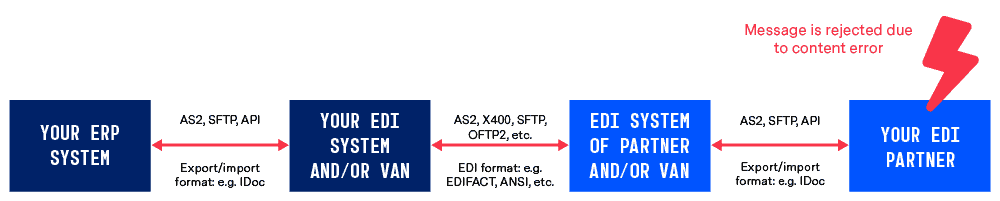
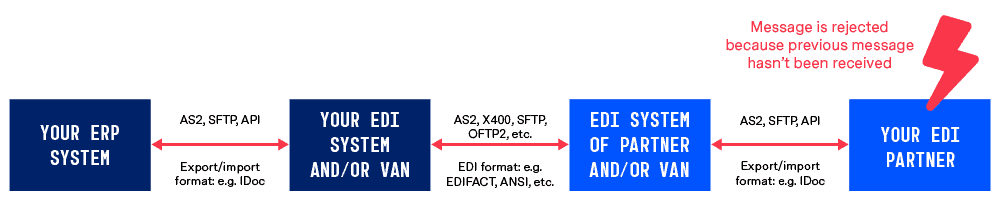
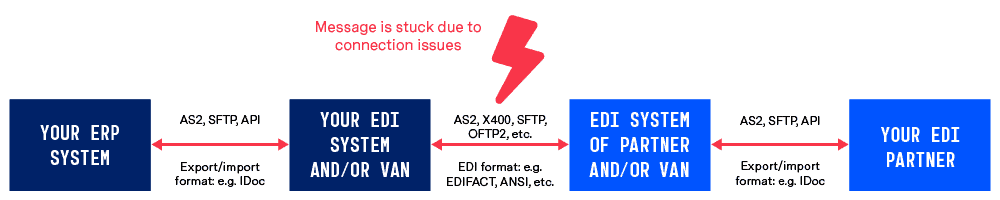
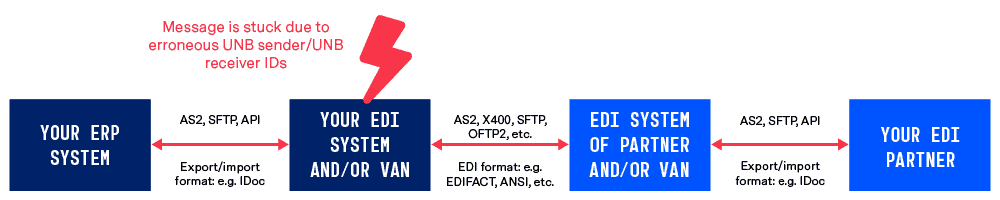
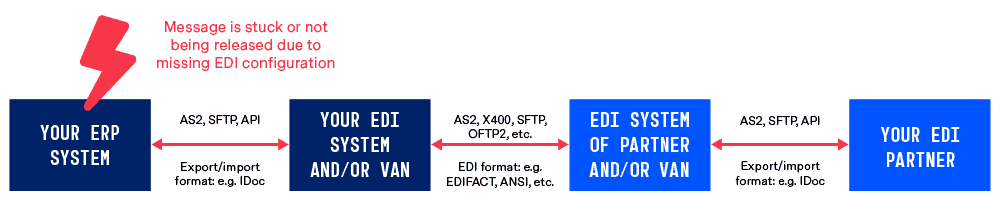
The typical modern EDI landscape has four main points (or ‘corners’, as they are often called). As shown in the diagram below, these are…
- Your ERP system
- Your EDI system and/or VAN
- The EDI system of your partner and/or VAN
- Your EDI partner’s ERP system
Although this model is the most efficient EDI landscape as far as the ease and efficiency of setting up EDI connections are concerned, the fact that multiple steps are involved means that there are several places where EDI errors can occur.

In the following section we’ll look at the five most common EDI error types and show you where each occurs on this same EDI architecture diagram.
The five most common EDI errors
1) Message content errors
What are message content errors?
Content errors happen when the EDI message in question contains missing or incorrect information. For example, a message may have the wrong item number (e.g. GTIN) or be missing a number such as the invoice recipient’s GLN (NAD+IV in case of EDIFACT).
How can I fix message content errors?
To correct content errors the exact source of the error needs to be located in the originating system (usually the ERP system) and manually updated.
How can I avoid message content errors?
Message content errors can be avoided if EDI onboarding is conducted correctly and master data is maintained properly. During EDI onboarding all potential message variants (e.g. in case of invoices) must be tested thoroughly. In addition, automated validations, which are executed as part of the document mappings, also help to prevent such errors.
Once a content error has been spotted in a message it is important to check that the issue didn’t stem from inaccurate master data, as the same error will happen again in the future if this was the cause and the master data is left unchanged.
2) Message sequence errors
What are message sequence errors?
Message sequence errors are when an EDI message is rejected because the intended target has not yet received a previous message. For example, if a buyer has not yet received an order response (ORDRSP), they may well not be able to acknowledge a despatch advice message (DESADV).
How can I fix message sequence errors?
In order to resolve this error the previous message in the workflow must be sent successfully. This may involve identifying and tackling a separate error, depending on why the previous message was not received.
How can I avoid message sequence errors?
Avoiding message sequencing errors requires your EDI solution to be set up in such a way that the system would recognise that the previous message has not yet been received and halt the transmission of further messages. Usually this can be achieved by setting up dedicated rules in the ERP system, preventing messages from being released where the necessary preceding documents have not yet been released.
3) Connection errors
What are connection errors?
Connection errors happen between your EDI provider/VAN and the EDI provider/VAN of your partner. For example, your EDI message may become stuck because an AS2 or X.400 server is not operational.
How can I fix connection errors?
Typically it isn’t possible for internal teams to resolve connection errors directly, as message exchange is normally handled by a service provider or VAN. However, good message monitoring processes will ensure you are aware of the issue as early as possible and can alert the relevant internal parties so they are informed about the connection outage. In addition your EDI service provider will have to try to restore the connection and resend any pending documents as soon as the connection is available again.
How can I avoid connection errors?
Due to the fact that EDI involves distributed systems where you are not in control of every node, you cannot fully avoid connection errors. The best way to reduce the impact of EDI connection errors is to work with an EDI service provider that offers proactive connection monitoring and error resolution. In case a connection error occurs, the EDI service provider will take all necessary steps to restore connectivity. In most cases your internal teams and business departments will not even realise that there was a connectivity hiccup.
Furthermore it helps to focus on EDI data visibility – e.g. integrating an EDI solution that utilises API. This way relevant internal teams such as procurement or sales can see when a connection issue arises as well and are proactively informed about the issue.
4) EDI routing errors
What are EDI routing errors?
EDI routing errors occur when the incorrect EDI sender/receiver configurations are present. For example, a message may become stuck due to erroneous UNB sender/receiver IDs in the case of EDIFACT.
How can I fix EDI routing errors?
Fixing an EDI routing error may require master data to be corrected and the message resent from your ERP system.
How can I avoid EDI routing errors?
An efficient EDI solution can avoid EDI routing errors by visualising the error directly in the ERP system. Consequently business users are immediately aware of the faulty configuration, can correct it and then resend the message. A proactive EDI service provider (such as ecosio) will also chase stuck messages and inform you proactively.
5) Configuration errors
What are configuration errors?
Configuration errors occur when key setups are missing in the ERP system. Without the correct logic in place, messages can become stuck, meaning potentially important information is never received. Usually this means that the necessary EDI messages are not being triggered in the ERP system, e.g. because the setup for a new Sold-to party is missing.
How can I fix configuration errors?
Fixing configuration errors will likely require master data updates. In addition it may also require technical work to ensure your EDI solution is integrated fully into your ERP system, e.g. by setting up validation routines which check for missing EDI configurations.
How can I avoid configuration errors?
In addition to maintaining good master data protocols, one good way to avoid configuration errors is to implement automated setup routines. This way business users cannot save new partner records (e.g. Bill-to or Sold-to), unless they have provided the necessary EDI configuration.
What can I do to avoid EDI errors?
In order to build a system resilient to EDI errors, there are two key steps businesses can take…
1) Ensure internal visibility of EDI traffic
If EDI errors are to be eliminated, business departments need visibility of the EDI process. Rather than EDI being a black box, with departments such as sales and procurement unable to access data, EDI traffic up to the EDI system and/or VAN of the EDI partner should ideally be visible directly in the ERP’s user interface for those who need it.
With good internal EDI data visibility, business users can easily see if something is wrong and react accordingly to prevent failure and frustration.
2) Establish reliable message monitoring processes
Whatever type of EDI solution you select, it is important to ensure that EDI traffic is supervised and overseen by experienced individuals.
For companies with extensive internal resources and EDI expertise it may be possible to do this in-house. For those businesses not in this situation, an EDI as a Service approach offers the most sensible solution. This way, not only are connections set up by your EDI provider, they are monitored and maintained by them too – leaving internal teams free to focus on more value-adding activities.
Want to eliminate EDI headaches once and for all?
EDI should be an asset, not a hassle, and the more time internal teams have to spend resolving EDI issues, the less they can devote to more value-adding activities.
At ecosio we’re well aware of just how difficult handling EDI can be for internal teams, which is why we’ve dedicated ourselves to helping businesses achieve maximum automation with minimum effort.
From initial setup right through to ongoing operation and error resolution, our EDI experts take care of all EDI tasks so you don’t have to. Plus, thanks to the modular and cloud-based nature of our solution, there’s no need to worry about the future, as your solution can easily be adapted to suit your changing needs.
Find out more about how ecosio could help you save time, save money, reduce risk and increase your competitive advantage, or get in touch today!
Der Beitrag Common EDI Errors and How to Fix Them erschien zuerst auf ecosio.
]]>Der Beitrag Peppol Message Responses – A Helpful Guide erschien zuerst auf ecosio.
]]>In this article we explore some of the technical aspects of Peppol – namely the three types of message response supported by Peppol, Peppol transport acknowledgements, message level responses and business level responses. Looking at each one by one, we’ll examine what they do, how they work and how they differ from one another. To skip to a particular section, please click the relevant section heading below:
- Peppol’s four corner model
- Transport Acknowledgements (Acks)
- Message level responses (MLRs)
- Business level responses (invoice responses)
If you would like a more general overview of what Peppol is and the benefits it can offer, please find our downloadable white paper “Peppol: What You Need To Know”.
The structure of the Peppol network
Before we jump into the three different types of Peppol message responses, it is first important to understand the underlying network structure behind Peppol. This is known as the four corner model.
The “four corners” of this network model refer to
- the message sender,
- the message sender’s Peppol access point,
- the Peppol access point of the message recipient, and
- the message recipient themselves
This arrangement is fundamental to Peppol message exchange as, along with strict rules regarding which standards and protocols can be used, it makes message exchange as simple as possible. The easiest way to understand the benefits is by comparing to the alternative models:
The two corner model
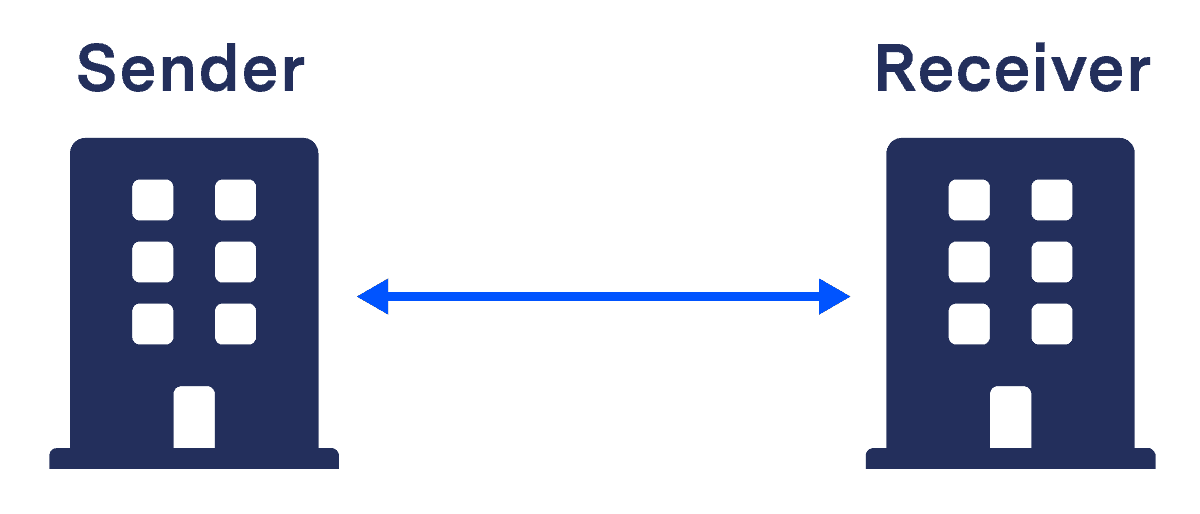
With direct automated message exchange (AKA a two corner model) each connection requires time-consuming set-up by inhouse IT teams or an external consultant. Connections are not reusable for multiple partners, meaning every new partner requires a completely new setup.
Two corner model
The three corner model
In a three corner model on the other hand, message routing is done via a central service provider hub. Though this may be preferable to a two corner model, it still lacks flexibility, as both sender and receiver must have the same service provider, making it badly suited to large supply chains. In addition this model typically results in one of the parties being forced into a contract with the service provider of their partner.
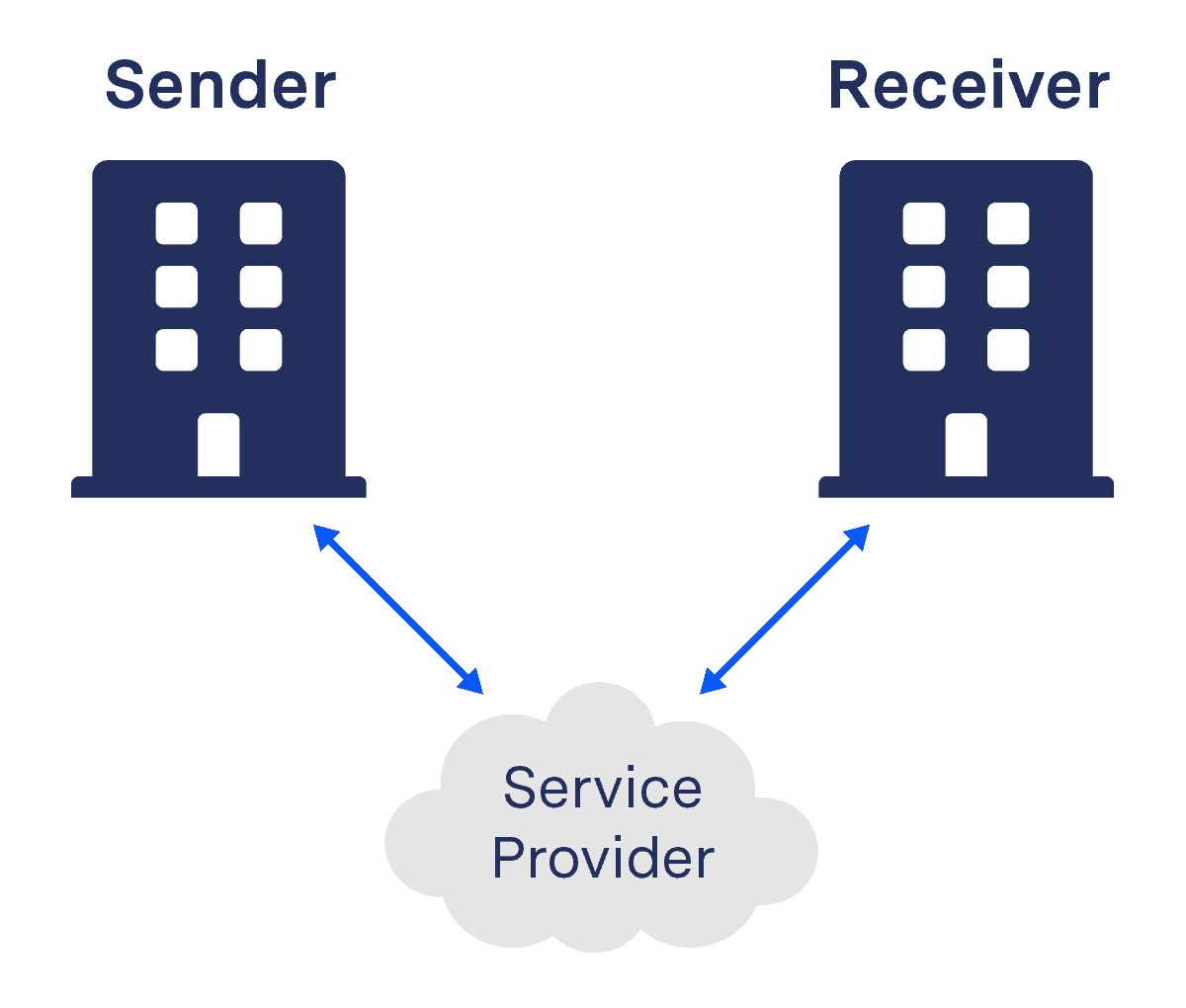
Three corner model
The four corner model
By contrast, Peppol’s four corner model doesn’t require unique point-to-point connections or for both parties to use the same provider.
Once a connection to an access point has been established, the Peppol Participant ID is sufficient to send an electronic message to any Peppol partner of choice (and be reached by other Peppol-connected companies). Message validation is handled by the sender’s access point and both sender and receiver’s access points can access a service metadata locator (SML) and service metadata publishers (SMP) as required.

The Peppol four corner model
How Peppol message responses fit in
To help provide a framework for understanding the more detailed descriptions of each Peppol message response type below, this diagram shows how they fit into the four corner model. All messages and acknowledgements are exchanged via the access points of the sender and the receiver. The dashed arrows indicate, to which component of the exchange infrastructure an acknowledgement or a response message belongs to.
Where message responses fit in
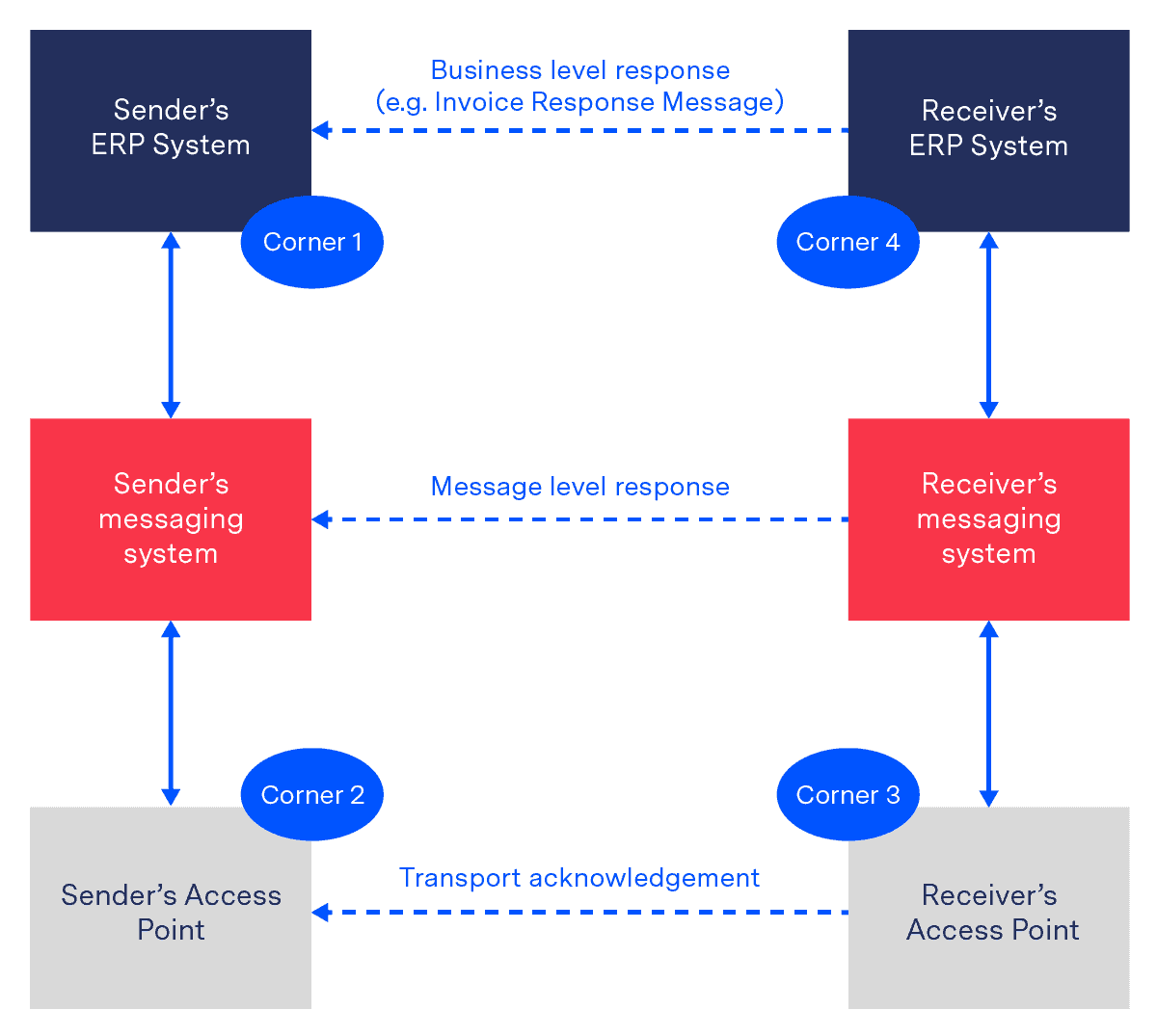
A transport acknowledgement is the most basic type of confirmation and is an integral part of Peppol’s AS4 protocol. Message level responses are generated by the receiver’s messaging system and are intended for the sender’s messaging system. Finally, a business level response is intended to be processed by the sender’s ERP system.
Now let’s examine each, starting with transport acknowledgements…
1) Transport acknowledgements
What is a transport acknowledgement (Ack)?
A transport acknowledgement is an electronic receipt sent from the receiving access point (C3) to the sending access point (C2) following the transmission of a structured message such as an invoice. The acknowledgement notifies the sending party if technical delivery was successful and can include relevant information such as why delivery of a message was unsuccessful. Importantly, however, acknowledgements do not say anything about the validation of the message or whether the contents were correct, for example.
In Peppol, communication takes place via the protocol AS4 (previously AS2). Acknowledgements are a key feature in AS4 communication, where an acknowledgement is referred to as a SignalMessage.
There are three types of SignalMessage:
- SignalMessage/Receipt
- SignalMessage/Error
- SignalMessage/PullRequest (not used in the context of Peppol)
What does a Peppol acknowledgement achieve?
Transport acknowledgements help to enforce data integrity and non-repudiation. In simple terms they clarify that a message has definitely been received and ensure that the recipient can’t deny receipt of that message.
In turn, this helps to speed up partner communication and make transactions more transparent.
A breakdown of the process
Essentially it works like this:
- The sender assigns the outgoing message a unique ID (this happens automatically by the sender’s access point)
- Once the outgoing message is received by corner three access point, the SignalMessage (Peppol acknowledgement) is returned. This message has a unique ID as well and carries a reference to the message it acknowledges. Thereby, a SignalMessage can carry a positive or a negative acknowledgement. Positive acknowledgements are submitted using SignalMessage/Receipt and negative acknowledgements are submitted using SignalMessage/Error.
2) Message level response (MLR)
Arguably the most important part of automated message exchange is message validation – i.e. where a message is checked against the agreed specifications (syntactical and semantic).
In Peppol, message level responses, or MLRs, serve to inform the sender of the success (or otherwise) of validation. Helpfully, in the case of failure, these messages also detail what went wrong, such as a specific syntax error relating to a missing closing tag. It is important to note that MLRs will not identify if a certain value is correct in the context of a certain message, but merely that it is in accordance with the agreed specifications. For example, an MLR would not notify you if an article number was wrong, but would alert you if an article number is missing (for a full rundown of what errors a message level response is capable of alerting you to, please check the external article “BIS Message Level Response 3.0”).
MLRs can communicate three things to the sender of the original message:
- The message contained errors and failed validation.
- The message did not contain errors and passed validation.
- The message has been received, but is not yet validated.
Technically MLRs are returned using UBL Application Response 2.1 messages.

3) Business level response
What is a business level response (AKA invoice response)?
The final Peppol message response type is the business level response and is used to inform the sender of a message about the status or outcome of corner four processing the message. In the case of invoices the business level response is called the invoice response message and could for instance contain a rejection, because the referenced purchase order number in the invoice is invalid.
In general an invoice response message supports the following status codes:
- AB – basic message acknowledgement
- AP – accepted
- RE – rejected
- IP – in progress
- UQ – under query
- CA – conditionally accepted
- PD – paid
While Peppol BIS does not require corner four to support all these codes, the first three (AB, AP and RE) must be supported as a minimum. Peppol BIS also requires that the initial sender (AKA corner one) must receive this response within three working days.
How a business level response works and what it looks like
In the event that an invoice is rejected (RE), put under query (UQ) or conditionally accepted (CA), corner four must provide information to help corner one resolve the issue. Status Reason codes and Status Action codes provide a means of doing this. Detailed information can also be added via a free text field which is supported by Peppol.
Like a message level response, a business level response is also based on a UBL Application Response 2.1. The following snippet shows an exemplary invoice response.
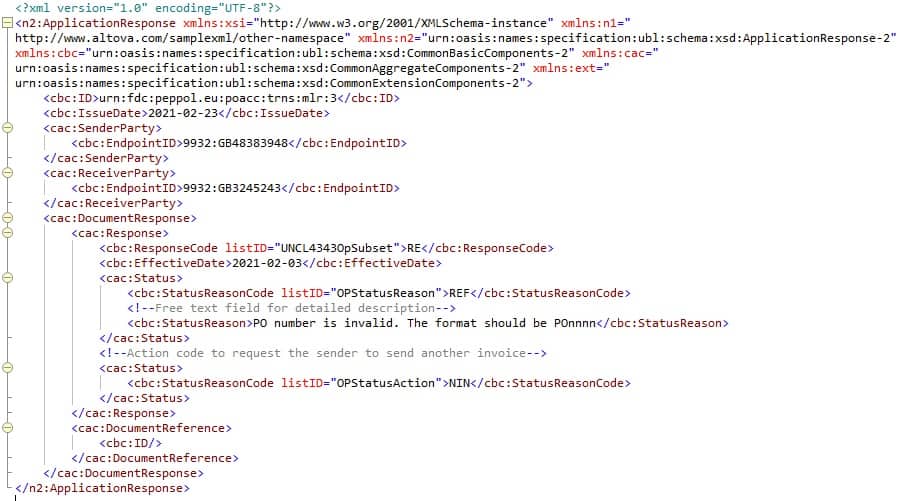
Business level response example (click for larger version)
Want more information?
At ecosio we are experts in Peppol and e-invoicing and were one of the very first Peppol Access points in Europe. To date we have helped hundreds of companies to integrate efficient e-invoicing processes into existing systems and experience the benefits of Peppol.
For more information on Peppol please feel free to get in touch with our experts via our chat or our contact form. We are always happy to help!
Have you tried our free XML/Peppol document validator?
To help those in need of a simple and easy way to validate formats and file types, from CII (Cross-Industry Invoice) to UBL, we’ve created a free online validator.
Der Beitrag Peppol Message Responses – A Helpful Guide erschien zuerst auf ecosio.
]]>Der Beitrag Peppol Message Responses – A Helpful Guide erschien zuerst auf ecosio.
]]>In this article we explore some of the technical aspects of Peppol – namely the three types of message response supported by Peppol, Peppol transport acknowledgements, message level responses and business level responses. Looking at each one by one, we’ll examine what they do, how they work and how they differ from one another. To skip to a particular section, please click the relevant section heading below:
- Peppol’s four corner model
- Transport Acknowledgements (Acks)
- Message level responses (MLRs)
- Business level responses (invoice responses)
If you would like a more general overview of what Peppol is and the benefits it can offer, please find our downloadable white paper “Peppol: What You Need To Know”.
The structure of the Peppol network
Before we jump into the three different types of Peppol message responses, it is first important to understand the underlying network structure behind Peppol. This is known as the four corner model.
The “four corners” of this network model refer to
- the message sender,
- the message sender’s Peppol access point,
- the Peppol access point of the message recipient, and
- the message recipient themselves
This arrangement is fundamental to Peppol message exchange as, along with strict rules regarding which standards and protocols can be used, it makes message exchange as simple as possible. The easiest way to understand the benefits is by comparing to the alternative models:
The two corner model
With direct automated message exchange (AKA a two corner model) each connection requires time-consuming set-up by inhouse IT teams or an external consultant. Connections are not reusable for multiple partners, meaning every new partner requires a completely new setup.
Two corner model
The three corner model
In a three corner model on the other hand, message routing is done via a central service provider hub. Though this may be preferable to a two corner model, it still lacks flexibility, as both sender and receiver must have the same service provider, making it badly suited to large supply chains. In addition this model typically results in one of the parties being forced into a contract with the service provider of their partner.
Three corner model
The four corner model
By contrast, Peppol’s four corner model doesn’t require unique point-to-point connections or for both parties to use the same provider.
Once a connection to an access point has been established, the Peppol Participant ID is sufficient to send an electronic message to any Peppol partner of choice (and be reached by other Peppol-connected companies). Message validation is handled by the sender’s access point and both sender and receiver’s access points can access a service metadata locator (SML) and service metadata publishers (SMP) as required.
The Peppol four corner model
How Peppol message responses fit in
To help provide a framework for understanding the more detailed descriptions of each Peppol message response type below, this diagram shows how they fit into the four corner model. All messages and acknowledgements are exchanged via the access points of the sender and the receiver. The dashed arrows indicate, to which component of the exchange infrastructure an acknowledgement or a response message belongs to.
Where message responses fit in
A transport acknowledgement is the most basic type of confirmation and is an integral part of Peppol’s AS4 protocol. Message level responses are generated by the receiver’s messaging system and are intended for the sender’s messaging system. Finally, a business level response is intended to be processed by the sender’s ERP system.
Now let’s examine each, starting with transport acknowledgements…
1) Transport acknowledgements
What is a transport acknowledgement (Ack)?
A transport acknowledgement is an electronic receipt sent from the receiving access point (C3) to the sending access point (C2) following the transmission of a structured message such as an invoice. The acknowledgement notifies the sending party if technical delivery was successful and can include relevant information such as why delivery of a message was unsuccessful. Importantly, however, acknowledgements do not say anything about the validation of the message or whether the contents were correct, for example.
In Peppol, communication takes place via the protocol AS4 (previously AS2). Acknowledgements are a key feature in AS4 communication, where an acknowledgement is referred to as a SignalMessage.
There are three types of SignalMessage:
- SignalMessage/Receipt
- SignalMessage/Error
- SignalMessage/PullRequest (not used in the context of Peppol)
What does a Peppol acknowledgement achieve?
Transport acknowledgements help to enforce data integrity and non-repudiation. In simple terms they clarify that a message has definitely been received and ensure that the recipient can’t deny receipt of that message.
In turn, this helps to speed up partner communication and make transactions more transparent.
A breakdown of the process
Essentially it works like this:
- The sender assigns the outgoing message a unique ID (this happens automatically by the sender’s access point)
- Once the outgoing message is received by corner three access point, the SignalMessage (Peppol acknowledgement) is returned. This message has a unique ID as well and carries a reference to the message it acknowledges. Thereby, a SignalMessage can carry a positive or a negative acknowledgement. Positive acknowledgements are submitted using SignalMessage/Receipt and negative acknowledgements are submitted using SignalMessage/Error.
2) Message level response (MLR)
Arguably the most important part of automated message exchange is message validation – i.e. where a message is checked against the agreed specifications (syntactical and semantic).
In Peppol, message level responses, or MLRs, serve to inform the sender of the success (or otherwise) of validation. Helpfully, in the case of failure, these messages also detail what went wrong, such as a specific syntax error relating to a missing closing tag. It is important to note that MLRs will not identify if a certain value is correct in the context of a certain message, but merely that it is in accordance with the agreed specifications. For example, an MLR would not notify you if an article number was wrong, but would alert you if an article number is missing (for a full rundown of what errors a message level response is capable of alerting you to, please check the external article “BIS Message Level Response 3.0”).
MLRs can communicate three things to the sender of the original message:
- The message contained errors and failed validation.
- The message did not contain errors and passed validation.
- The message has been received, but is not yet validated.
Technically MLRs are returned using UBL Application Response 2.1 messages.
3) Business level response
What is a business level response (AKA invoice response)?
The final Peppol message response type is the business level response and is used to inform the sender of a message about the status or outcome of corner four processing the message. In the case of invoices the business level response is called the invoice response message and could for instance contain a rejection, because the referenced purchase order number in the invoice is invalid.
In general an invoice response message supports the following status codes:
- AB – basic message acknowledgement
- AP – accepted
- RE – rejected
- IP – in progress
- UQ – under query
- CA – conditionally accepted
- PD – paid
While Peppol BIS does not require corner four to support all these codes, the first three (AB, AP and RE) must be supported as a minimum. Peppol BIS also requires that the initial sender (AKA corner one) must receive this response within three working days.
How a business level response works and what it looks like
In the event that an invoice is rejected (RE), put under query (UQ) or conditionally accepted (CA), corner four must provide information to help corner one resolve the issue. Status Reason codes and Status Action codes provide a means of doing this. Detailed information can also be added via a free text field which is supported by Peppol.
Like a message level response, a business level response is also based on a UBL Application Response 2.1. The following snippet shows an exemplary invoice response.
Business level response example (click for larger version)
Want more information?
At ecosio we are experts in Peppol and e-invoicing and were one of the very first Peppol Access points in Europe. To date we have helped hundreds of companies to integrate efficient e-invoicing processes into existing systems and experience the benefits of Peppol.
For more information on Peppol please feel free to get in touch with our experts via our chat or our contact form. We are always happy to help!
Have you tried our free XML/Peppol document validator?
To help those in need of a simple and easy way to validate formats and file types, from CII (Cross-Industry Invoice) to UBL, we’ve created a free online validator.
Der Beitrag Peppol Message Responses – A Helpful Guide erschien zuerst auf ecosio.
]]>Der Beitrag Supplier EDI Onboarding – The Seven Key Steps erschien zuerst auf ecosio.
]]>With this in mind, in this article we will take you chronologically through a thorough supplier EDI onboarding process, from kick-off to go-live – looking at what’s needed from you and your suppliers along the way. Hopefully by the end you will know exactly what a successful project involves and be more confident in making the right choice of solution.
Step 1 – Kick off and definition of EDI requirements
Unsurprisingly the first step in any supplier onboarding project is for your provider to identify exactly what it is that you want. Though there is no one way to achieve this, it is generally best if both you and your EDI provider have a clear point of contact, as this will increase the project’s speed and efficiency.
Once your internal team has been agreed, your provider will liaise with them to find out what your requirements are. This involves discussing:
- Processes – How are orders, deliveries and invoices handled?
- Document types – What document types need to be realised? For example, are you looking to trade invoices only, or do you also want to exchange other common document types, such as orders and despatch advices (aka INVOIC, ORDER and DESADV for EDIFACT messages and 810, 850 and 856 for X12 messages, for example). More sophisticated EDI integrations will also enable automated transmission of sales data reports (SLSRPT / 818), inventory reports (INVRPT / 846) and receiving advice messages (RECADV / 861).
- Message data granularity – Which data elements do you want to be included in each message? In addition to the basics (price, quantity, article number) do you require additional information, such as descriptions or best-before dates?
- Message / process semantics – What is the structure and content of your exchange messages? Usually the ERP system has a preferred (data model) exchange format. This needs to be communicated to the EDI provider for the creation of the dataΩmapping.
- Message protocols – How is your EDI data exchanged with your back-end system? This can be handled via a number of different protocols, such as API, SFTP and HTTPs.
It is tough to give an estimate of how long this process will take given the bespoke nature of the process, but if you are aware of your requirements in advance and have assigned a dedicated project leader internally, this step can take as little as a couple of days. Usually the process will take longer than this, however, and typically involves a fair amount of back and forth.
Step 2 – Creation of Message Implementation Guide (MIG)
Having completed the fact-finding step, your EDI provider will then create your message implementation guide (or MIG). A MIG is basically a ‘how to’ guide for your partners which details your business’s EDI requirements and the specifics of your preferred message formats etc. This normally takes around two days of work per MIG to complete.
As the success of this step has a knock-on impact on the success of the rest of the EDI onboarding process, it is particularly important that this is completed carefully. To ensure the reliability of the MIG, fully managed EDI providers, such as ecosio, will send sample messages to your system. They may even enlist the help of one of your close suppliers to conduct a parallel phase to check everything is functioning correctly. All that is required on your side is to check the messages and flag if anything needs altering.
Sadly, with non fully-managed EDI solutions this phase is often rushed, with little or no testing conducted, leading to errors further down the line.
Step 3 – Creation of Web EDI platform
If you are looking to automate as much as possible of your supply chain’s document exchange, you may also intend to connect suppliers who do not have EDI capability using Web EDI (see our white paper for more information on Web EDI and how it can benefit you).
If this is the case, it is important that the scope of your Web EDI platform matches the scope of message types used with suppliers via “classic” integrated EDI. For example, you may need to exchange non-mainstream documents such as SLSRPT, INVRPT or RECADV in addition to orders, despatch advices and invoices – in which case care should be taken to select a provider, such as ecosio, that can support this (as this functionality is rare).
Your Web EDI platform will be built in parallel with the creation of your MIG(s). This process involves a one-time connection of the EDI solution to your ERP system and subsequent configuring of the platform to meet your requirements. Your supplier should be able to send test documents via the platform according to your MIG (for you to then check). As with the creation of the MIG, you may also want to enlist the help of a close supplier to help test the platform before wider rollout.
As Web EDI requires suppliers to put in manual effort in order for you to experience full automation, platforms are not always hugely popular with suppliers. As a result, selecting a Web EDI system, like ecosio’s Web EDI solution, which is able to minimise effort on your suppliers’ side through features such as semi-automatic document creation, PDF printing and batch support can greatly increase take-up across your supply chain.
Step 4 – Prioritising / approaching your partners
Once your MIG and Web EDI platform have been created it is time to begin onboarding your partners. Before approaching them, however, it is important to agree a strategy with your EDI provider. With large supply chains, it can take a while for partners to be onboarded. As such it makes sense to prioritise onboarding certain partners first so you get maximum benefit from your new system. For example, you may wish to prioritise your biggest suppliers, or those with whom you are closest. As your EDI solution provider will have handled similar projects many times before, they should be able to offer valuable input here.
Once the supplier EDI onboarding strategy has been agreed, your provider should approach each supplier to clarify details such as identifiers (e.g. GLN number), current capabilities (e.g. what types of documents they can exchange via EDI) and which type of connection they would prefer (e.g. AS2, X.400, VAN etc.).
During this process your EDI provider should also share your new message guidelines with your suppliers, allowing them to know what your system requires and how to create valid outgoing documents, which brings us on to…
Step 5 – Message exchange testing / validation
The testing phase involves your provider sending your supplier documents in order for them to send back the necessary responses (e.g. an Order and Order Response).
If your supplier returns an incorrect message they should be informed by your provider what the errors are, enabling them to be corrected. This is known as validation.
Validation can be done manually by checking the message against the MIG. This is a tedious and error-prone method, however. Instead, validation is better handled automatically, by employing in-built validation checks on the integration software, or semi-automatically, by using external software capable of checking message syntax.
Automatic checks (such as those completed by ecosio’s cloud-based EDI solution (our Integration Hub)) can immediately return error reports via email or web portal to the document issuer. Manual checks, on the other hand, involve much more effort, meaning more time until the error report is ready
Once any errors have been corrected and your supplier is able to send a response that conforms to your MIG, the message will be sent to your internal team to check. If a fully managed provider is opted for, this checking should be the extent of the input required from you.
Step 6 – Go-live
When you are happy with the responses from your supplier the connection can be put live. In some cases you may wish to run a parallel phase (alongside a continuation of your previous message exchange method), for several months to ensure that everything is functioning smoothly.
With suppliers being connected via Web EDI the process is even simpler, as they simply need to be activated on the platform. If your Web EDI portal is sufficiently intuitive / user-friendly, training may not even be needed. Alternatively it can be provided in the form of pre-recorded videos / documentation.
Step 7 – Post go-live
Whilst go-live might well signal the end of the EDI onboarding process, it is far from the end of the work when it comes to ongoing document exchange with your partners. For example, your supplier may conduct (as ecosio does) ongoing validation mapping checks to ensure that message details match the requirements of your MIG – thus avoiding the complications associated with incorrect details being transmitted to your ERP.
In order to benefit from a successful and future-proof system, processes also need to be in place covering message monitoring and error handling. Significantly, with many solutions go-live effectively signals the end of your EDI partner’s active involvement, meaning these responsibilities fall to internal teams. However, this is not the case if a fully managed EDI provider such as ecosio is opted for.
Ideally your EDI provider will continue to oversee your business’s EDI connections, acting as a point of contact for your suppliers (both those using classic EDI and Web EDI) and working proactively to correct errors and ensure connections are functioning at maximum efficiency. This way you benefit from both more reliable EDI and the time and cost savings associated with less pressure on internal teams.
As your needs are likely to change over time, it also makes sense to consider investing in a solution that can adapt alongside your business. For example, clients of ecosio are able to add additional Supplier Relationship Management (SRM) modules as required.
Discover a fully managed approach to EDI onboarding with ecosio
As every supply chain is different, every business faces unique challenges when it comes to connecting to suppliers. To be successful, electronic data interchange requires not only technical expertise during set-up and onboardings, but also ongoing time and effort in the form of message monitoring, error handling and installation of updates etc. after go-live. Simply put, each of the steps we have covered is crucial to the lasting health and reliability of your EDI connections.
At ecosio we understand the effort involved in establishing and maintaining efficient EDI, which is why we aim to help businesses avoid the time and stress it can cause by minimising internal effort. As well as making sure connections are as secure as possible through conducting thorough testing, ecosio’s experts manage the entire EDI onboarding process, from kick-off to ongoing operation (unlike other providers). Essentially we do the work so you don’t have to! The upshot is a more cost-effective outcome, faster connections and peace of mind.
To find out more about ecosio’s fully managed solution and how we can help you benefit from simple, efficient and intelligent EDI, contact us today! We are always happy to answer your questions.
Der Beitrag Supplier EDI Onboarding – The Seven Key Steps erschien zuerst auf ecosio.
]]>Der Beitrag Supplier EDI Onboarding – The Seven Key Steps erschien zuerst auf ecosio.
]]>With this in mind, in this article we will take you chronologically through a thorough supplier EDI onboarding process, from kick-off to go-live – looking at what’s needed from you and your suppliers along the way. Hopefully by the end you will know exactly what a successful project involves and be more confident in making the right choice of solution.
Step 1 – Kick off and definition of EDI requirements
Unsurprisingly the first step in any supplier onboarding project is for your provider to identify exactly what it is that you want. Though there is no one way to achieve this, it is generally best if both you and your EDI provider have a clear point of contact, as this will increase the project’s speed and efficiency.
Once your internal team has been agreed, your provider will liaise with them to find out what your requirements are. This involves discussing:
- Processes – How are orders, deliveries and invoices handled?
- Document types – What document types need to be realised? For example, are you looking to trade invoices only, or do you also want to exchange other common document types, such as orders and despatch advices (aka INVOIC, ORDER and DESADV for EDIFACT messages and 810, 850 and 856 for X12 messages, for example). More sophisticated EDI integrations will also enable automated transmission of sales data reports (SLSRPT / 818), inventory reports (INVRPT / 846) and receiving advice messages (RECADV / 861).
- Message data granularity – Which data elements do you want to be included in each message? In addition to the basics (price, quantity, article number) do you require additional information, such as descriptions or best-before dates?
- Message / process semantics – What is the structure and content of your exchange messages? Usually the ERP system has a preferred (data model) exchange format. This needs to be communicated to the EDI provider for the creation of the data mapping.
- Message protocols – How is your EDI data exchanged with your back-end system? This can be handled via a number of different protocols, such as API, SFTP and HTTPs.
It is tough to give an estimate of how long this process will take given the bespoke nature of the process, but if you are aware of your requirements in advance and have assigned a dedicated project leader internally, this step can take as little as a couple of days. Usually the process will take longer than this, however, and typically involves a fair amount of back and forth.
Step 2 – Creation of Message Implementation Guide (MIG)
Having completed the fact-finding step, your EDI provider will then create your message implementation guide (or MIG). A MIG is basically a ‘how to’ guide for your partners which details your business’s EDI requirements and the specifics of your preferred message formats etc. This normally takes around two days of work per MIG to complete.
As the success of this step has a knock-on impact on the success of the rest of the EDI onboarding process, it is particularly important that this is completed carefully. To ensure the reliability of the MIG, fully managed EDI providers, such as ecosio, will send sample messages to your system. They may even enlist the help of one of your close suppliers to conduct a parallel phase to check everything is functioning correctly. All that is required on your side is to check the messages and flag if anything needs altering.
Sadly, with non fully-managed EDI solutions this phase is often rushed, with little or no testing conducted, leading to errors further down the line.
Step 3 – Creation of Web EDI platform
If you are looking to automate as much as possible of your supply chain’s document exchange, you may also intend to connect suppliers who do not have EDI capability using Web EDI (see our white paper for more information on Web EDI and how it can benefit you).
If this is the case, it is important that the scope of your Web EDI platform matches the scope of message types used with suppliers via “classic” integrated EDI. For example, you may need to exchange non-mainstream documents such as SLSRPT, INVRPT or RECADV in addition to orders, despatch advices and invoices – in which case care should be taken to select a provider, such as ecosio, that can support this (as this functionality is rare).
Your Web EDI platform will be built in parallel with the creation of your MIG(s). This process involves a one-time connection of the EDI solution to your ERP system and subsequent configuring of the platform to meet your requirements. Your supplier should be able to send test documents via the platform according to your MIG (for you to then check). As with the creation of the MIG, you may also want to enlist the help of a close supplier to help test the platform before wider rollout.
As Web EDI requires suppliers to put in manual effort in order for you to experience full automation, platforms are not always hugely popular with suppliers. As a result, selecting a Web EDI system, like ecosio’s Web EDI solution, which is able to minimise effort on your suppliers’ side through features such as semi-automatic document creation, PDF printing and batch support can greatly increase take-up across your supply chain.
Step 4 – Prioritising / approaching your partners
Once your MIG and Web EDI platform have been created it is time to begin onboarding your partners. Before approaching them, however, it is important to agree a strategy with your EDI provider. With large supply chains, it can take a while for partners to be onboarded. As such it makes sense to prioritise onboarding certain partners first so you get maximum benefit from your new system. For example, you may wish to prioritise your biggest suppliers, or those with whom you are closest. As your EDI solution provider will have handled similar projects many times before, they should be able to offer valuable input here.
Once the supplier EDI onboarding strategy has been agreed, your provider should approach each supplier to clarify details such as identifiers (e.g. GLN number), current capabilities (e.g. what types of documents they can exchange via EDI) and which type of connection they would prefer (e.g. AS2, X.400, VAN etc.).
During this process your EDI provider should also share your new message guidelines with your suppliers, allowing them to know what your system requires and how to create valid outgoing documents, which brings us on to…
Step 5 – Message exchange testing / validation
The testing phase involves your provider sending your supplier documents in order for them to send back the necessary responses (e.g. an Order and Order Response).
If your supplier returns an incorrect message they should be informed by your provider what the errors are, enabling them to be corrected. This is known as validation.
Validation can be done manually by checking the message against the MIG. This is a tedious and error-prone method, however. Instead, validation is better handled automatically, by employing in-built validation checks on the integration software, or semi-automatically, by using external software capable of checking message syntax.
Automatic checks (such as those completed by ecosio’s cloud-based EDI solution (our Integration Hub)) can immediately return error reports via email or web portal to the document issuer. Manual checks, on the other hand, involve much more effort, meaning more time until the error report is ready
Once any errors have been corrected and your supplier is able to send a response that conforms to your MIG, the message will be sent to your internal team to check. If a fully managed provider is opted for, this checking should be the extent of the input required from you.
Step 6 – Go-live
When you are happy with the responses from your supplier the connection can be put live. In some cases you may wish to run a parallel phase (alongside a continuation of your previous message exchange method), for several months to ensure that everything is functioning smoothly.
With suppliers being connected via Web EDI the process is even simpler, as they simply need to be activated on the platform. If your Web EDI portal is sufficiently intuitive / user-friendly, training may not even be needed. Alternatively it can be provided in the form of pre-recorded videos / documentation.
Step 7 – Post go-live
Whilst go-live might well signal the end of the EDI onboarding process, it is far from the end of the work when it comes to ongoing document exchange with your partners. For example, your supplier may conduct (as ecosio does) ongoing validation mapping checks to ensure that message details match the requirements of your MIG – thus avoiding the complications associated with incorrect details being transmitted to your ERP.
In order to benefit from a successful and future-proof system, processes also need to be in place covering message monitoring and error handling. Significantly, with many solutions go-live effectively signals the end of your EDI partner’s active involvement, meaning these responsibilities fall to internal teams. However, this is not the case if a fully managed EDI provider such as ecosio is opted for.
Ideally your EDI provider will continue to oversee your business’s EDI connections, acting as a point of contact for your suppliers (both those using classic EDI and Web EDI) and working proactively to correct errors and ensure connections are functioning at maximum efficiency. This way you benefit from both more reliable EDI and the time and cost savings associated with less pressure on internal teams.
As your needs are likely to change over time, it also makes sense to consider investing in a solution that can adapt alongside your business. For example, clients of ecosio are able to add additional Supplier Relationship Management (SRM) modules as required.
Discover a fully managed approach to EDI onboarding with ecosio
As every supply chain is different, every business faces unique challenges when it comes to connecting to suppliers. To be successful, electronic data interchange requires not only technical expertise during set-up and onboardings, but also ongoing time and effort in the form of message monitoring, error handling and installation of updates etc. after go-live. Simply put, each of the steps we have covered is crucial to the lasting health and reliability of your EDI connections.
At ecosio we understand the effort involved in establishing and maintaining efficient EDI, which is why we aim to help businesses avoid the time and stress it can cause by minimising internal effort. As well as making sure connections are as secure as possible through conducting thorough testing, ecosio’s experts manage the entire EDI onboarding process, from kick-off to ongoing operation (unlike other providers). Essentially we do the work so you don’t have to! The upshot is a more cost-effective outcome, faster connections and peace of mind.
To find out more about ecosio’s fully managed solution and how we can help you benefit from simple, efficient and intelligent EDI, contact us today! We are always happy to answer your questions.
Der Beitrag Supplier EDI Onboarding – The Seven Key Steps erschien zuerst auf ecosio.
]]>Der Beitrag How Peppol IDs Work erschien zuerst auf ecosio.
]]>First, though, it’s important to note that the Peppol ID is only one of several crucial identifiers required for successful document exchange via Peppol…
The three most important identifiers used in Peppol exchanges
The three main identifiers found in messages sent via Peppol are:
- Peppol Participant Identifiers (or Peppol ID)A Peppol Participant Identifier, also known as a Peppol endpoint ID or simply a Peppol ID, is the unique reference that is used to establish the identity of connected parties.
As explored in more detail below, the syntax for a Peppol ID is
<BusDoxParticipantIdentifier>::<IssuingAgencyCode>:<Code>. - Document IdentifiersUnsurprisingly, Document Identifiers are used to indicate which document is being exchanged.
The syntax of Document Identifier is <DocumentIdentifier> = <RootNamespace>::<documentLocalName>##<CustomizationID>::<Version> Within this, <Version> refers to the version of the underlying syntax (i.e UBL 2.1), while Customisation ID specifies the standardised transaction (e.g. invoice) and related Peppol extension. The full syntax of the Customisation ID in turn is <transactionId>:# <extensionId>[#<extensionId>].
- Process IdentifiersProcess identifiers are used to specify what process should be used for the transaction (e.g. invoice only or catalogue only).
The BusDox* Process Identifier scheme used by Peppol is cenbii-procid-ubl. Peppol processes are identified by the respective BII processes and therefore the process identifier must match the BII profile ID. A list of the different Profile IDs can be found in the OpenPeppol eDEC Code List.
Below is an example of a Peppol message, in which it is possible to see where all the above identifiers are located.
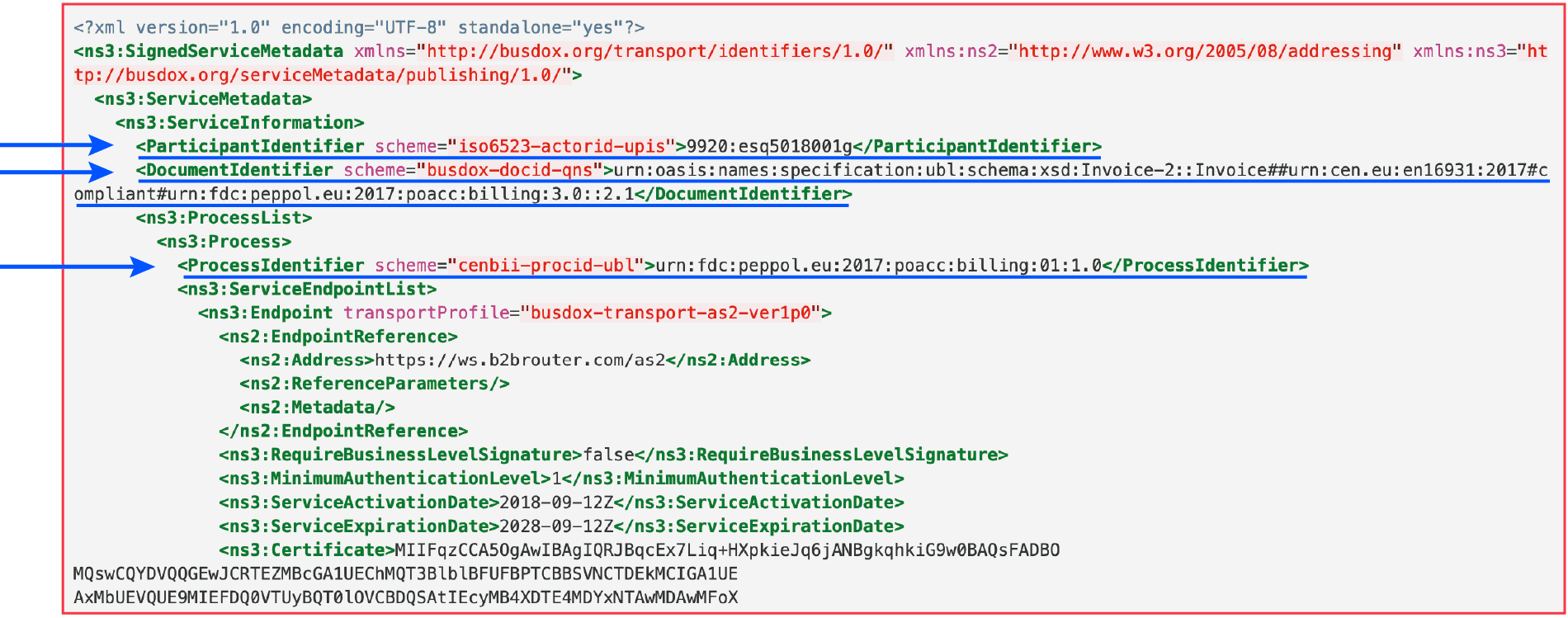
Why do I need a Peppol ID?
Every buyer and supplier within the Peppol network must have a Peppol ID. Without a Peppol ID you will be unable to send or receive invoices via the network.
Once you have a Peppol ID your business can exchange automated messages with all other connected companies that support the necessary document types. As discussed in more detail below, a list of the document types that other businesses support can be found via the Peppol directory.
How do I get a Peppol ID?
Peppol IDs are obtained through Peppol Access Point providers. All that is required in order to get an ID is to register with your preferred provider.
What does a Peppol ID look like?
As Peppol doesn’t have its own unique system for identifying connected parties, the network instead employs a federated system based on the ISO 15459 format scheme for unique identifiers. There is a set number of Issuing Agency Codes (IACs) that are acceptable for Peppol compliance. The Peppol ID (or Peppol Party Identifier) you are given will be a combination of the IAC and the value given by the agency issuing the code.
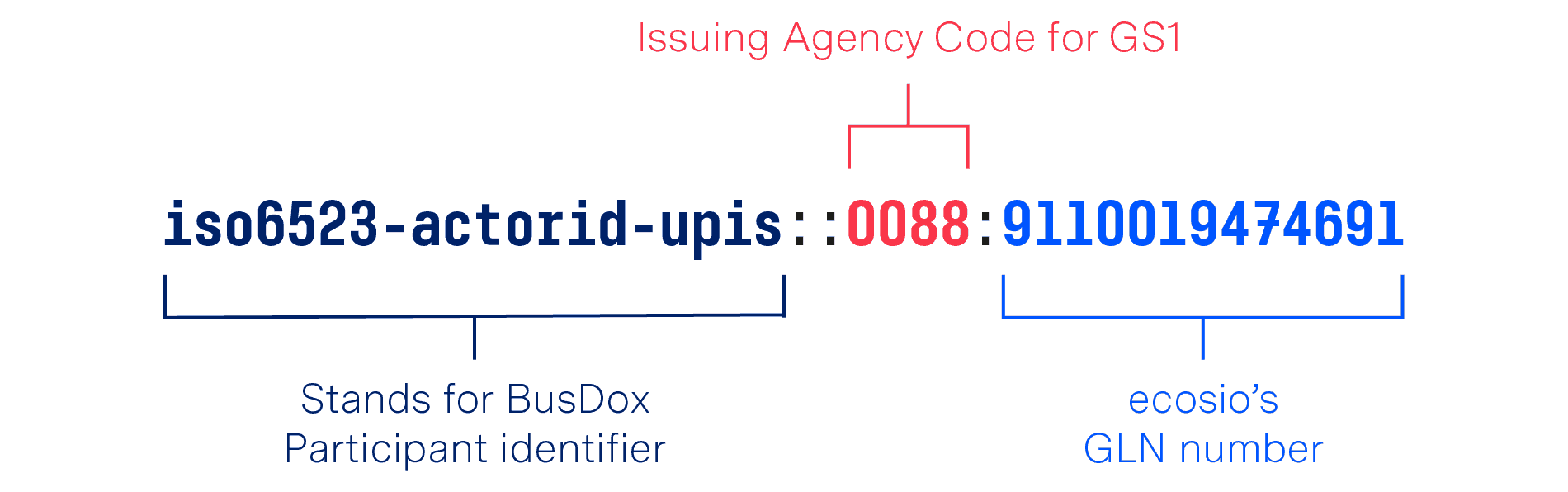
For example, ecosio’s full Peppol ID is iso6523-actorid-upis::0088:9110019474691.
This full endpoint ID is comprised of the BusDox Participant Identifier prefix, the Issuing Agency Code for GS1 (Global Standards 1), and the GLN (Global Location Number), as illustrated below.
What’s needed for Peppol message exchange?
Peppol uses the BusDox infrastructure for message exchange. Within Peppol, BusDox is only concerned with the services that the receiver participant can handle as this is the key information in any exchange. The receiver participant can be a supplier, customer or another business role depending on what is being sent. Significantly, there is also no agreed relationship in Peppol specifications between identifiers used in the document transport infrastructure and in-message identifiers.
When it comes to message exchange in Peppol, BusDox requires the document sender to identify both the receiver participant and the recipient service (this is often their Access Point provider). Generally this is achieved by searching for the relevant Service Metadata Publisher (SMP) in the Service Metadata Locator (SML) to discover the required endpoint address – the endpoint address is the service, or Access Point, address and is different to the endpoint ID used in the document itself. Given this process it is important that the documents and services that the receiver can handle are clearly defined.
In short, every message exchange via Peppol requires the following information:
- The document to be exchanged
- The recipient’s Peppol ID (aka Peppol Participant Identifier)
- The necessary document type ID and process ID
A detailed explanation of how document exchange in Peppol takes place can be found on the website “Peppol Practical – Document exchange explained”. Likewise, a detailed look at the types of message response found in Peppol exchanges can be found in our article “Peppol Message Responses – A Helpful Guide”.
Using the Peppol directory
The Peppol directory is intended to help businesses to identify prospective/existing partners on the network. It can prove particularly useful in the following two scenarios, for example:
- If a business is looking to send invoices via Peppol moving forward and wants to see which of its current trading partners is capable of receiving invoices in the format dictated by Peppol BIS (Business Interoperability Specifications).
- If a business wishes to set up an alert to see when current trading partners join the Peppol network so that future exchanges can take place via Peppol.
Currently anyone is able to search the Peppol directory via this web interface by entering the name, address, ID or any other keyword relating to the entity they want to find. If the business is found, the page will then display key business information (country, entity name, geographical information, website and full Peppol participant ID) in addition to listing all document types supported by the entity.
Planned Peppol directory improvements
Peppol has also outlined the following three improvements that they would like to make in the future. These are:
- Free text search
This functionality would enable the searcher to enter any phrase or list of characters and find all listings that contain that string of text in their Peppol ‘business card’. - Identifier search
This proposed update to the Peppol directory would allow users to search for a business with a certain identifier and specific BIS capabilities. This identifier would not have to be a Peppol ID, however, and could be a VAT or legal identifier. In turn, this would enable businesses to monitor when a specific business gains the ability to send/receive certain documents via Peppol without knowing their Peppol ID. - API search
Rather than having to conduct the search through a separate web interface, users in the future will have the option of accessing the directory via API. This will allow businesses to benefit from automated searches within their existing ERP systems, vastly improving ease of use.
ecosio – your trusted Peppol Access Point provider
ecosio was one of the first certified Peppol Access Points in Europe and is now one of a limited number of Access Point providers that are both AS2 and AS4 compliant.
With a single connection to the ecosio cloud-based EDI solution (our Integration Hub), you will be able to exchange messages with all Peppol-enabled companies.
Want to learn more about Peppol?
For more information on Peppol our white paper “Peppol: What you need to know” can be downloaded at any time.
Alternatively, if you would like advice concerning your specific situation or would like to know exactly what it takes to obtain a Peppol ID and get connected to the network, contact us! We are always happy to answer your questions.
Try our free XML/Peppol document validator!
To help those in need of a simple and easy way to validate formats and file types, from CII (Cross-Industry Invoice) to UBL, we’ve created a free online validator.
* BusDox is a set of specifications designed by OASIS for Peppol document exchange
Der Beitrag How Peppol IDs Work erschien zuerst auf ecosio.
]]>Der Beitrag The Real Cost of EDI: Considerations When Selecting a Solution erschien zuerst auf ecosio.
]]>With limited experience of EDI and faced with a choice between multiple different solutions, it is understandable that many people use the price of the solution as a key selection criterion. However, as we shall explore in this article, when it comes to EDI solutions, focusing principally on price is unwise. In fact, opting for a cheaper package that is less well suited to your current and future needs will almost always end up costing your business more than implementing a more comprehensive solution.
Implemented correctly, EDI solutions can bring substantial long term cost savings and hugely reduce internal effort and associated complications. By opting for a substandard solution, however, many of the key benefits of efficient EDI (and attendant savings) are negated.
To see exactly where savings are lost, let’s look at some of the common areas where EDI solution buyers typically experience problems.
Mapping / Routing
As mapping and routing is the bread and butter of EDI providers and something that everyone considering EDI requires, EDI users understandably do not expect to be charged extortionate amounts to test connections, to send/receive a new document type or to exchange messages via a new communication channel.
Unfortunately, however, this is exactly the situation many businesses face once tied into a contract. By failing to check exactly how much work their contract obliges their provider to do or what functionality their package contains, customers run the risk of encountering large license fees or activation charges. Despite the fact that activation of new functionalities (e.g. exchanging via AS2) often requires no effort on the part of the EDI software vendor, something as simple as gaining an license key to activate a new function can cost thousands of pounds! Obviously this quickly eradicates whatever savings a business intended to achieve by selecting the cheaper solution.
A common example of such a situation can be found below:
- A supplier is faced with an immediate request to enable the receipt of purchase orders and the transmission of invoices over EDI. Due to their contract volume, this customer is very important and therefore needs to be satisfied or will otherwise look for a different supplier.
- The supplier tries to fulfill this need with the least amount of effort involved and with little time left. The decision process therefore does not involve a true internal discussion of the real needs and capabilities of internal teams such as current IT backend systems, the sales department, logistics etc.
- Due to this, often the lowest bidder wins the race. Issues are not identified before the solution is purchased, resulting in more problems down the line when a unfitting EDI solution needs to be implemented
- As a result, EDI stakeholders are unhappy about the speed and quality of the implementation, encounter problems with its capability and ease of use and are faced with additional charges to bring the EDI solution closer to the real needs.
Partner onboarding
Like mapping and routing, partner onboarding is an essential part of EDI for growing businesses. Predictably, therefore, it is another key area where solution buyers become frustrated with substandard service from EDI software vendors.
As anyone who has had to onboard partners themselves will recognise, onboarding requires a huge amount of effort. In addition to sorting the technical details (e.g. setting up test connections etc.), liaising with partners to get the necessary connection information can be a very time-consuming process.
With a fully comprehensive EDI software vendor this process is handled by the solution provider. Ideally, a dedicated project manager will be assigned to oversee the connection process. This involves chasing partners for relevant details, validating information and overseeing document implementation. In addition to removing all internal effort, this drastically improves the speed of connections.
By contrast, some EDI software vendors offer remarkably little help when it comes to partner connections. Whilst they may claim to provide assistance with onboarding, the contract may only specify that they are obliged to send a single email requesting relevant requirements from your prospective partner, for example. Solution buyers therefore experience neither fast, nor hassle-free connections and are left having to chase both their partners and their EDI software vendor to achieve results. Obviously, as with extortionate costs for unlocking new mapping/routing capabilities, this can quickly erase whatever savings were made by selecting a cheaper solution.
Maintenance and updates
As EDI is constantly evolving, it is necessary to implement regular updates to keep a system functioning at optimum level. Updates can relate to many different things, such as document standards, EDI protocols or e-invoicing regulations.
For example…
- In recent years there was a switch from OFTP1 to OFTP2 connections in the automotive industry. This involved all existing connections between thousands of suppliers and their OEM customers and other suppliers requiring work. Due to the changes involved in this many EDI solutions needed additional licenses or adapters to meet the requirements of OFTP2. Further, additional security options such as encryption and message signature meant that EDI users needed to be trained and capable of understanding the principles behind the communication protocol to correctly setup and troubleshoot OFTP2 connections.
- Similar efforts and effects need to be assumed for changes in e-Invoicing for governments, such as with FatturaPA in Italy. As the systems are still relatively new they are subject to a significant amount of changes, on both the technology side and the regulation side. They may include smaller changes such as a renewed certificate, but can also affect business processes and regulations.
Therefore an experienced integration partner that knows about the business level as well as the technological implications should be selected.
The larger a business’s partner network, the more updates have to be implemented, the more work is required to do so, and the higher the risk of failing to make the changes.
With the best fully managed EDI solutions such updates are implemented as required with zero effort needed from the customer. Cheaper and less comprehensive packages, on the other hand, will not include updates. Customers then face a choice between attempting to fix issues in-house (and running the risk of making costly mistakes while doing so), or paying for their service provider or an external consultant to update their system.
Further, by selecting a substandard solution which does not offer ongoing maintenance and automatic implementation of updates businesses may not even be aware of new and potentially crucial updates. Over time this can cause a significant reduction in process efficiency and security. Businesses in this situation also run the risk of experiencing sudden errors across a large proportion of their supply chain, which can be extremely expensive to rectify.
Error handling
As costly as issues relating to mapping, routing, partner onboarding and maintenance can be, arguably the area where EDI solution buyers experience the most frustration with non-comprehensive EDI software vendors is error fixing.
Although many solutions claim to offer support, the quality of this support differs hugely from one provider to the next. Whilst a fully comprehensive EDI provider may offer 24/7 support, cheaper providers’ support will be limited. Often ‘support’ is limited to a single phone number or email address, via which it is typically extremely difficult and time-consuming simply to get through to anybody, let alone the right person.
Unfortunately, many businesses neglect to investigate the quality of their chosen provider’s support prior to signing a contract. When errors then occur, valuable time is lost trying to fix the issue. Further, the longer it takes to resolve the issue, the more likely it is to escalate or for similar issues to appear elsewhere in your supply chain, a scenario that can easily result in spiralling costs.
How to secure a good value contract with an EDI software vendor
1 – Conduct a thorough requirement analysis
Possibly the single most useful step you can take before starting the process of selecting your EDI supplier is to conduct a thorough requirement analysis. Though this takes some time, it is well worth the effort and will ensure you don’t get stuck in the wrong contract. Some key questions to ask during this stage might be:
- Do we have sufficient EDI knowledge in-house to operate an on-premise system?
- Are we able to develop effective testing processes to ensure the security of new connections?
- What functionality are we likely to need in the future?
- Are internal teams capable of protecting data security by staying on top of updates?
- Do we need a provider that can respond quickly to resolve errors?
- Is simplifying partner onboarding a priority?
2 – Don’t underestimate the effort required to setup and operate effective EDI
Although fully automated EDI hugely reduces the amount of manual effort required to exchange business documents, there are still many processes even after setup, such as error handling and message monitoring, that require management by someone to keep your system running smoothly.
A common error made by those selecting an EDI software vendor is to focus on the capabilities of the software, without considering who will be in charge of making sure things function correctly. Ultimately, even if you purchase the most incredible software, if you don’t know how to use it effectively or don’t have sufficient internal resources, you won’t see any benefit. Businesses in this situation are therefore forced to hire the required resources, change their EDI solution altogether or enlist the help of another third party supplier in the form of an EDI consultant (and in so doing commit to another contract).
With a comprehensive EDI solution these problems do not arise. Whilst operating an EDI solution in-house makes sense for those businesses with sufficient internal resources/knowledge and for whom EDI is a central part of the business, this is not the case for others. By far the most sensible option for businesses new to EDI or without EDI experience in-house is to opt for a fully managed solution. As opposed to the hands-off approach of other providers, a fully managed EDI solution provider will handle everything from the initial setup to ongoing operation, virtually eliminating the need for internal involvement. In addition to offering much better value, this approach ensures optimal system performance and frees up time for internal teams, allowing businesses to focus on what they do best.
A detailed breakdown of the differences between different EDI provider solutions can be found in our infographic on this topic.
3 – Consider future needs
Choosing a flexible solution is one of the best ways to ensure you achieve value over the course of your EDI contract. From a change in the amount of monthly messages you send, to needing the ability to send information in different formats and via different communication protocols, your EDI needs can easily shift over time. It is essential, therefore, that you select a solution that is able to help your business as you grow and requirements change. Sadly too few businesses consider this and are forced to pay through the nose to achieve simple functionality as their needs evolve.
Don’t let that be your business! By considering future needs and choosing a flexible, comprehensive EDI solution you can ensure that your business avoids surprise fees and continues to benefit from efficient, hassle-free EDI for the duration of your contract.
4 – Make sure you know what your package does and doesn’t include
Though it sounds obvious, clarifying exactly what your package includes can save you a huge amount in the long run. If a provider seems to be offering the same service for considerably less, this is very unlikely to be the case! By failing to identify the difference between the two before making your decision you are likely to pay for it later.
A concise list of five things to consider when selecting a vendor can be found in our article “5 Key Components to Consider When Selecting an EDI Vendor”.
Can ecosio’s comprehensive EDI solution help you?
For more information on ecosio’s unique, fully managed EDI solution and to find out how we could help your business to benefit from efficient B2B document exchange with minimal internal effort, contact us today.
Der Beitrag The Real Cost of EDI: Considerations When Selecting a Solution erschien zuerst auf ecosio.
]]>Der Beitrag Create and Process UBL Documents with Attachments in SAP erschien zuerst auf ecosio.
]]>As of November 27th 2019, all federal agencies in Germany must be able to receive and process XRechnung. XRechnung is the German CIUS (Core Invoice Usage Specification), which originated from the EU standard EN 16931 . EN 16931 provides two types of XML schemas: Universal Business Language (UBL) and UN / CEFACT Cross Industry Invoice (CII). As a result, the ability to process CII and UBL documents is becoming increasingly important.
Companies that are contractors of public institutions must be able to create and send XRechnung. Furthermore, the billing format is also used in the B2B sector, which is why it makes sense for companies to make their ERP system fit for the creation, transmission, and receiving of XRechnung.
SAP ERP is one of the most popular ERP systems in the world but cannot create, convert or read documents out of the box according to the UBL standard. This means that without add-on modules, SAP ERP cannot work with the standard XRechnung and companies must look for suitable solutions.
Create UBL documents in SAP using the EPO connector
The SAP ERP system cannot generate XML files from the SD and FI modules that conform to the UBL specification. However, a solution can be created by using middleware in conjunction with a service provider. The EPO Connector happens to be a middleware solution that is integrated directly into the SAP system and helps connect further external products and services to the SAP. This means additional functions can be added to SAP cost effectively without having to intervene in the system itself.
In the following, we’ll look at how to use the EPO Connector to create UBL files with attachments, and also send and receive them.
Create and send XRechnung with attachments
Using the EPO Connector, e-Invoices can be created in UBL format from SD and FI documents. Since the middleware is written in ABAP and thus runs directly in SAP, no external tool is necessary, and the invoice workflow can be completely mapped in SAP. In addition, the EPO Connector can be used to integrate attachments into UBL that are directly embedded as Base64-encoded character strings in the document. For this purpose, UBL has its own attachment elements (cac: AdditionalDocumentReference):
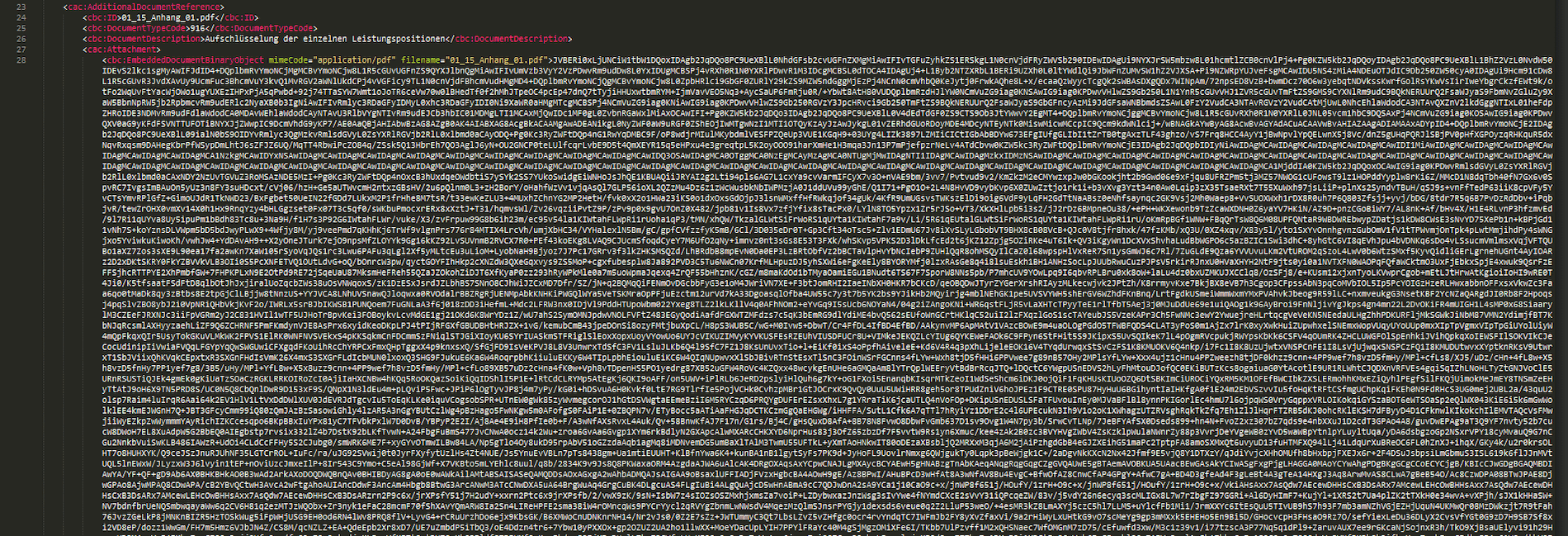
Extract of a Base64-encoded Attachment in UBL
The EPO Connector takes care of the correct coding and embedding of the desired attachments and creates the final UBL file according to the XRechnung specification. In order to be able to transmit the created e-Invoice to the recipient, a service provider such as ecosio can be connected to the middleware. ecosio reads out the sender and recipient ID as well as the document type and sends the invoice to the bill-to party via the required channel. This results in a consistent and seamless invoice delivery and invoice receipt process. Peppol (Pan-European Public Procurement Online), which was developed by the European Union to facilitate the exchange of data between companies and public authorities, must be used for the automatic sending of XRechnung. In this case, the service provider connects to the recipient’s Peppol access point, which receives the transmitted XRechnung and forwards them for processing.
Receive and process XRechnung with attachments
The invoice receipt process using the EPO Connector is like sending invoices. The EDI service provider receives invoices via the required protocols (e.g. Peppol) and transfers them to the EPO Connector, which controls the transfer of the documents to the SAP system of the company. Since SAP cannot work with the XML format UBL, the received documents must be converted to the required SAP format. The EPO Connector is responsible for the correct conversion and unpacks any attachments from the UBL.

Invoice Book for Incoming Invoices Provided by the EPO Connector.
© 2020. SAP SE or an SAP affiliate company. All rights reserved. Used with permission of SAP SE.
These attachments are appended to the final SAP document and can be viewed in the system as usual. The approval workflow can now be started in SAP and invoices released accordingly for payment.
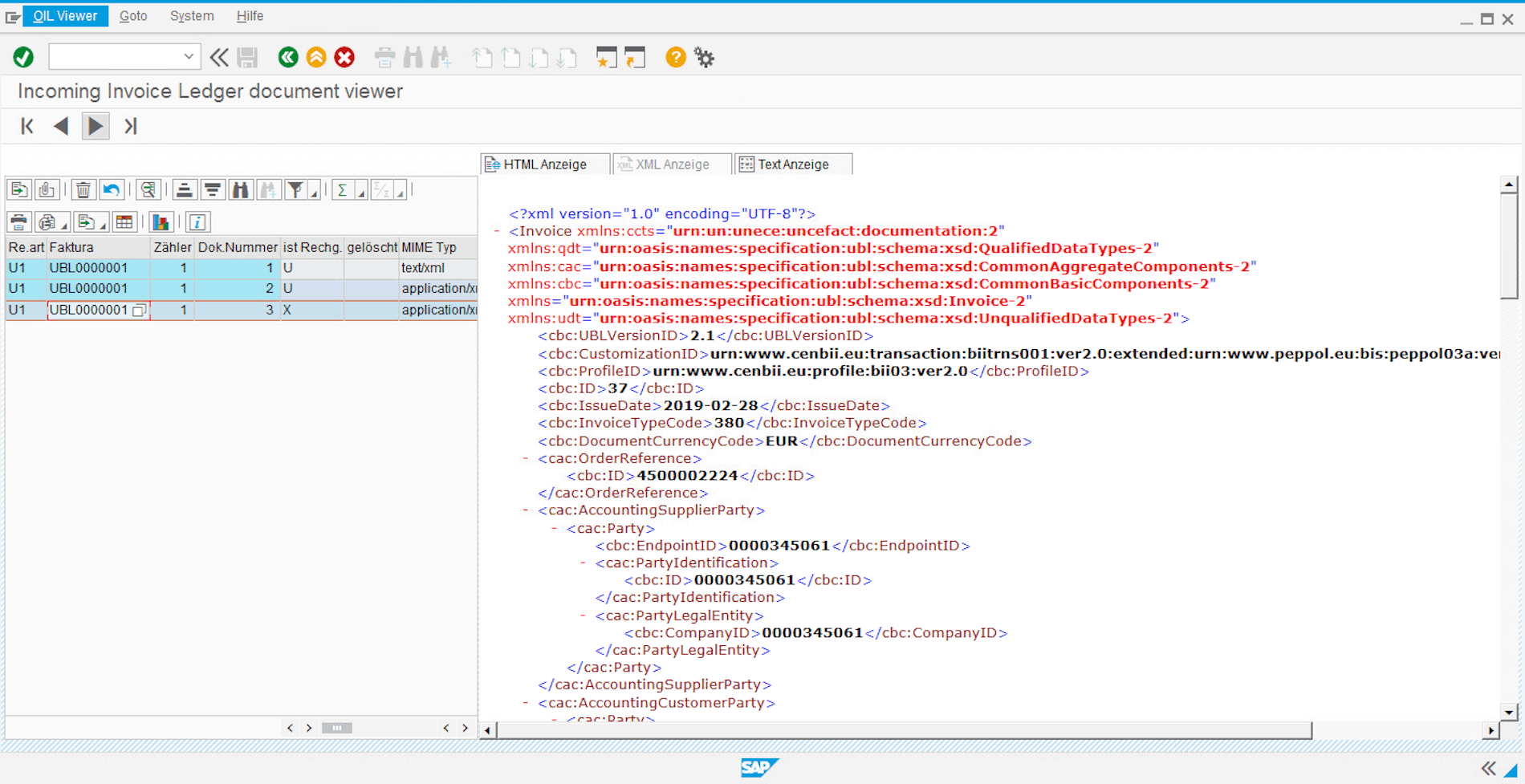
© 2020. SAP SE or an SAP affiliate company. All rights reserved. Used with permission of SAP SE.
Transmission of UBL invoices by ecosio
Thanks to ecosio’s connection to the SAP system, documents can be sent in various structured formats via all common EDI protocols. In addition to the usual document exchange protocols such as X.400, AS2, SFTP, SMTP, OFTP2, as well as EDI networks such as GXS, INOVIS, etc., files can also be accessed via special platforms such as Peppol, FACe (Spain) or the Sistema di Interscambio (Italy).
This makes it quick and easy to send and receive UBL documents via the Peppol network.
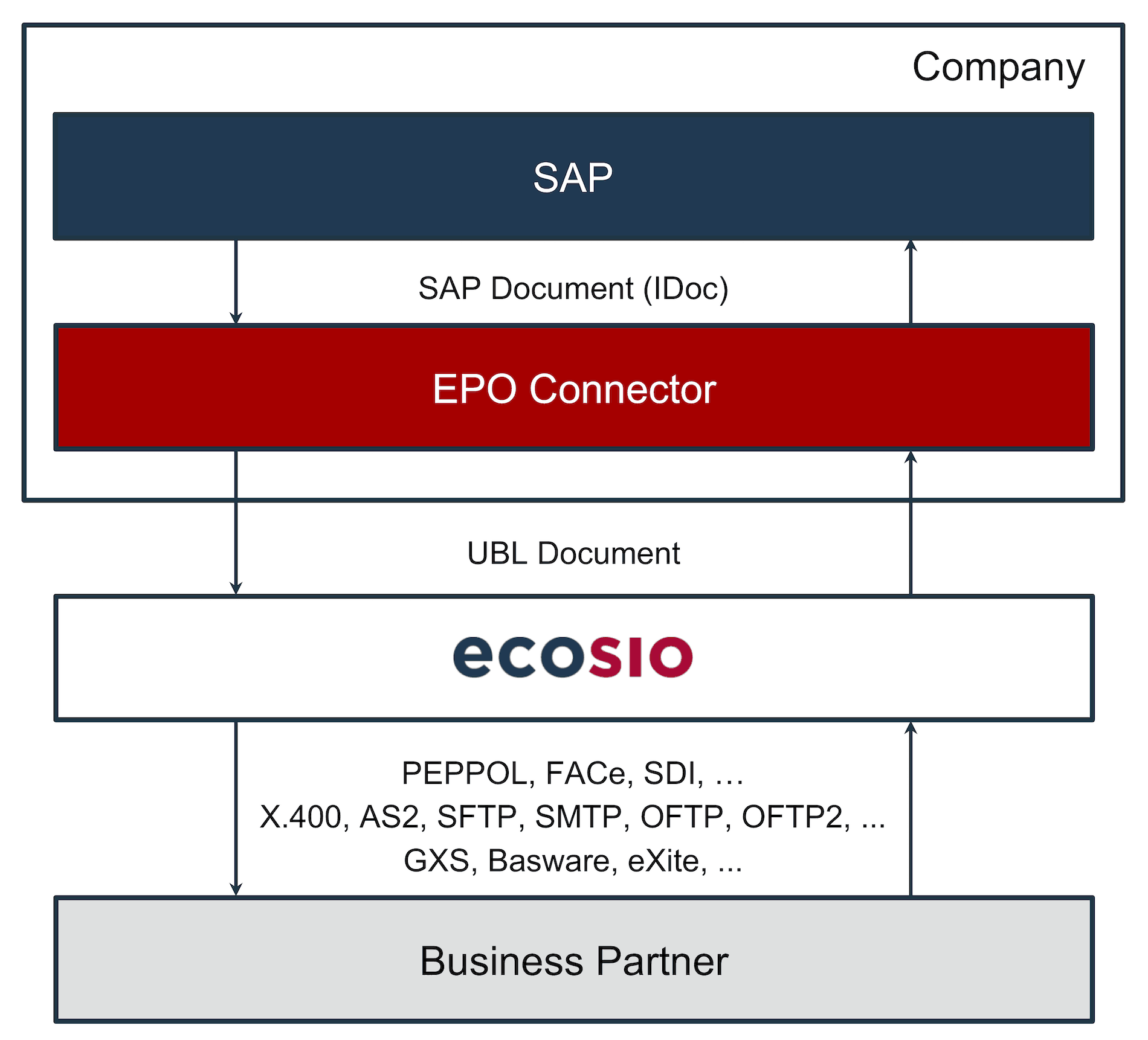
Conversion and Dispatch of UBL Documents with the EPO Connector and ecosio
Since ecosio allows the connection of any partner via different protocols, companies do not need to worry about expensive special programming in SAP. In conjunction with the EPO Connector, companies stay up to date with the technological requirements surrounding EDI and can focus on their core business.
Summary
The EPO Connector allows companies to convert invoices in SAP into XML format UBL and add attachments. Likewise, UBL documents can be received, converted into an SAP format and then edited. In conjunction with ecosio, the generated invoices can be sent via all standard exchange protocols. It is also possible to send and receive XRechnung via Peppol with ecosio.
Thus, companies are not dependent on expensive additional software for SAP but can pursue a long-term and cost-saving strategy to meet the ever-increasing requirements for e-Invoices.
Any questions?
Do you still have questions about UBL documents in SAP and how they can be created and sent? Feel free to contact us or check out our chat, we would love to help you!
SAP ERP and SAP S/4HANA are the trademarks or registered trademarks of SAP SE or its affiliates in Germany and in several other countries.
Der Beitrag Create and Process UBL Documents with Attachments in SAP erschien zuerst auf ecosio.
]]>Der Beitrag EDI_DC40: Understand the SAP IDoc Control Record erschien zuerst auf ecosio.
]]>- EDI_DC40 is the SAP IDoc control record that captures essential metadata like sender, receiver, IDoc type, message type, and routing settings used in both inbound and outbound IDoc processing
- Some control record fields are automatically set by SAP based on system configuration, such as timestamps and client details
- Other fields, including sender port, partner type and partner number, must be provided by the EDI service provider during document conversion to ensure proper routing and processin
- EDI_DC40 follows a uniform structure across all IDoc types and is stored for each IDoc in table EDIDC
Before looking in detail at control record EDI_DC40, it is first necessary to understand how IDocs work. IDocs are used to import and export data from an SAP ERP system. In the context of EDI, IDocs play a very important role. For example, they can be used to import purchase order documents or to export invoice documents from the SAP ERP system.
In general, a differentiation is made between inbound and outbound IDocs in an SAP ERP system. As shown in the following image, IDocs that are exiting the system are called outbound IDocs. IDocs which are being imported into the system are called inbound IDocs.
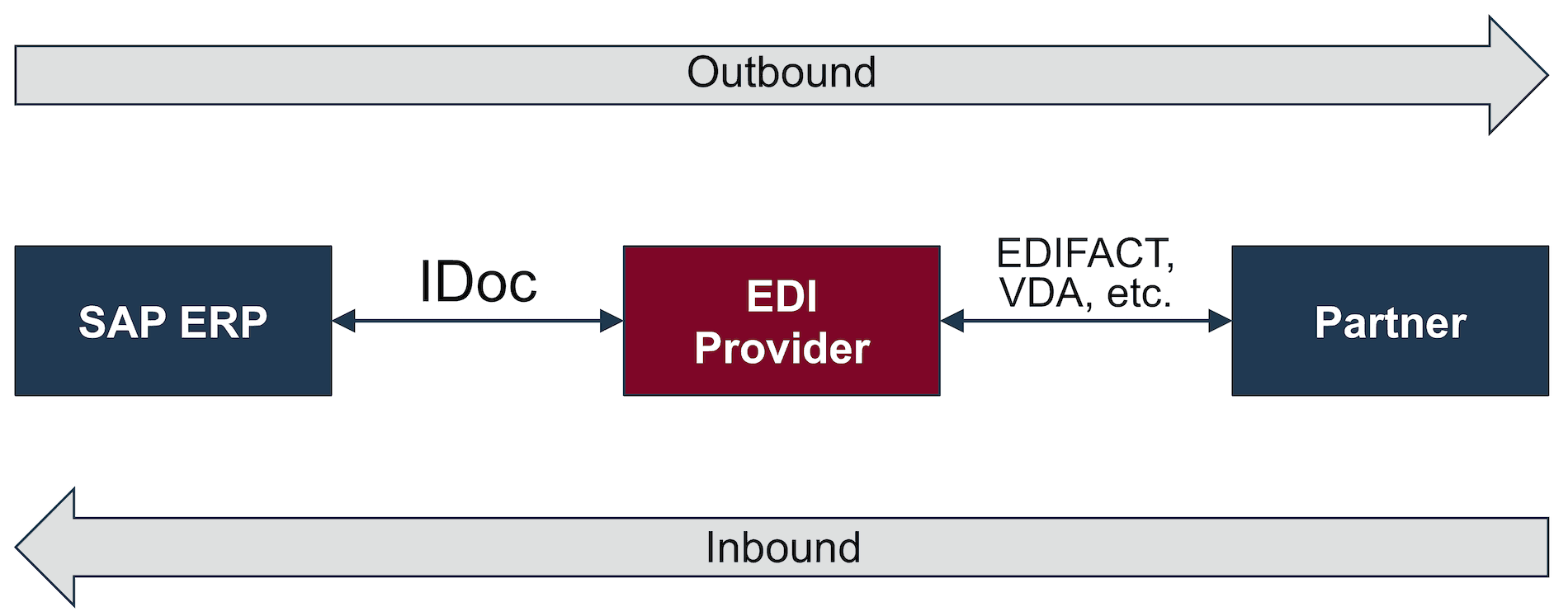
SAP ERP: In- and Outbound IDocs
For incoming IDocs, the correct transfer and control of the corresponding processing routine in the SAP system is controlled with the information in element EDI_DC40. Element EDI_DC40 plays a vital role with outbound IDocs as well, as the EDI provider will start the conversion and routing based on the information displayed there.
Now we will have a more detailed look into the control record EDI_DC40. We will highlight which values are set automatically by SAP and what needs to be set by the EDI service provider during document conversion.
SAP know-how
In order to understand all the individual values in element EDI_DC40, a few basic SAP terms need to be clarified, which we will define below.
Logical system
A logical system is a unique identification and is used to identify individual clients in an SAP environment. Logical systems are managed with the help of transaction BD54. Usually, a uniform schema is used company-wide for the classification of the logical systems. Mostly the schema follows this pattern:
<Name of the instance> + CLNT + <Client Nr.>
Assuming the name of the instance is P01 and the client 100, this results in the logical system P01CLNT100.
Partner type
As the name already implies, partner type defines the type of partner during the exchange of IDocs. the partner type serves as the identification of the type of partner.
Partner types are managed with the help of transaction WE44. By default the following partner types are available.
| Partner Type | Description |
|---|---|
| B | Bank |
| BP | Benefits provider |
| GP | Business Partner |
| KU | Customer/Debtor |
| LI | Supplier/Creditor |
| LS | Logical System |
| US | User |
IDoc ports
Ports are a fundamental necessity for IDoc communication. Every external system (as is the EDI provider), which wants to communicate with the SAP system, must have at least one defined port. The following image visualizes the underlying concept:

SAP supports multiple port types, e.g file, XML file, Remote Function Call (RFC), ABAP programming interface (ABAP-PSS) etc. These IDoc ports can be managed in SAP in transaction WE21.
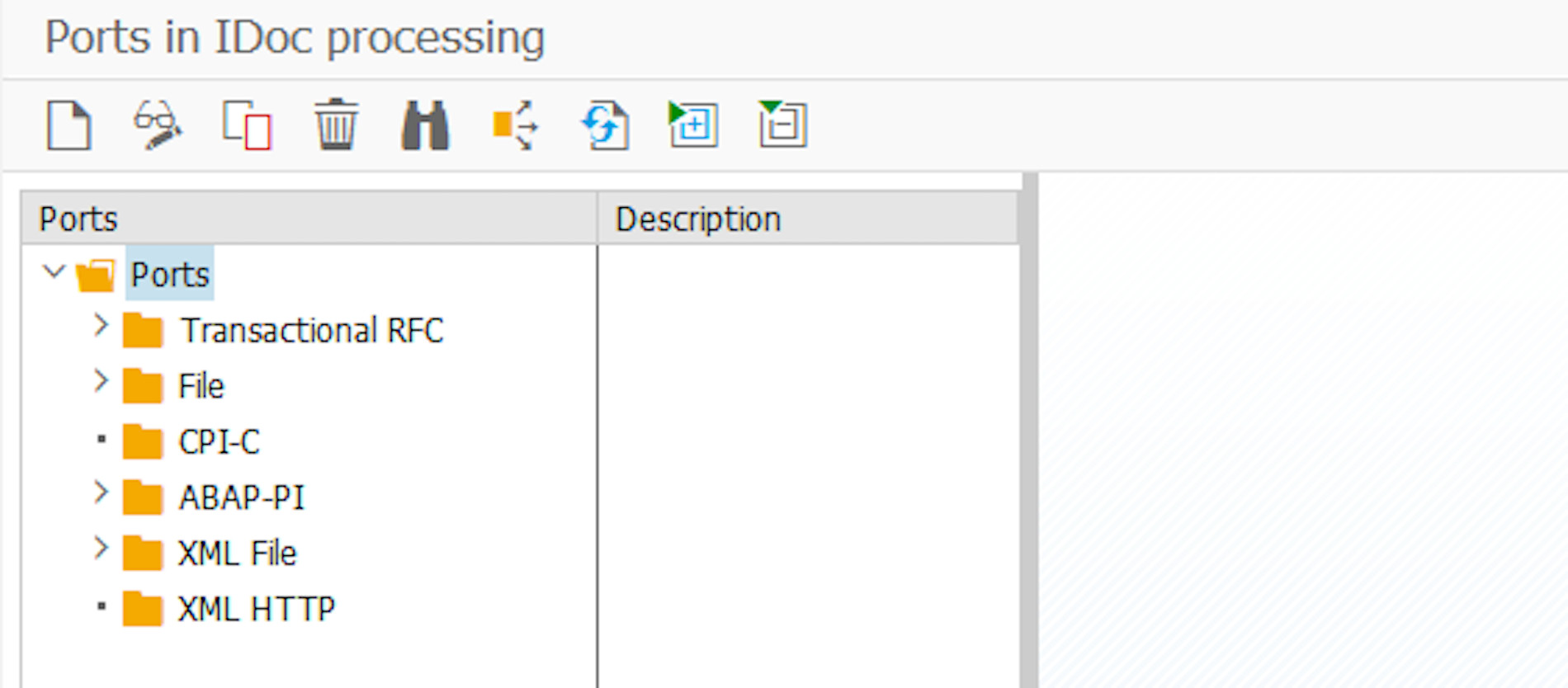
Administration of IDoc ports in WE21
© 2020. SAP SE or an SAP affiliate company. All rights reserved. Used with permission of SAP SE.
In case the port is a file, the IDoc will be written into a file which can then be processed by an external service. Another possibility is ABAP-PSS. In that case the IDoc is forwarded to an ABAP application, which will process the IDoc, e.g. sending it over HTTPS to an EDI service provider.
Partner profile
To exchange EDI data with an EDI service provider, partner profiles for the different partners need to be configured in the SAP system. Typically, partner profiles are created for customers (creditors) and suppliers (debtors). As a result it’s possible to create outbound partner profiles (for sent IDocs) and inbound partner profiles (for received IDocs). The partner profile further specifies the IDoc type, over which port, and which role is being used for the sending or receiving.
The creation of partner profiles is done with the help of transaction WE20. The following image shows a partner agreement with the customer Daimler.
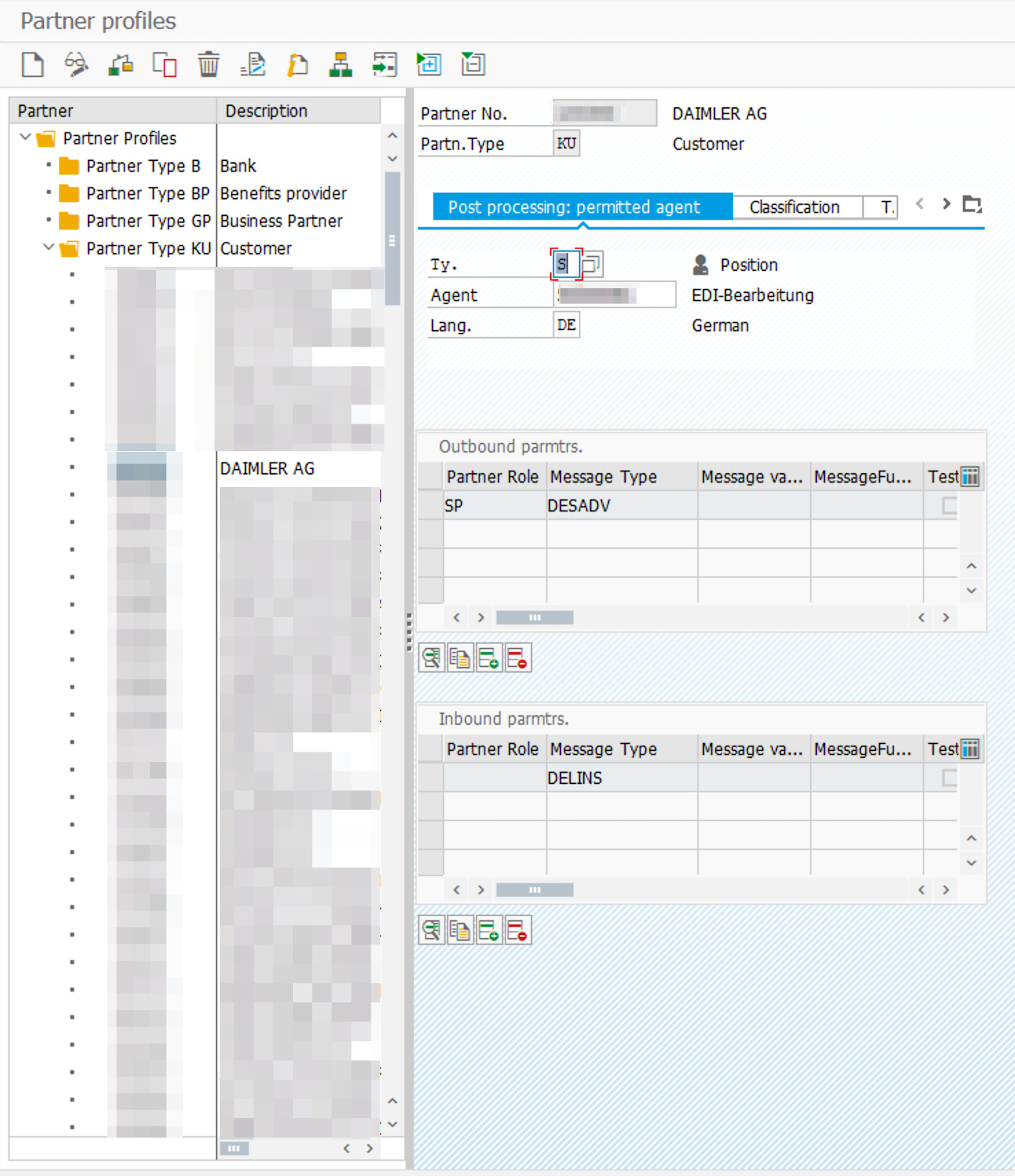
Example of a partner agreement with the customer Daimler
© 2020. SAP SE or an SAP affiliate company. All rights reserved. Used with permission of SAP SE.
As seen on the right side, two IDoc types are configured. Outbound DESADV (Despatch Advice) and inbound DELINS (Delivery Schedules). This example represents a classic scenario in the automotive industry. The customer sends delivery schedules (DELFOR) and Just-In Time schedules (DELJIT), and expects despatch advices (DESADV) in return. DELINS is the SAP message type for DELFOR and DELJIT.
The following image shows the outbound DESADV configuration in detail.
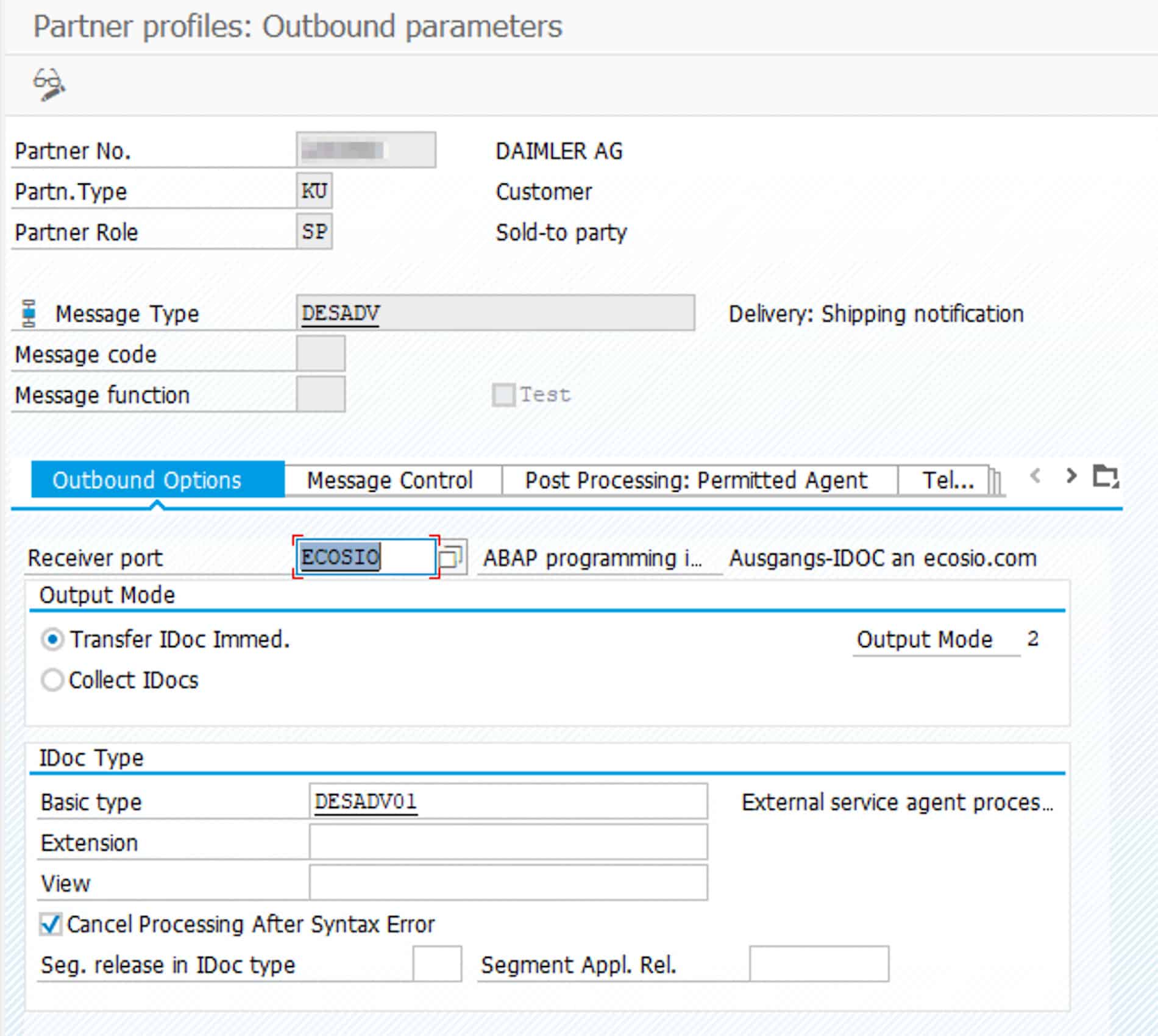
Example for an outbound partner agreement
© 2020. SAP SE or an SAP affiliate company. All rights reserved. Used with permission of SAP SE.
In addition to the partner number, partner type and partner role, the properties message type and receiver port are also defined here. In the example from above, the receiver port is ECOSIO and is from the type ABAP programming interface.
The following image shows the configuration for inbound DELINS in further detail.

Example of an inbound partner agreement
© 2020. SAP SE or an SAP affiliate company. All rights reserved. Used with permission of SAP SE.
There is a close relation between the parameters configured in the partner agreement and the entries in the control record EDI_DC40, which we will explain in the following section.
Control record EDI_DC40
Here we analyse the most important sub elements of EDI_DC40, which are relevant for processing the IDoc on either the SAP system or the EDI provider. For the complete list of elements please refer to the official IDoc documentations. The documentation for a specific IDoc can be exported in SAP via transaction WE60. The control record is structured the same for all IDoc types. In an SAP system, the multiple control records for different IDocs can be found in table EDIDC.
For a better understanding of the in and outbound IDocs we will take the following SAP setup.
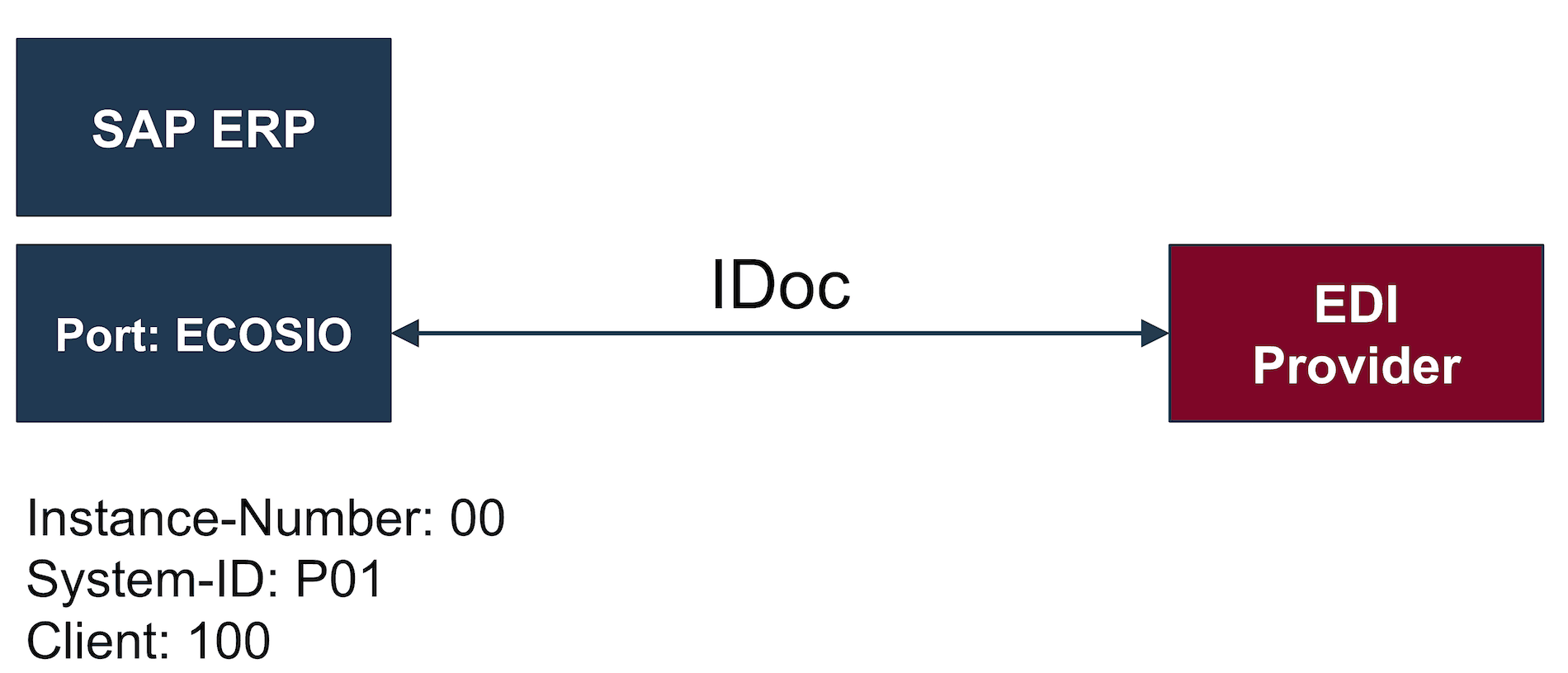
SAP example setup with an EDI provider
As for the IDoc documents to be exchanged, we use an inbound DELFOR message and an outbound DESADV message in this example.
EDI_DC40 for inbound IDocs
Example of an inbound DELFOR file:
<DELFOR02>
  <IDOC BEGIN="1">
    <EDI_DC40 SEGMENT="1">
      <TABNAM>EDI_DC40</TABNAM>
      <DIRECT>2</DIRECT>
      <IDOCTYP>DELFOR02</IDOCTYP>
      <MESTYP>DELINS</MESTYP>
      <SNDPOR>ECOSIO</SNDPOR>
      <SNDPRT>KU</SNDPRT>
      <SNDPRN>10000254</SNDPRN>
      <SNDLAD>9853254125456</SNDLAD>
      <RCVPOR>SAPP01</RCVPOR>
      <RCVPRT>LS</RCVPRT>
      <RCVPRN>P01CLNT100</RCVPRN>
      <RCVLAD>45325412545687</RCVLAD>
      <CREDAT>20170825</CREDAT>
      <CRETIM>152814</CRETIM>
      <REFINT>15599156</REFINT>
      <REFMES>15845251560001</REFMES>
      <SERIAL>20170809545852</SERIAL>
  </EDI_DC40>
 ...
</DELFOR02>
SNDPOR: sender port (SAP system, external subsystem)
In this element the EDI provider needs to specify the sender port which was configured in transaction WE21. In our case it has the value ECOSIO.
SNDPRT: partner type of sender
This field needs to contain the description of sender partner type, e.g. KU for customer or LI for supplier.
The combination of SNDPFC, SNDPRN and SNDPRT is the unique identification of the sender. This combination needs to be set in the SAP as partner profile (defined in transaction WE20). In case this setting is missing in the SAP, or the parameters are set incorrectly in the IDoc, the processing of the IDoc will fail.
SNDPFC: partner function of sender
This serves for the optional identification of the partner function, e.g. LF for the seller or AG for the ordering party. This field can be left empty and is also optional in the partner profile in transaction WE20.
SNDPRN: partner number of sender
In this case the internal partner number of the sender must be specified in this field, identical to its value in the SAP system. E.g. the customer or creditor number. In our case it’s 10000254.
SNDSAD: sender address (SADR)
This is a reference to the SAP directory service and is usually not in use.
SNDLAD: logical address of sender
The UNB Sender ID is entered in this field (in case EDIFACT is being used). Otherwise, it is the corresponding logical sender identifier, which is used in ANSI ASC X12, XML, CSV etc. This field is optional. We use the fictional GLN 9853254125456.
RCVPOR: receiver port
The receiver port of the receiver. For inbound IDocs this is the SAP system, identified through the combination SAP + System-ID – e.g. SAPP01 in our example.
RCVPRT: partner type of receiver
The receiver’s partner type. For incoming IDocs this is the SAP system. Therefore, the value for this field is set to LS (logical system).
RCVPFC: partner function of recipient
The partner function of the receiver. Since the recipient is the SAP system, no partner function is used. Thus, the sending system (typically the EDI provider) should leave this field empty.
RCVPRN: partner number of receiver
This is the partner number of the receiver. Since the receiver is the SAP system, there is no specific partner number as with the debtor or creditor. Instead, one uses the description for the logical system. In our case the description for the logical system is P01CLNT100.
RCVSAD: recipient address (SADR)
Reference to the SAP Directory Service. Currently not used.
RCVLAD: logical address of recipient
This field can be used to transmit the UNB receiver ID (if EDIFACT is used). Otherwise it would be the respective logical ID used in ANSI ASC X12, XML, CSV et cetera. This field is optional. In our example we are using the fictional GLN 45325412545687.
EDI_DC40 with outbound IDocs
Example for an outbound IDoc.
<DESADV01>
  <IDOC BEGIN="1">
    <EDI_DC40 SEGMENT="1">
       <TABNAM>EDI_DC40</TABNAM>
       <MANDT>100</MANDT>
       <DOCNUM>0000000046615484</DOCNUM>
       <DOCREL>700</DOCREL>
       <STATUS>30</STATUS>
       <DIRECT>1</DIRECT>
       <OUTMOD>2</OUTMOD>
       <IDOCTYP>DESADV01</IDOCTYP>
       <MESTYP>DESADV</MESTYP>
       <SNDPOR>SAPP01</SNDPOR>
       <SNDPRT>LS</SNDPRT>
       <SNDPRN>P01CLNT100</SNDPRN>
       <SNDLAD>7844849473214</SNDLAD>
       <RCVPOR>ECOSIO</RCVPOR>
       <RCVPRT>KU</RCVPRT>
       <RCVPFC>SP</RCVPFC>
       <RCVPRN>100542101</RCVPRN>
       <RCVLAD>95412163215412</RCVLAD>
       <CREDAT>20170822</CREDAT>
       <CRETIM>064159</CRETIM>
       <SERIAL>20170822064159</SERIAL>
    </EDI_DC40>
    ...
</DESADV01>
SNDPOR: sender port
For outbound IDoc this field contains the ID of the sending SAP system. In our example it is SAPP01.
SNDPRT: partner type of sender
The partner type of the sending SAP system, usually set to LS, standing for logical system.
SNDPFC: partner function of sender
For outgoing IDocs the sender is the SAP system and doesn’t have a partner function. Therefore, this field is usually left empty.
SNDPRN: partner number of sender
This is the partner number of the sender. As the sender is the SAP system, the value used here is the description of the logical system – in our case P01CLNT100.
SNDSAD: sender address (SADR)
Reference to the SAP Directory Service. Is usually not in use.
SNDLAD: logical address of sender
Used to transmit the UND Sender ID (if EDIFACT is in use). Otherwise, the respective ID, which is in use with ANSI ASC X12, XML, CSV etc. In our example it is the fictional GLN 7844849473214.
RCVPOR: receiver port
For outbound IDocs this port is determined based on the port set in the partner profile, which is configured in transaction WE20. The value is automatically set by the SAP system in the IDoc. In our case the port is ECOSIO.
RCVPRT: partner type of receiver
The partner type of the receiver – e.g. KU for customer or LI for supplier.
The combination of RCVPFC, RCVPRN and RCVPRT serves as a unique identification of the receiver. This combination needs to be set as an outbound partner profile (defined in transaction WE20) in the SAP.
RCVPFC: partner function of recipient
The partner function of the receiver – e.g. LF for seller and AG for the ordering party.
RCVPRN: partner number of receiver
The partner number of the receiver as it is configured in the SAP system. E.g. in the Creditor or Debtor master data settings. In our example it is number 100542101.
RCVSAD: recipient address (SADR)
Reference to the SAP Directory Service. Usually not in use.
RCVLAD: logical address of the recipient
Used to transmit the UNB receiver ID (if EDIFACT is used). Otherwise, it would be the respective logical ID used in ANSI ASC X12, XML, CSV et cetera. This field is optional. In our example, we are using the fictional GLN 95412163215412.
Any questions?
Do you still have questions regarding the topic of IDocs or Electronic Data Interchange with an SAP ERP system? Please contact us or check out our chat – we look forward to helping you!
SAP ERP and SAP S/4HANA are the trademarks or registered trademarks of SAP SE or its affiliates in Germany and in several other countries.
Der Beitrag EDI_DC40: Understand the SAP IDoc Control Record erschien zuerst auf ecosio.
]]>