Der Beitrag What is Peppol and how does it work? erschien zuerst auf ecosio.
]]>- Peppol is a standardised framework for electronic document exchange, used for fast, secure, and compliant B2G and B2B communication
- Its four-corner model enables universal connectivity via a single certified Access Point, eliminating the need for custom EDI links
- Documents follow Peppol BIS standards, reducing mapping effort and ensuring compatibility across partners and countries
- API integration with Access Points like ecosio offers real-time tracking and ERP visibility, streamlining compliance and automation
With more and more governments worldwide mandating the use of e-invoicing for transactions involving public bodies, the use of Peppol is growing rapidly among supply chain businesses. As an ever-growing number of companies become Peppol-enabled, Peppol in turn grows increasingly attractive for those businesses not yet connected.
In this article we’ll answer some of the most commonly asked questions surrounding Peppol, how it works, and how it can benefit you.
Peppol basics
What is Peppol?
Peppol, which stands for Pan-European Public Procurement Online, is not an e-procurement platform. Rather Peppol provides the methodology and technical specifications as well as an agreement framework to send documents between e-procurement partners.
In short, Peppol makes it easier for businesses and public authorities to exchange electronic documents such as invoices and purchase orders in a standardised and secure way. It’s especially helpful for cross-border transactions, as it ensures documents are compliant with local regulations and can be processed quickly.
Why is Peppol popular?
Although theoretically governments could use any common communication protocol, such as SFTP, X.400 or AS2, this would require government bodies to support each one, which would involve significantly more work and increase the likelihood of errors occurring. Peppol solves this problem by offering a single, consistent framework.
Compared to document exchange via traditional EDI channels, Peppol also offers faster connections, reduced partner connection costs, increased message reliability and an all round simpler process for everyone involved.
Given these significant benefits, it’s hardly surprising that Peppol’s usage has grown steadily over the past decade. Today Peppol is not only used across the vast majority of European countries but further afield as well, with countries such as Australia, Canada, New Zealand, Singapore, the USA, Japan among others all now placing their trust in Peppol.
What are the three pillars of Peppol?
Ultimately, what Peppol provides can be boiled down to three factors, which are known as the three pillars of Peppol. These are…
- The Peppol network
- Peppol’s document specifications
- Peppol’s agreement framework
For more information on each of these pillars, please see the following three sections.
What’s required to connect to the Peppol network?
In simple terms, all a business needs to be able to connect to Peppol (in addition to the capability to send and receive automated messages) is a connection to a certified Peppol Access Point, such as ecosio.
Whereas before Peppol, trading with partners may have required connections to several service providers, with Peppol this is not the case. To ensure exchanging key B2B data with partners is as simple and cost-effective as possible, Peppol uses a four corner connection model. Unlike two and three-corner models, this model means that a single connection to a Peppol access point is sufficient to exchange automated documents with any other Peppol-enabled companies.
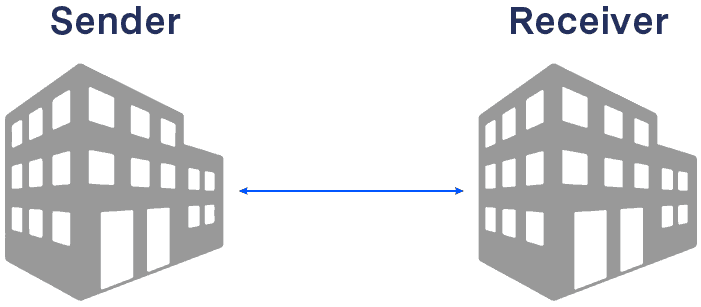
The two-corner model
Also known as point-to-point transmission, the two corner model requires time-consuming set-up and is usually handled by inhouse IT teams. Due to the high maintenance effort and setup time this model does not scale well. As connections are not reusable for multiple partners, each partner needs a new setup.
The three-corner model
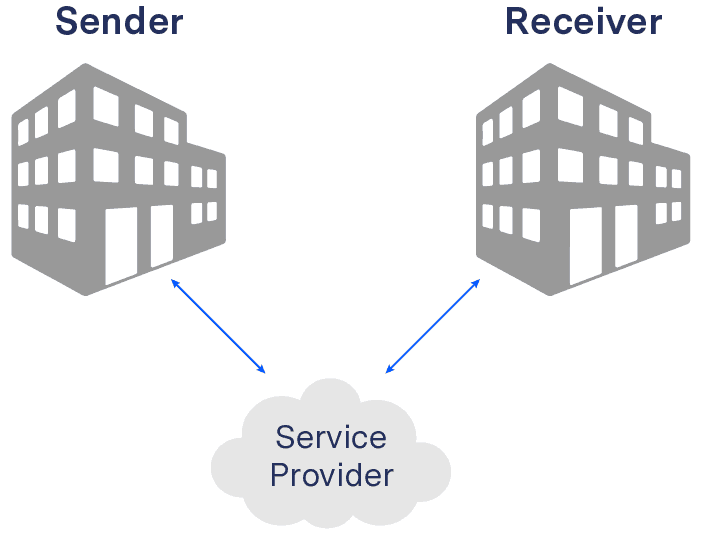
In this model message routing is done via a central hub offered by a service provider. The main downside is lack of flexibility, as both sender and receiver must have the same service provider, meaning it is badly suited to large supply chains such as those for which Peppol was created. In addition there is a ‘lock-in’ effect in regard to the service provider – i.e. one of the parties is usually forced into a contract with the service provider of the buyer or the seller (depending on the market dominance of the party).
The four corner model
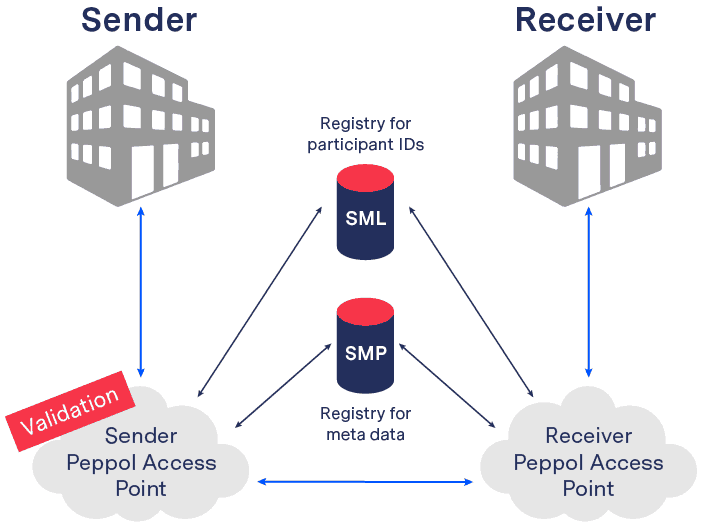
This has several advantages over the two corner and the three corner transmission models. Unlike them, the four corner model offers simplicity and flexibility, allowing for quick and cost-effective connections to partners. To exchange information, sender and receiver aren’t required to set up unique point-to-point connections or use the same service provider.
Once a connection to an access point has been established, the Peppol Participant ID is sufficient to send an electronic message to any Peppol partner of choice. Vice versa, after connecting to Peppol a company can be reached by any other Peppol sender.
What are Peppol’s document specifications?
When it comes to the formatting of documents exchanged between Peppol Access Points, all messages must conform to Peppol Business Interoperability Specifications 3.0 (known as Peppol BIS). The Peppol Code list provides standards for >100 message types (most of which are Peppol BIS). Peppol also allows custom document types within a country, if these are officially acknowledged.
This way each access point only needs to be able to process these approved messages. Consequently, systems connected to the Peppol access point only need to convert from the BIS format to the inhouse format and vice versa. Thus, once the mapping is set up, it is valid for all business partners. This is much simpler than building custom mappings for each partner connection.
What are Peppol’s Transport Infrastructure Agreements (TIAs)?
Finally, the existence of Transport Infrastructure Agreements (or TIAs) ensures that all parties conform to the necessary Peppol regulations This protects the reliability of document exchange via Peppol. Peppol Authorities, Peppol Access Point providers and Peppol Service Metadata Publisher providers must all sign these agreements.
Peppol Access Points
What is a Peppol Access Point?
A Peppol Access Point is a software, offered or owned by a company, that can connect others to the Peppol network and exchange documents via the required standards/protocols and in accordance with the necessary regulations.
Why do you need a Peppol Access Point?
Apart from becoming a Peppol Access Point yourself (which involves several complex steps), connecting to a Peppol Access Point provider is the only way to get an officially registered Peppol ID, which all Peppol participants must have in order to experience Peppol’s benefits. Without an Access Point and a Peppol ID, exchanging automated documents with your business partners via Peppol’s international e-invoicing network is impossible.
Isn’t it easier to set up an EDI connection to my partner directly?
In short, no. As we explore in more detail in our introductory video on Peppol, Peppol hugely simplifies automated document exchange for connected companies. Instead of requiring you or your provider to build an EDI (electronic data interchange) connection to your partner from scratch, Peppol utilises a four corner model and enforces the use of specific standards and protocols, meaning there is less work required for each connection. This makes partner onboarding via Peppol faster and more scalable than via classic EDI.
How do I find a Peppol Access Point?
You’ve already found one! At ecosio we are e-invoicing and Peppol experts and can help you get connected to Peppol in no time.
A full list of all certified Peppol Access Points can also be found on the Peppol website.
How do Access Points differ from one another?
Although all Peppol Access Points will enable you to connect to Peppol, not all Access Points offer the same service. For example, the level of help provided by Access Points with regard to setting up new mappings and monitoring messages etc. varies wildly from one provider to the next. Further, some Access Points may be faster than others to adapt when Peppol introduces new technical requirements, such as the recent move from AS2 to AS4.
Different Access Points are also governed by different Peppol Authorities across the globe. While all are able to connect you to Peppol, it makes sense to select an Access Point that operates in the same geographical area to you.
Perhaps most significantly, however, very few Peppol access points provide APIs (Application Programming Interfaces) to help their customers achieve the best possible connection to their partners…
What are the benefits of connecting to Peppol via API?
Peppol as a whole has been developed to streamline B2G and eventually also B2B transactions. Conducting Peppol with the help of an API connection simply takes this streamlining to the next level (just as an API connection is able to boost the efficiency of traditional EDI).
An API basically specifies how different applications shall interact with each other, by defining the exchange format, exchange protocol, security requirements, etc. Thereby, APIs can help businesses connect their own internal IT landscape to other third party services. While Peppol perfectly solves the interoperability challenge between heterogeneous B2B networks by introducing a common exchange infrastructure, it does not define the “last mile”. As in telecommunications the last mile refers to the connection piece between the network hub and the end user’s system (e.g. the telephone).
In case of Peppol the network hub is the Peppol access point and the end user’s system is the ERP system of the company. The ERP system is usually the main system, where invoices, orders, despatch advices etc. are being created and consumed. If a Peppol access point provider offers a dedicated API, the ERP system can be seamlessly connected to the access point.
Using such an API for Peppol transactions comes with a number of significant advantages for the customer, including:
End-to-end message monitoring
With an API connection, Peppol can be seamlessly integrated in your ERP system. This enables users to see the delivery status of messages from within their existing user interface, eliminating the need to log into independent external software to check that a partner has acknowledged a message.
Accurate delivery/fetching of messages
Once connected to your Peppol access point via API, requests can be set up at regular intervals to check for new messages. Alternatively, new messages can be transferred proactively from the Peppol access point to the recipient.
Full text search
Thanks to the depth of the integration provided by the API, messages can even be searched directly in the ERP system. For example, users could locate invoice messages by inputting any relevant invoice data such as article number, reference to the underlying despatch advice, etc.
Error handling
Unlike with traditional protocols such as SFTP, where it can be difficult to ascertain where and why sending failed, thanks to the unparallelled data visibility achieved with an API connection, users can immediately see where the issue occurred and what should be done to resolve it.
How long does connecting to Peppol take?
Once you’ve chosen your preferred Access Point (something that should not be rushed), the actual connection process is fast and simple. Your provider will register a unique Peppol ID for you, whereby existing IDs such as VAT-ID or Global Location Numbers can be reused.. After this you will be able to start connecting to other Peppol-enabled partners and exchanging structured invoices etc.
Peppol in SAP systems
Is an SAP Peppol connection easy to achieve?
While achieving an SAP Peppol connection is very possible, its complexity depends on your chosen integration method. The simplest way to achieve an SAP Peppol connection is to opt for a managed service provider that will handle everything from technical setup to message monitoring and error resolution once the connection is live.
How does ecosio achieve SAP Peppol connectivity?
The illustration below shows a connection between an SAP System and Peppol with the help of ecosio. ecosio is a certified Peppol Access Point Provider and can therefore send and receive documents to and from the Peppol network.

The connection between the SAP system and ecosio occurs thanks to the EPO Connector. The EPO Connector is a middleware solution for SAP and entirely programmed in ABAP. The solution is SAP certified for all SAP versions from 4.6 and is thereby also compatible with S/4HANA. IDoc documents can be sent and received through the EPO Connector to the ecosio MessagingHub. For example, one can use INVOIC02 IDocs for e-invoices.
Should an SAP middleware such as SAP PI or SAP PO be the current solution, those components can also be used to connect to the ecosio MessagingHub. Additionally, SFTP solutions can be used for the connection as well. The SFTP server can either be hosted by ecosio or by the company.
After receiving the IDocs, ecosio will determine the sender, receiver and document type, and will convert the message to the correct target format, to finally transmit it to the receiver. If Peppol is in use, the delivery to the receiver’s Peppol Access Point will take place via the PEPPOL network, e.g. to German authorities or a company, which uses Peppol.
This allows for e-invoices to be sent via Peppol straight from SAP and be compliant with the XRechnung standard.
The communication is also possible the other way. For example, purchase orders can also be received over the Peppol network.
Why should you consider ecosio as your Peppol Access Point provider?
ecosio is one of a limited number of certified Peppol Access Point providers that offers Peppol connectivity as part of a comprehensive full service package.
With a single connection to ecosio, your business can trade all relevant e-documents with hundreds of thousands of connected companies and public institutions worldwide. What’s more, as we are able to handle all EDI and e-invoicing tasks for you, from set-up right through to ongoing operation, you don’t need any in-house expertise to benefit from the savings associated with automated B2B document exchange.
To find out more, get in touch today!
Are you aware of our free XML/Peppol document validator?
To help those in need of a simple and easy way to validate formats and file types, from CII (Cross-Industry Invoice) to UBL, we’ve created a free online validator.
SAP ERP and SAP S/4HANA are the trademarks or registered trademarks of SAP SE or its affiliates in Germany and in several other countries.
Der Beitrag What is Peppol and how does it work? erschien zuerst auf ecosio.
]]>Der Beitrag How to End Another User’s SAP Session erschien zuerst auf ecosio.
]]>- Use transaction SM04 to list all active sessions including the one locking your document
- Double‑click the relevant user to view all the open transactions they have
- Select the session that is locking the document and click ‘Delete Session’ to end it
- This frees the document so you can continue editing it immediately
We’ve all been in that situation. You want to change a certain SAP document (e.g. a sales order in transaction VA02), but the system is giving you the following message: “Sales document 4711 is currently being processed (by user XYZ)”.
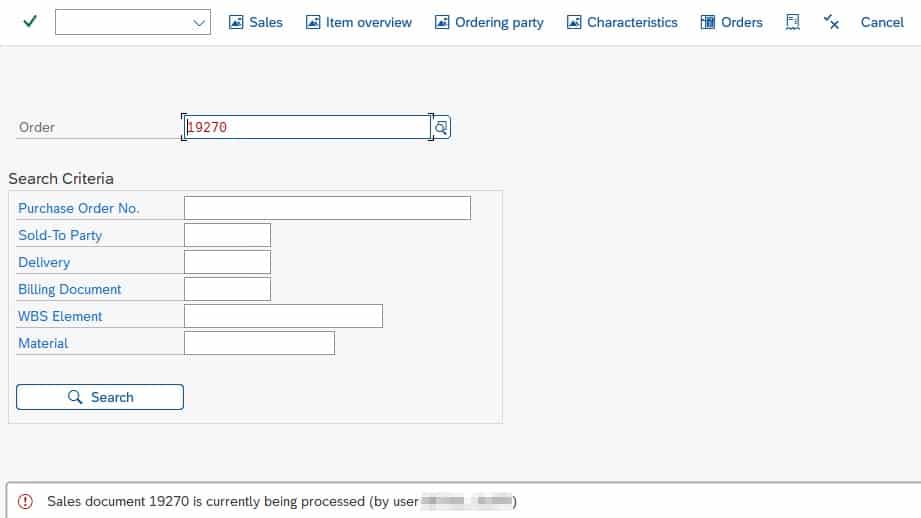
Often the user in question will simply have forgotten to close the transaction. This is an issue as SAP will keep the sales order document locked until they close it.
In order to resolve this issue, the logical next step is to try to get hold of the user (e.g. via email, Slack, Teams, etc.) and ask them to release the lock so that you can edit the sales document. Sometimes, however, the user locking the transaction may be away from their desk or already at home.
But you don’t have time to wait for them to return. You need to fix something in the sales order now – e.g. remove a delivery block. Luckily there is one more trick you can use – manually terminating the SAP session of another user.
Manually end another SAP user’s session
In order to kick another user out of their session, first open transaction SM04 and search for the user locking the document and the respective transaction. If you don’t have access to transaction SM04, reach out to somebody who does have access – e.g. a key user.

Double click on the session. This will open an overview of all the open transactions of the specific user.
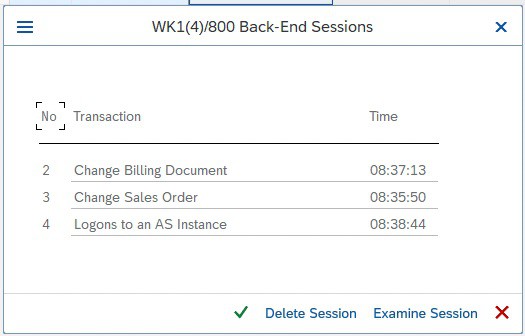 List of open transactions of a specific user
Select the transaction you would like to end and click Delete Session. The lock has gone and you can continue editing the document!
Want more SAP tips?
We’ve got lots of helpful “how to” articles on our blog. Simply visit our blog homepage and click on the “how to guides” tab to see them all.
SAP ERP® and SAP S/4HANA® are the trademarks or registered trademarks of SAP SE or its affiliates in Germany and in several other countries.
Der Beitrag How to End Another User’s SAP Session erschien zuerst auf ecosio.
]]>Der Beitrag Finding Translations for SAP® Terminology erschien zuerst auf ecosio.
]]>SAP® terminology
Anyone who deals with SAP® systems also quickly acquires the associated SAP® terminology – “transactions”, “sales organisations”, “company codes”, “SE80”, “VA01” and so on. For those working as consultants, specialist departments or SAP® Basis admins, these are all everyday terms.
While some terms consist purely of numbers and letters, such as transaction abbreviations like “SE80”, some SAP® terminology, such as “company code” or “sales organisation”, uses language/country-specific phrases and words. Unsurprisingly, this can result in difficulties when a project involves an international team. For example, when working with colleagues from Germany or France, the terms “company code” and “sales organisation” should not be used. In these cases the right country- and language-specific terms have to be used.
The following table shows the English terms for some development objects in ABAP alongside the corresponding German terms.
| English | Deutsch |
| Development Object | Entwicklungsobjekt |
| Application Hierarchy | Anwendungshierarchie |
| Package | Paket |
| Programme | Programm |
| Function Group | Funktionsgruppe |
| Function Module | Funktionsbaustein |
| Class / Interface | Klasse / Interface |
How did we arrive at these translations? We logged on to SAP® once in English, opened transaction SE80 and then repeated the whole thing in German. This works, but it is awkward. Moreover, it may be the case that the language you wish to get the translation for is not installed on your SAP® system.
SAP® transactions for translations
In order to find the correct translations for SAP® terminology quickly, SAP® provides its own transactions.
Terms in other languages can be found via the transaction STERM. The following illustration shows a section of the transaction and the search for the German term “Buchungskreis”.
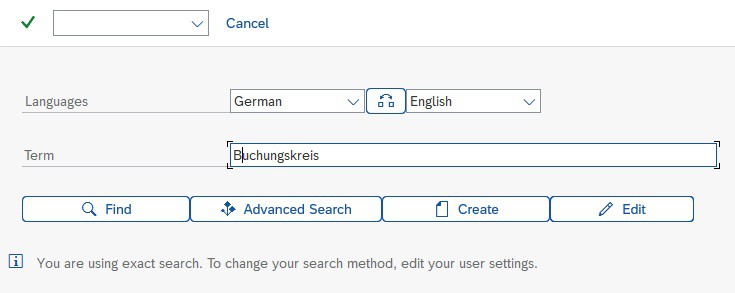
© 2020. SAP SE or an SAP affiliate company. All rights reserved. Used with permission of SAP SE.
The results are listed according to the various SAP® components such as FI, MM, etc.
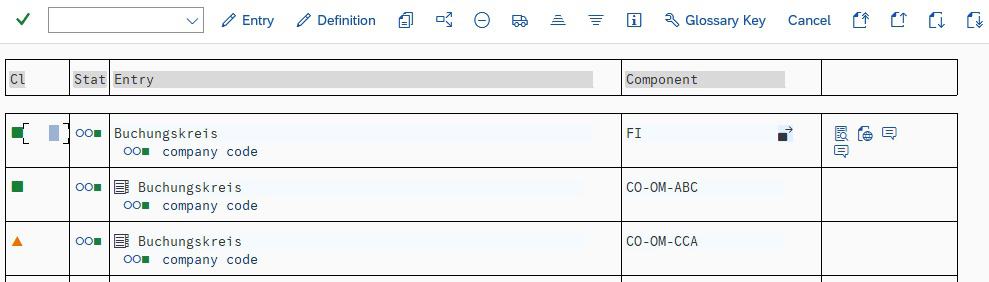
Search result in transaction STERM
© 2020. SAP SE or an SAP affiliate company. All rights reserved. Used with permission of SAP SE.
As an alternative to the STERM transaction, the SAPTERM transaction can also be used. The functionality is the same – the transaction just has more retro-chic.
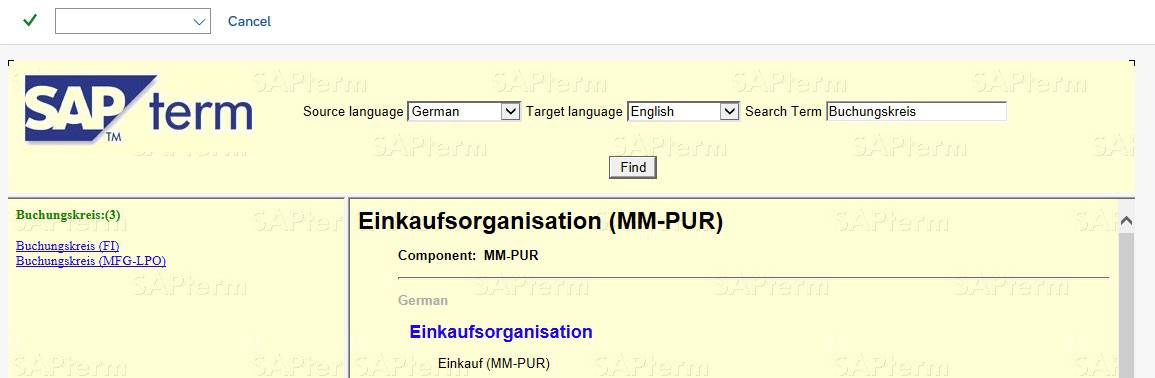
Search result in transaction SAPTERM
© 2020. SAP SE or an SAP affiliate company. All rights reserved. Used with permission of SAP SE.
Want more SAP® tips and tricks?
Our blog offers a wide range of articles on everything from specific SAP® topics to broader areas such as e-invoicing and EDI optimisation.
Der Beitrag Finding Translations for SAP® Terminology erschien zuerst auf ecosio.
]]>Der Beitrag How do I implement EDI with SAP Integration Suite®? erschien zuerst auf ecosio.
]]>- Implementing EDI with SAP Integration Suite® needs strong internal EDI skills and resources for mapping, routing, and 24/7 monitoring
- Managing EDI includes handling integration flows, certificates, mapping tables, and legal compliance like XRechnung or FatturaPA
- Outsourcing EDI to a managed service like ecosio makes the process simpler by providing one connection that covers onboarding, mapping, and monitoring
- Managed EDI reduces internal effort and gives access to a broad EDI network with full SAP integration and message tracking
In this article we show you how companies can best implement electronic data interchange (EDI) to automate message exchange across supply chains using SAP Integration Suite® (previously known as SAP Cloud Platform Integration).
In short are basically two possibilities:
- Managing EDI internally with SAP Integration Suite®
- Outsourcing to a specialised fully managed EDI service provider
We also present a number of questions that decision-makers and IT managers can ask themselves to find the right solution.
EDI and B2B integration with SAP Integration Suite® – what decision do I need to make?
The SAP Integration Suite® itself is a Platform-as-a-Service solution that includes a comprehensive range of services for the in-house development, integration and operation of cloud services or cloud applications. At the same time, individual extensions of cloud and on-premise landscapes can be carried out.
Thor’s SAP hammer…
One of these services is SAP Integration Suite®, which was designed to integrate cloud or on-premise applications into SAP systems. SAP Integration Suite® is an extremely comprehensive and powerful tool from the cloud that allows you to create EDI functions (and much more) in-house and is very popular in companies with large supply chains. In essence it is similar to SAP PI or SAP PO, but unlike these is designed to be used locally.
…can be quite difficult!
However, this tool must be used properly. The big challenge in implementing EDI in SAP Integration Suite® is the high degree of effort and EDI expertise required from the in-house teams that implement the connections individually for each B2B partner.
Therefore, the key question for decision makers implementing EDI in companies with SAP Integration Suite® is:
- How much internal EDI capacity can I use? Do I want to manage EDI completely internally or do I want to relieve my internal teams by outsourcing EDI?
Further potentially useful questions include:
- What EDI capabilities does my B2B network require? Do I need access to Value Added Networks (VANs)? Does I need to connect to Peppol? Do I want automated message exchange with those suppliers without EDI capability (via Web EDI)?
- How flexible do I want my EDI solution to be? Can I rely on a rigid implementation in the long run or do I want to make my EDI solution resilient and future-proof?
- Which technical requirements must my EDI solution fulfil now and in the future? Which formats, protocols, document types and legal regulations in electronic invoicing (e.g. XRechnung in Germany or FatturaPA in Italy) do I need for my B2B network?
Let us now look at the two options in detail:
1) Manage EDI internally with SAP Integration Suite®
In principle, many necessary EDI tasks can be implemented via SAP Integration Suite® with correspondingly high internal capacities and previous EDI knowledge. These include:
- Mapping and routing of all existing and new connections
- Ongoing maintenance of the connection parameters and regular renewal of all certificates
- Ongoing maintenance of mapping tables and industry internal practical knowledge about the implementation of special formats (e.g. VDA)
- Ongoing coordination with B2B partners and procurement of all necessary information (especially during onboarding)
- 24/7 monitoring and troubleshooting
These processes require a great deal of internal EDI know-how and corresponding industry knowledge, especially when problems or errors occur in message transmission, as protocols and formats can vary greatly across different industries, regions and business areas.
Potential problem areas must be considered:
- E-invoice compliance: this can be partially implemented with pre-defined integration flows. However, it is important to ensure that no necessary updates are missed, so that the legal requirements are always met.
- Maintenance of various integration scenarios: this must be done on an ongoing basis, including regular monitoring of integration flows and temporary data as well as the management of security artefacts such as digital certificates.
- No access to message payload. Only available if payload trace is enabled. This can only be activated for ten minutes per iFlow and then automatically deactivates again. This makes real-time monitoring of connections difficult.
It should also be mentioned that additional services may have to be purchased, such as OFTP2 connectivity. If Value Added Networks (VANs) or X.400 are used, companies that manage EDI themselves are also stuck paying a high cost per message. By contrast, EDI service providers can provide lower costs by exploiting economies of scale thanks to high message volumes.
2. Outsourcing to a fully managed EDI service provider
Fully managed EDI is a cloud-based EDI solution where a company is connected to a specialised EDI service provider via a single connection. This service provider then takes over all EDI functions and processes, depending on your company’s requirements.
All the above points are taken care of by an experienced team. The time-consuming coordination of information and technical changes during partner connections is also handled by a dedicated project manager – in turn speeding up the process hugely. Meanwhile, troubleshooting is a fixed component of the 24/7 monitoring and support and is carried out proactively.
This means:
- Internal teams are completely relieved of EDI tasks (especially during operation)
- A single connection provides companies with the complete “EDI package” without the need for EDI expertise
- Companies purchase bespoke, fully functional EDI that is turnkey ready
The technical implementation of the connection between ecosio and SAP Integration Suite® takes place via HTTPS using the ecosio API. This enables a seamless integration of EDI functions into the SAP system using SAP Integration Suite® and ecosio, which retains complete data transparency within the company – including full text search and message status tracking.
This means, for example, that the exact delivery status of a sent EDI message, right up to the final recipient, can be viewed directly in the SAP system as IDoc status. This gives specialist departments security and confidence in the EDI solution as well as the possibility to view failed messages and the exact reasons for rejection directly in the familiar SAP GUI at any time.
Summary: EDI with SAP Integration Suite®
You now know the two possibilities for EDI implementation with SAP Integration Suite®: handle it yourself or outsource it. SAP Cloud Platform is a comprehensive Platform-as-a-Service solution that can provide a good foundation for experienced developers and EDI experts – as long as your company has appropriate resources and expertise and potential future changes and extensions to your EDI landscape are anticipated and planned for in advance.
Partnership with a fully managed EDI service provider enables companies to fully manage and operate all EDI functions without the need for internal EDI effort and expertise, flexibly scalable and monitored 24/7 during operation.
Do you still have questions about EDI and SAP Integration Suite®?
Do you still have questions about SAP Integration Suite® or electronic data exchange with an SAP® ERP or SAP S/4HANA® system? Get in touch with us – we will be happy to help you.
Discover more about our updated product, ecosio.flow.
SAP ERP and SAP S/4HANA are the trademarks or registered trademarks of SAP SE or its affiliates in Germany and in several other countries.
Der Beitrag How do I implement EDI with SAP Integration Suite®? erschien zuerst auf ecosio.
]]>Der Beitrag An Overview of the Most Important SAP Modules erschien zuerst auf ecosio.
]]>The SAP Business Suite is SAP’s core product. It consists of several solutions, which can be purchased either together or separately.
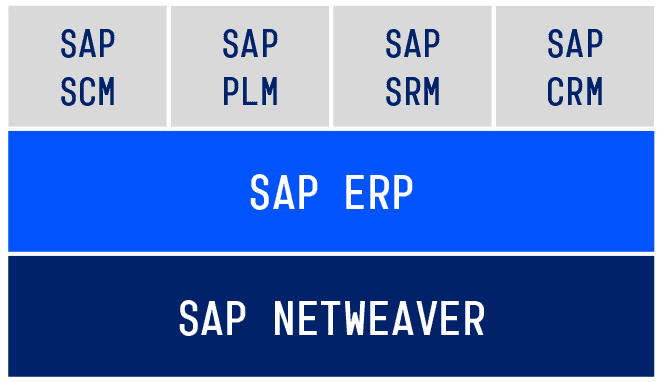
Structure of the SAP Business Suite
The technical foundation is SAP NetWeaver, on which all other modules and components are based. SAP ERP is the central component and offers functions for the following fields:
Logistics (SAP ERP Operations and SAP ERP Corporate Services)
- Real estate management (component RE)
- Production planning & control (component PP)
- Warehouse management (component WM)
- Customer service (component CS)
- Plant maintenance (component EAM/PM)
- Environment, health & safety (component EH&S)
- Logistics execution (component LE)
- Quality management (component QM)
- Sales & distribution (component SD)
- Materials management (component MM)
Accounting (SAP ERP Financials)
- Treasury (component TR)
- Project system (component PS)
- Controlling (component CO)
- Financial accounting (component FI)
- Enterprise controlling (component EC/SEM)
- Financial supply chain management (component FSCM)
Human Resources (SAP ERP Human Capital Management)
- Organisation management (component OM)
- Travel management (component TM)
- Recruitment (component RC)
- Personnel time management (component PT)
- Personnel planning and development (component PD)
- Personnel administration (component PA)
- Payroll (component PY)
- Personnel events (component PE)
The advanced modules can be found in the top layer of the SAP Business Suite. They are intertwined with SAP ERP and offer additional functions. Let’s first look at SAP ERP before looking at the single modules.
Logistics – SAP ERP SC
The SAP ERP SC (Supply Chain) maps the processes of a company’s entire logistics chain and is therefore very extensive. It consists of several components.
The SAP component MM (Materials Management) supports the purchasing of goods and services. It includes functions such as the processing of requisitions, inventory management and the maintenance of material master data.
The component PP (Production Planning & control) is used for sales and production planning, as well as an assembly process.
SAP SD (Sales and Distribution) covers the processes of selling goods or services of a company. It also provides solutions for foreign trade and customs clearance.
Finally, SAP CS (Customer Service) provides the most important functions for customer service, such as the processing of customer service orders.
Accounting – SAP ERP FI
The SAP ERP Financials covers internal and external financial accounting, corporate governance, treasury and receivables management.
Financial accounting and business transactions, among other things, are documented in order to produce the yearly balance sheet and the profit/loss account can be prepared (GuV).
The SAP component CO (Controlling) supports the internal accounting of a company. It allows the collection of economically important information based on cost, performance and investment calculation.
SAP ERP Financials is also responsible for other important tasks, e.g. the creation and planning of financial resources (Treasury), as well as the securing of liquidity through receivables management.
Human Resources – SAP ERP HCM
SAP ERP HCM (Human Capital Management) helps companies manage processes concerning their employees. Each employee is saved with a so-called infotype record. This record contains all important information about the employee, as well as their job title within the company. SAP ERP HCM can also record an employee’s working hours and create their payrolls. The entire course of training and further education for employees is also covered.
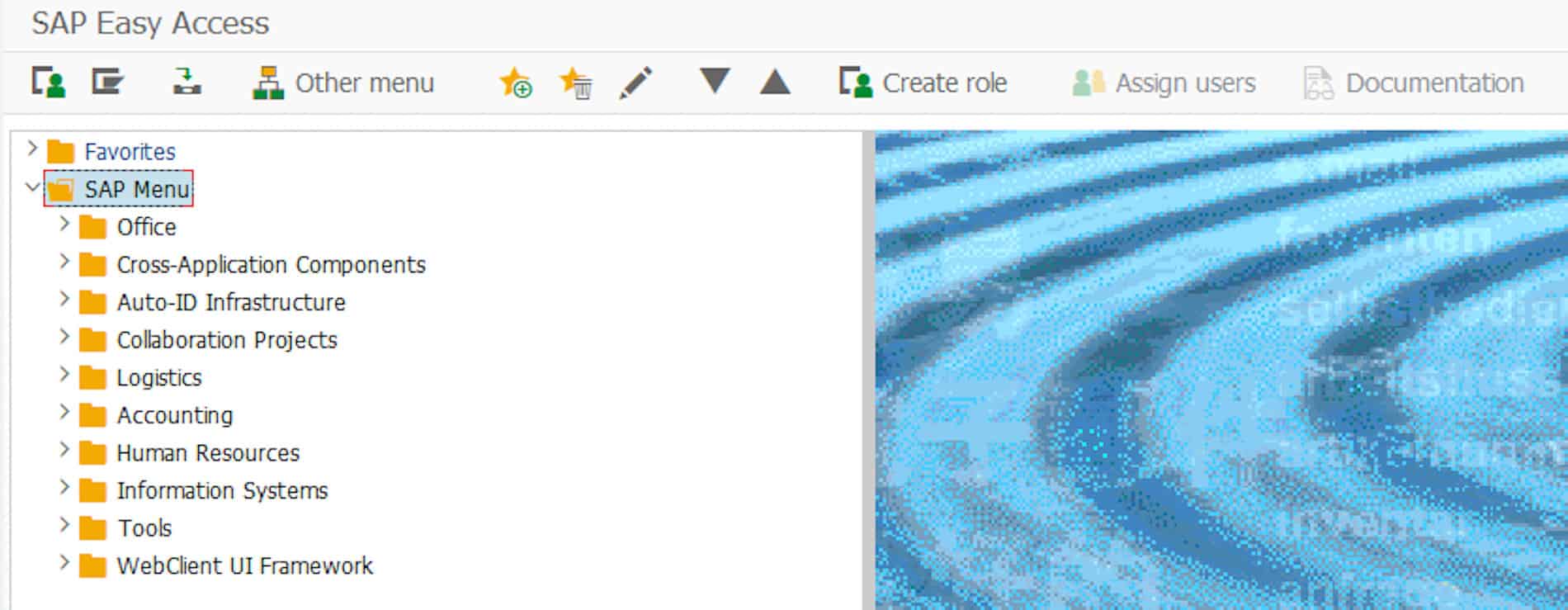
© 2020. SAP SE or an SAP affiliate company. All rights reserved. Used with permission of SAP SE.
Special modules in detail
Now let’s look at the top layer of the SAP Enterprise Suite: the SAP modules. These partly overlap with the functions from SAP ERP. However, these modules offer a wider range of functions to address a business’s more specific needs.
Supply Chain Management – SAP SCM
SAP Supply Chain Management (SAP SCM) offers advanced logistics functions from SAP ERP. SAP SCM is suitable for the entire supply chain: from the supplier to the customer. The SAP SCM functions include warehouse management, transportation management, supply chain planning and optimisation, and RFID processes (Radio Frequency Identification).
Product Lifecycle Management – SAP PLM
SAP Product Lifecycle Management (SAP PLM) represents the lifecycle of a product beginning with an idea through the production, and later to customer service. This module is very popular in the manufacturing sector, as it simplifies the internal and external communication through the exchange of information, plans, instructions, etc…
Supplier Relationship Management – SAP SRM
Businesses who work with many different suppliers can optimise their relationships with them using the Supplier Relationship Management (SAP SRM). Suppliers are more closely involved in the purchasing processes, which helps plan and manage the relationships in a more efficient way.
SAP Customer Relationship Management – SAP CRM
SAP Customer Relationship Management (SAP CRM) is responsible for the active customer relationship management and supports the communication between different departments and the customer. The customer information is given to the marketing department, sales and service, which in return allows them to fill the needs of the customer and react accordingly. Various analytic functions offer a deeper insight into customer behaviour and enable the development of efficient marketing strategies.
Special industry solutions
In response to the needs of different industries, SAP offers customised solutions in addition to the standard solutions. For this purpose, special functions are added on to enhance the standard processes of the respective industry. There are now over 20 industry solutions, including:
- Process industry (e.g. SAP for Oil and Gas)
- Service provider (e.g. SAP for Retail)
- Manufacturing industry (e.g. SAP for Automotive)
- Administration and finance services (e.g. SAP for healthcare or Banking)
Extensions to an SAP system
Thanks to the NetWeaver Stack, an SAP system is very flexible when it comes to the implementation of company-specific requirements and the integration from third party software. Therefore, almost all SAP modules can be provided with extensions, as long as they are programmed with ABAP.
If a specific functionality is needed, it is possible to implement the systems of third-party providers, such as an EDI provider, into the SAP ERP system.
Summary
SAP ERP already offers an extensive amount of basic functions for businesses of different industries. Depending on the requests, new modules can be added. This gives businesses the possibility to optimise control and have an overview in the logistics, accounting and human resource areas.
Questions?
Do you still have questions about SAP or implementing EDI into your ERP system? Feel free to contact us, we would love to help you!
Alternatively, you can find lots of relevant SAP content in our resource centre.
SAP ERP and SAP S/4HANA are the trademarks or registered trademarks of SAP SE or its affiliates in Germany and in several other countries.
Der Beitrag An Overview of the Most Important SAP Modules erschien zuerst auf ecosio.
]]>