Der Beitrag How to Save an IDoc Parser Report to a Local File erschien zuerst auf ecosio.
]]>How do I export an IDoc parser report?
Open transaction WE60 and enter the IDoc basic type – e.g. DELVRY01 and then hit the Parser icon or alternatively press F9.

© 2021. SAP SE or an SAP affiliate company. All rights reserved. Used with permission of SAP SE.
The SAP® system will generate the parser report.

© 2021. SAP SE or an SAP affiliate company. All rights reserved. Used with permission of SAP SE.
In order to export the parser report click More > System > List > Save > Local File. When being asked for the format in which you want to export, select Unconverted.
Have you already read our white paper on EDI in SAP®?
Discover the options available to SAP users when it comes to successful EDI integration in various systems with our helpful guide.
In search of other useful tips?
Our blog is filled with helpful “how to” articles, which can be found by clicking the “How to Guides” tab on our blog overview page.
Our resources section is also filled with useful assets, including white papers, webinars and infographics.
Alternatively, if you would like to speak to someone about your specific situation, please get in touch. We are always happy to help however we can!
Der Beitrag How to Save an IDoc Parser Report to a Local File erschien zuerst auf ecosio.
]]>Der Beitrag Alternative Solutions for EDI Data Exchange with SAP PI erschien zuerst auf ecosio.
]]>SAP PI (Process Integration) is a software component offered by SAP, which allows data exchange between an SAP and an internal or external system. Therefore SAP PI is the SAP Exchange Infrastructure (SAP XI) successor. Technically speaking, SAP PI is part of SAP Netweaver, the technical platform on which the SAP ERP system runs.
The picture below illustrates the basic idea behind SAP PI using a typical EDI situation.
SAP PI can also be used to integrate internal systems (e.g. CRM system, HR systems, etc.), however, this aspect will not be discussed in this article.
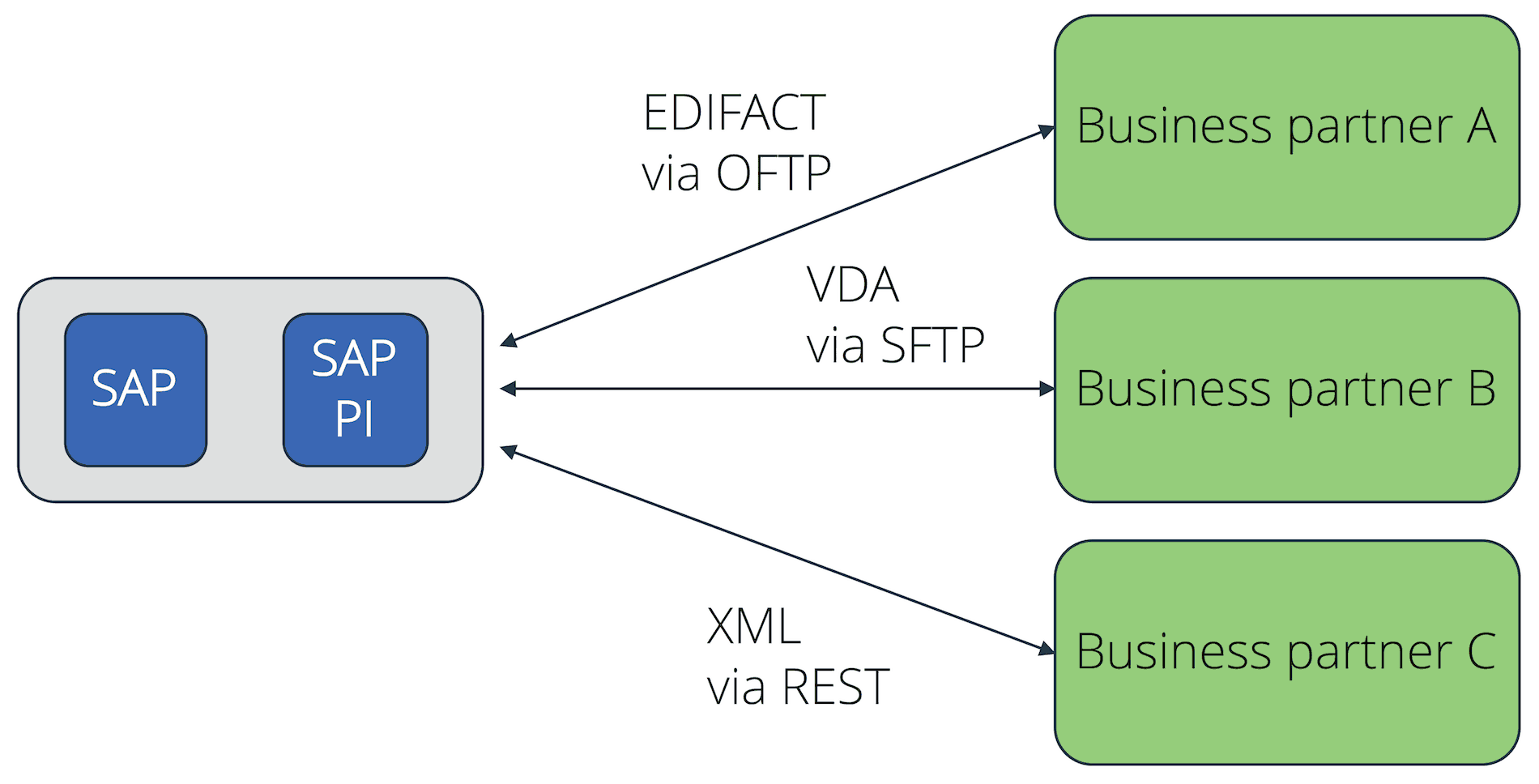
Ground Principles of SAP PI in a EDI Scenario
The core functions of SAP PI are:
- Connectivity
- Mapping
- Routing
The connectivity function allows SAP PI to offer a variety of adaptors for the various message transport protocols. This includes several protocols, which are needed for the electronic data interchange with external partners, such as AS2, X.400, OFTP, SFTP, RESTful Web Services, etc.
With the support of the relevant maps, SAP PI is also able to translate files from an internal SAP format (e.g. IDoc) to an external EDI format such as EDIFACT, XML, ANSI X.12, etc. The maps can be created using a graphic editor and deployed based on XSLT or with the help of an ABAP program.
The routing will then help to deliver the messages to different receivers, based on the information present within the file.

Challenges EDI businesses face with SAP PI
One of the main challenges when creating an EDI connection based on SAP PI is the complexity of the software. As a figure of speech, instead of being handed a hammer and nails, one needs to make do with a very comprehensive and complex toolset. Therefore a lot of know-how is needed to configure and operate SAP PI, which requires qualified employees. As EDI does not go home at 5pm, but is a 24/7 matter, the responsible employees constantly need to be available in the business for maintenance and to ensure a smooth EDI process.
Below is an outline of the many other challenges a company might encounter in its day-to-day operations.
Connection parameter maintenance
Despite the common belief, EDI connections are not entirely maintenance free. Connections using digital certificates (e.g. AS2 or OFTP2) need to have their certificates changed regularly, in unison with the partners in order to avoid connection disruptions. One could for example expect a medium-sized company in the production industry to have a few hundred clients or suppliers who are connected via EDI. For SAP PI, this implies the maintenance of a few hundred different connections. In most cases, the number of connections is considerably higher.
When new connections need to be established, this often does not go completely smoothly. For example, AS2 allows a number of settings, which are not necessarily uniformly implemented by all business partners. Therefore the set up of a new AS2 connection requires an adequate level of detailed technical know-how. The same can be said about OFTP2 or other protocols.
Difficulties when integrating exotic protocols
Even though SAP PI supports multiple EDI protocols, there are always connections for which standard protocols will not work. An example is the Peppol network, used to deliver electronic documents within Europe. Should a company want to implement this protocol in their SAP PI, they must create their own adaptors, which would require experienced employees or an external service provider.
Maintenance of mapping tables
Having document mappings created in-house for SAP PI requires detailed know-how of the EDI standards used. Depending on the number and type of clients and suppliers, a lot of different standards and formats have to be used. Pure IDoc know-how, which many SAP trained employees have, is not enough here.
However, the effort in regard to document mappings is not only in the initial creation of the mapping tables, but also in the consistent maintenance of the existing ones. This will also require trained employees, who can apply the necessary adjustments to the mappings when changes are needed.
In addition to the technical implementation of mappings, the professional evaluation of information in document standards is also important. For example, companies in the automotive industry have their own standards (e.g. VDA). However, there can be variations in how the different automotive manufacturers apply those standards.
Due to the large number of carried out projects and implemented mappings, this domain knowledge naturally exists with an EDI service provider. Therefore, should a company wish to create each connection in SAP by itself, employees would first have to go through the tedious process of learning this knowledge. It might even prove impossible at times, as the information is not available on the manufacturer’s website, but is only known by certain contact persons in the company. Part of the challenge is to know who those contact persons are.
Constant monitoring of the EDI data flow
Another important complication when connecting with SAP PI is the constant monitoring of the EDI data flow. EDI connections might not need much maintenance, but they still need to be constantly monitored. The need for constant monitoring is due to the fact that EDI takes place in a network. Within a network, nodes may fail at any time without warning, or nodes may not behave as expected.
During a network outage, the connection to a partner can be interrupted, thus preventing the delivery of receipt confirmations (e.g. MDN for AS2 or EERP for OFTP2). In this case one would have to personally contact their business partners to find out if they received the messages correctly. To do this, one would first need to find and align the message IDs, which is time consuming.
Even though EDI is a system-to-system type of communication, there are still people in front of each system, who may enter potentially incorrect data. This would cause message maps to fail, and would need to be corrected manually. This is another case where highly trained professionals are needed, as they would need to quickly solve this issue.
X.400 cost topic
When using a paid third party network for the message exchange, such as X.400, the costs can be quite high. A single business typically gets poor conditions from these providers, as the data volumes are too low. A central service provider is able to procure large data volumes at a better price than a single business unit.
Conclusion
SAP PI offers a wide range of functionality and flexibility. However, the configuration, operation, and maintenance require the employment of adequate staff, which needs to be taken into consideration when planning the total cost of ownership. The same applies when using a local EDI converter.
Alternatives based on EPO connectors
An alternative to creating in house EDI connections based on SAP PI is the use of a managed EDI solution. Below is an example of an EDI connection based on ecosio.EDI and the EPO connector.
One connection for all
The main difference to EDI connections with SAP PI is the concept of one connection for all. The following diagram illustrates how instead of having x different connections to one’s business partners, a company can only have one connection to a central EDI provider, ecosio in this case.
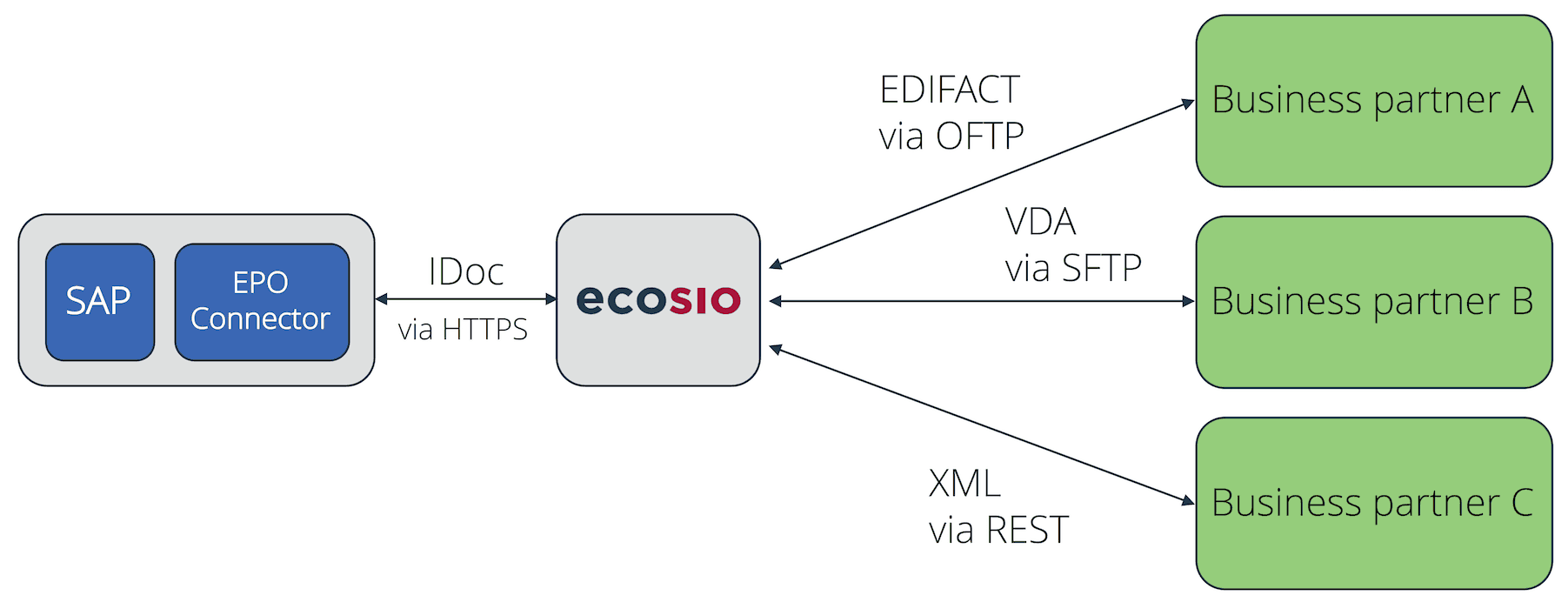
EDI Connection Using EPO Connector
The EDI provider takes over all tasks centrally – tasks which would be carried out in an in house solution with SAP PI. This includes the set up and maintenance of the EDI connections, setting up and maintaining document mappings, the correct routing of messagess, and the ongoing monitoring of the data flow.
Instead of maintaining x different connections and mappings in SAP, the SAP native document exchange format IDoc is used. Incoming IDocs are delivered to the EPO Connector by ecosio, and appear in SAP, directly in transaction BD87. The EPO connector will automatically accept outbound IDocs and deliver them to ecosio, who then converts them into the correct final format and delivers them to the receiver.
The only task that is left to the SAP system is to monitor transaction BD87, to get an overview of the inbound and outbound IDoc. The illustration below shows this overview.
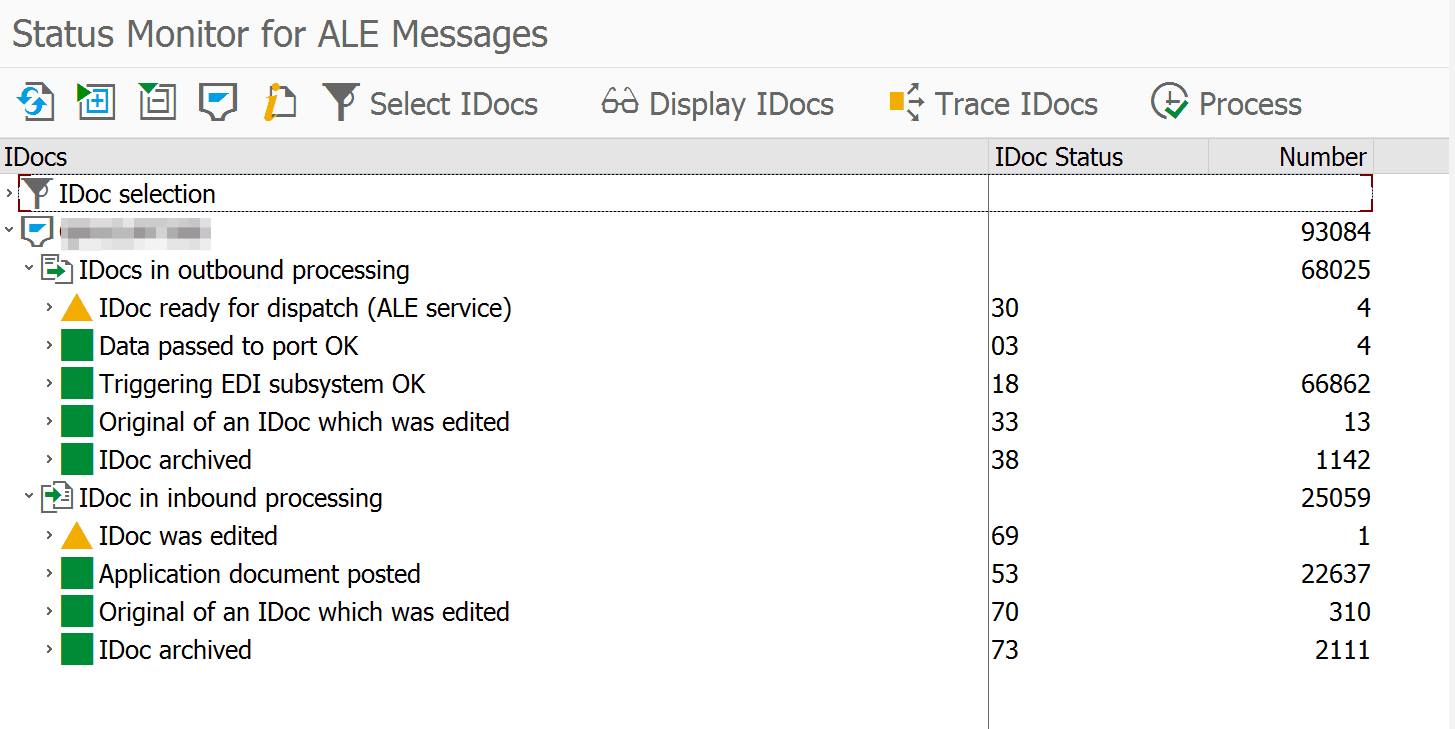
IDoc Overview of Transaction BD87
© 2020. SAP SE or an SAP affiliate company. All rights reserved. Used with permission of SAP SE.
Should a more detailed tracking of an inbound or outbound message be needed, the ecosio.Monitor can be used for this purpose as well. It provides an overview of all sent and received messages, and informs users about the delivery status of messages. With a sent message for example, it is possible to see if the receiver actually received the message (e.g. Daimler or BMW).
In order to view the ecosio.Monitor, it is not necessary to leave the SAP. On the contrary, the ecosio.Monitor can be opened directly in SAP with one click on the EDI message ID in the IDoc viewing page, as demonstrated below. A login using a single-sign-on solution is performed in the background. Thus, the user does not have to enter any login credentials for the ecosio.Monitor.
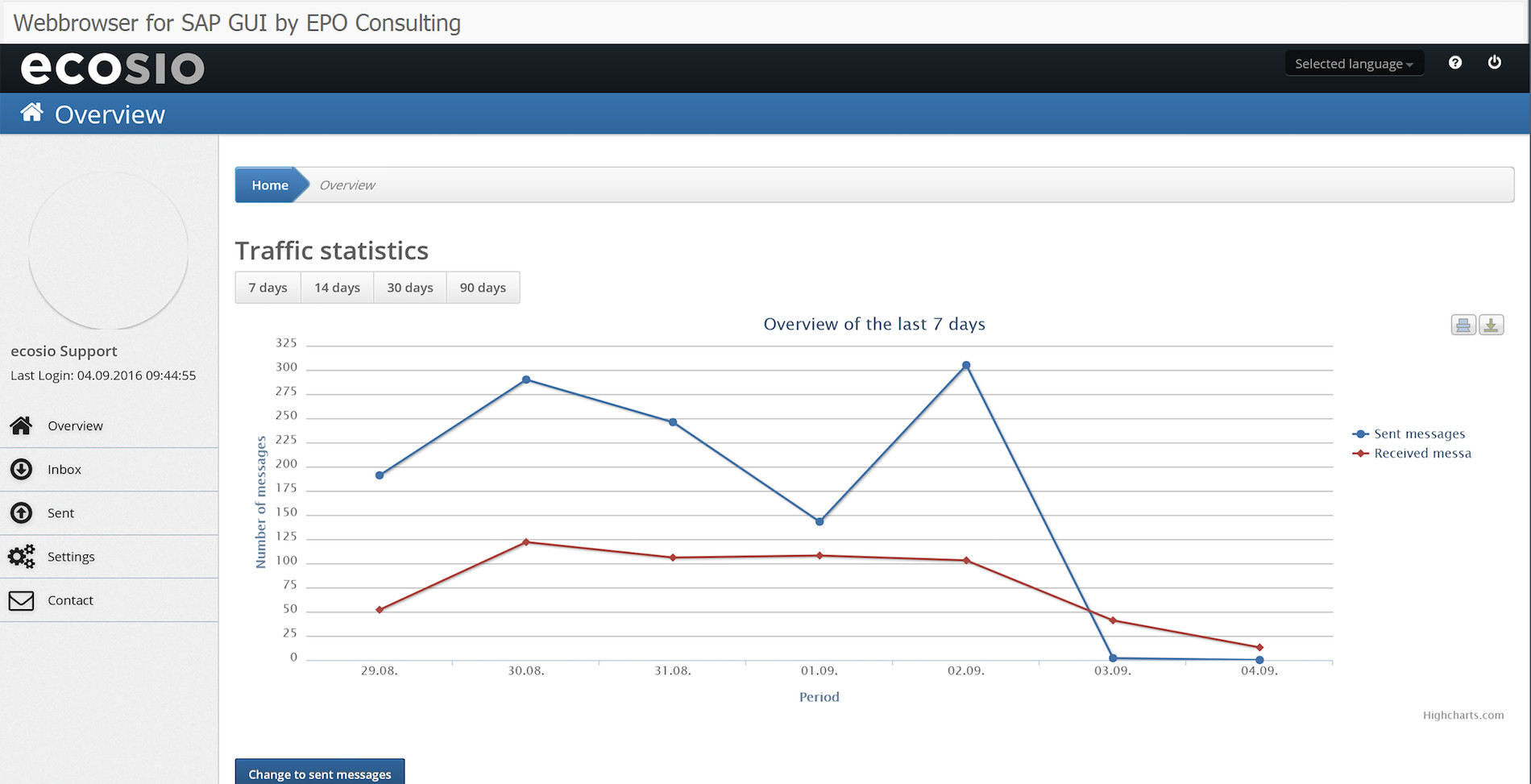
ecosio.Monitor directly accessible in SAP
In the ecosio Integration Hub SAP users can view the delivery state of a specific message, or check other sent or received messages.
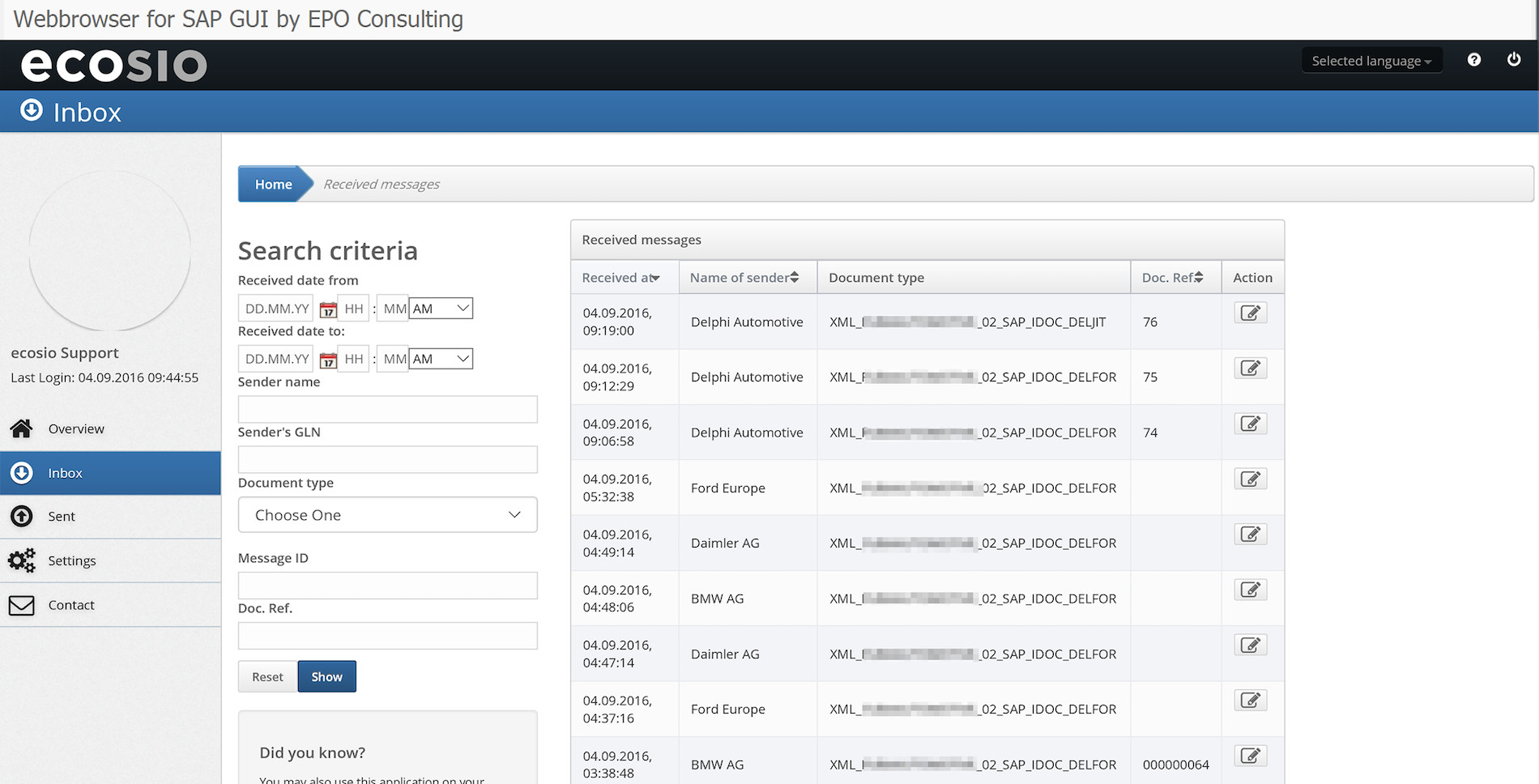
Detailed View of Messages in ecosio.Monitor
Ongoing monitoring by external professionals
If a company chooses ecosio to take care of its EDI processes, the ecosio operations team constantly monitors all of the EDI data flow. Should there be issues with the delivery of messages from and to business partners, the operations team will sort this out with their EDI contact person and the message delivery will resume as soon as the issue is resolved.
Since the operations team’s main task is to monitor EDI connections and solve issues, the phone numbers and email addresses of all EDI contacts of the different companies are stored. The team even knows some of the EDI contact persons personally, which reduces the communication effort and increases the speed at which issues are being solved.
24/7 Connection monitoring
EDI processes are time sensitive, especially in logistics. DESADVs (Dispatch Advice) need to be sent on time, DELJIT (delivery just in time) and production synchronous forecasts must be received on time etc. Therefore a connection breakdown would be disastrous, as it would prevent reaching SLAs and can lead to penalties on the business partner’s side.
All connections to and from ecosio are monitored 24/7. If a connection stops, an alerting mechanism kicks in, allowing the operations team to counteract quickly.
Set Up of any connection protocol
Thanks to their full focus on EDI topics, an EDI provider such as ecosio can implement even the more exotic protocols, Peppol being one example of these. From an SAP point of view, this means that no expensive or complicated special adaptors are needed for SAP PI data exchange.
Summary
SAP PI offers SAP users a wide range of possibilities and functions to create connections to internal and external systems. Especially when considering the total cost of ownership, an outsourced EDI solution with an external EDI service provider is cheaper than an in-house EDI solution.
Do you have any questions?
Do you still have questions about SAP PI data exchange or EDI with a SAP ERP system? Feel free to contact us, we would love to help you!
SAP ERP and SAP S/4HANA are the trademarks or registered trademarks of SAP SE or its affiliates in Germany and in several other countries.
Der Beitrag Alternative Solutions for EDI Data Exchange with SAP PI erschien zuerst auf ecosio.
]]>Der Beitrag Alternative Solutions for EDI in SAP PI and SAP PO erschien zuerst auf ecosio.
]]>- Managing EDI with SAP PI or SAP PO internally yourself
- Installing a local EDI converter and connecting to SAP PI or SAP PO
- Outsourcing to a fully managed EDI service provider
We will show you which EDI functionalities you can implement in your company with the respective solution and which questions decision-makers can use to help themselves in choosing the right solution.
EDI and B2B integration with SAP PI or SAP PO – What do I need to know?
SAP Process Integration (SAP PI) is a comprehensive software component that enables data exchange between the SAP system and internal and external systems. SAP PI uses various Java-based routing and integration mechanisms as well as various adapters that can be used to implement transport protocols and format conversions.
SAP Process Orchestration (PO) is an SAP PI installation variant (with different license models) that has been enhanced to include functionality in the area of “business process modeling and implementation”. In addition to the classic SAP PI capabilities of message routing, mapping and connectivity, PO also includes parts of SAP Business Process Management and SAP Business Rules Management.
In terms of EDI, the core technical functionalities of SAP PI and SAP PO are:
- Connectivity
- Mapping
- Routing
Under Connectivity, SAP PI offers a range of adapters that can be used to convert various message transport protocols. These include many protocols that are required for electronic message exchange with external partners, such as AS2, X.400, OFTP2, SFTP, RESTful Web Services, and so on. Mappings can be used to implement translations between SAP internal formats (for example, IDoc) and external EDI formats such as EDIFACT, XML, ANSI ASC X.12, and so on. Mappings can be converted using a graphical editor, based on XSLT, or using a Java program. Routing controls message delivery to different recipients based on information in the message.
All three solutions presented in the same way are based on these core functionalities of SAP PI or SAP PO, but differ essentially in the following factors in EDI operation or in the following questions that the decision-maker can ask himself:
- How much internal EDI capacity (i.e. personnel & EDI expertise) can I use for mapping, routing, 24/7 monitoring, troubleshooting and maintenance of the connections? Do I want to manage EDI completely internally or do I want to relieve my internal teams and outsource EDI?
- Which technical requirements does my EDI solution have to meet? Which document types, protocols, formats and legal requirements regarding electronic invoicing (e.g. XRechnung in Germany or FatturaPA in Italy) do I need for my B2B network?
- What EDI capabilities does my B2B network require? Do I need access to Value Added Networks (VANs)? Do I want or need to connect to Peppol? Do I have suppliers without EDI capabilities that I still want to connect to automated message exchange (with Web EDI?)
- How flexible or scalable do I want to design my EDI solution? Can I rely on a rigid implementation in the long term or do I want to become more resilient and future-proof with regard to the technical requirements?
If you know the answer to all these questions for your company, you will be able to make the right choice for your business. Keeping the questions in mind, we will now look at the three technical approaches for an EDI implementation in SAP PI and SAP PO.
1. Managing EDI with SAP PI or SAP PO internally
SAP PI and SAP PO are extremely complex and extensive software components that allow for internal implementation of some EDI functionalities. According to the point-to-point principle, automated EDI connections to individual partners can be established by appropriately qualified personnel.
However, one of the main challenges during implementation is precisely the complexity of the software. One does not get the proverbial hammer and nail in the hand, but a very extensive toolset. For the independent configuration and the ongoing operation of EDI connections via SAP PI or SAP PO, highly qualified employees with corresponding EDI expertise are therefore required. If smooth EDI operation is to be guaranteed 24/7, these employees must be available on a continuing basis.
Furthermore, not all required EDI functionalities (current and future) may be supported or require the use of additional solutions, as shown in the graphic:
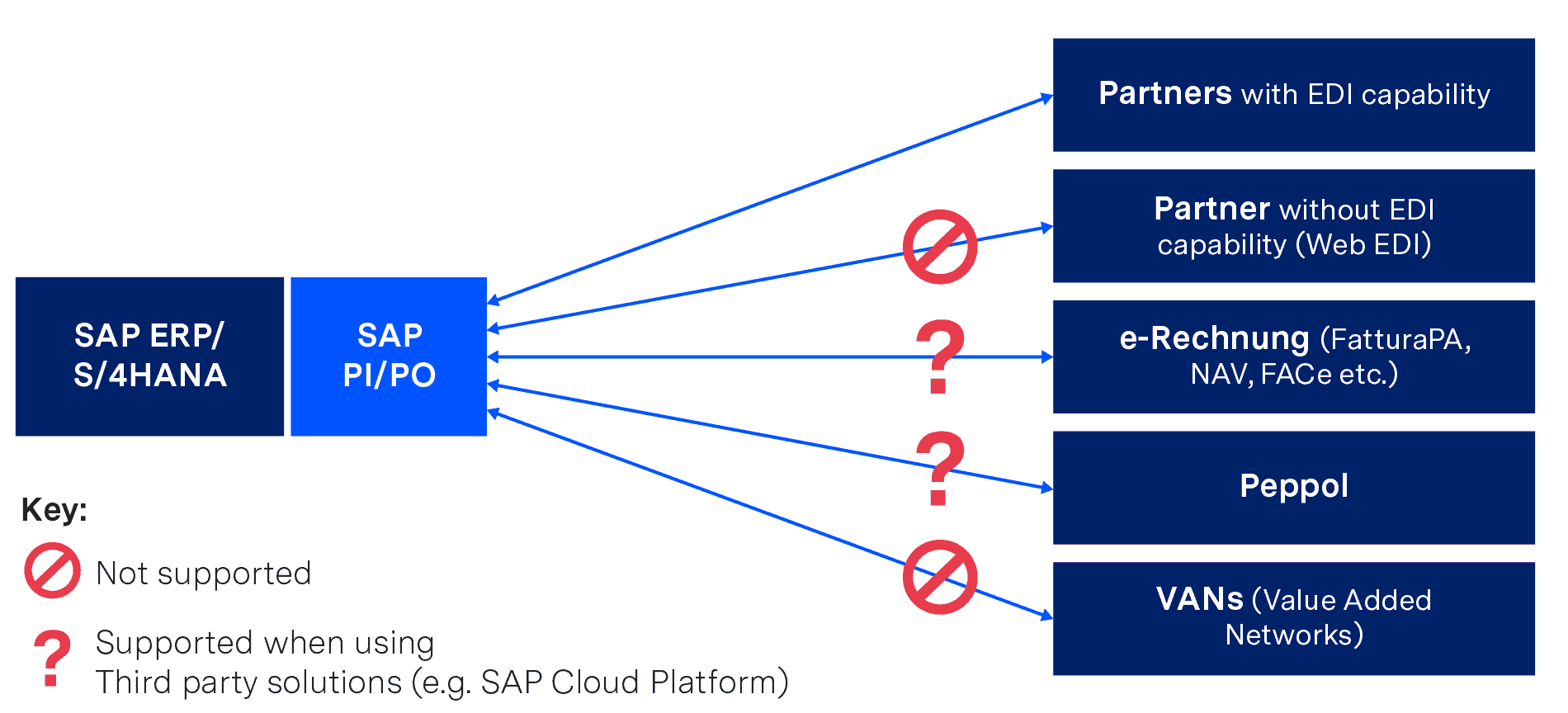
If you want to implement EDI internally purely with SAP PI or SAP PO, you will therefore have to do without some functions (or implement them as a third-party solution), but you will also need highly qualified personnel, EDI know-how and sufficient resources to cope with:
- Mapping and routing of all necessary connections
- Ongoing maintenance of the connection parameters and regular renewal of certificates
- Ongoing maintenance of mapping tables and industry internal practical knowledge about the implementation of special formats (e.g. VDA)
- Ongoing coordination with the B2B partners and procurement of all necessary information (especially in the onboarding process)
- 24/7 monitoring and troubleshooting
Incidentally, those who only want to work with SAP PI have to accept a major restriction – this only allows flat file formats via SFTP/SOAP/REST/HTTP protocols. If you want to use “classic” EDI formats (such as EDIFACT or ANSI ASC X12) and protocols (such as AS2 or X.400), you must have either a special package from a third-party manufacturer or the “B2B Add-on” from SAP – but this is only available with the SAP PO license (even if no other SAP PO functions are required).
The issue of X.400 costs should also be mentioned. If messages have to be transmitted to third-party networks that are subject to charges, these costs can be quite high. As an individual company, often only poor rates are available due to the relatively small amount of data being exchanged.
Internal implementation of EDI with SAP PI and SAP PO offers you a very high degree of functionality and flexibility. However, configuration, operation and maintenance also require the use of appropriate resources, which must be included in the total cost of ownership analysis. These costs must also be taken into account when using a local EDI converter, the option we present next…
2. Installing a local EDI converter and connecting to SAP PI or SAP PO
Another possibility is the acquisition and operation of a local EDI converter, which is connected to SAP PI or SAP PO. This is a software to be installed locally that converts documents from SAP internal IDoc format to partner format and vice versa.
Converter solutions are individually adaptable, but are potentially cost-intensive due to individually payable license costs for various functionalities, formats and upgrades in combination with long-term maintenance contracts. For example, support for protocols such as X.400 or services such as VAN connectivity must be purchased separately.
Local converter solutions must also be operated completely by internal teams, just as in the previous solution (implementing and operating EDI in SAP PI or SAP PO internally). This includes particularly time-consuming processes such as mapping, testing and 24/7 monitoring. This again requires appropriately trained employees.
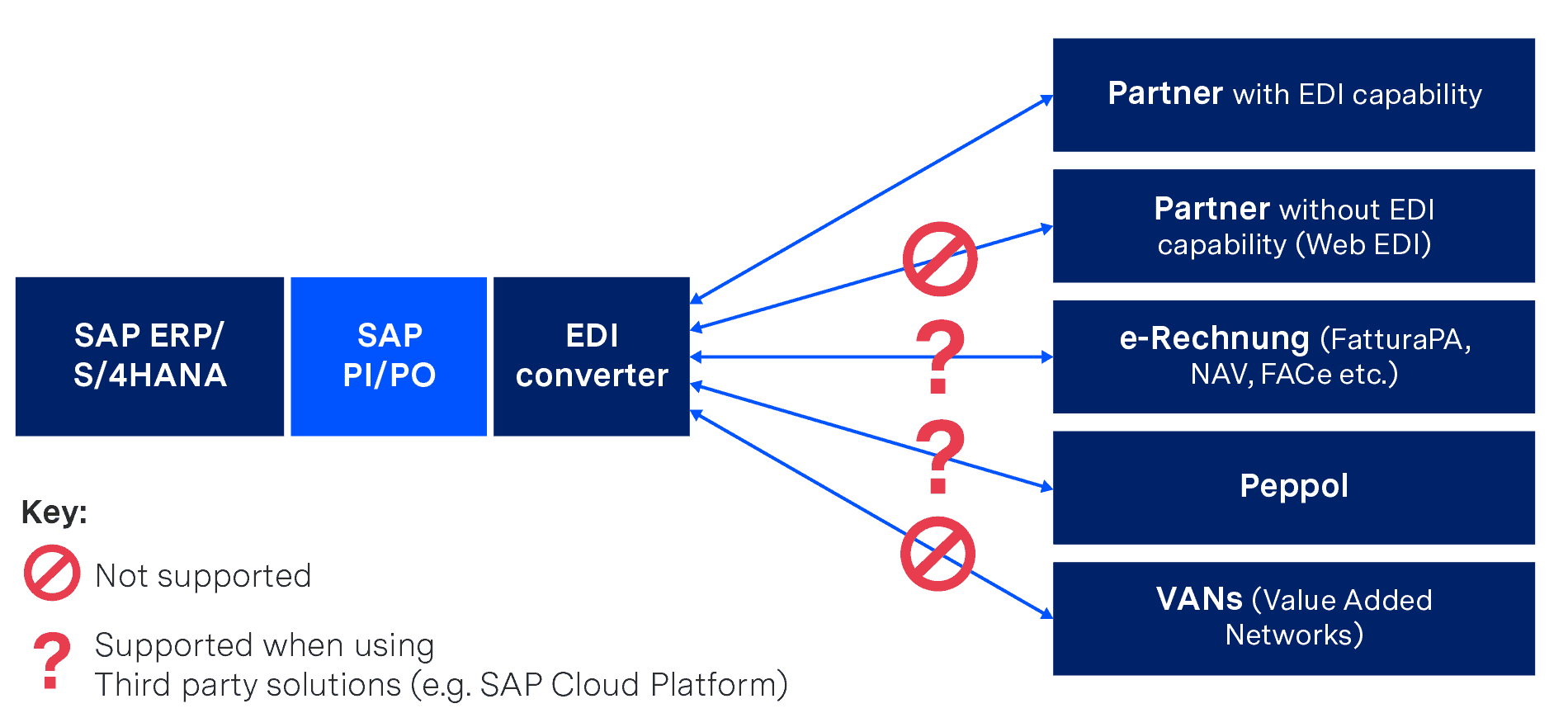
SAP PI/PO with local EDI converter
It should also be considered that both the software itself and the individual mappings age. In other words, over time new releases of the converter will be published, which do not necessarily allow an upgrade from the existing version and mappings. This results in corresponding migration projects that have to be realised internally or with the help of an external consulting company.
3. Outsourcing to a fully managed EDI service provider
Fully managed EDI is a cloud-based EDI solution where a company is connected to a specialised EDI service provider via a single connection. This service provider then takes over all EDI functions and processes, depending on your company’s requirements.
If your company uses SAP PI or SAP PO, all you need for a successful connection to ecosio as your EDI service provider is the snap ecosio Bridge for SAP and its turnkey integration flows in SAP PI or SAP PO, which was especially created by SNAP Consulting.
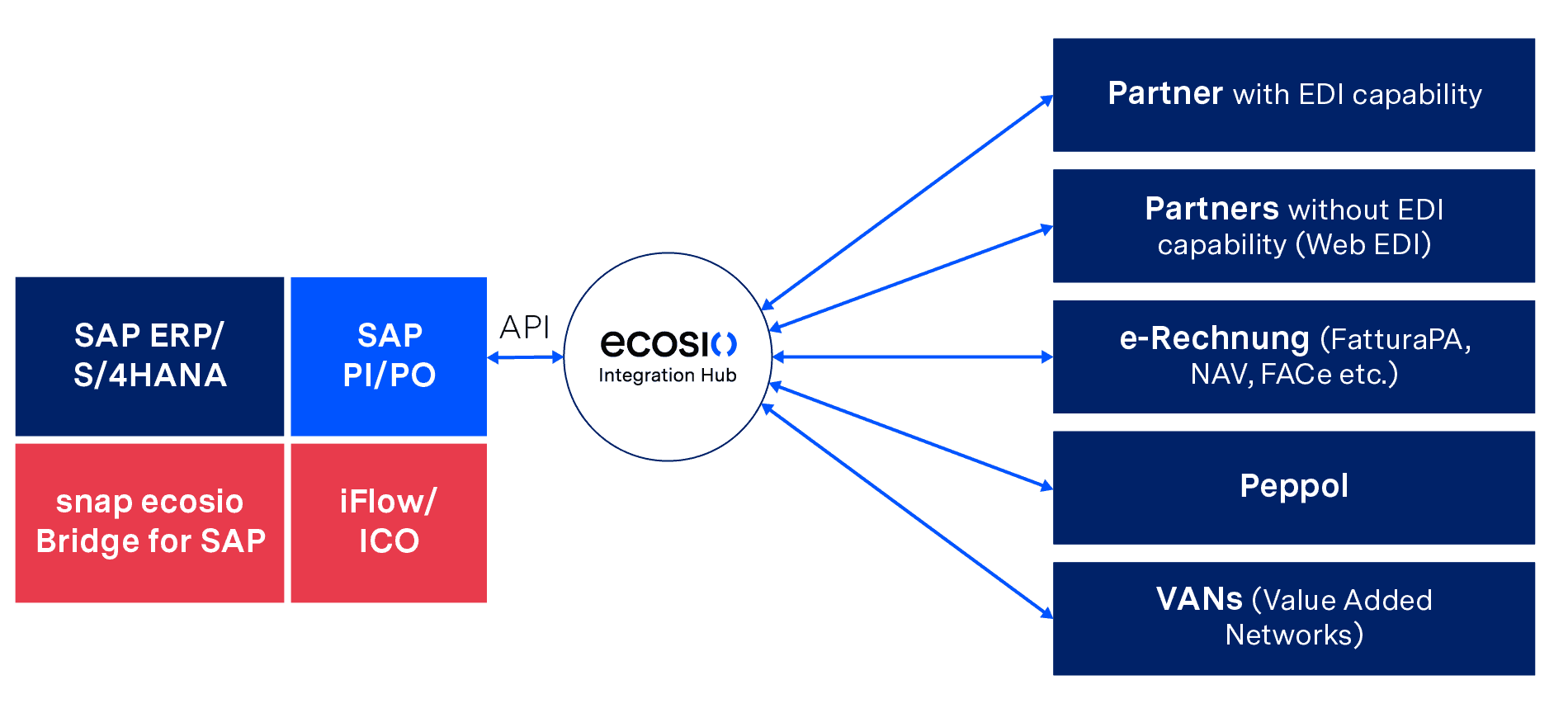
Deep EDI Integration in SAP with snap ecosio Bridge for SAP and iFlow/ICO
In this solution the EDI service provider creates and ensures all technically desired EDI prerequisites, such as routing via various protocols, VANs and Peppol or conversion into all common and necessary formats, including legal requirements in the field of e-invoicing. Further, operation, 24/7 monitoring and partner onboarding (including partner communication) are also handled by the service provider.
The deep integration of the EDI functionalities into the SAP system also enables your business department to:
- Jump to the original EDI message for incoming messages, directly in SAP – without need for an extra login
- Jump to the generated EDI message for outgoing messages – again without extra login
- Track the EDI message status directly in SAP by changing the IDoc status of sent EDI messages to status 40 or 41 – depending on whether the recipient received the message or not
- Conduct a full text search of all messages and documents
- Benefit from automatic alerts/notification if messages are incorrect or could not be delivered
Updates, the ongoing certification of protocols and new SAP versions (such as SAP S/4HANA) are easily adopted and supported. Fully managed EDI offers companies the possibility to use all EDI functions without an expiration date – providing maximum EDI efficiency with minimum internal effort.
Summary
You now know the three possible technical approaches for implementing EDI on the basis of SAP PI or SAP PO and which criteria and questions you should use to select the most suitable one for your company. Essentially, you need to assess how much capacity you have internally to cope with implementing and operating an EDI solution.
Independent EDI implementation or the use of a local EDI converter enables a company to send and receive EDI messages, but requires a high level of internal effort, and highly qualified personnel. In addition, some functionalities may have to be purchased externally.
Outsourcing to a fully managed EDI service provider offers you all the EDI functionalities available with SAP PI and SAP PO but in a flexible and freely scalable way. The entire effort, from mapping and routing to monitoring and troubleshooting, is taken over by the EDI service provider, relieving internal teams.
Want more information?
Discover more about our updated product, ecosio.flow.
Do you still have questions about SAP PI data exchange or EDI with an SAP ERP system? Feel free to contact us, we would love to help you!
SAP ERP and SAP S/4HANA are the trademarks or registered trademarks of SAP SE or its affiliates in Germany and in several other countries.
Der Beitrag Alternative Solutions for EDI in SAP PI and SAP PO erschien zuerst auf ecosio.
]]>Der Beitrag How to Set Up and Manage Automatic SAP Jobs erschien zuerst auf ecosio.
]]>- SAP jobs run processes automatically at scheduled times to avoid manual execution, such as running tasks during off‑peak hours or retrieving EDI messages
- You create jobs in transaction SM36, choosing a unique job name, assigning a job class for priority (A high, B medium, C low), and defining start conditions and processing steps
- Jobs consist of one or more steps, typically running ABAP programs with specific variants
- Job status transitions from planned to released, ready, active, and finished, and any cancellations or issues are visible in job logs and spool
What is an SAP job for and how is it structured?
Background jobs are used in many areas where processes are executed automatically by the system at certain times without manual intervention. In the area of Unix systems, the concept of cron jobs is well known, and on Windows computers,background processes can be set up with the task scheduler. SAP also has appropriate background processing for processes – so-called SAP jobs.
SAP jobs can be executed once or recurrently – for example, every day at midnight. This allows, for example, resource-intensive processing to take place at night when few or no users are logged on to the system. Another application example is the recurring collection of new EDI messages from an external B2B Integration Hub, as in the case of ecosio.
In the following article we will introduce the most important features and show how to set them up. We then go into how to modify existing SAP jobs and how to read processing logs from SAP jobs.
Properties of SAP jobs
SAP jobs are set up using transaction SM36. The following graphic shows an example SAP job.
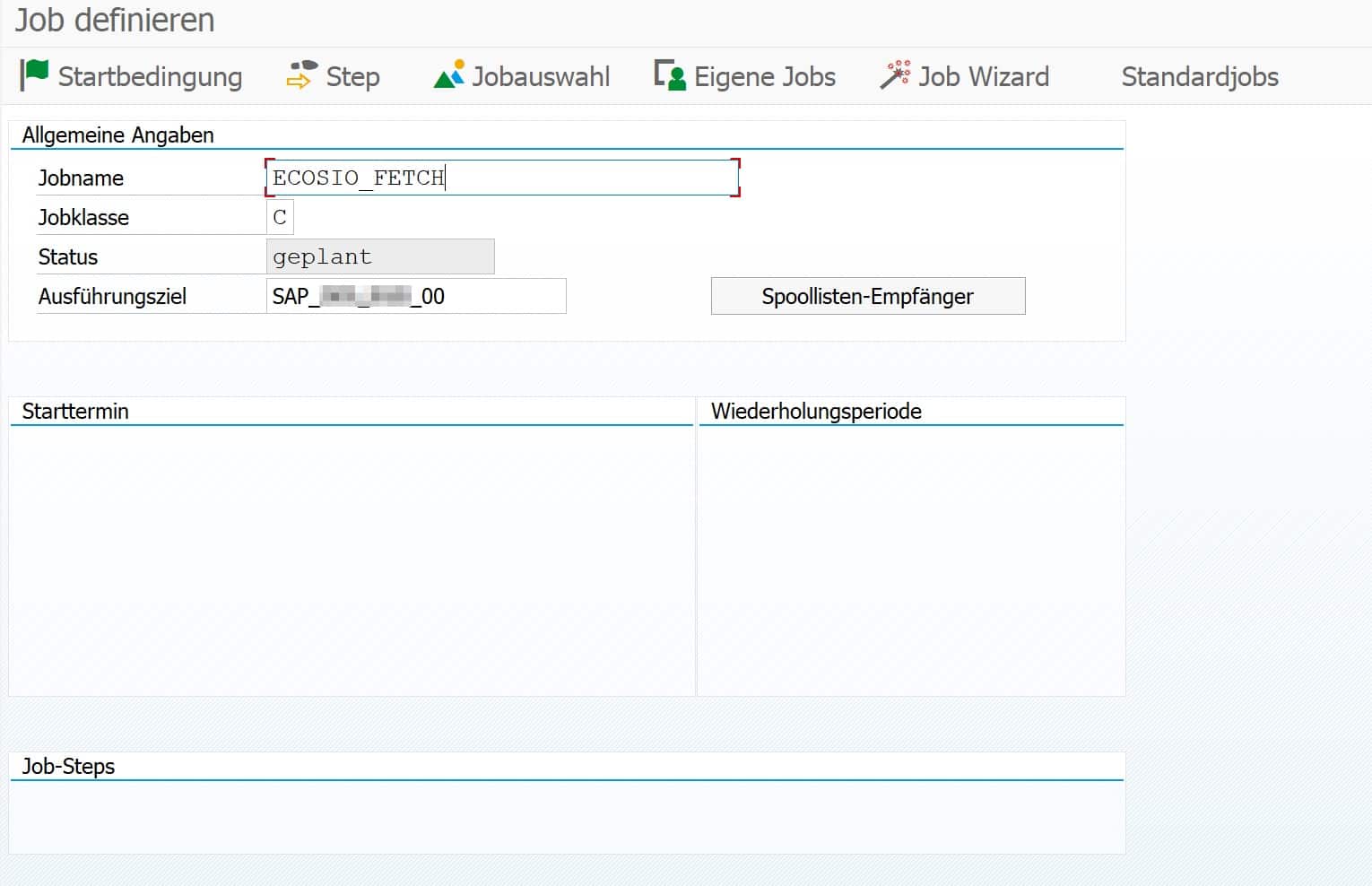
© 2020. SAP SE or an SAP affiliate company. All rights reserved. Used with permission of SAP SE.
There are unique job names that can be freely assigned. For reasons of clarity, it is recommended that you adhere to a uniform system-wide naming convention.
SAP job classes
An SAP job must be assigned to a specific job class when it is created. Job classes define the priority with which a background job is executed. A distinction is made between the following three classes.
Class A – High priority
Urgent or critical background jobs can be planned with class A. These jobs are given priority before class B or C jobs are executed.
Class B – Medium priority
As soon as class A jobs are processed, class B jobs are started.
Class C – Low priority
Class C jobs have the lowest priority and are only started when class A and B jobs have been processed.
Status
Besides the assigned priority class, there is a certain status. The possible statuses are as follows:
- Planned
The job is only scheduled, but has no start condition, end date, execution frequency, and so on, and will never run. - Released
The job has assigned process steps and all the parameters for execution are available. The job is waiting to be executed for the first time as soon as the start condition is fulfilled – e.g. a certain time. - Ready
The job is ready for execution and has been placed in the execution queue by the job scheduler. As soon as a background process is free, the job is executed. - Active
The job runs in the background. The status of the job can no longer be changed during execution. - Ready
The job has been successfully completed. - Cancelled
The job has been canceled. The termination may have been caused manually by an administrator, or a problem may have occurred during the execution of the job. The exact details can be read in the job logs and in the spool (see description below).
Steps
Every SAP job consists of one or more processing steps – so-called steps. The following figure shows an example step.
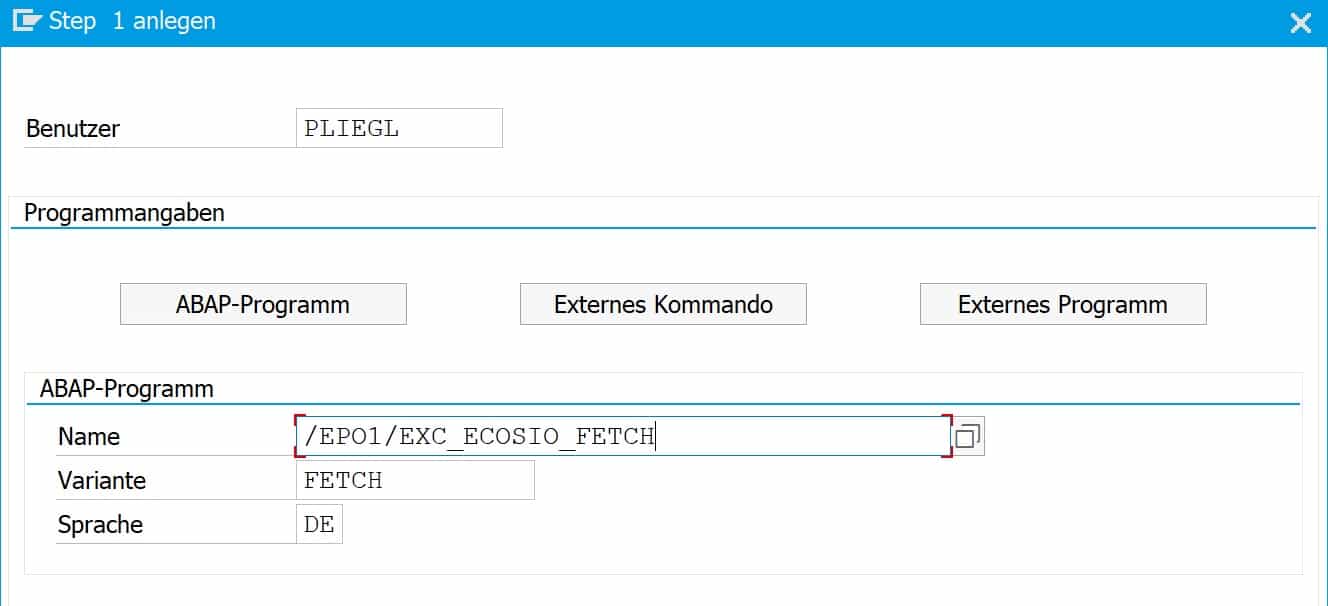
© 2020. SAP SE or an SAP affiliate company. All rights reserved. Used with permission of SAP SE.
A step in an SAP job can have three different characteristics:
- ABAP program
In this case, an ABAP program is started and a variant and the language can be passed. In the screenshot above, for example, the ABAP program /EPO1/EXC_ECOSIO_FETCH is executed with the variant FETCH, which periodically fetches messages from the ecosio cloud-based EDI solution (our Integration Hub). - External command
With this function, a command predefined by the system administrator can be called up and parameters can also be transferred for the call. - External program
In this case an external program is started, whereby parameters can also be transferred here.
Setup
In the first step, the job name and job class are defined in transaction SM36, as mentioned above. Then the individual steps of the job are defined, which are executed in sequence – from top to bottom.
The next step is to select the start condition of the job.

© 2020. SAP SE or an SAP affiliate company. All rights reserved. Used with permission of SAP SE.
Usually you choose a certain time as start condition, from when the job should be executed, and a repeat interval – e.g. every 10 minutes. If no time is specified, the job remains in the “scheduled” state and is not executed.
After specifying a time and a repetition frequency, the job is saved. Afterwards the job changes to “released” and waits for its first execution. Alternatively, a job can be executed immediately by clicking on “Immediately”.
Change
To change an SAP job, go to transaction SM37. There you can get an overview of all jobs in the different statuses. To change a job that has already been released, select it in the overview and then choose “Job > Released – Scheduled” from the menu bar.

© 2020. SAP SE or an SAP affiliate company. All rights reserved. Used with permission of SAP SE.
The job can now be processed again and then released again.
View logs
As with a regularly executed process, an SAP job can also terminate unexpectedly. In this case, we recommend that you look at the logs. You can access this again using transaction SM37. In the first step, select one of the jobs already executed and then choose “Spool” or “Job log”.

© 2020. SAP SE or an SAP affiliate company. All rights reserved. Used with permission of SAP SE.
These two functions provide an overview of the logs themselves and the individual process steps. A prerequisite is, of course, that the process steps also write processing logs.
With the introduction of SAP S/4HANA, the IDoc format will undergo some changes. You can find out what these changes are in detail in this article.
Do you have any questions?
Do you still have questions about SAP jobs or the connection of external systems to your SAP ERP or SAP S/4HANA system? Do not hesitate and contact us. We are always available to answer your questions.
SAP ERP and SAP S/4HANA are the trademarks or registered trademarks of SAP SE or its affiliates in Germany and in several other countries.
Der Beitrag How to Set Up and Manage Automatic SAP Jobs erschien zuerst auf ecosio.
]]>Der Beitrag IDoc Status Change in SAP ERP erschien zuerst auf ecosio.
]]>- Errors during inbound or outbound IDoc processing can cause an IDoc to “hang” in an error status, often due to incomplete data from business partners or misconfiguration
- An IDoc stuck in status 20 (“Error triggering EDI subsystem”) must first be reset to status 30 (“IDoc is ready to send via ALE”) before it can be processed agai
- To change the status of one or multiple IDocs, run transaction SE38 and execute the programme RC1_IDOC_SET_STATUS then restart processing using transaction WLF_IDOC
- The article includes a full list of standard SAP IDoc status codes, covering both outbound (00–49) and inbound (50–75) scenarios for reference and troubleshooting
The status of an IDoc
IDoc documents are used to exchange business documents such as purchase orders, invoices, delivery notes, etc. with an SAP system. Upstream of the SAP system, an EDI service provider typically converts the IDocs to and from the various formats of the individual business partners (for example, EDIFACT or ANSI ASC X12).
Errors can occur during processing of both inbound and outbound IDocs in the SAP system. For example, incomplete IDocs may arrive in the SAP system because a business partner has not sent all the information requested. In this case, the IDoc “hangs” in an error status.
The following figure shows an extract from SAP transaction BD87.
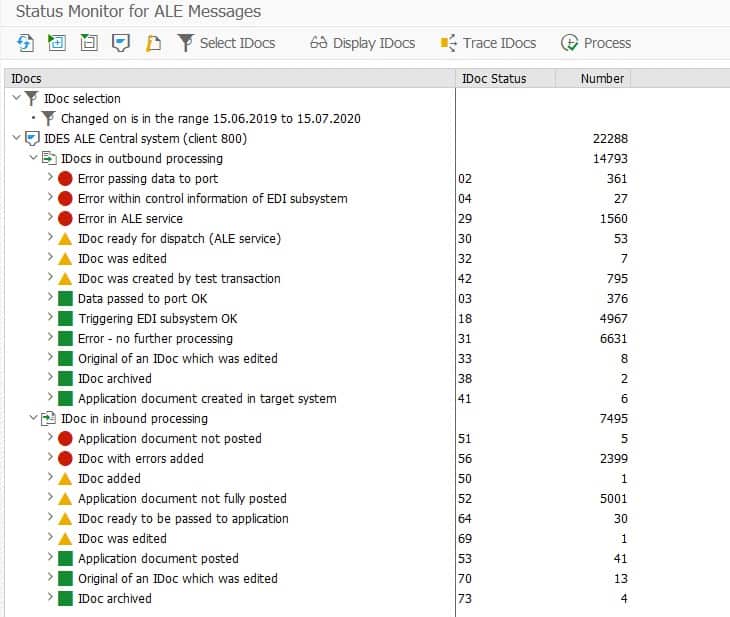
BD87 transaction with IDoc overview
© 2020. SAP SE or an SAP affiliate company. All rights reserved. Used with permission of SAP SE.
For example, an outgoing IDoc has stuck in status 20. This status means ‘Error when triggering the EDI subsystem’. One reason for this error could be incorrectly configured settings in the system. The IDoc detail view provides more information. As soon as the error has been corrected, processing of the IDoc must be restarted. However, status 20 does not allow direct processing, so the status must first be set to 30. 30 stands for ‘IDoc is ready to send (ALE service)’.
A list of all the possible statuses of an IDoc can be found at the end of this article.
Change Status
To change the status of an IDoc, proceed as follows.
Call transaction SE38 and execute the program RC1_IDOC_SET_STATUS.

Program call in transaction SE38
© 2020. SAP SE or an SAP affiliate company. All rights reserved. Used with permission of SAP SE.
The following report will then open. If you want to change the status of several IDocs at once, you can use the button next to the text field ‘IDOC number’ and specify several IDoc numbers.
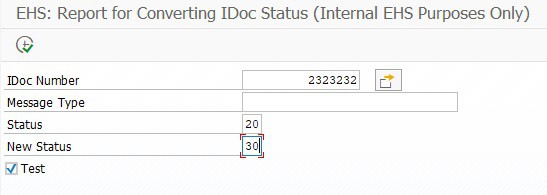
© 2020. SAP SE or an SAP affiliate company. All rights reserved. Used with permission of SAP SE.
You can then trigger the processing of the IDoc again — for example, in transaction WLF_IDOC.
Our blog is filled with helpful “how to” articles, which can be found by clicking the “How to Guides” tab on our blog overview page.
Any more questions?
Do you still have questions about IDocs or electronic data exchange with an SAP ERP system? Do not hesitate and contact us or use our chat. We’re always happy to help!
IDoc statuses
The following table provides an overview of the standard IDoc statuses in an SAP system.
| STATUS | Description |
|---|---|
| Outgoing IDocs (from SAP view) | |
| 00 | Not used, only R/2 |
| 01 | IDoc created |
| 02 | Error passing data to port |
| 03 | Data passed to port OK |
| 04 | Error within control information of EDI subsystem |
| 05 | Error During Translation |
| 06 | Translation OK |
| 07 | Error during syntax check |
| 08 | Syntax check OK |
| 09 | Error during interchange handling |
| 10 | Interchange handling OK |
| 11 | Error during dispatch |
| 12 | Dispatch OK |
| 13 | Repeat transmission (Retransmission) OK |
| 14 | Interchange acknowledgement positive |
| 15 | Interchange acknowledgement negative |
| 16 | Functional acknowledgement positive |
| 17 | Functional acknowledgement negative |
| 18 | Triggering EDI subsystem OK |
| 19 | Data passed to port for test |
| 20 | Error triggering EDI subsystem |
| 21 | Error passing data for test |
| 22 | Dispatch OK, acknowledgement still due |
| 23 | Error during retransmission |
| 24 | Control information of the EDI subsystem OK |
| 25 | Processing despite syntax error (outbound) |
| 26 | Error during syntax check of IDoc (outbound) |
| 27 | Error in dispatch level (ALE service) |
| 28 | IDoc sent to ALE distribution unit retroactively |
| 29 | Error in ALE service |
| 30 | IDoc ready for dispatch (ALE service) |
| 31 | Error, no further processing |
| 32 | IDoc was edited |
| 33 | Original of an IDoc that was edited |
| 34 | Error in the control record of IDoc |
| 35 | IDoc reloaded from archive |
| 36 | Electronic signature not performed (timeout) |
| 37 | Error when adding IDoc |
| 38 | IDoc archived |
| 39 | IDoc is in target system (ALE service) |
| 40 | Application document not created in target system |
| 41 | Application document created in target system |
| 42 | IDoc created by test transaction |
| Incoming IDocs (from SAP view) | |
| 50 | IDoc added |
| 51 | Application document not posted |
| 52 | Application document not fully posted |
| 53 | Application document posted |
| 54 | Error during formal application check |
| 55 | Formal application check OK |
| 56 | IDoc with errors added |
| 57 | Test IDoc: Error during application check |
| 58 | IDoc copy from R/2 connection |
| 59 | Not used |
| 60 | Syntax error in IDoc (inbound) |
| 61 | Processing despite syntax error (inbound) |
| 62 | IDoc passed to application |
| 63 | Error passing IDoc transfer to application |
| 64 | IDoc ready to be passed to application |
| 65 | Error in ALE service |
| 66 | IDoc waits for predecessor IDoc (serialization) |
| 67 | Not used |
| 68 | Error, no further processing |
| 69 | IDoc was edited |
| 70 | Original of an IDoc that was edited |
| 71 | IDoc reloaded from archive |
| 72 | Not used, only R/2 |
| 73 | IDoc archived |
| 74 | IDoc created from test transaction |
| 75 | IDoc is in inbound queue |
SAP ERP and SAP S/4HANA are the trademarks or registered trademarks of SAP SE or its affiliates in Germany and in several other countries.
Der Beitrag IDoc Status Change in SAP ERP erschien zuerst auf ecosio.
]]>Der Beitrag IDocs in SAP S/4HANA: The Differences to SAP ECC 6.0 erschien zuerst auf ecosio.
]]>- IDocs remain the standard format for data exchange in SAP S/4HANA, continuing from SAP ECC 6.0, with most integrations still based on IDocs
- The IDoc structure has been updated in S/4HANA, including corrections to segment descriptions and the addition of new elements like SGT_RCAT, HANDOVERLOC, and MATNR_LONG
- The INVOIC02 IDoc has 37 differences compared to its ECC 6.0 version, with 33 being descriptive corrections and 4 adding new elements
- The changes aim to improve handling of S/4HANA, with new fields supporting enhanced data precision and extended material numbers
SAP ECC 6.0 has officially ended. Until 2027, maintenance of the third version of SAP SE, which was introduced in 1993 (!) as R/3, will continue unchanged and without additional fees. Between 2027 and 2030 only core applications of Business Suite 7 are to be maintained, but at additional cost. The fourth and current version SAP S/4HANA has already been guaranteed maintenance until at least 2040. Now is therefore a good time to get serious about the update from an EDI perspective as well. In this article we cover what you need to know concerning IDocs in S/4HANA.
IDoc: the SAP standard format and its changes under S/4HANA
…or rather, from the IDoc perspective. IDocs are the standard format in SAP when it comes to exporting or importing data and this will not change quickly in S/4HANA. This means that most SAP integrations and implementations of automated message exchange will also continue to be based on IDocs.
The update to S/4HANA changes the structure of the IDoc format. Some descriptions of individual segments have been corrected (mainly upper/lower case), other elements have been added. However, IDoc is known to use a lot of rather short abbreviations for the available elements, so without documentation and the XML tree from the XML schema it is not immediately clear which are new and which have changed. The XML schema of an IDoc can be easily exported using transaction WE60 – and of course also to S/4HANA.
Below we’ll examine an example to illustrate the changes more clearly. We use the IDoc basic type INVOIC02 IDoc, which represents the de facto standard export of all invoices under SAP (this is particularly interesting as XRechnung will soon have to be generated from IDoc in Germany).

© 2020. SAP SE or an SAP affiliate company. All rights reserved. Used with permission of SAP SE.
IDocs in S/4HANA – the differences in detail
In total, there are currently 37 differences between an INVOIC02 IDoc in S/4HANA and SAP ERP ECC 6.0.
The first 33 differences are merely corrections to the description of the segments (mainly case-sensitive). The other four differences are more interesting:
1) E1EDP01 – general data document item
The IDoc segment E1EDP01 receives some new elements. Their names and documentation are as follows:
"SGT_RCAT" Requirement Segment
"SGT_SCAT" Stock Segment
"HANDOVERLOC" Location for a physical handover of goods
"MATNR_LONG" Material Number
"REQ_SEG_LONG" Requirement Segment
"STK_SEG_LONG" Stock Segment
"EXPECTED_VALUE" Currency amount for BAPIS (with 9 decimal places)
"LIMIT_AMOUNT" Currency amount for BAPIS (with 9 decimal places)
2) E1EDP02 – document item reference data
There are also three new elements in segment E1EDP02:
"RMA" Order Acknowledgment Number
"REASON" Order Reason (Reason for the Business Transaction)
"RSNTXT" Description
3) E1EDP19 – document item object data
A longer material number can now be specified for the object data:
"IDTNR_LONG" up to 40-digit material number
4) Generic IDoc type extension
A new element in the generic IDoc type extension has also been added:
"E1IDOCENHANCEMENT"
You can use this element to specify generic key/value pairs in the IDoc XML file. However, the length of the character strings in the value elements is limited to 970 characters.
The changes in the IDoc structure are therefore manageable, and should be recognised as useful improvements for the best possible handling of S/4HANA.
Want more information on IDocs and EDI under S/4HANA?
For more details about the changes in SAP from ERP ECC 6.0 to S/4HANA and what a seamless EDI/ERP integration into your company’s SAP system involves, please contact us.
SAP ERP and SAP S/4HANA are the trademarks or registered trademarks of SAP SE or its affiliates in Germany and in several other countries.
Der Beitrag IDocs in SAP S/4HANA: The Differences to SAP ECC 6.0 erschien zuerst auf ecosio.
]]>Der Beitrag Exchange of Electronic Invoices with the SAP eDocument Framework erschien zuerst auf ecosio.
]]>Before exploring the complexities of the SAP eDocument framework, let’s first consider the development of the e-invoice over recent years. In the past it was common practice to send paper invoices by post or fax. But since then, invoices have usually been created and transmitted digitally, for example as PDF documents that are sent by email. In the course of digitisation, the need for automation of existing processes is increasing. For this reason, and due to legal regulations, more companies are switching to e-invoices, which can be created, sent and processed automatically. Invoicing is carried out fully automatically using a structured exchange format (e.g. XML) between the IT systems of the participating companies – without any human interaction. This process not only saves time and money, but also reduces the likelihood of errors.
Governing institutions are increasingly focusing on e-invoices, which must be created in a certain processable format. This started primarily in Latin America to combat tax fraud. Since the use of the regulations has proven itself successful and authorities can thus act more effectively, European countries now also use similar guidelines.
The EU Directive 2014/55 / EU requires public authorities in Europe to receive and process electronic invoices. This resulted, for example, in the German CIUS (Core Invoice Usage Specification) XRechnung. The Italian Government went one step further on January 1st 2019 by obliging all companies in Italy to invoicing through the SDI system (Sistema di Interscambio). Likewise, there are already signs in Spain that the B2G e-Invoicing guidelines will be extended to the B2B sector.
E-Invoices in Use
Companies are therefore faced with the challenge of implementing various laws for sending and receiving invoices in IT systems. Depending on the country, different invoice formats are used and different transmission channels for e-Invoices are required. In particular, government institutions often rely on Web service-based approaches to transmit invoices – see, for example, the submission of ebInterface invoices in Austria or FatturaPA invoices in Italy.
Another challenge is the ongoing monitoring of e-invoice processes: were invoices created and converted correctly? Has the client received the invoice? Faulty invoices are a cause for complaint by the issuer and a well-used reason for non prompt payment.
When settling invoices through central governmental regulators (such as FatturaPA), the integrity check of invoices is already done by the authority. Invalid invoices will not be accepted and will not reach the recipient.
However, companies should focus primarily on their core business and therefore need a strategy that will allow them to work safely and efficiently for a long time, at the most up-to-date invoicing standards.
If an SAP system is used in the company as an ERP system, a component of this strategy can be the use of the SAP eDocument Framework in conjunction with the SAP Application Interface Framework (AIF). This framework is further discussed below.
SAP and e-invoicing: Overview of SAP Document Compliance
To enable SAP to better support its customers – especially in the area of e-invoicing – the eDocument Solution (also known as SAP Document Compliance) was developed for SAP ECC and SAP S/4HANA. This solution helps companies to meet the requirements of electronic invoicing in different countries.
How it works
With SAP Document Compliance, documents from logistics, sales and accounting can be converted into common e-invoice formats (e.g. XML files). In order to be able to respond to specific requirements of individual countries, the SAP Application Interface Framework (SAP AIF) can be used, which converts generated eDocuments into the required target format, such as the XRechnung for Germany or FatturaPA for Italy. In order to be able to map country-specific requirements in the AIF, “Packaged Solutions” must be imported. These build on the AIF and realise different country-specific requirements. In the case of FatturaPA, for example, these notes are to be entered separately in “Global AIF Settings & BC Sets” and “Italy-specific AIF Settings and BC Sets”.
To give the accounting system an overview of all eDocuments, SAP offers the eDocument Cockpit (EDOC_COCKPIT).
The benefit for you
As the first step in minimising the burden of issuing e-invoices, converting electronic invoices with SAP into popular formats provides a great relief for internal teams.
However…
After conversion the e-invoices must still be sent via a corresponding protocol or network (such as Peppol). In the case of government-mandated e-invoicing procedures such as FatturaPA in Italy, the exchange must also be carried out via a central service. This is not possible with the e-Document Solution alone.
In the next section we’ll look at the three available options for exchanging invoices with SAP Document Compliance…
Exchanging invoices with SAP Document Compliance – your three options
Option 1: Convert documents with SAP Document Compliance and AIF and send them via the SAP Cloud Platform
The SAP Application Interface Framework (AIF) is an SAP module for converting eDocuments into country-specific formats, such as the XRechnung. For the transmission of the created invoicing data the SAP Cloud Platform can be used, from which the invoices are forwarded to the receiver.
The SAP Cloud Platform Integration (CPI) is a communication platform with which data from SAP ERP or S/4HANA can be exchanged with other systems. Web services are used to send and receive documents and messages to external systems. To use CPI, a subscription to the service is required.
Option 2: Convert documents with SAP Document Compliance and send them via an EDI service provider
Once e-invoices have been converted to the desired target format using the AIF, they can also be sent using a service provider.
To accomplish this, middleware is needed to link the customer’s SAP system with the service provider’s software. ecosio’s EPO connector is a perfect example of a lightweight middleware that performs this function. If another SAP middleware such as SAP PI or SAP PO is available, this can also be used for the “last mile” connection to the service provider. The following figure shows the principle used.
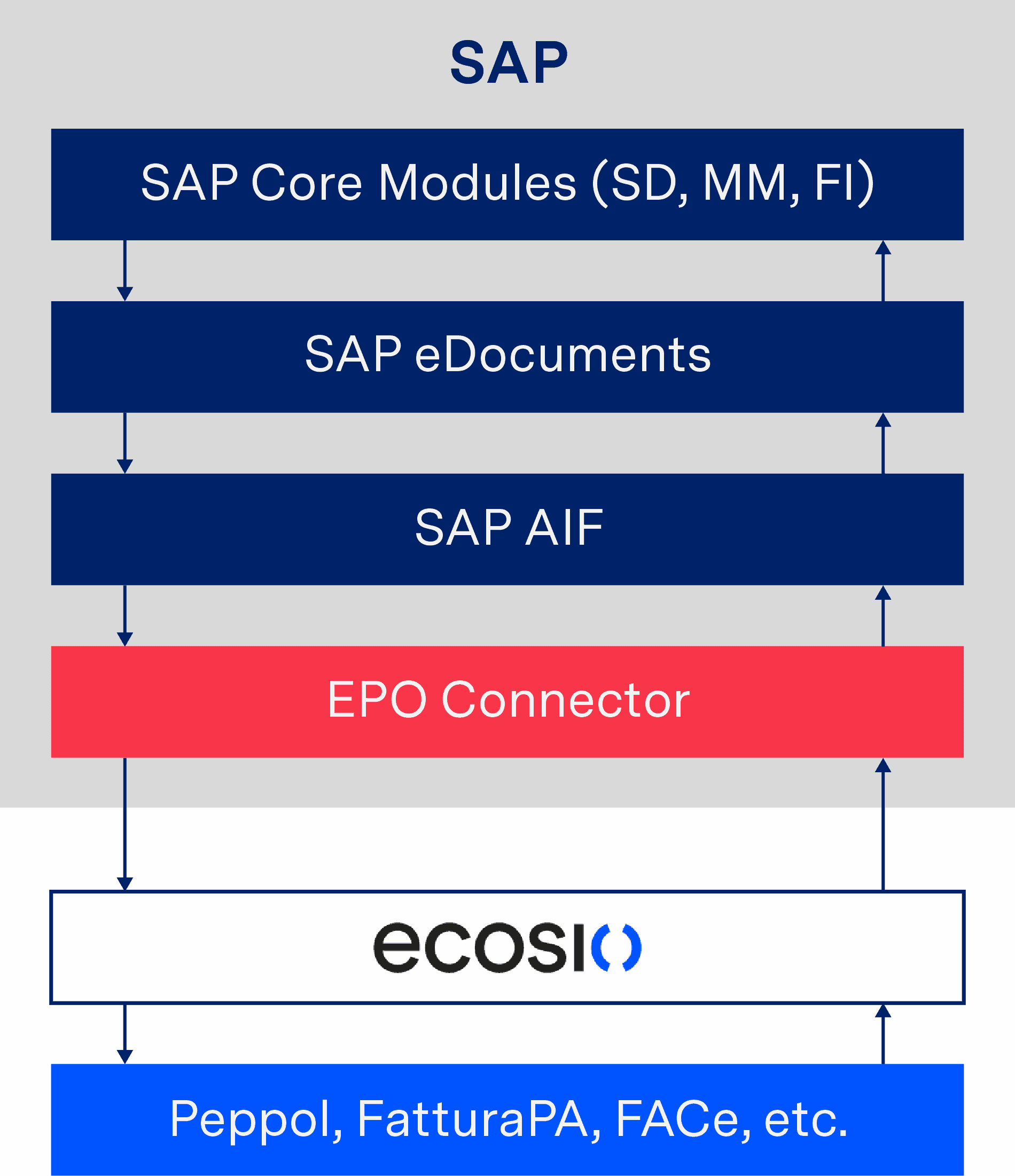
Conversion of an e-invoice via AIF and shipping via a service provider
As soon as an invoice arrives in the service provider’s system, the required data for the delivery of the invoice is extracted, enabling the e-invoice to be sent to the recipient. In the case of XRechnung, documents are delivered to the recipient’s Peppol access point, such as a German authority. Receiving data, such as an order via Peppol, is also possible in this way.
If only the AIF is used in conjunction with the EDOC_COCKPIT, the invoices are only stored on the application server and must be manually downloaded and sent from there. With a connection to the EPO Connector, however, the dispatch and receipt of the invoices as well as the transfer of the invoicing data to and from SAP takes place fully automatically and without manual interaction. This allows complete automation of the invoicing process.
But what if you are unable to convert documents with AIF? Although SAP AIF is part of SAP Business Suite / S/4HANA and standard in modern SAP releases, to use the “SAP Document Compliance, On-Premise Edition” you need a separate license. If this is the case for you, it may make sense to consider outsourcing the conversion of eDocument formats to a service provider. If the provider is already connected to SAP ERP, the required process can be implemented particularly quickly and easily. The following example shows an integration of SAP eDocument in conjunction with the EPO Connector.
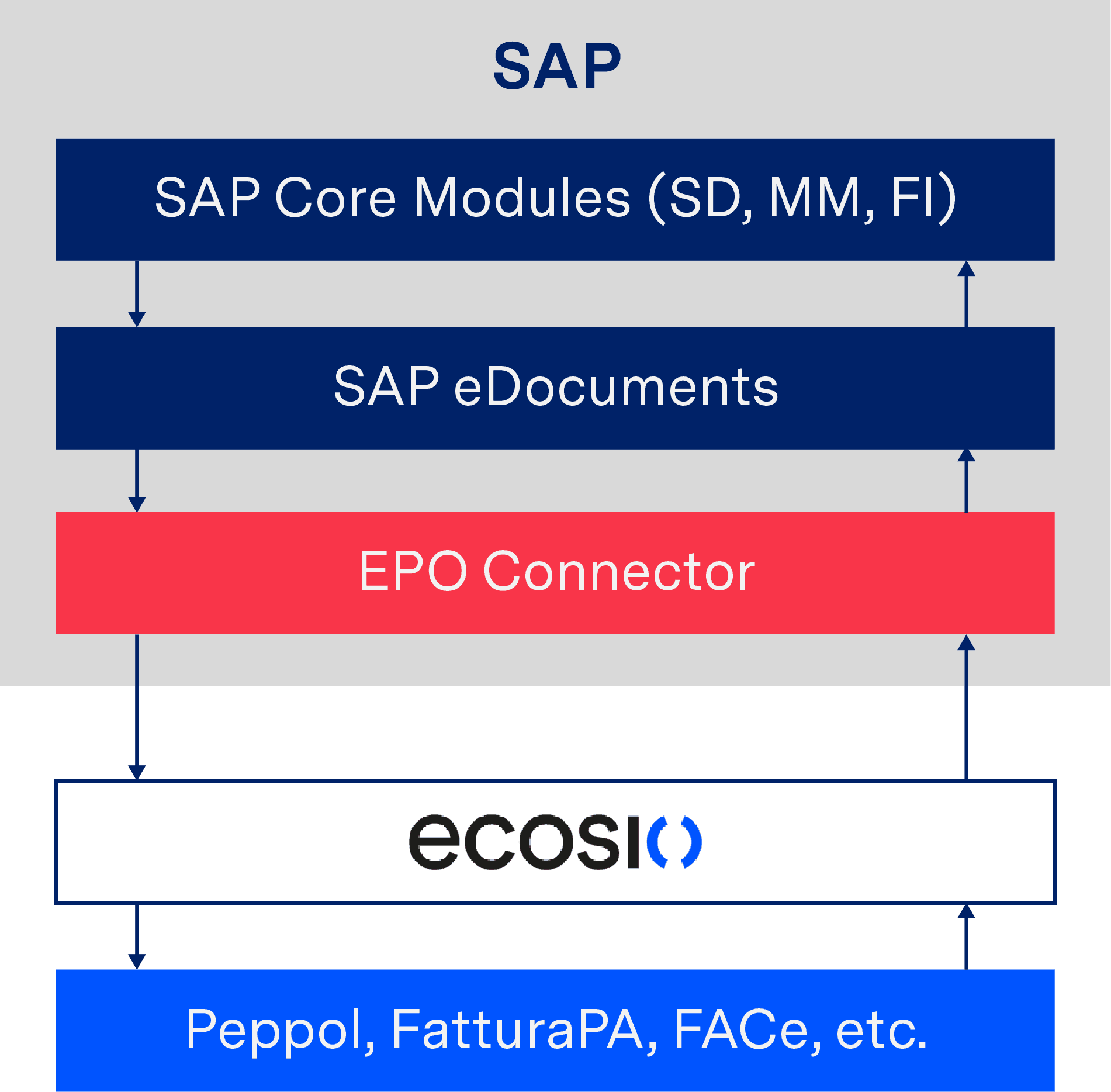
Conversion and sending of e-invoices with the help of a service provider
In this process, eDocuments are sent to the service provider via the EPO Connector, which then automatically determines the required invoice format and – if necessary – converts the document accordingly. It is then sent to the recipient as previously described.
Option 3: Use IDocs and a dedicated EDI service provider instead
The third and simplest option for internal teams involves bypassing the need to convert the documents internally (via Document Compliance) with a single connection to a fully managed service provider.
In such a solution, the provider is essentially a B2B network, creating and ensuring the success of all technical elements, such as conversion into all common and necessary formats, including e-invoicing requirements, as well as routing via various protocols, VANs and Peppol.
How this works
Let’s take the exchange of an invoice as an example using ecosio’s EPO connector…
Upon sending, the invoice data is transmitted directly from SAP ERP to the EPO Connector. The EPO middleware handles the conversion of the invoice into the required format and forwards the final document to your service provider. This takes care of the correct addressing and delivery of the e-invoice. The following figure shows the principle used.
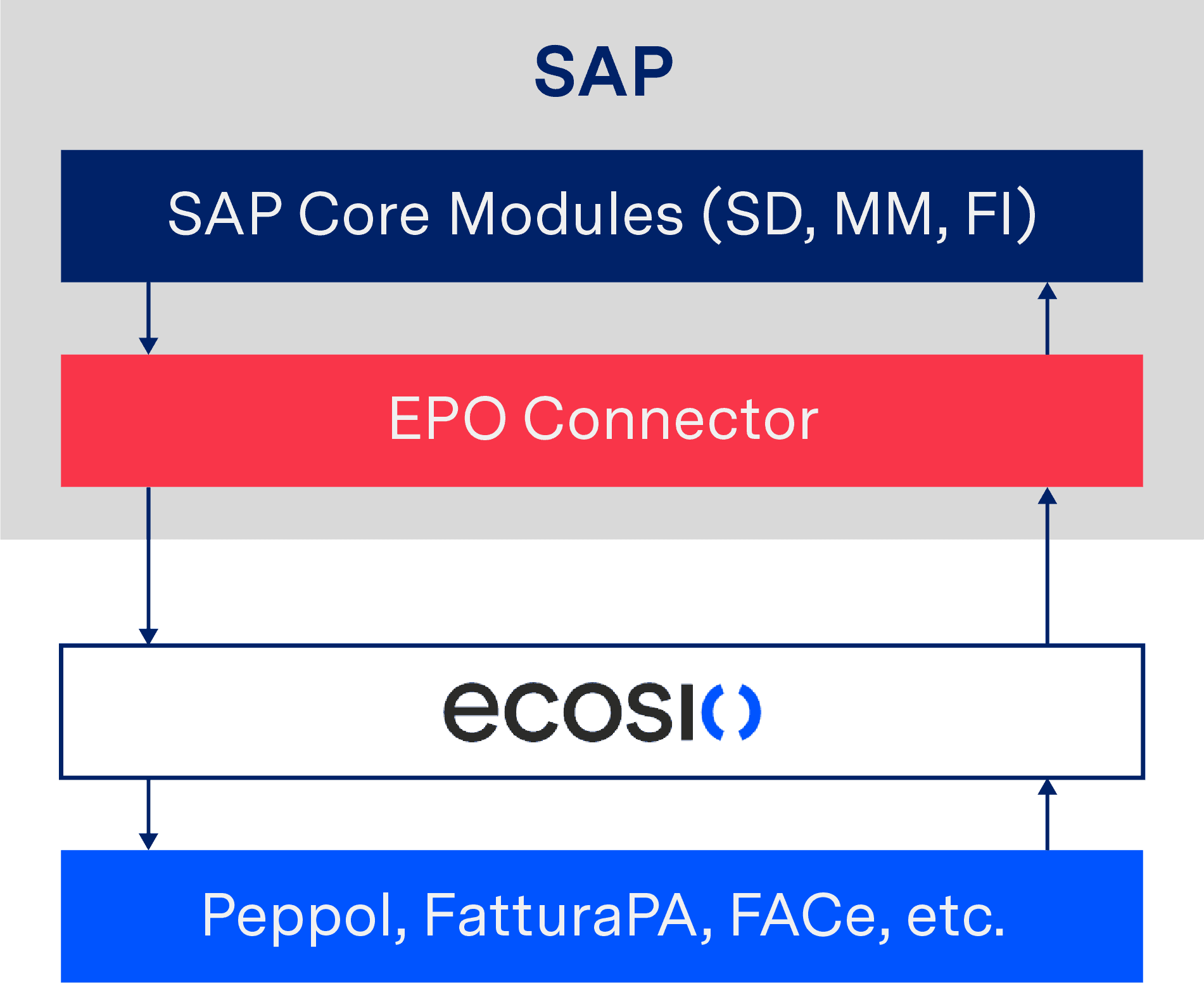
Conversion of an e-invoice via AIF and shipping via a service provider
The main advantage of this approach is the financial savings.
When using the AIF solution, many SAP notes must be imported. These in turn require a large number of further manual adjustments. For SAP consultants who work on a time and material basis, this can quickly become very expensive.
By contrast, using the EPO Connector in conjunction with ecosio eliminates expensive time and material costs, allowing you to work with predictable fixed costs. The final e-invoice solution is handed over “key in hand” and the exchange of electronic invoices can be fully automated.
The most efficient way to use fully managed EDI seamlessly in the familiar user interface of SAP systems is through integration via API (Application Programming Interface). This allows you to display the status of a sent message directly on the SAP IDoc or SAP document, for example, or to perform a full text search in all documents – for more information on what this means, see the following section.
The benefits of a fully managed EDI service provider
A fully managed service provider not only takes care of the conversion and transmission of e-invoices, but also the monitoring of ongoing processes. This way invoices that do not meet the required standard can be corrected immediately. In addition, converted invoices are validated before they are sent to ensure that the recipient has no reason to contest the invoice.
As e-invoicing is subject to constant change due to changing legal requirements, using a fully managed provider also provides peace of mind that your system will always be up to date. If new requirements are imposed by the legislator, these are implemented by the service provider and the company can make full use of the modified solution. There is no additional implementation effort for the company.
In short, fully managed EDI offers companies the possibility to use all EDI functions in their company without an expiration date – all while relieving internal teams.
Evaluating your options for document exchange with SAP
SAP document compliance undoubtedly offers a good basis for converting e-invoices into popular formats. Sending too can be effectively handled via SAP document compliance in combination with other SAP add-ons and extensive internal knowhow. However, handling EDI via a powerful single connection to a fully managed provider provides an easy-to-implement, future-proof and cost effective alternative for businesses without in-house expertise or simply looking to streamline the process.
To help you understand which option makes the most sense for you, we have identified 12 possible capabilities/funtionalities that you may desire from your SAP-EDI solution:
- EDI status visible on the SAP IDoc or SAP document (purchase order / invoice, etc.)
- Full text search across all documents
- Support for all standard EDI protocols
- Out-of-the-box routing to third party EDI networks (VANs)
- Out-of-the-box routing to Peppol
- Support for message conversion in EDI formats such as ANSI or EDIFACT
- Support for message split and merge
- Support for international e-invoicing requirements
- Automatic alerts when message failure occurs
- IDoc field conversions of ext./int. IDs in SAP
- EDI project coordination
- Ongoing support/monitoring/error resolution
For more information on these 12 points and to find out which solution offers what, download our white paper “EDI Integration in SAP: A Definitive Guide”. In it we expand on the specifics of these 12 functionalities and how they can benefit your business. We also compare the numerous options available to SAP users when it comes to EDI integration and how they differ in relation to these 12 factors.
Alternatively, if you have any other questions about EDI integration in SAP systems, or B2B data exchange more generally, please get in touch. We are always happy to help!
Are you aware of our free XML/Peppol document validator?
To help those in need of a simple and easy way to validate formats and file types, from CII (Cross-Industry Invoice) to UBL, we’ve created a free online validator. To try it out yourself!
SAP ERP and SAP S/4HANA are the trademarks or registered trademarks of SAP SE or its affiliates in Germany and in several other countries.
Der Beitrag Exchange of Electronic Invoices with the SAP eDocument Framework erschien zuerst auf ecosio.
]]>Der Beitrag Electronic Invoicing in Hungary – Transmission to the NAV System erschien zuerst auf ecosio.
]]>Due to the increasing spread of electronic invoices, the Republic of Hungary is now also relying on the use of electronic invoices (via the NAV system). The aim is to facilitate the reporting of VAT-related data to companies, increase transparency for invoice issuers, invoice recipients and the Republic of Hungary and, finally, fight sales tax fraud.
Those affected by the new law in Hungary are:
- Hungarian companies
- Foreign companies with a branch in Hungary
- From July 2020, anyone who issues an invoice to another domestic taxable person where the transaction is carried out in Hungary (regardless of VAT content)
For businesses, this means that invoices must be reported electronically through a centralized system. Invoicing data are transmitted electronically in XML format to the Hungarian NAV system. For companies that cannot generate XML documents, there is also a web-based interface available, via which the invoicing data can be entered manually. Due to the manual processing, the web interface is only convenient with a very small invoice volume.
The notification to the Republic of Hungary must be made within three days – and ideally directly after the invoice is created.
Technical Realisation
Invoices are sent to the NAV system in Hungary via a web service, whereby the invoice data must be transmitted in XML format. The official NAV website of the Republic of Hungary provides a detailed technical description of the web service as well as the XML schemas.
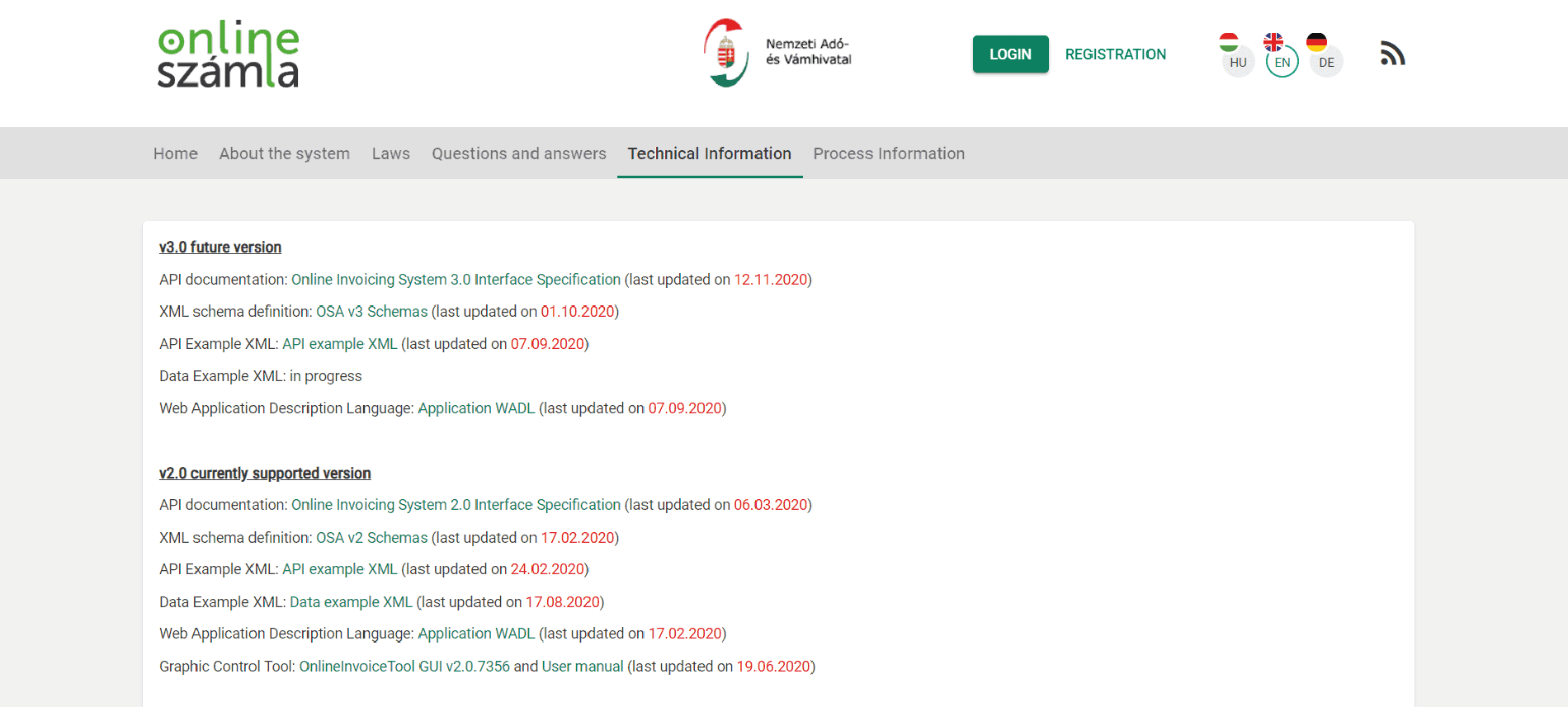
Website of the NAV system
The information is available in Hungarian, English and German, although not all parts of the website have been translated into English and German.
A look at the WADL file shows the methods offered by the Web service:
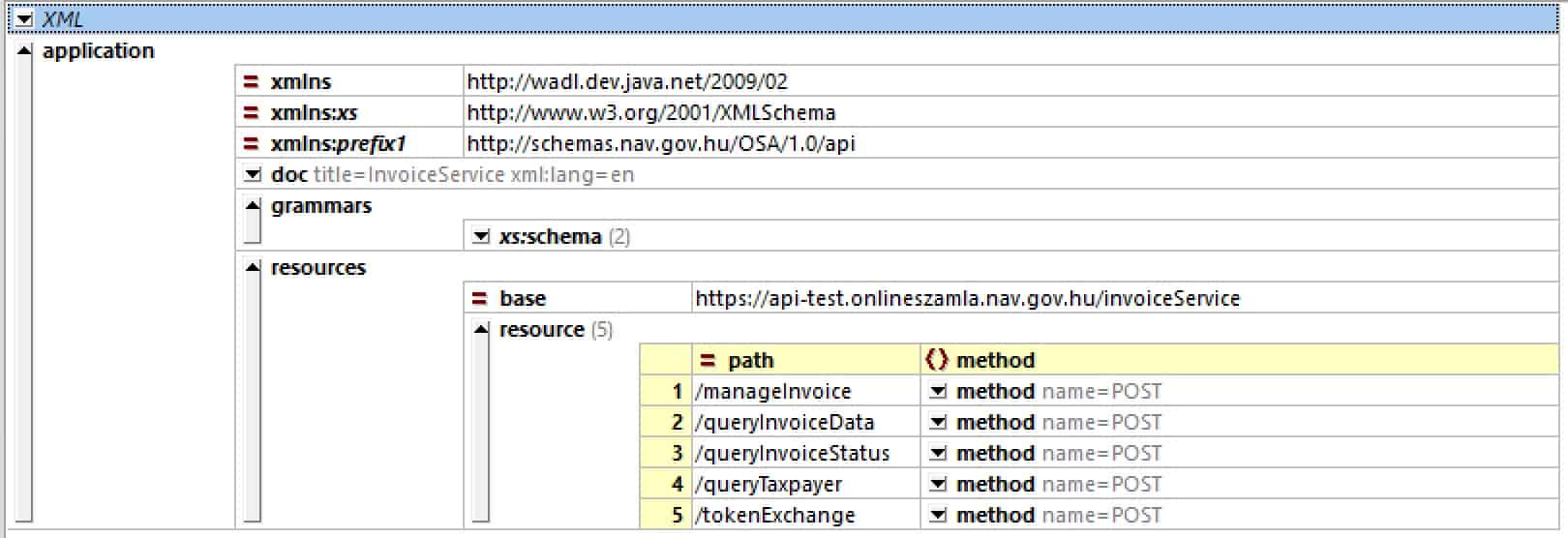
Web service operations of the NAV system
As can be seen, all communication is handled using HTTP POST operations. RESTful purists may raise their eyebrows at this.
The exact sequence of the individual web service calls and the code examples in Java can be found in the Technical Guide on the NAV website.
Transmission from the ERP System
When automatically transferring invoice data to the NAV system, the invoice data is taken directly from the ERP system. This means that in addition to issuing a regular invoice, an invoice artefact for the NAV system must be generated. For this, a corresponding copy control must be set up in the ERP system.
As shown in the following figure, the invoice document is transferred to ecosio in the ERP export format (e.g. IDoc in the case of SAP). ecosio converts the ERP export format into the desired target format of the NAV system, according to the official OSA XML schema. Subsequently, the invoice document is transmitted.
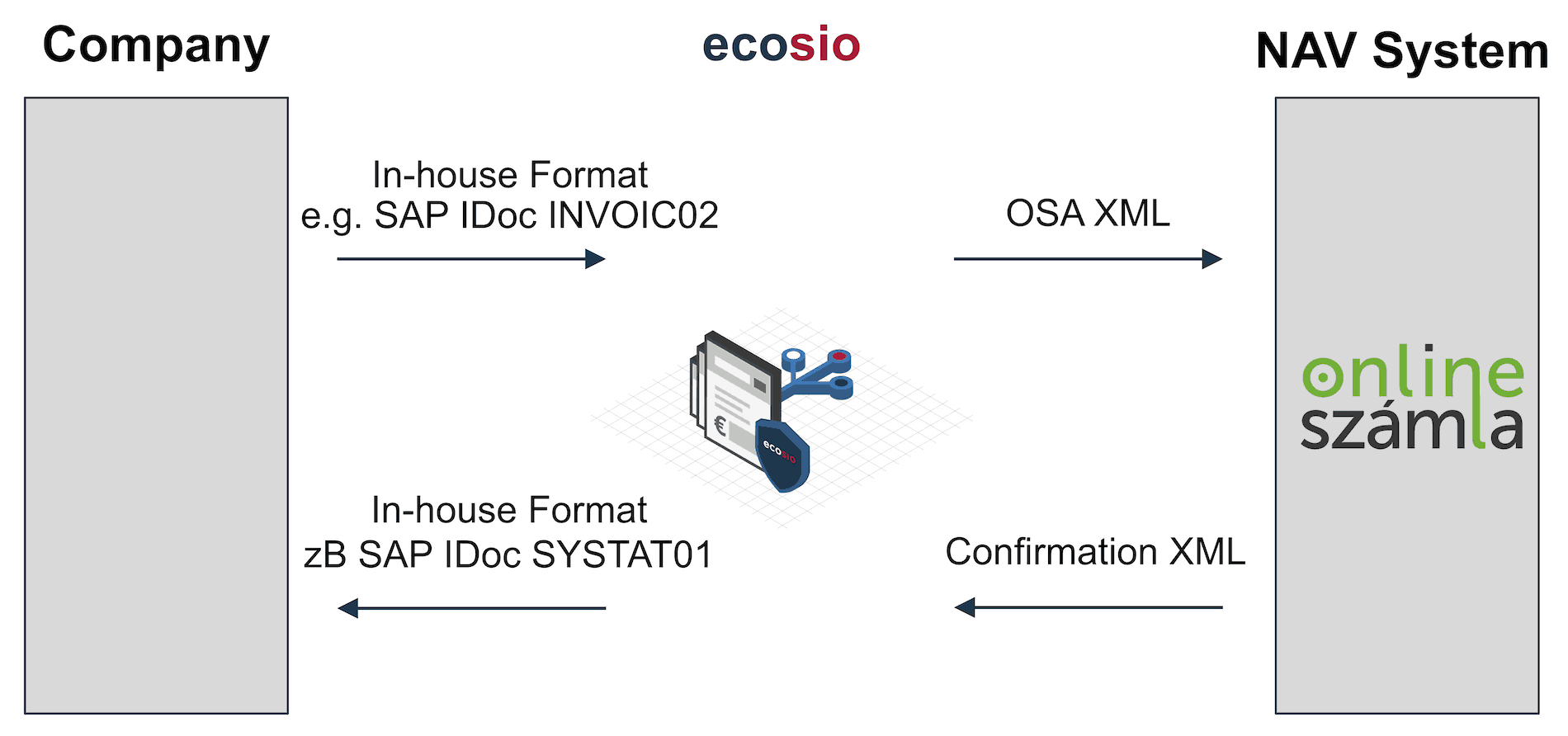
Transfer of data from the ERP system
The Web Service returns a confirmation message about the processing of the delivered invoice as an XML document. This XML document is converted by ecosio into a message state (invoice successfully transmitted, or invoice not successfully transmitted) and, if desired, can also be sent back to the ERP system as a separate XML document.
In the case of an SAP system, a confirmation can, for example, be based on a SYSTAT01 IDoc, which can be used to change the status of the originally transmitted invoice IDoc (for example, to status 41 – application document created in the target system).
Depending on the ERP system, the integration can be implemented as desired, allowing feedback in Microsoft Navision / Dynamics, Oracle, abas ERP, etc.
Registration
To file invoices in accordance with the Hungarian legislation, registration via the NAV system is necessary.
For companies from the DACH area, this means that the representative of the Hungarian branch must complete this registration and then create a technical administrator in the system. Using the access data of this technical administrator, an EDI service provider such as ecosio can then carry out the next setup steps and start the tests.
Developers have their own test platform available.
Questions?
Do you still have questions about e-invoicing in Hungary or are you looking for a solution to automatically transfer invoicing data to the NAV system? Please contact us or check out our chat – we are happy to help!
Are you aware of our free XML/Peppol document validator?
To help those in need of a simple and easy way to validate formats and file types, from CII (Cross-Industry Invoice) to UBL, we’ve created a free online validator. Try our free Peppol tool out yourself.
Der Beitrag Electronic Invoicing in Hungary – Transmission to the NAV System erschien zuerst auf ecosio.
]]>Der Beitrag How Can You Save an IDoc from SAP on Your Hard Drive? erschien zuerst auf ecosio.
]]>To save an IDoc (or, more accurately, export an IDoc) from an ERP system, you would normally do it via defined interfaces with the help of EDI or ALE. In the case of EDI, the IDoc is sent to a different business partner and when using ALE, it is sent mostly to a different application (e.g. a CRM system).
During the development of EDI or ALE interfaces, it may also be necessary to have an IDoc as a file on your local hard drive. To save an IDoc as a file locally, you can proceed as follows.
Please note this is different to saving an IDoc as an XML. To find out how to do this please read our article “How to Save an IDoc as an XML – A Guide”.
Save an IDoc as a file
In the first step, search for the IDoc using transaction WE02, as the picture below demonstrates. To execute the transaction, press F8.
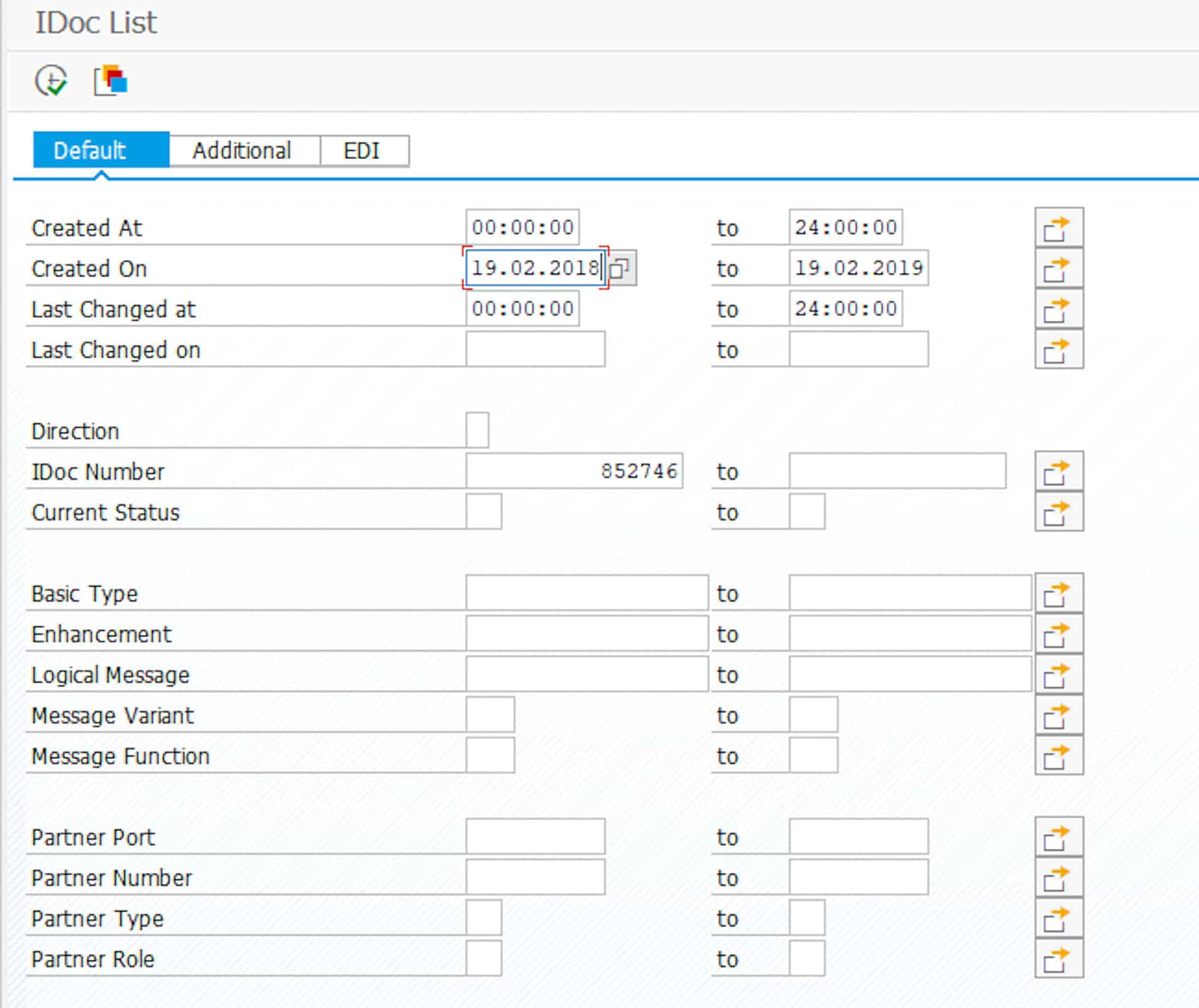
How to look for an IDoc with Transaction WE02 (click for a larger view
© 2020. SAP SE or an SAP affiliate company. All rights reserved. Used with permission of SAP SE.
If you find more than one IDoc, double click on the desired IDoc in the detailed view. This will open the IDoc detailed view, and you can then choose Print IDoc in the menu bar under IDoc.
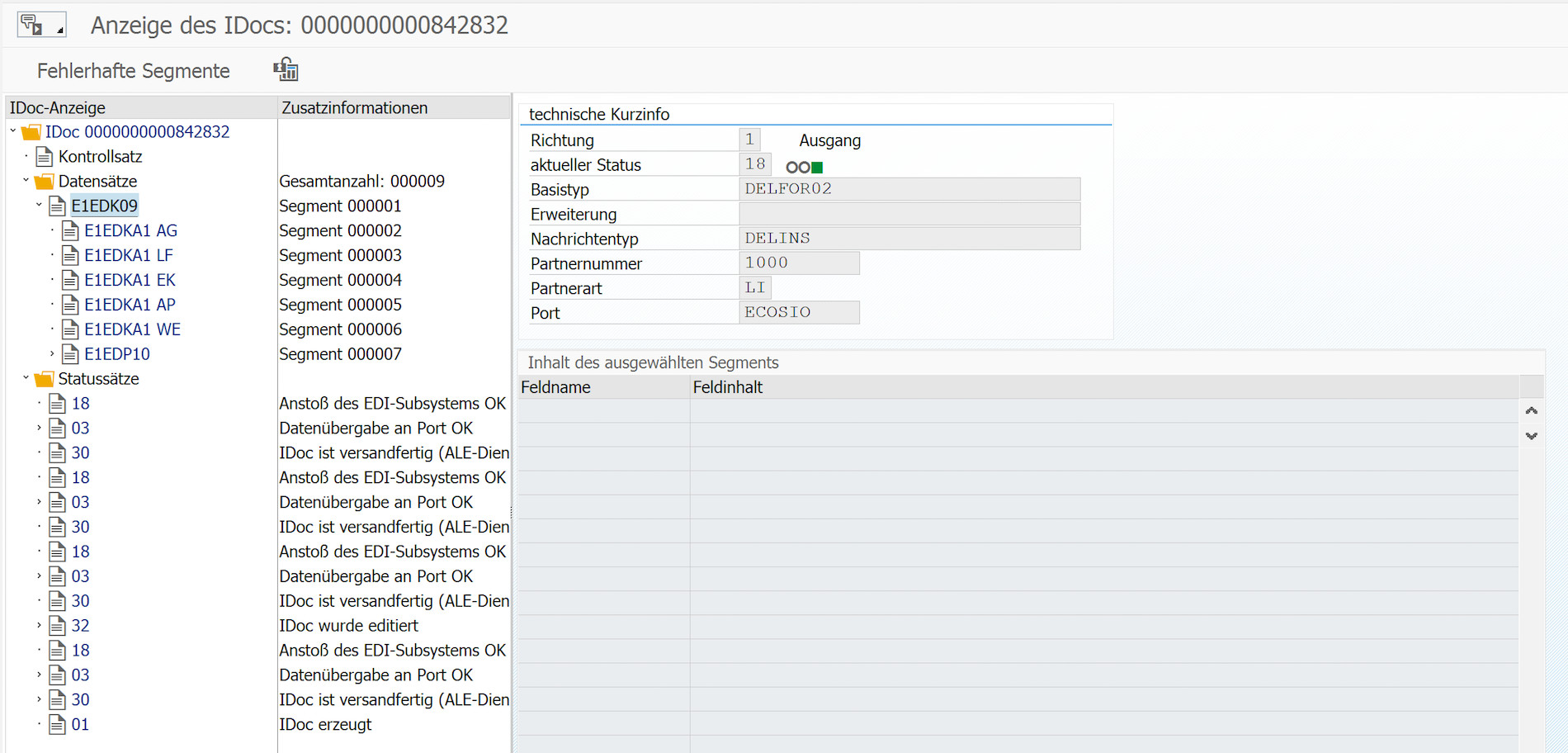
© 2020. SAP SE or an SAP affiliate company. All rights reserved. Used with permission of SAP SE.
The content of the IDoc is shown in a table in the next step. If you go to the export functions in the function bar (where the arrow is), then you can export the IDoc as a file, an Excel file for example.
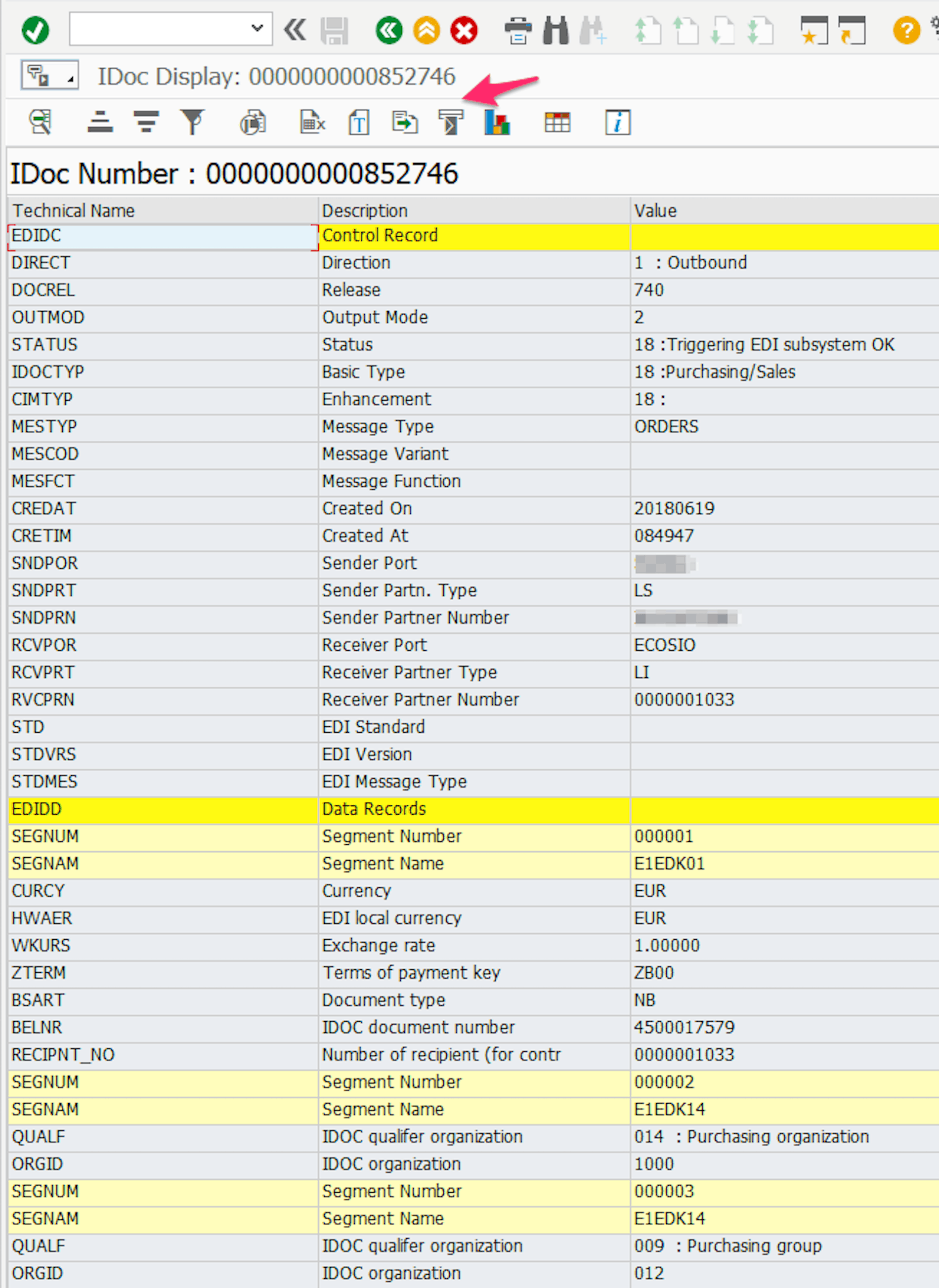
Overview of the IDoc Content in a Table
© 2020. SAP SE or an SAP affiliate company. All rights reserved. Used with permission of SAP SE.
Any questions?
Do you still have questions about how to save an IDoc or about SAP in general? Feel free to contact us or check out our chat, we would love to help you!
You may also find the following articles helpful:
SAP ERP and SAP S/4HANA are the trademarks or registered trademarks of SAP SE or its affiliates in Germany and in several other countries.
Der Beitrag How Can You Save an IDoc from SAP on Your Hard Drive? erschien zuerst auf ecosio.
]]>Der Beitrag Create and Process UBL Documents with Attachments in SAP erschien zuerst auf ecosio.
]]>As of November 27th 2019, all federal agencies in Germany must be able to receive and process XRechnung. XRechnung is the German CIUS (Core Invoice Usage Specification), which originated from the EU standard EN 16931 . EN 16931 provides two types of XML schemas: Universal Business Language (UBL) and UN / CEFACT Cross Industry Invoice (CII). As a result, the ability to process CII and UBL documents is becoming increasingly important.
Companies that are contractors of public institutions must be able to create and send XRechnung. Furthermore, the billing format is also used in the B2B sector, which is why it makes sense for companies to make their ERP system fit for the creation, transmission, and receiving of XRechnung.
SAP ERP is one of the most popular ERP systems in the world but cannot create, convert or read documents out of the box according to the UBL standard. This means that without add-on modules, SAP ERP cannot work with the standard XRechnung and companies must look for suitable solutions.
Create UBL documents in SAP using the EPO connector
The SAP ERP system cannot generate XML files from the SD and FI modules that conform to the UBL specification. However, a solution can be created by using middleware in conjunction with a service provider. The EPO Connector happens to be a middleware solution that is integrated directly into the SAP system and helps connect further external products and services to the SAP. This means additional functions can be added to SAP cost effectively without having to intervene in the system itself.
In the following, we’ll look at how to use the EPO Connector to create UBL files with attachments, and also send and receive them.
Create and send XRechnung with attachments
Using the EPO Connector, e-Invoices can be created in UBL format from SD and FI documents. Since the middleware is written in ABAP and thus runs directly in SAP, no external tool is necessary, and the invoice workflow can be completely mapped in SAP. In addition, the EPO Connector can be used to integrate attachments into UBL that are directly embedded as Base64-encoded character strings in the document. For this purpose, UBL has its own attachment elements (cac: AdditionalDocumentReference):
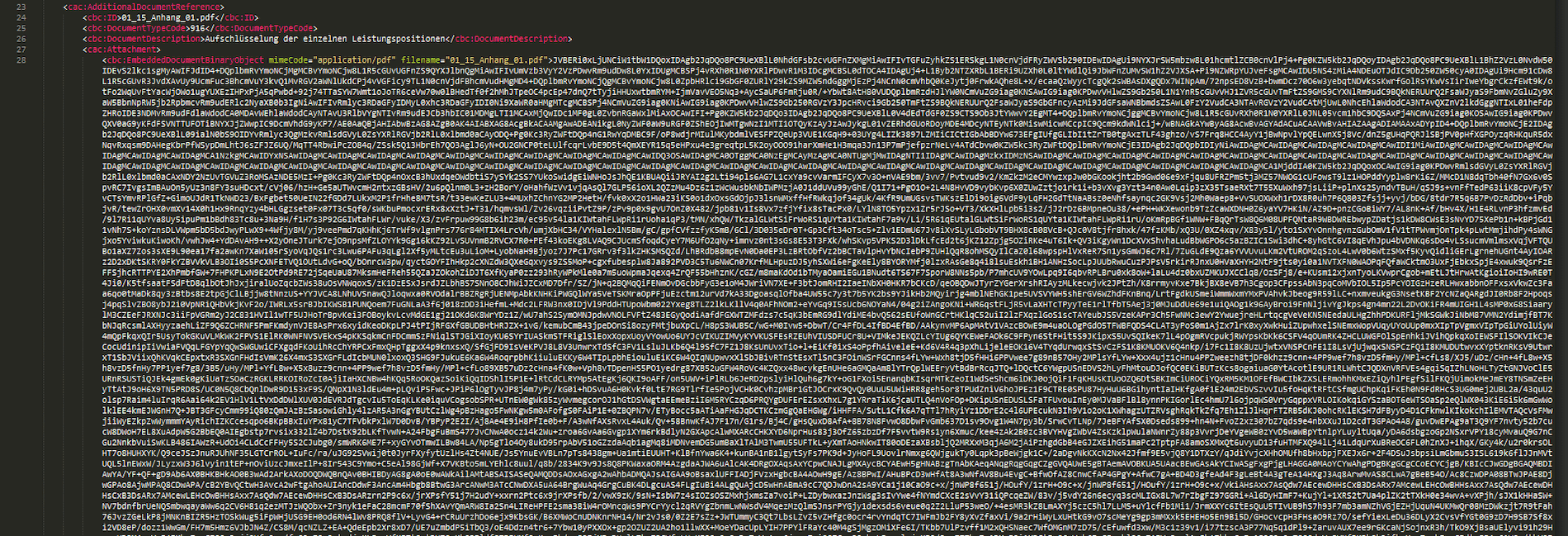
Extract of a Base64-encoded Attachment in UBL
The EPO Connector takes care of the correct coding and embedding of the desired attachments and creates the final UBL file according to the XRechnung specification. In order to be able to transmit the created e-Invoice to the recipient, a service provider such as ecosio can be connected to the middleware. ecosio reads out the sender and recipient ID as well as the document type and sends the invoice to the bill-to party via the required channel. This results in a consistent and seamless invoice delivery and invoice receipt process. Peppol (Pan-European Public Procurement Online), which was developed by the European Union to facilitate the exchange of data between companies and public authorities, must be used for the automatic sending of XRechnung. In this case, the service provider connects to the recipient’s Peppol access point, which receives the transmitted XRechnung and forwards them for processing.
Receive and process XRechnung with attachments
The invoice receipt process using the EPO Connector is like sending invoices. The EDI service provider receives invoices via the required protocols (e.g. Peppol) and transfers them to the EPO Connector, which controls the transfer of the documents to the SAP system of the company. Since SAP cannot work with the XML format UBL, the received documents must be converted to the required SAP format. The EPO Connector is responsible for the correct conversion and unpacks any attachments from the UBL.

Invoice Book for Incoming Invoices Provided by the EPO Connector.
© 2020. SAP SE or an SAP affiliate company. All rights reserved. Used with permission of SAP SE.
These attachments are appended to the final SAP document and can be viewed in the system as usual. The approval workflow can now be started in SAP and invoices released accordingly for payment.
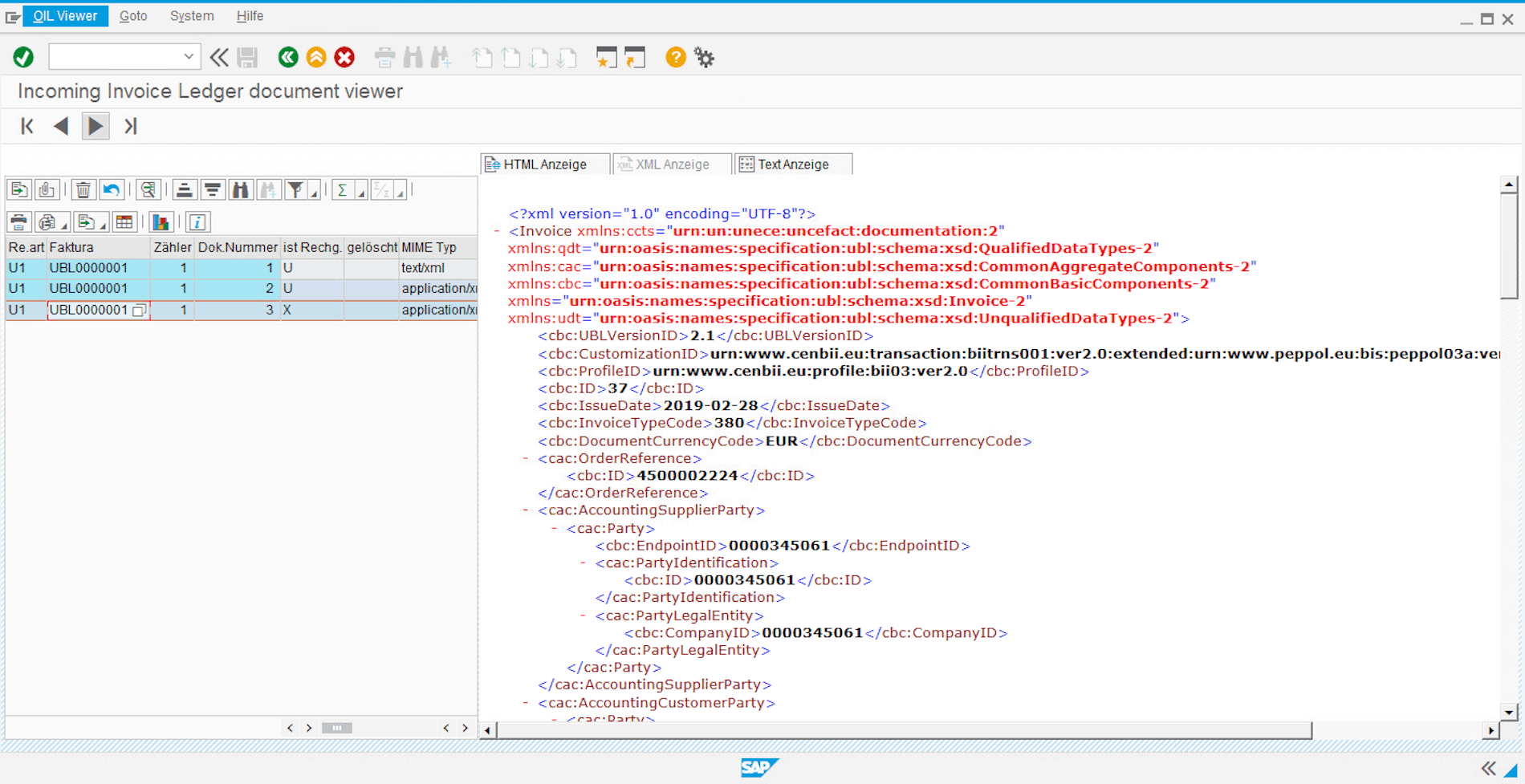
© 2020. SAP SE or an SAP affiliate company. All rights reserved. Used with permission of SAP SE.
Transmission of UBL invoices by ecosio
Thanks to ecosio’s connection to the SAP system, documents can be sent in various structured formats via all common EDI protocols. In addition to the usual document exchange protocols such as X.400, AS2, SFTP, SMTP, OFTP2, as well as EDI networks such as GXS, INOVIS, etc., files can also be accessed via special platforms such as Peppol, FACe (Spain) or the Sistema di Interscambio (Italy).
This makes it quick and easy to send and receive UBL documents via the Peppol network.
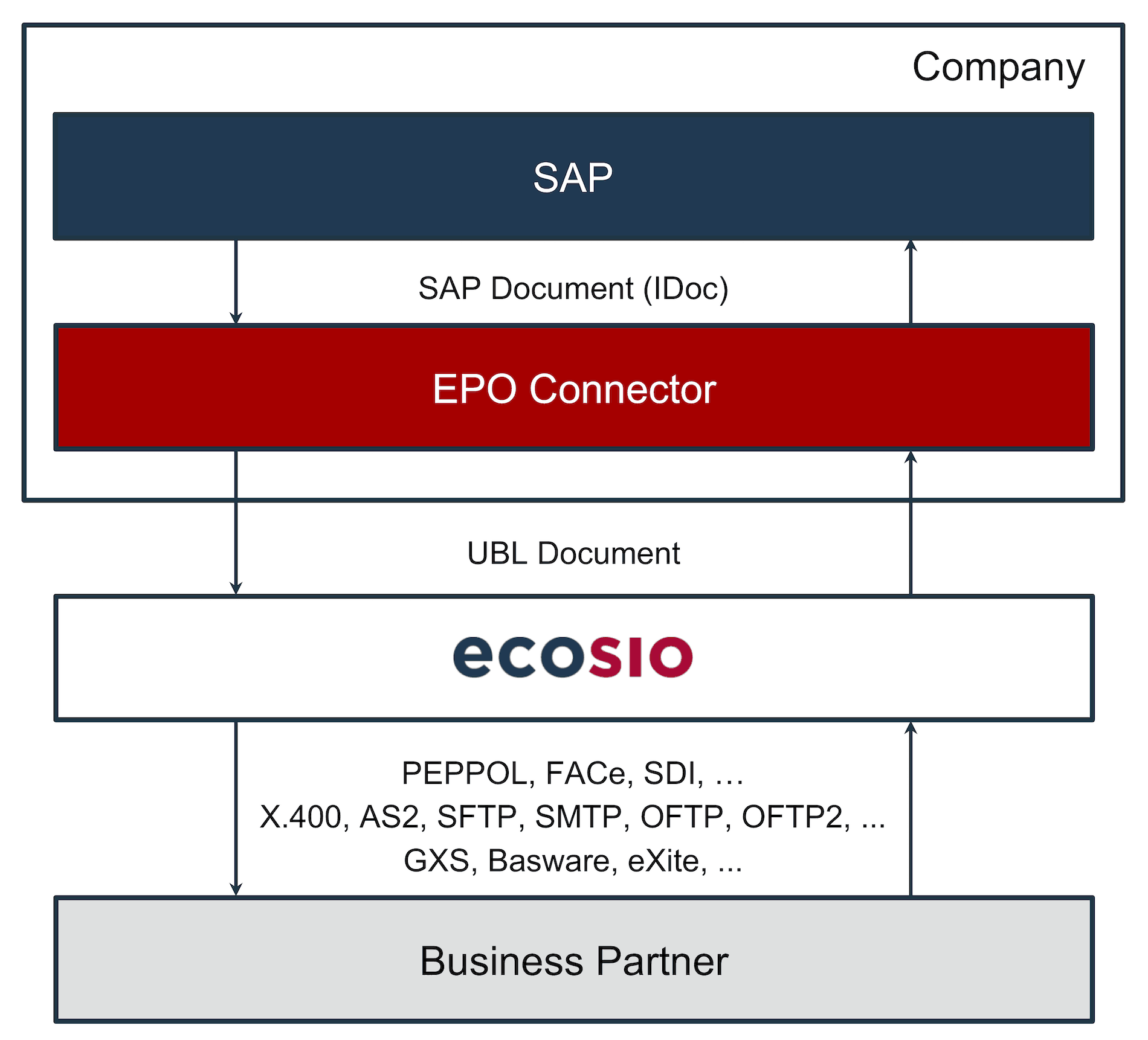
Conversion and Dispatch of UBL Documents with the EPO Connector and ecosio
Since ecosio allows the connection of any partner via different protocols, companies do not need to worry about expensive special programming in SAP. In conjunction with the EPO Connector, companies stay up to date with the technological requirements surrounding EDI and can focus on their core business.
Summary
The EPO Connector allows companies to convert invoices in SAP into XML format UBL and add attachments. Likewise, UBL documents can be received, converted into an SAP format and then edited. In conjunction with ecosio, the generated invoices can be sent via all standard exchange protocols. It is also possible to send and receive XRechnung via Peppol with ecosio.
Thus, companies are not dependent on expensive additional software for SAP but can pursue a long-term and cost-saving strategy to meet the ever-increasing requirements for e-Invoices.
Any questions?
Do you still have questions about UBL documents in SAP and how they can be created and sent? Feel free to contact us or check out our chat, we would love to help you!
SAP ERP and SAP S/4HANA are the trademarks or registered trademarks of SAP SE or its affiliates in Germany and in several other countries.
Der Beitrag Create and Process UBL Documents with Attachments in SAP erschien zuerst auf ecosio.
]]>