Der Beitrag The 7 EDI Documents Typically Found in a Trading Partner Cycle erschien zuerst auf ecosio.
]]>The exchange of business documents is part of a procurement process between suppliers and buyers, whether in retail, automotive or other production industries transacting goods and services on a regular basis. The following figure represents the typical flow of the seven most common EDI documents between a buyer and seller in a trading partner cycle, which I will explain further below.
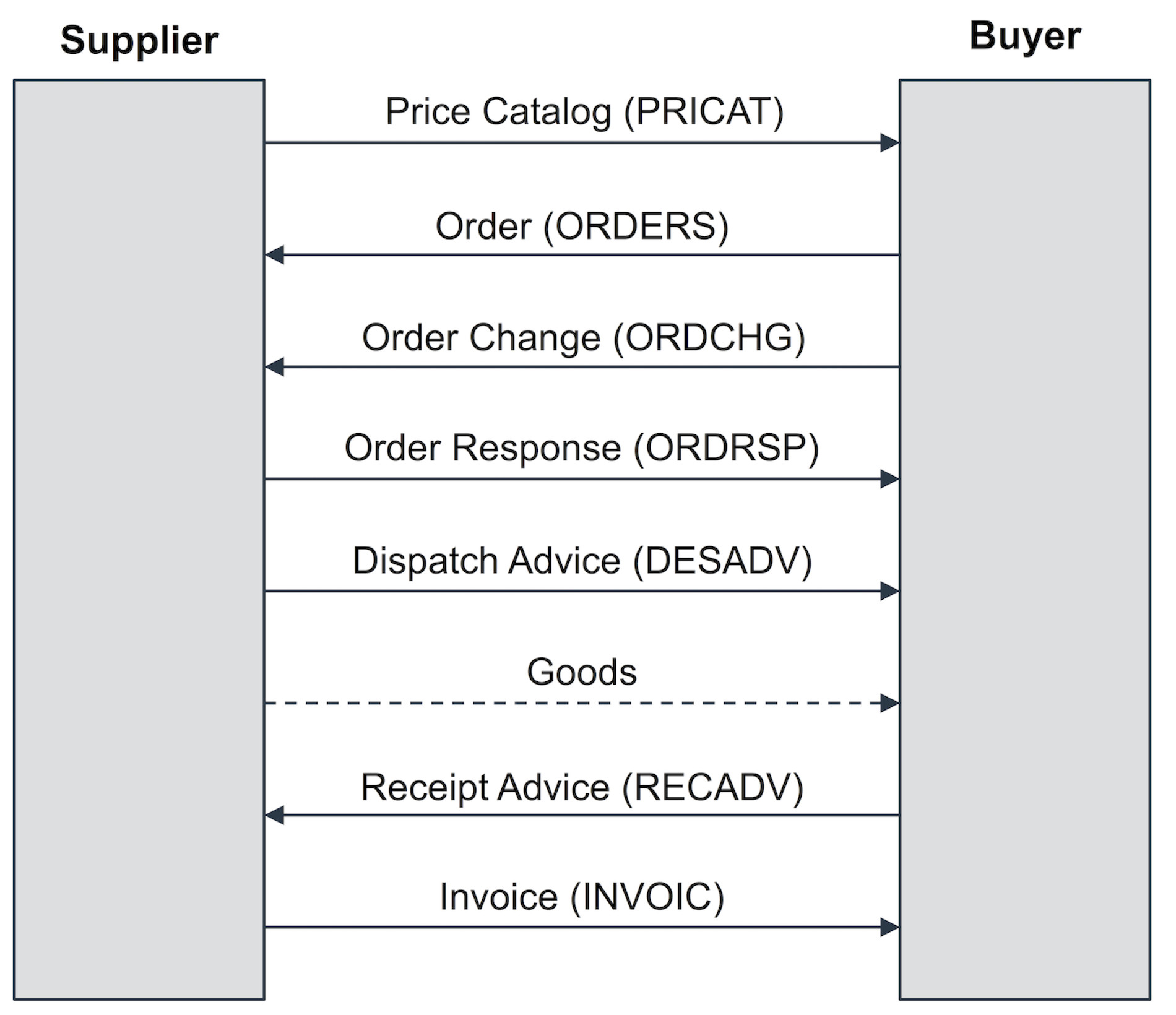
buyer and seller in a trading partner cycle
Price Catalog (PRICAT)
The first step of the exchange process between trading partners, is the price catalog and is required when the supplier provides the buyer with a current list of its products, product details, as well as price information. This process is commonly referred to as the product master data exchange, however, is not that common in modern trading partner cycles.
Purchase Order (ORDERS)
Once a buyer decides on the parameters of purchase from its supplier, the buyer must send a purchase order in order to receive those good. As such, this document is a necessary EDI transaction used by a customer, e.g. Sainsbury’s or Skanska, to place an order with one of its suppliers, e.g. Nestle or Tata Steel. This will contain the same information included in a traditional paper purchase order (PO), such as specific items and quantities to be produced, pricing and applicable discounts and shipping details. With EDI, the message includes coded information about the buyer, supplier, delivery point, products, etc. This means that unique identifiers such as global location numbers (GLNs) or global trade identification numbers (GTINs) are used for the identification of the involved trading partners and their goods. GLNs and GTINs are mostly found in retail and wholesale – manufacturing and the automotive industry often build on supplier’s or customer’s article numbers for material identification. In regard to partner identification bilaterally agreed IDs (e.g. JLR for Jaguar Landrover) or DUNS numbers are often used.
The benefit of using purchase orders via EDI allows businesses to avoid data entry errors associated with manually entering data into your system. It also reduces time delays and speeds up the process of sending and receiving documents, as well as, eliminating duplicates.
Order Change (ORDCHG)
A buyer may wish to request to change the quantity of goods ordered or the requested delivery date by emitting an order change message, indicating to the supplier a change of the initial purchase order.
Order Response (ORDRSP)
The supplier may acknowledge a received order message or a received order change message using an order response message. The order response can also be used as an Order Confirmation so as to recap and confirm what was in the purchase order. The supplier is essentially telling the customer that the order was received and they will take the job. It closes the loop and confirms the order electronically, without a follow up call or fax. The document can also indicate that the purchase order was accepted or rejected. It can even indicate any changes in pricing or quantity, alert the customer of product availability (in stock or backorder) and provide ship and delivery dates.
An automatic update of confirming an order or response will prevent confusion or mistakes when the invoice is sent later down the line. Time and money is saved by not having to follow up manually and check.
Dispatch Advice (DESADV)
A supplier notifies the buyer of the shipped good the buyer can expect to receive. Using the dispatch advice message, the supplier provides the buyer with information about the shipment including number of pallets, pallet identification numbers such as serial shipping container codes (SSCC), net and gross weight, identification of the transport vehicle such as license plate number of the truck, etc.
The benefit of this is that the buyer may coordinate the arrival and processing of the goods-to-arrive, e.g., in case of cross-docking-scenarios, frozen goods, etc. Furthermore, the buyer may verify the completeness of the shipment by comparing the received goods with the information provided in the previously received dispatch advice message.
Receipt Advice (RECADV)
After the goods have been received by the buyer, the buyer may emit a receipt advice message, confirming the amount of received goods. The amount of confirmed goods in the receipt advice may be different from the amount communicated by the supplier in the dispatch advice. Reasons for such a deviation may for instance be damaged goods the buyer refuses to accept or a wrong number of goods shipped by the supplier.
Invoice (INVOIC)
An outbound EDI document that replaces the traditional paper invoice. This document basically says that your order is complete and has shipped, so now we are billing you. Invoice details typically include goods provided, shipping particulars and payment terms. If your EDI is embedded, the invoice data is usually translated directly out of your accounts receivable module into the EDI document and subsequently into the accounts payable module of the customer.
Questions about the trading partner cycle of document types?
If you’d like more help with gathering your requirements from your supply chain, you can reach out – we’d be happy to help. or check out our chat.
Der Beitrag The 7 EDI Documents Typically Found in a Trading Partner Cycle erschien zuerst auf ecosio.
]]>Der Beitrag How to Delete an IDoc in an SAP ERP System erschien zuerst auf ecosio.
]]>- Transaction BD87 is a useful tool for the administration of IDocs, ideally showing green or yellow statuses and identifying faulty IDocs in error statuses
- You can either edit and process the faulty IDoc again or delete the old IDoc to keep a clean BD87, depending on whether it’s outbound or inbound and whether data can be regenerated
- To delete an IDoc you can change its status (for example to status 31 or status 38) to reset it without physical deletion, maintaining housekeeping in BD87
- Physical deletion is performed using transaction WE11, exercising caution through the confirmation prompt and the available test run option
Working with IDocs
An IDoc (Intermediate Document) is the central import and export format of an SAP ERP system. By using IDocs, you can export and import any type of data from an SAP system. In addition to the pre-defined IDoc formats, such as ORDERS, ORDRSP, DESADV, etc, you can also define your own IDoc formats.
In the SAP system, transaction BD87 is a useful tool for the administration of IDocs. Ideally, all IDocs have a green or yellow status in transaction BD87.
The following screenshot shows transaction BD87 in a test system. As you can see, some IDocs are in an error status. The status below would not be acceptable in a production system, as it would mean that important data would potentially not leave the system or were not received by it.
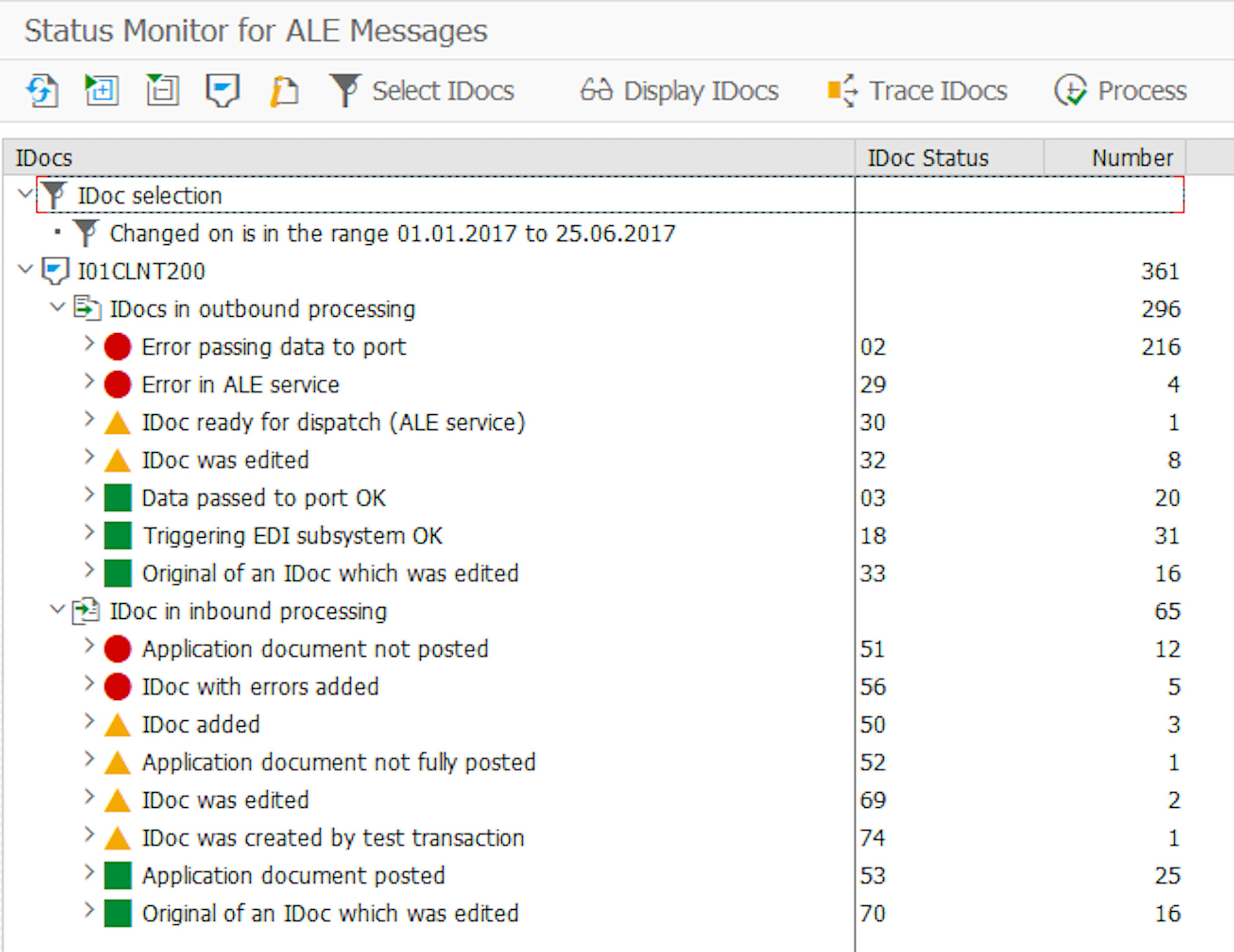
Transaction BD87 with Faulty IDocs
© 2020. SAP SE or an SAP affiliate company. All rights reserved. Used with permission of SAP SE.
There are two options to correct the red status in a production system. Either the IDoc can be edited and processed again, or the faulty IDoc can be deleted and the data regenerated. For outbound IDocs this means that the generating process in SAP needs to be started again (e.g., retriggering of DESADV IDoc generation using new LALE message entry). However, for inbound documents, this means that the data needs to be sent to the SAP system again, e.g., from the EDI system.
But first you want to delete the old IDoc, to keep a clean transaction BD87.
Deleting IDocs
There are two options to delete an IDoc.
The first option is to change the IDoc status, e.g. reset it to status 31 (error, no more processing) or to status 38 (IDoc archived). The IDoc is not physically deleted, but the status is reset, so that the IDoc does not stay in a defective status in transaction BD87.
The other option is to physically delete the IDoc. SAP provides transaction WE11 for this purpose, as shown in the Figure below.
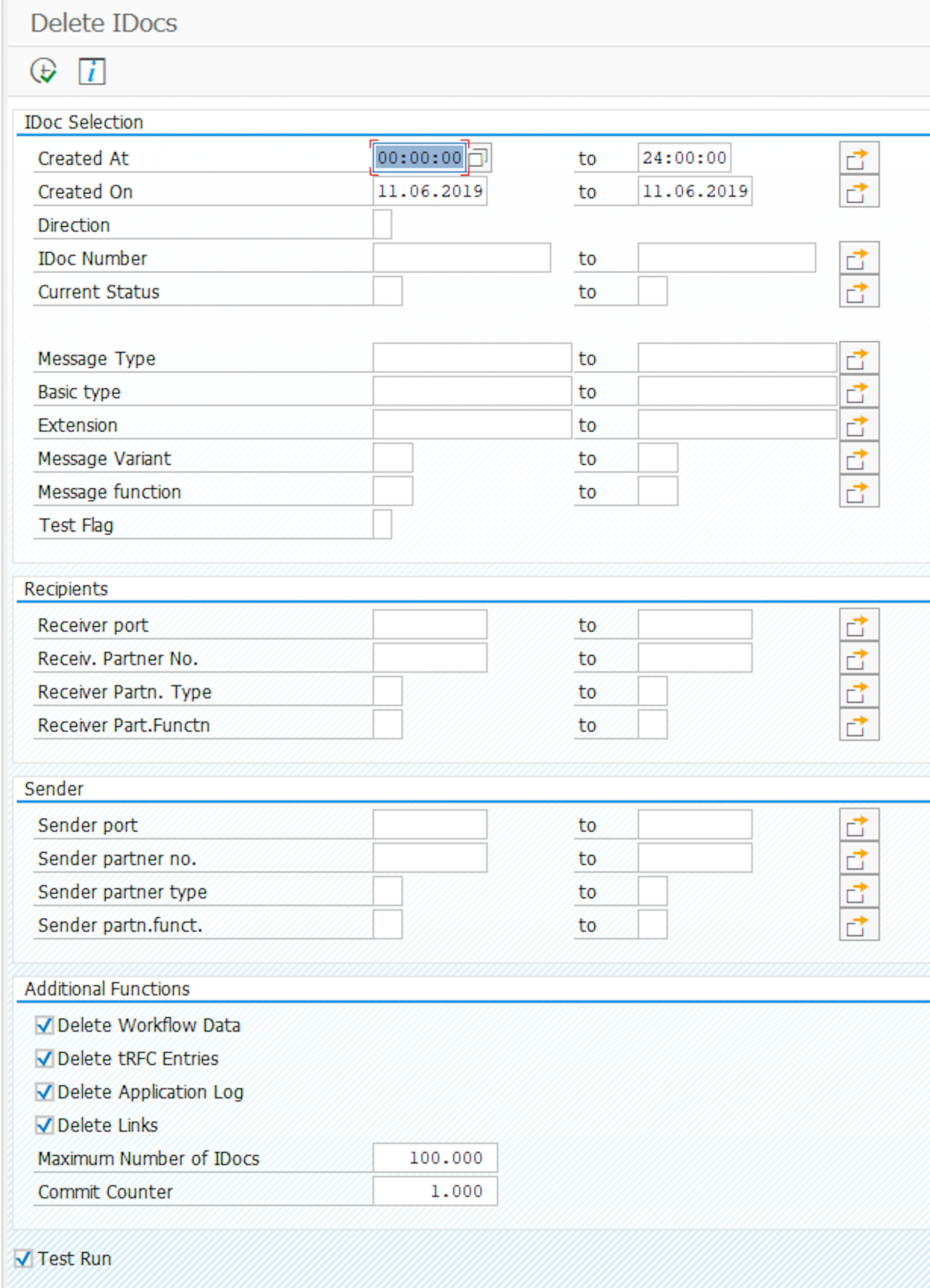
Transaction WE11 to Delete IDocs
© 2020. SAP SE or an SAP affiliate company. All rights reserved. Used with permission of SAP SE.
Similar to transaction BD87, you can select IDocs using several different parameters. Just as with transaction BD87, it is highly recommended to use extreme caution when using transaction WE11, as you could accidentally delete many IDocs. Fortunately, after clicking on execute (alternatively pressing F8), transaction WE11 will issue a confirmation prompt, as shown in the following screenshot.
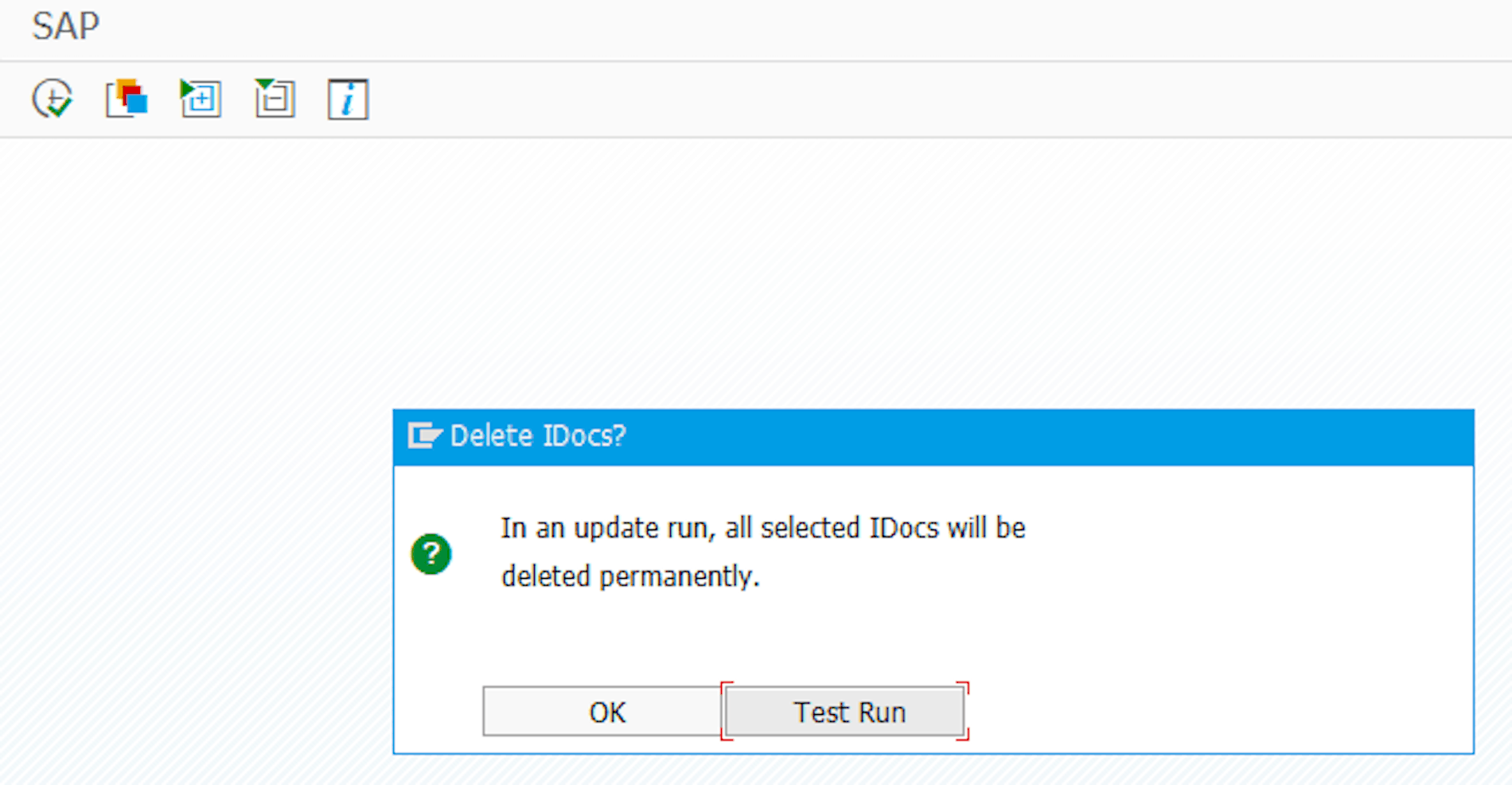
Confirmation Prompt in Transaction WE11 when Deleting IDocs
© 2020. SAP SE or an SAP affiliate company. All rights reserved. Used with permission of SAP SE.
If you are not sure, you can alternatively start a test run instead of deleting. In this case, the deletion is only simulated, and you can see how many IDocs would be deleted. Since deleting is a potentially irreversible action, one should be very careful about what exactly is selected for deletion.
After the deletion, an overview of the deleted artifacts will be displayed.

© 2020. SAP SE or an SAP affiliate company. All rights reserved. Used with permission of SAP SE.
Which of the two methods is used to delete an IDoc depends primarily on the compliance rules of the respective company. For example, transaction WE11 may be deactivated in the production system because, for audit reasons, you want to prevent something from being removed from SAP. Furthermore, access to transaction WE11 may only be possible for a small group of users (e.g., EDI administrators), as one would like to prevent the business units from accidentally cleaning up the system.
Any questions about IDocs or SAP?
You still have questions about SAP, IDocs or EDI? Please contact us or use our chat — we’re more than happy to help!
You may also find the following articles helpful:
SAP ERP and SAP S/4HANA are the trademarks or registered trademarks of SAP SE or its affiliates in Germany and in several other countries.
Der Beitrag How to Delete an IDoc in an SAP ERP System erschien zuerst auf ecosio.
]]>Der Beitrag SAP SD (Sales and Distribution) Reference Processes for EDI erschien zuerst auf ecosio.
]]>Sales and Distribution guides the sales processes from the first order request to the delivery and invoicing of the sold goods and services. Important modules of SAP SD are, for example: Master Data, Sales, Shipping, Transportation, Foreign Trade, Billing and Sales Support. They also happen to strongly depend on other modules such as FI/CO (Finance/Controlling), MM (Materials Management) or PP (Production Planning). This article will show you the type of documents that are exchanged using SD processes.
There are two main scenarios, which can be differentiated within SD. The first scenario is a sales process based on a scheduling agreement and the second a sales process based on purchase orders.
SD processes based on scheduling agreements
The automotive industry and its associated suppliers very often make use of scheduling agreements. The process diagram below shows the document exchange sequence when using scheduling agreements.
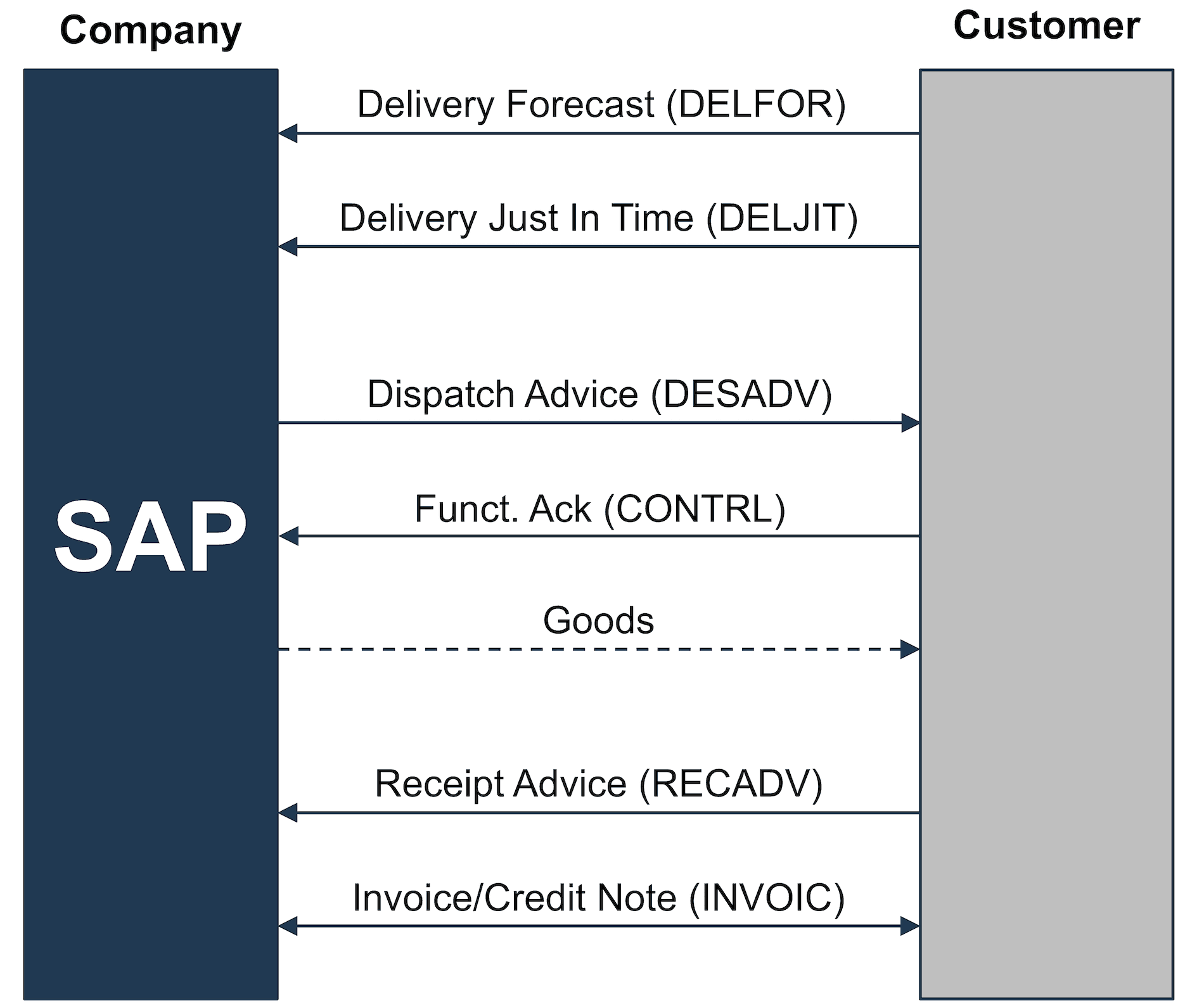
SD Reference Process based on a Scheduling Agreement
This process can be extended with additional transactions, such as the exchange of master data (based on PRICATs) or offer requests/offers.
However, the most important SAP SD processes for a delivery plan are:
- Customer sends a delivery forecast (DELFOR)
- Customer sends a just in time delivery forecast (DELJIT)
- Customer receives a dispatch advice (DESADV)
- Customer sends a receipt advice (RECADV)
- Customer sends a credit note (GSVERF)
- Customer receives an invoice (INVOIC)
Depending on the situation, confirmations can also be exchanged at business level, e.g., the client can send CONTRL files after receiving a dispatch advice.
SAP SD processes based on purchase orders
Regular purchase orders are typically used in the retail industry. In the manufacturing industry order changes and order confirmations are also frequently used. The process below shows the corresponding document exchange sequence.
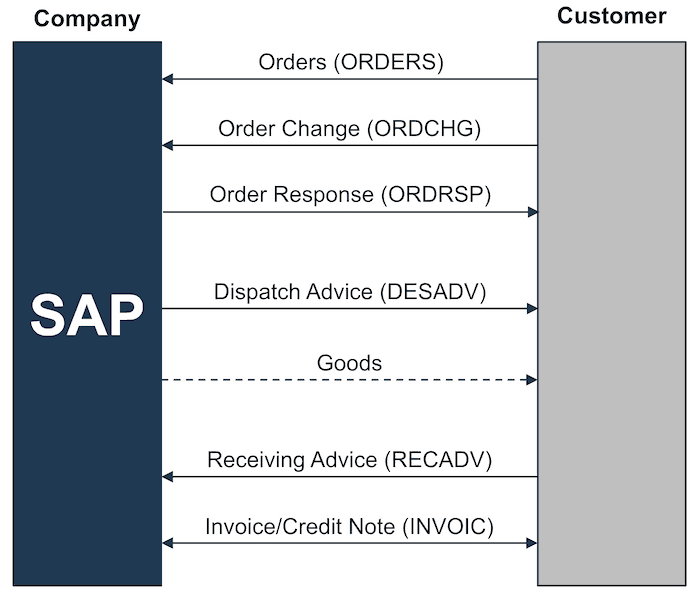
SD Reference Process based on Purchase Orders
Additional IDoc types such as PRICATs can also be used. The most important SD processes based on purchase orders are:
- Customer sends a purchase order (ORDERS)
- Customer sends a purchase order change (ORDCHG)
- Customer receives an order response (ORDRSP)
- Customer receives a dispatch advice (DESADV)
- Customer sends a goods receipt advice (RECADV)
- Customer sends a credit note (GSVERF)
- Customer receives an invoice (INVOIC)
Do you still have questions about SAP SD or EDI?
Do you still have questions about SAP SD and the EDI processes which go with it? Feel free to contact us, we would love to help you!
SAP ERP and SAP S/4HANA are the trademarks or registered trademarks of SAP SE or its affiliates in Germany and in several other countries.
Der Beitrag SAP SD (Sales and Distribution) Reference Processes for EDI erschien zuerst auf ecosio.
]]>Der Beitrag What is a DESADV with SSCC and Why Should I Care? erschien zuerst auf ecosio.
]]>Before we get into looking at DESADV with SSCC in detail, it is first necessary to understand the context. The retail trade has seen substantial changes in recent years. Most small grocery stores have closed down and branches from big retailers dominate the market. The difference between these small grocery stores (also known as convenience stores) and the modern supermarkets from today is, that supermarkets offer a much larger variety of products, which suppliers need to keep restocking.

An old fashioned grocery store
For retailers however this means that the ordering and shipping of goods from the manufacturers to the branches must take place smoothly and efficiently.
Depending on the type of goods, the companies rely on a direct store delivery or warehouse delivery.
Two things are crucial when it comes to deliveries:
- The goods arrival needs to be announced on time to allow correct planning of the inbound logistics for the retailer.
- The announced delivery and the physical delivery need to be clearly assigned.
The first case scenario is supported by the DESADV EDI message type. This EDI message needs to be sent before the goods physically arrive at the warehouse, as it describes the exact structure and content of the delivery.
The second case scenario is supported with identifiers, so called SSCC numbers (Serial Shipping Container Code). This number is fitted on the delivery as a physical, machine readable sticker with a barcode and is also contained in the DESADV message.
This allows the delivery process to the warehouse as illustrated in the image below: On the left side, we can see the goods have arrived in the warehouse and are being distributed to the correct shelves. In case of a cross docking delivery, the storing is bypassed and the goods are to be loaded on another truck right away.

Inbound logistics in a warehouse
Thanks to the supplier’s prior notice, the warehouse employees can plan the shelf space and immediately know where the pallets need to go.
Furthermore the pallets are fitted with the SSCC labels, which the warehouse employees can scan by hand (see illustration below). The employees scan the SSCC numbers and compare them with the data from the DESADV that was sent earlier. This way, they can verify whether the quantity or the structure of the shipment is correct.

A hand scanner being used in a warehouse.
What becomes clear with the above description of the process, is that the cooperation of the suppliers is vital to ensure a smooth running of the logistics. The DESADV messages have to be sent electronically and long enough before the arrival of the goods, and they must contain the SSCC numbers, which are also mentioned in the label of the shipped goods.
SSCC number example
SSCC numbers are used for the clear identification of shipping units.
SSCC numbers are based on a GS1 company prefix, just like most GS1 identification numbers. Other GS1 identification numbers include for instance GLNs and GTINs. A GLN – Global Location Number is a global, unequivocal and non-overlapping identification for a specific business. GTINs (Global Trade Item Number) are used to clearly identify products.
SSCCs have 18 digits and are set up as follows:
- 1 reserve digit
- 7 – 9 digits of the GS1 company prefix
- A consecutive number for the shipping unit. The allowed length depends on the length of the GS1 company prefix.
- A verification number.
Let’s use the ecosio InterCom GmbH GLN 4260304620007 as an example to create a SSCC number. The GS1 company prefix is 426030462:
- Reserve number:
3 - GS1 company prefix:
426030462 - Consecutive number for the shipping unit:
1234567 - Verification number:
8
We now have the SSCC 342603046212345678. This number can be used for the clear identification of the shipping unit. Since it is built using the GS1 company prefix, it is guaranteed that this SSCC will not be used by another company.
Here you can find out more about creating a SSCC number.
SSCC transport label
In order to easily and efficiently process the SSCC number in the logistic chain, it is necessary to display it as a machine readable barcode. The barcode can be captured by an optical reader, thus allowing a complete delivery to be unloaded in the warehouse, without anyone having to manually type any data.
This is exactly what the GS1 transport label is for. Not only does it contain information that the human eye can read, but also machine readable data contained in the barcode. The following picture illustrates the set up of a GS1 transport label:

Set up of a GS1 Transport Label
The label is composed of a header segment, which contains free formatted information about the sender and receiver. The middle segment contains information in clear text, whose size can vary, depending on what it is used for. It must contain the SSCC number. The footer segment only contains the machine readable GS1-128 barcode.
The picture below depicts an example of a transport label. You will find in the middle segment, next to the SSCC number, the GTIN, the production date as well as the lot number. The bottom part contains two barcodes, the first one stands for the GTIN, production date and lot. The second stands for the SSCC number.

Example of a GS1 Label with SSCC
Incorporating the SSCCs on pallets
As the type and structure of the shipping unit can differ, using boxes or pallets for example, so can the incorporation of the SSCC labels. If the label needs to be put on a box whose dimensions are smaller than 1 meter, then you need to follow the instruction sbelow:
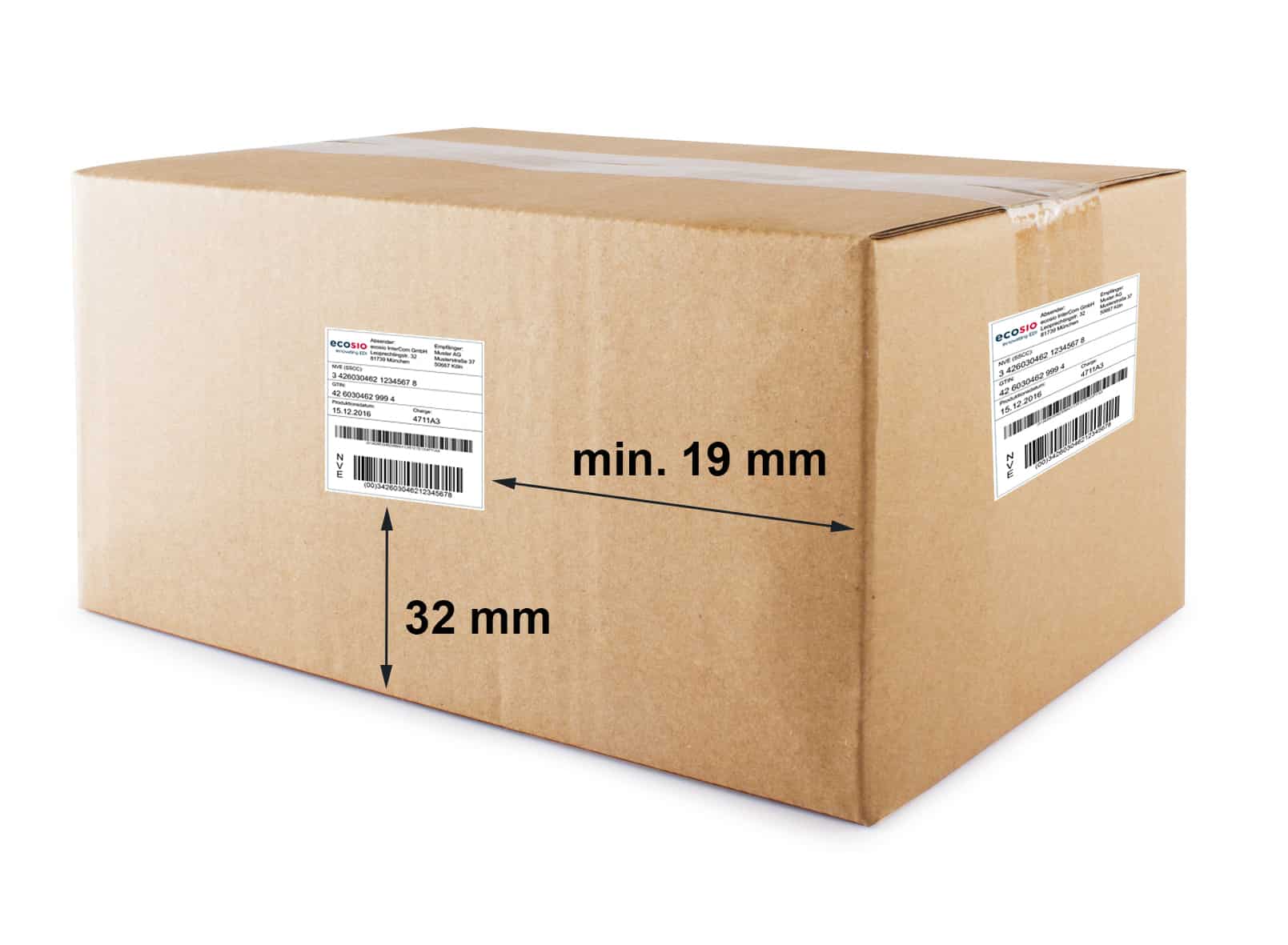
Example of a SSCC label on a box
The SSCC label must be present on at least two sides, the distance between the label and the bottom of the box needs to be at least 32 mm and 19mm from the right and left edges. In the logistic trade, boxes are mostly stacked on pallets, these can contain one sort of boxes or mixed boxes.
An unmixed pallet only contains goods which have the same article number, e.g. “gherkins in glass, 250g, GTIN 9001234567896”. The SSCC labels will need to be fitted on the pallet the same way as for the boxes, at least two of them on different sides.
Mixed pallets are pallets on which you will find goods with different article numbers. To allow them to be sorted, sandwich pallets will often be used. This type of stacking might remind one of a classic club sandwich. Tasty!

Mixed pallets are mostly used for direct store deliveries. Unmixed pallets and sandwich pallets are predominantly used for warehouse deliveries and in cross docking scenarios.
In a sandwich pallet, every single pallet will have its own SSCC label and the sandwich pallet itself will have a master SSCC label. The master label aggregates the SSCC labels from all the layers. The picture below illustrates this concept:

Example of an SSCC Label on a Sandwich Pallet
As you can see on the left side, each pallet layer has its own SSCC label (Layer SSCC Label). The sandwich pallet is wrapped in a plastic film, thus creating a new and unique shipping unit. The shipping unit as a whole has a Master SSCC label, as seen on the right side of the picture. When the goods arrive at their first unloading point, the warehouse employees will only scan the master SSCC label, since the plastic wrap often makes the scanning of the labels underneath impossible.
If the single pallets are isolated further down the processing line, the employees will then use the layer SSCC labels to clearly identify the layers.
Use of a SSCC in a DESADV
When DESADV messages are used to announce a delivery, the EANCOM Standard defines four different scenarios:
1 – No SSCC and no Shipping Structure
In this scenario only the article numbers and total quantities of the shipping are stated. There is no representation of the shipping structure and no SSCCs are being used. The shipping structure defines which boxes are on which pallets, how many pallets are being sent etc. This type of representation and its content correspond to a basic delivery note on paper.
2 – SSCC per Pallet without Shipping Structure
In this version article numbers and total quantities are given. The packages are also identified with the SSCCs. However, the shipping structure is not described.
3 – SSCC per Pallet with Shipping Structure
This option clearly describes the hierarchy of the shipping structure up to the content of the pallets. The DESADV will contain information about the article numbers and total quantity of the boxes per pallet. Furthermore it will contain the description of the hierarchy of the composition of the delivery (number of pallets, number of boxes per pallet, etc…). Each pallet will be clearly identified thanks to the SSCC. Sandwich pallets will have every layer also identified with their own SSCC.
4 – SSCC per Box and Pallet and with Shipping Structure
In this last option, the hierarchy of the shipping structure is described. Both pallets and boxes have SSCC numbers.
Example of an unmixed pallet
In the case of an unmixed pallet, the packing hierarchy can be described in two levels:
Level 1 = the whole shipping, which corresponds to three euro pallets in the example below.
Level 2 = per single pallet. This level dictates the representation of every single pallet, even if all pallets contain the same articles. The delivered units, usually boxes, are represented with GTINs. In the DESADV, you will find the distinction for the level hierarchy in the CPS segments.
Let us take a look at the three unmixed pallets below as an example. Each pallet has its own SSCC number. You will find different article types in each pallet, packed in individual boxes. The boxes have their own GTINs.
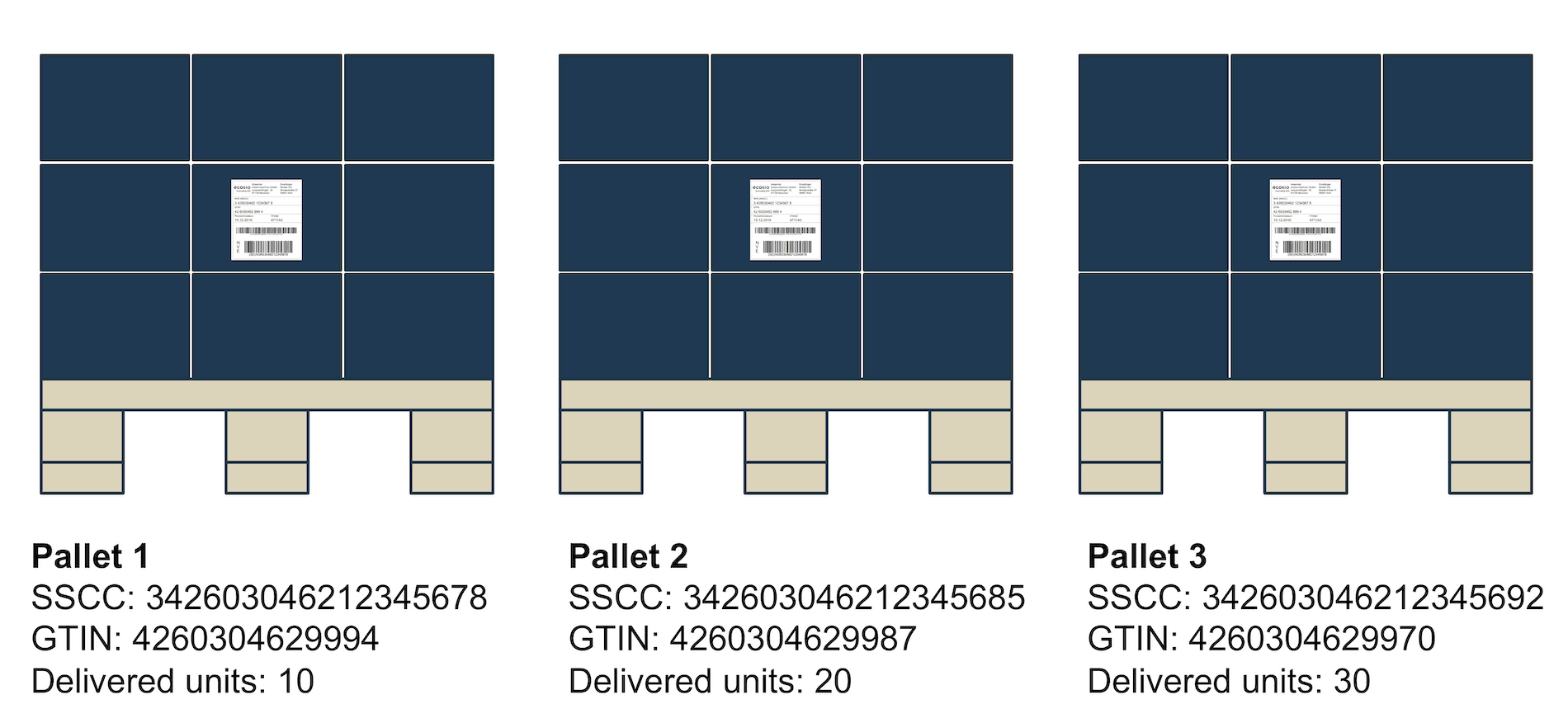
Example of three unmixed pallets
The resulting structure of the DESADV looks as follows (to make it clearer, we will only be showing the relevant CPS segments):
CPS+1'
PAC+3++201'
CPS+2+1'
PAC+1++201'
PCI+33E'
GIN+BJ+342603046212345678'
LIN+1++4260304629994:EN'
QTY+12:10:PCE'
CPS+3+1'
PAC+1++201'
PCI+33E'
GIN+BJ+342603046212345685'
LIN+1++4260304629987:EN'
QTY+12:20:PCE'
CPS+4+1'
PAC+1++201'
PCI+33E'
GIN+BJ+342603046212345692'
LIN+1++4260304629970:EN'
QTY+12:30:PCE'
The meaning of each segment is as follows:
CPS+1'
Corresponds to the highest order level.
PAC+3++201'
Number of packages in the whole delivery (3 euro pallets).
CPS+2+1'
Second hierarchy level (1st pallet). The 1 refers to the shipping. The 2 is the consecutive number of the hierarchy level.
PAC+1++201'
Number of packages in the current hierarchy level ( Pallet 1 = 1 euro pallet).
PCI+33E'
This shows the package is identified with an SSCC.
GIN+BJ+342603046212345678'
The SSCC number from pallet 1.
LIN+1++4260304629994:EN'
The GTIN of the delivered unit in pallet 1 (of the boxes).
CPS+3+1'
Second hierarchy level (2nd pallet). The 1 refers to the shipping. The 3 is the consecutive number of the hierarchy level. The other segments for pallets 2 and 3 are to be read in the same way.
Example of a sandwich pallet
In a sandwich pallet, the articles of the same type are stacked on each other. The single layers are separated by a euro pallet and have their own SSCC number. The whole pallet is then wrapped in plastic film and has its own master SSCC number. This number allows for the different layers underneath to be recognised during the unloading process.
The difference between unmixed and sandwich pallets is that the latter will have to have one more level in their hierarchy. Level 1 and 2 will be the same as for an unmixed pallet, however the master SSCC will be found on level 2. The delivered units are therefore represented in the third level.
Let us have a look at the sandwich pallet below with three levels.

Here is how the DESADV structure would look like:
CPS+1'
PAC+1++201'
CPS+2+1'
PAC+1++201'
MEA+PD+LAY+PCE:3’
PCI+33E'
GIN+BJ+342603046212345104'
CPS+3+2'
PAC+1++201'
PCI+33E'
GIN+BJ+342603046212345692'
LIN+1++4260304629970:EN'
QTY+12:30:PCE'
CPS+4+2'
PAC+1++201'
PCI+33E'
GIN+BJ+342603046212345685'
LIN+1++4260304629987:EN'
QTY+12:20:PCE'
CPS+5+2'
PAC+1++201'
PCI+33E'
GIN+BJ+342603046212345678'
LIN+1++4260304629994:EN'
QTY+12:10:PCE'
Here is what these segments mean:
CPS+1'
Stands for the first level (the actual shipping)
PAC+1++201'
Number of packaging in the whole shipping ( 1 euro pallet)
CPS+2+1'
Second level (the sandwich pallet)
PAC+1++201'
Number of packaging in the current level (1 euro pallet)
MEA+PD+LAY+PCE:3’
Number of layers in the sandwich pallet
PCI+33E'
Indicates a SSCC labeling is present
GIN+BJ+342603046212345104'
The SSCC number of the pallet (=Master SSCC)
CPS+3+2'
Third level for the description of the first layer. It refers to the pallet (with the “`2““)
PAC+1++201'
Number of packages (1 euro pallet)
PCI+33E'
Indicates a SSCC labeling is present
GIN+BJ+342603046212345692'
SSCC from the first layer
LIN+1++4260304629970:EN'
The GTIN from the delivered unit in the first layer
QTY+12:30:PCE'
The number of delivered units in the first layer
CPS+4+2'
Third level describing the second layer. The description for layer 2 and 3 is the same as for layer 1.
Benefits for all involved
Using DESADV messages with SSCC labels can be cumbersome at times, however the use of SSCCs has its advantages for the parties involved. It can help reduce the sending and picking times on the side of the supplier in the warehouse processing. The advanced notice of the delivery and the use of the SSCC allows the retailer to plan their logistics widely and optimise their workload and warehouse capacity.
As soon as the supplier delivers the goods, the unloading and storing can happen much quicker, reducing the time the trucks have to stay. The supplier then has more flexibility when booking time slots for the delivery. The retailer also benefits from the simplified processes when storing the goods. SSCCs can also guarantee transparency by complying with the legislation on products origins and tracing them back.
The automation of receiving goods also has benefits on the following processes, such as product recalls, confirmation of the goods reception etc. The use of DESADV with SSCC makes the suppliers competitive, as they can comply with the expectations of the retailers.
Should you wish to consult your crystal ball to see the future of DESADVs with SSCC in the retail industry, all you need to do is look at the the delivery processes in the automotive industry. The advanced notice of a delivery and the labelling are mandatory, so much so that it is a necessary pre-condition in establishing a partnership between a supplier and a buyer.
Do you have any questions?
You still have questions about DESADV and SSCC, or you need to implement those processes for one of your clients or suppliers? Feel free to contact us, we would love to help you!
Image credits
- An old fashioned grocery store: GNU Free Documentation License, Version 1.2, via Wikimedia Commons
- Club sandwich, Creative Commons CC0 1.0 Universal Public Domain Dedication
Der Beitrag What is a DESADV with SSCC and Why Should I Care? erschien zuerst auf ecosio.
]]>Der Beitrag Electronic Data Interchange (EDI) with 3M erschien zuerst auf ecosio.
]]>Even if you have not heard about 3M in the past, it is quite likely that you stumbled upon one of their products in everyday life. One of their most famous products is, without doubt, the Post It note. In innovation classes, Post It notes are often taken as a famous example for a serendipity innovation. Originally in search for a super-strong adhesive, the chemist at 3M created a low-tack glue which allows for an easy attachment and detachment of the glued item. The rest is history.
Today 3M produces much more than just Post It notes. In order to allow for efficient management of its procurement and distribution processes, 3M makes heavy use of electronic data interchange (EDI). In the rest of the article we outline the most important facts in regard to EDI on the supplier’s side – that is, if your company delivers goods or services to 3M.
EDI with 3M
If you have been requested to start doing EDI with 3M, there are three important aspects to consider: document formats, exchange protocol and the onboarding process with 3M. We will further examine all three aspects in detail.
EDI document formats
On the supplier side 3M typically focuses on the following EDI document types:
- ORDERS (Purchase Order)
- ORDCHG (Purchase Order Change)
- ORDRSP (Purchase Order Response)
- DESADV (Despatch Advice)
- INVOIC (Invoice)
Thereby, they support the following EDI document formats:
- EDIFACT D96A
- ANSI ASC X12 version 4010
The exact format specifications may be retrieved as follows.
- Go to: https://www.3m.com
- Select your preferred Location/Language
- Select menu options > Suppliers > Source to Pay Transactions > Electronic Data Interchange
- Download the required document
Unless your ERP system is able to directly import and export the EDI formats mentioned above (which is unlikely), you have to employ a converter solution. The converter solution translates between the document format of your ERP system and the EDI format of 3M and vice versa. Usually converter solutions come either as an on-premise solution, or are provided by a service provider as a managed solution.
Of particular importance in regard to the document formats is the turnaround of information from 3M to your ERP and back to 3M. To be more precise – several identifiers have to be taken from the ORDERS message, which is received from 3M and must be returned in the documents which are being sent back to 3M (ORDRSP, DESADV and INVOIC). When using EDIFACT, the following turnaround principle applies.
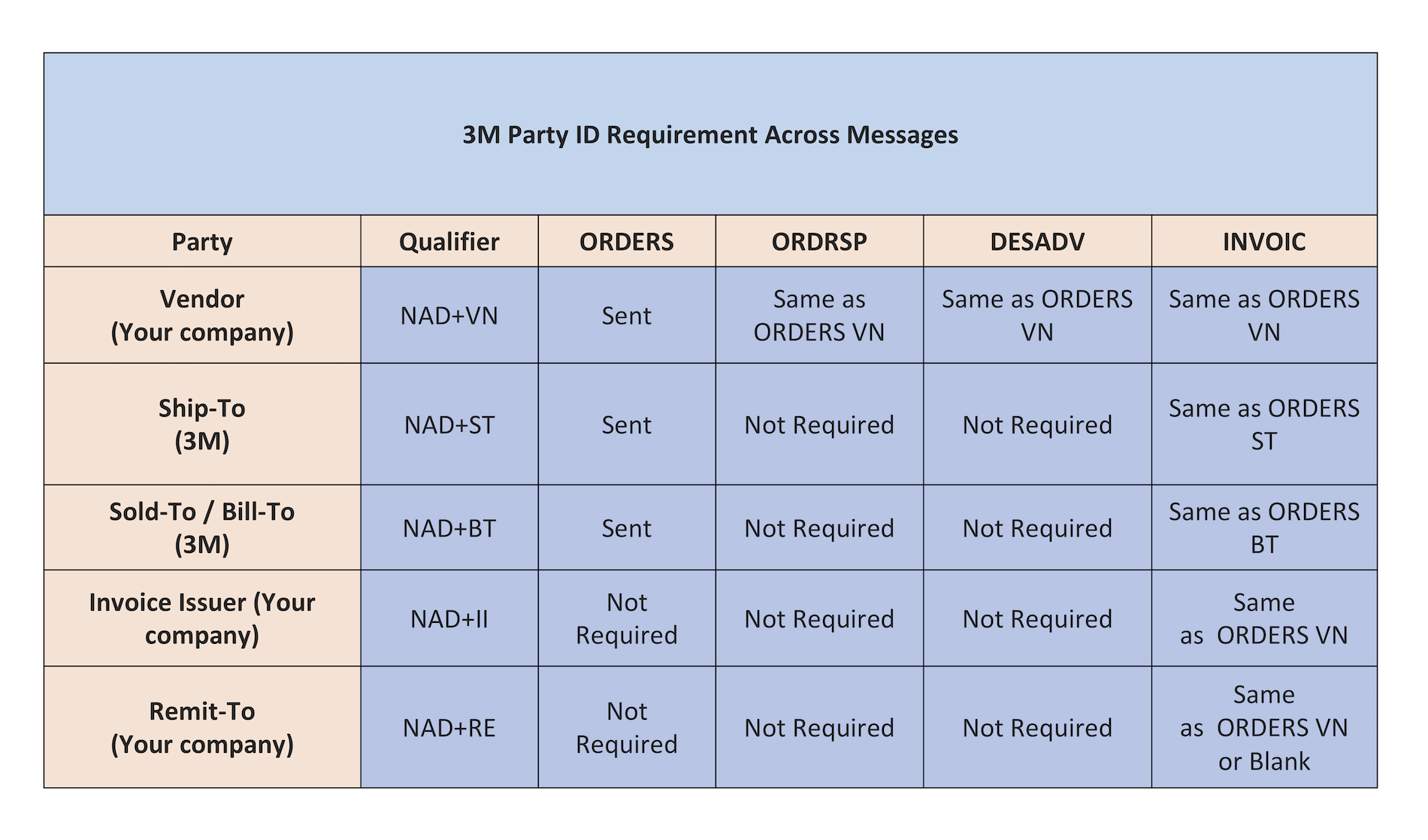
3M Party ID Requirement Across Messages
It is, for instance, essential, that the NAD+VN information from the ORDERS is correctly returned in the ORDRSP, DESADV and INVOIC message. The most complex document type is the INVOIC message. All NAD identifiers from the original ORDERS must be correctly returned in the INVOIC message.
Thus, it is imperative that the correct turnaround process is configured in the ERP system, ensuring that all information from the ORDERS is stored in the ERP and correctly returned when the INVOIC is exported.
When working for instance with an SAP ERP system, the correct configuration of the EDPAR table helps transfer the identifiers from the ORDERS through the ERP and back to the INVOIC document.

EDI exchange protocol
To allow for an exchange of EDI documents with 3M, an exchange channel using an EDI protocol must be set up. An EDI service provider like ecosio can take care of this connection for you and create a connection to 3M’s EDI service provider in order to exchange the required EDI messages. Exact details of the provider will be communicated to you by 3M during the course of the project.
3M along with their EDI service provider will set up two connections: a test connection and a productive connection. The test connection will be used during the onboarding phase to exchange documents with the test system of 3M.
The production connection is then used after the go live.
EDI onboarding process
The EDI team of 3M together with your own EDI service provider will assist you in setting up the EDI process to 3M.
First, master data has to be aligned to avoid disconnects relating to units of measurement and price multipliers. The necessary EDI document mappings should then be set up, after which 3M will provide you with EDI test orders via the test connection. You are then required to send back the necessary order response, despatch advice and invoice documents. Thereby, 3M’s onboarding team will execute various test cases, covering the different aspects of your business relationship to 3M, e.g., different types of deliveries.
After the test phase has been completed successfully, your EDI process will be put into production and your company will start to exchange EDI messages with 3M.
How ecosio can help
Ecosio is experienced in connecting suppliers to 3M and recently connected Mitsubishi Polyester to the conglomerate.
Our unique Integration Hub supports all secure EDI protocols and formats, meaning one connection to ecosio allows message trading with 3M (and other partners) in the correct format and over the correct protocol with minimum effort.
Unlike other providers, ecosio offers an integrated, managed solution which is embedded directly in the user’s ERP system as a native feature. As a result, important processes are built into the existing user interface, producing useful end-to-end message visibility.
Benefits at a glance
- All testing, mapping and routing achieved via a single connection to ecosio’s cloud-based EDI solution (our Integration Hub)
- No internal EDI knowledge needed
- Hassle-free partner onboarding
- Unparalleled end-to-end data visibility thanks to deep ERP integration
Any questions?
If you still have questions, feel free to contact us. We would love to help you!
SAP ERP and SAP S/4HANA are the trademarks or registered trademarks of SAP SE or its affiliates in Germany and in several other countries.
Der Beitrag Electronic Data Interchange (EDI) with 3M erschien zuerst auf ecosio.
]]>Der Beitrag Cloud-based EDI solutions: A silver lining for your business erschien zuerst auf ecosio.
]]>At first sight, managing your own EDI may seem like the cheaper option compared to outsourcing to a cloud-based service, keeping up with the wide range of software, hardware and compliance necessities. But this can quickly become expensive.
Specialist software, dedicated staff, regular updates, maintenance and scaling, all add up and remain ongoing expenses, even once your system is up and running.
Outsourcing your EDI management eliminates many of these expenditures, allowing for lower-cost EDI deployment and operation than on-premise hosting.
Boost performance and agility
Purchased software solutions may offer some customization in terms of functionality, but they are predominantly one-size-fits-all and it’s unlikely that any will suit your business precisely.
An outsourced cloud-based solution can be tailored to your needs and easily updated — with no additional effort on your part — to meet additional document types, partners and protocols as your business expands or shifts direction.
Additionally, unlike in-house hosting where you are restrained by the limits of your hardware and software, cloud-based solutions are flexible and perfect for higher traffic loads.
Our decision guide compares on-premise v cloud managed EDI services in detail
Free up your staff with cloud-based EDI
Operating EDI management systems takes significant specialist knowledge, which your IT team may not possess, and a large number of daily tasks to ensure optimal operation. This often means that you’ll have to hire new IT members, pay for expensive training, and reduce the amount of time that your IT team spends on other essential, or more strategic, activities for your business.
Adopting a cloud-based EDI solution gives you immediate access to trained and highly competent experts, saving your business on staff costs and your IT team on valuable time and resources to work on other key projects.
For a detailed breakdown of how much work is done by different EDI solution types, download our infographic on this topic.
Stay safe and secure
While you may have some concerns about the security of cloud-based EDI systems, they are actually highly secure,featuring sophisticated encryption and monitoring. In fact, we monitor our EDI traffic 24/7, allowing one of our specialists to intervene immediately in the event of any sort of breach and disruption.
Even better, because your precious data is being stored on the cloud, it’s also safe from unexpected catastrophes such as hardware and software failures. That means your business can still keep on track, even in the event of a crisis.
Get in touch
Despite all of these positive aspects, moving to a cloud-based EDI service is a big step for many businesses. In fact, over 70% of companies are still holding back from embracing cloud-first EDI providers and we understand the reasons. After all, you’re handing over a huge aspect of your business into someone else’s hands.
At Ecosio, we’re here to help. We’re experts at providing bespoke EDI solutions to businesses of all shapes and sizes. Talk to us today to find out how you can cut your overheads, unlock resources and empower your business for the future with an EDI technology partner you can trust to deliver.
Any questions?
Do you have questions or would you like to implement an EDI based process? Please contact us – we look forward to hearing from you!
Der Beitrag Cloud-based EDI solutions: A silver lining for your business erschien zuerst auf ecosio.
]]>Der Beitrag What is an Order-to-Cash process? erschien zuerst auf ecosio.
]]>An Order-to-Cash process is the process of receiving a customer’s order, to the customer’s payment of his outstanding account. The Order-to-Cash process is an order process as seen by the supplier and thus it should be assigned to the sales department within the company.
The Purchase-to-Pay process is the equivalent of the Order-to-Cash process, but as seen from the procurement side.
The diagram below shows an example of an Order-to-Cash process between a company (supplier) and a customer.
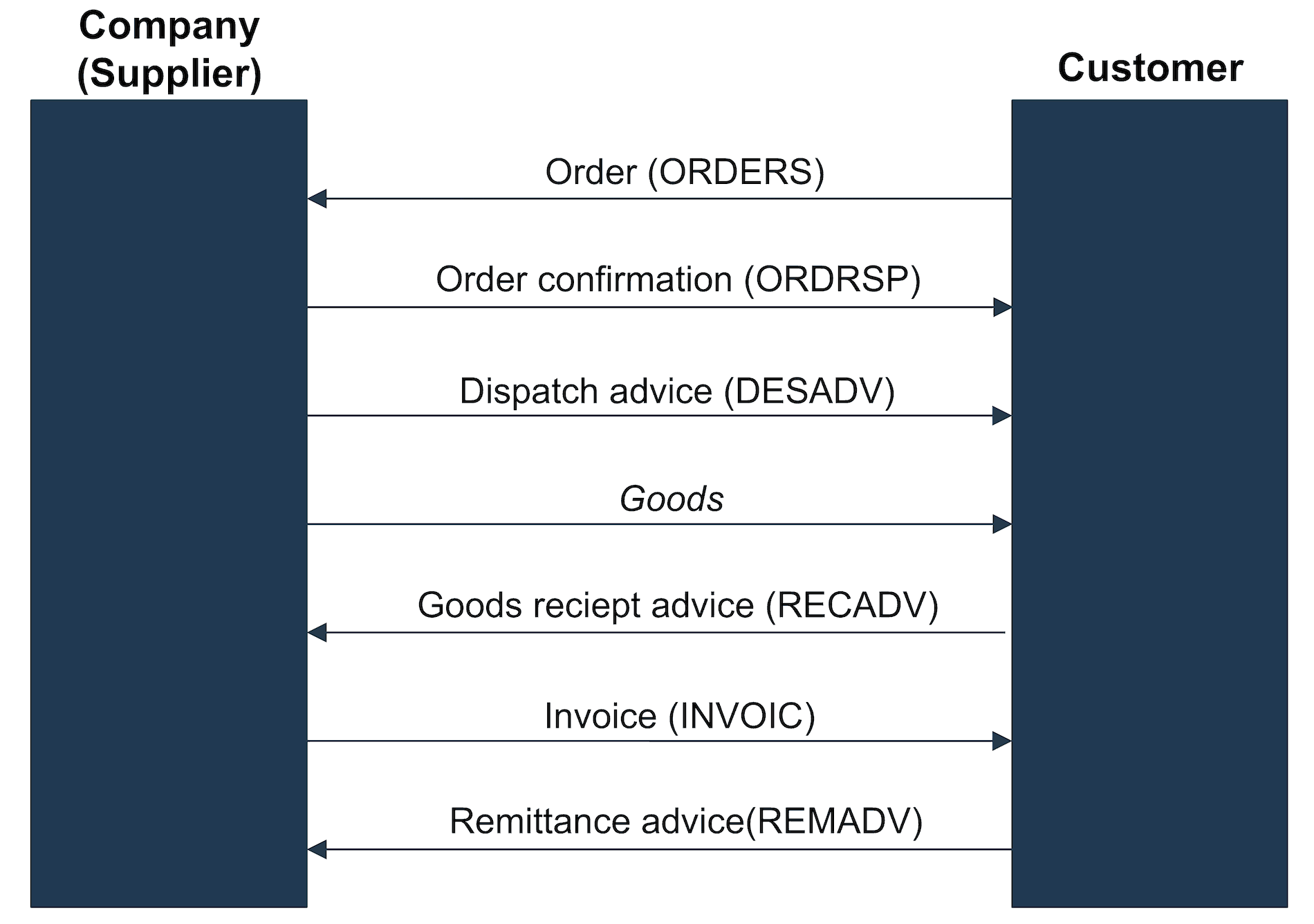
Example of an Order-to-Cash process
Modern Order-to-Cash processes are executed via EDI messages. This means that electronic, non paper, documents are exchanged between involved companies, and there is no human intervention needed.
The diagram above shows a customer transmitting an electronic order (ORDERS) to his supplier. The supplier will then automatically process the order in his ERP system and initiate provisioning of the goods.
An Order confirmation (ORDRSP) is returned to notify the customer that the order has been accepted as is, accepted with changes, or declined. Depending on the industry and field of application, an Order change (ORDCHG) may occur. To keep it simple, this type is not shown in the diagram above. Order changes will also be acknowledged with order confirmations (ORDRSP).
Learn how fully managed EDI could help to boost your business
An electronic dispatch advice (DESADV) will be transmitted to the customer before his goods are shipped. This is to inform a customer about an oncoming delivery, allowing him to plan his inbound logistics.
After receiving the goods, the customer will confirm the quantities received via a goods receipt advice (RECADV). This allows customers to inform suppliers of any deviations. Deviations may be the result of losses during delivery (goods lost in transit) or lack of quality (goods rejected due to unacceptable quality).
A supplier will transmit his electronic invoice (INVOIC) upon receipt of the goods by his customer. The customer will transmit a remittance advice (REMADV) to notify the supplier of payments made.
Depending on industry and applications, different types of documents may be used. In this respect refer also to an overview of EDI document types used in the trade and an overview of the EDI document types used in the automotive industry.
Order-to-Cash process in a SAP ERP system
The effective implementation of EDI-based Order-to-Cash processes requires corresponding ERP system support. Modern ERP systems such as SAP ERP will support various types of Order-to-cash processes and different EDI document types.
SAP ERP Order-to-Cash processes are supported by the SD module (Sales & Distribution) and incoming invoices may also have interdependencies with the FI module (Finance).
Any questions?
Any questions about the Order-to-Cash process and support offered by EDI documents – maybe also in connection with a SAP system? Please contact us – we look forward to assisting you!
SAP ERP and SAP S/4HANA are the trademarks or registered trademarks of SAP SE or its affiliates in Germany and in several other countries.
Der Beitrag What is an Order-to-Cash process? erschien zuerst auf ecosio.
]]>Der Beitrag Overview of the EDIFACT EANCOM format erschien zuerst auf ecosio.
]]>EDIFACT stands for Electronic Data Interchange for Administration, Commerce and Transport and has been in constant development by the United Nations since 1986. This standard is known under the name UN/EDIFACT. Whilst working on standardising the UN/EDIFACT format, numerous requirements from all industries needed consideration. However, although this may have helped broaden the UN/EDIFACT standard and make it more flexible, it also complicated its actual use.
A simple invoice may, for instance, include many optional elements and different identifiers may be used for the identification of the involved companies and products, etc. Before they can create an actual EDIFACT invoice, the sender and receiver need to agree on the subset of segments they will be invoked when exchanging files. If it were the case, that both parties always needed to agree on a specific subset, this would inevitably lead to a huge and unnecessary number of different subsets, and therefore reduce the benefits of EDI through the time needed to make the subsets compliant.
It is therefore advisable to agree on certain standard EDIFACT-subsets. These EDIFACT subsets are derived from the EDIFACT standard and were tailored to suit a specific user group. Mandatory elements are defined according to the EDIFACT subset and additional specifications laid down (e.g. identifiers to use, date formats, code lists, etc.).
These subsets apply to whole industries (e.g. paper, steel or consumer goods industry), including at the corporate level.
The diagram below illustrates the subset approach.
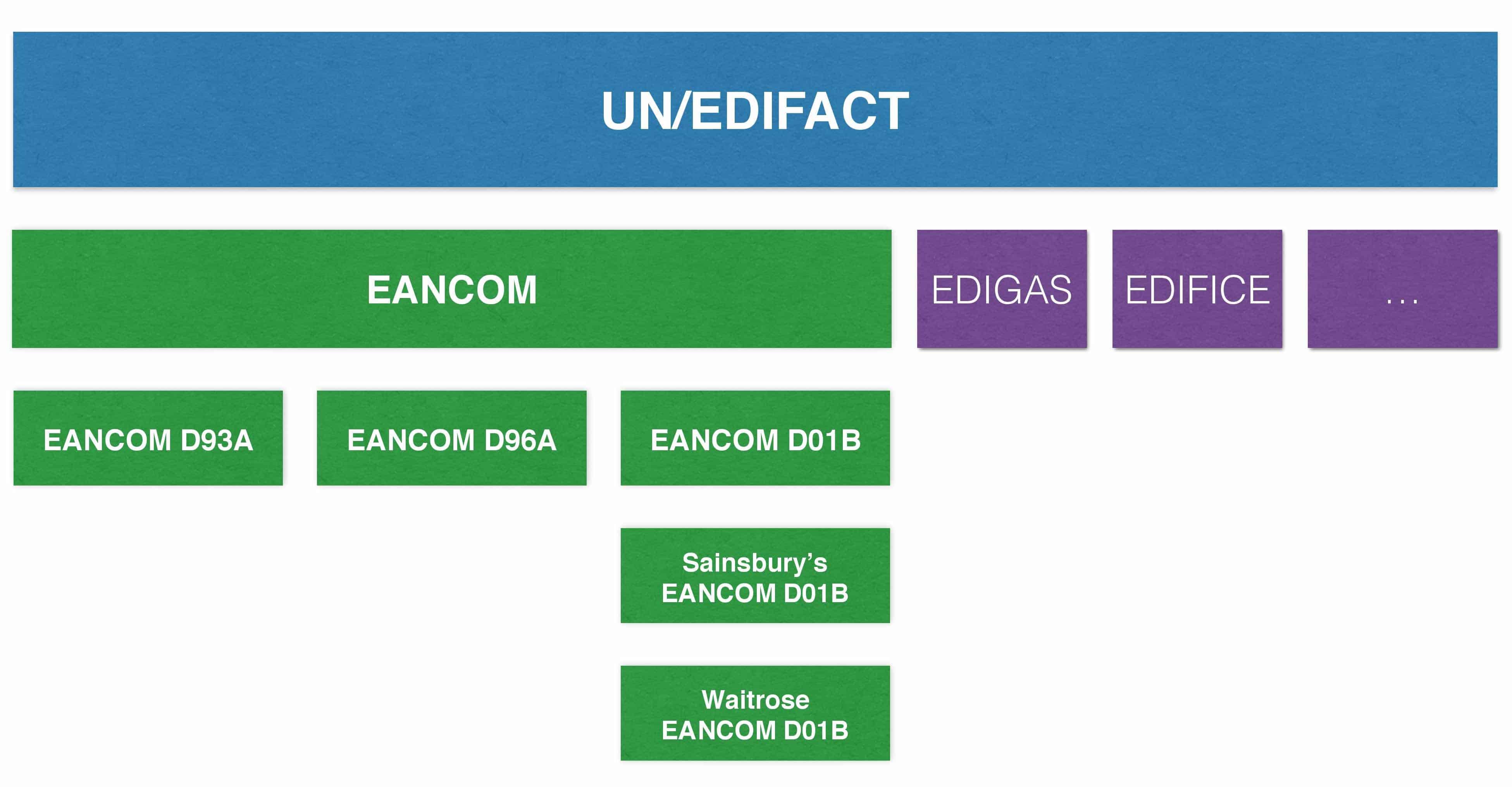
Individual subsets based on the UN/EDIFACT standard were defined for different industries. The globally most used EDIFACT subset is EANCOM (abbreviation of EAN + Communication) and GS1 is continuing its development for the consumer goods industry. Other subsets include, for instance, EDIGAS (gas industry) or EDIFICE (high-tech industry).
EANCOM exists today in three different versions (D93A, D96A and D01B). Major companies such as REWE or Metro are also defining their own subsets based on the EANCOM subset.
EANCOM-Subset
EANCOM is being developed by the GS1 organisation for global standards and is a 100% subset of the UN/EDIFACT standard for the consumer goods industry. Since the EANCOM standard is highly popular, it is by now also used in other industries, such as the health sector. As opposed to the very extensive UN/EDIFACT standard, EANCOM reduces the various EDI messages to essential fields that are mandatory to specific business processes or for specific message types. The EANCOM standard currently includes about 50 different message types.
As the name suggests already, the EANCOM standard is based on the GS1 identification system (GLN, GTIN,SSCC, etc.). The use of globally unique GS1 identification allows effective and uniform processing of EDI messages. Every sender and recipient will, for instance, be uniquely identified by it’s GLN – thus excluding confusion caused by proprietary identifiers. The same applies to product identification using GTINs and identification of packages using SSCCs.
EANCOM also defines the logical sequence of messages used in a specific business area. The diagram below illustrates message flows that may be depicted with EANCOM. In addition to buyers and sellers, communication between logistics service providers and banks is also included.
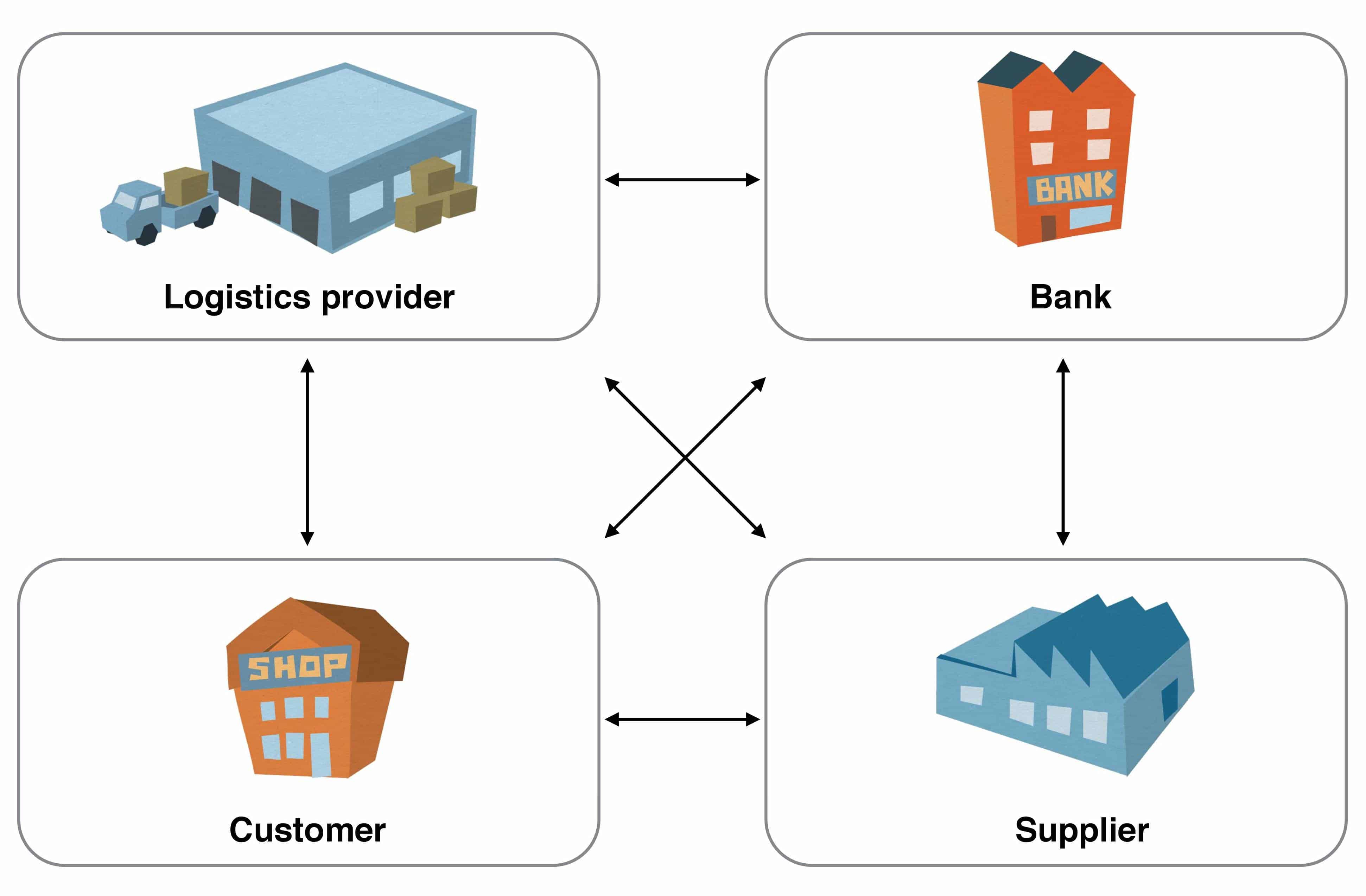
EANCOM – Participating Companies
The individual EANCOM message types may be roughly classified into the following four categories:
- Master data reconciliation
These message types are used for the exchange of master data for products and for involved trading partners. The master data is therefore stored in the systems of the involved partners and used for message transactions afterwards. This will, for instance, ensure that only the most recent product identifiers and prices will be used. - Transactions
These message types are used to order goods, organise their transportation and pay for goods received. - Reporting and planning
These message types are used for the exchange of data allowing future planning. Examples include Sales Reports or Inventory Reports, used to communicate current product sales figures to a supplier. The supplier may use this information to plan his own production. - Miscellaneous
The message types in this category serve various purposes, such as the exchange of additional information required by the different industries.
Overview of EANCOM message types
The diagram below offers an overview of the most important EANCOM message types and the order of the message exchange.
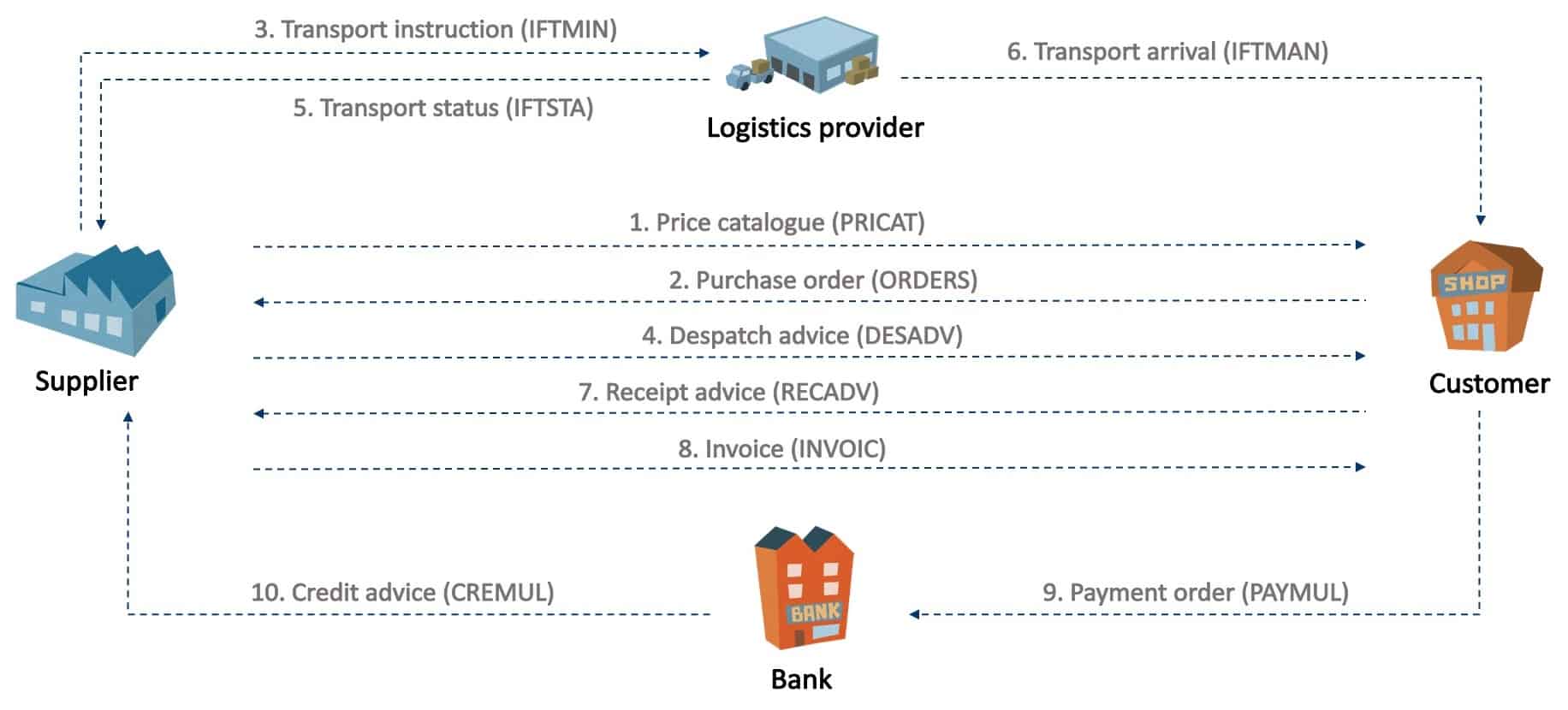
The three most important message types by far are ORDERS (order), DESADV (despatch advice) and INVOIC (invoice).
Price list/Catalogue (PRICAT)
A supplier will send a PRICAT message with a list of all relevant product data to his customers. A supplier will send a PRICAT message to customers whenever the product range changes.
Order (ORDERS)
A customer will transmit an ORDERS message to a supplier to order products and services. An order will typically also include the required quantity, date and place of delivery. The GTIN codes for the ordered products and services and the GLNs used will typically have been received via a previous PRICAT message.
It is also possible to leave out the master data reconciliation using PRICAT, if the parties have exchanged beforehand the lists with the product codes, e.g. on an Excel sheet. However, this might present a few drawbacks, such as input errors due to media faults, etc…
Transport order (IFTMIN)
A supplier will transmit an IFTMIN message to a logistics service provider to order transportation of goods.
Despatch message (DESADV)
Suppliers will send a DESADV message to notify customers of impending deliveries, prior to arrival of the goods at the customer. DESADV messages are particularly relevant to large companies since DESADV messages will allow coordination of their own goods receipt logistics (such as cross-docking warehouses).
Transport status (IFTSTA)
Logistics service providers will use IFTSTA messages to confirm shipment of an order to their client (in this case the supplier). The time of sending this message will be agreed on between the shipping agent and supplier. An IFTSTA message may, for instance, be sent once every day, at the time a shipment is executed, etc.
Arrival message (IFTMAN)
A shipping agent may send an IFTMAN message to the recipient of the goods (in this case the customer) to notify of imminent delivery. Similar to a DESADV, the purpose would be better planning of goods receipt logistic by the customer.
Goods receipt notification (RECADV)
Customers may send a RECADV message to confirm receipt of a specific shipment. This will allow the customer to, for instance, notify the supplier of deviations of quantities supplied or of his rejection of specific shipments.
Invoice (INVOIC)
The supplier may use an INVOIC message to transmit an invoice to his customer.
Banker’s order (PAYMUL)
The customer may use a PAYMUL message to transmit payment instructions to his bank. The bank will on receipt of this message pay the invoice amount to the account of the supplier.
Credit note (CREMUL)
A bank will use a CREMUL message to inform the supplier of payments made by his customer.
Questions?
Do you have any more questions about EANCOM? Please do contact us or use our chat – we’re more than happy to help!
Der Beitrag Overview of the EDIFACT EANCOM format erschien zuerst auf ecosio.
]]>Der Beitrag What is a DESADV message? erschien zuerst auf ecosio.
]]>- DESADV is the abbreviation for despatch advice, a document exchanged during procurement and distribution
- It serves as an EDIFACT document type, notifying the buyer about goods, quantity and delivery time to prepare inbound logistics
- In automotive, the designation ASN (advance shipping notice) is often used instead of DESADV, though both refer to the same document
- Common formats include EDIFACT DESADV D96A, D01B, and occasionally D93A in retail; VDA 4913 and 4987 in automotive; and ANSI 856 Ship Notice/Manifest in North America
Despatch advice
DESADV is the abbreviation for despatch advice. A despatch advice is a type of document that is exchanged in the course of procurement and distribution processes. DESADV is also the name of the corresponding EDIFACT document type of a despatch advice. The designation ASN (advance shipping notice) is often used in the automotive industry, instead of DESADV. Both terms, however, mean the same.
The following illustration provides an overview of the various documents in a procurement process occurring in the retail industry and illustrates the use of a despatch advice.
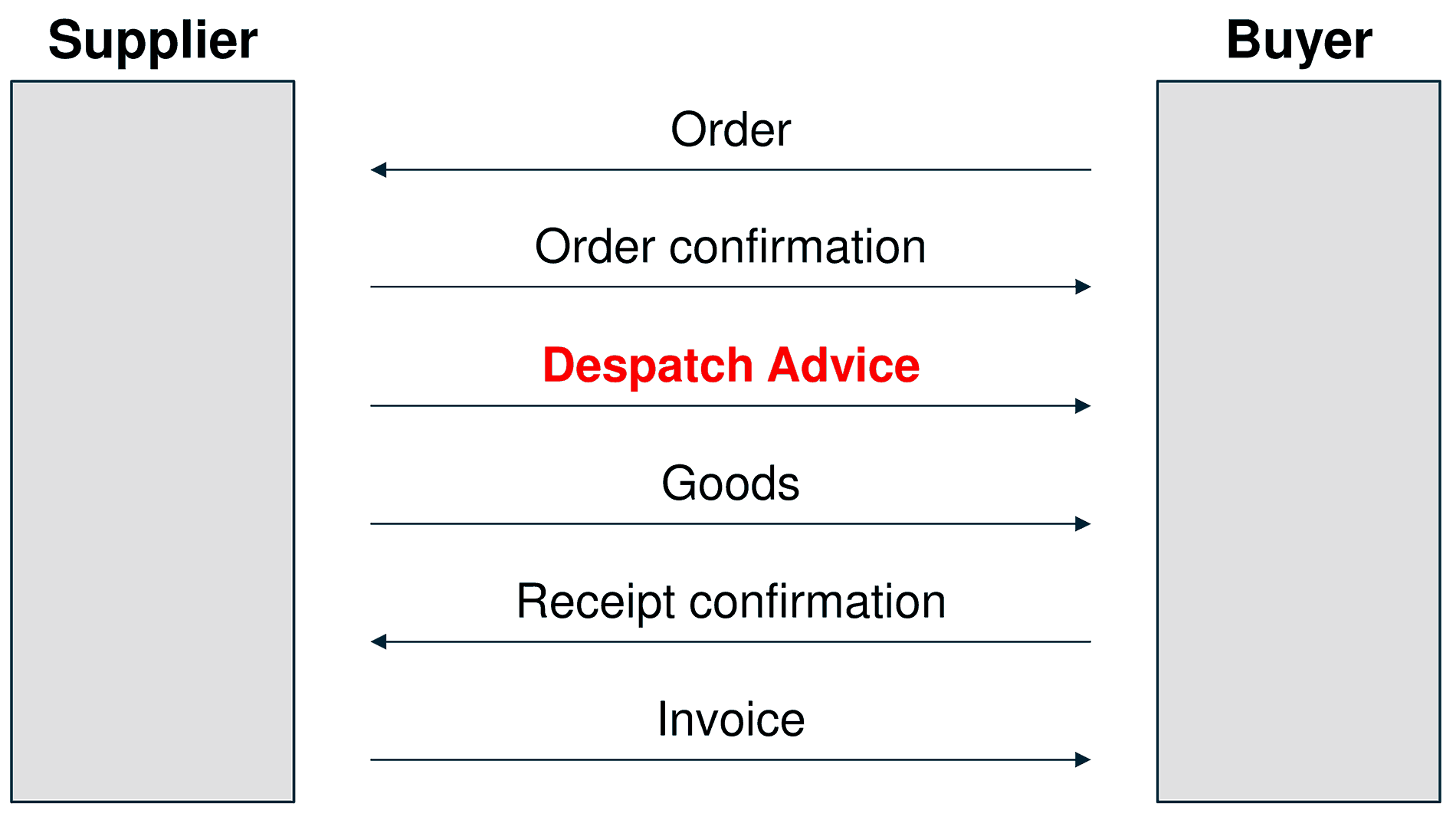
Sequence of electronic documents in a procurement process in the retail industry
A buyer uses an order message to place an order at a supplier. The supplier sends an order confirmation message to confirm the order. The supplier will then send a dispatch advice to the buyer before shipping the actual goods. This will inform the buyer about the nature of the goods, the quantity and the time of delivery, allowing him to prepare his inbound logistics. The goods will then be despatched. The buyer may optionally acknowledge the receipt of goods with a receipt confirmation message. The last step is the submission of an invoice message.
The process described above serves just as an example. Different types of documents may be used, depending on participating partners and the industry. Amazon, for instance, attaches great importance to order confirmation messages. Inventory Report (INVRPT) or Sales Report (SLSRPT) documents play an important role in the textile sector.
The need for notification of delivery
Commercial enterprises such as Tesco face enormous logistic challenges every day. Goods are ordered from many different suppliers for delivery either to warehouse locations (cross-docking) or to individual branches directly (drop-shipping).
Overviews of pending deliveries must be available at all times to ensure that cross-docking and drop-shipping logistics remain efficient. Using the despatch information sent by the suppliers the retail stores may plan and optimize their inbound logistics.

Loading and unloading in a warehouse
Incoming goods must be offloaded and stored in their designated place as quickly as possible. In the case of refrigerated and deep-frozen goods, adequate storage capacities must be ready, to avoid interruption of the cold chain.
To ensure efficient warehouse administration all suppliers must transmit electronic despatch advice messages to announce upcoming deliveries. The despatch advice will contain the date and time of the delivery and the details of the delivered goods. Depending on the given industry, this may comprise basic product designations as well as information about the itemised packaging means and their hierarchy on a pallet. Gross and net weights may also be given.
Different types of DESADV messages
Different EDI standards may be used for the exchange of electronic exchange of despatch information, depending on the industry. The EDIFACT EANCOM format is primarily used in the retail industry in Europe. Thereby, the two most widely used document types are: EDIFACT DESADV D96A and EDIFACT DESADV D01B. The older EDIFACT DESADV D93A may also occasionally occur.
VDA standards are mostly used in the automotive industry. The two VDA despatch advice standards are VDA 4913 (the older, flat text-based standard) and VDA 4987 (the newer, EDIFACT-based standard).
ANSI ASC X12 standards are commonly used in North America. The ANSI despatch advice standard is 856 Ship Notice/Manifest.
More questions about DESADV?
You have further questions in regard to DESADV? You would like to use DESADV messages with a customer or supplier of yours? Please do contact us or use our chat – we’re more than happy to help!
Der Beitrag What is a DESADV message? erschien zuerst auf ecosio.
]]>