Der Beitrag Using EDIFACT Parties Correctly – A Breakdown erschien zuerst auf ecosio.
]]>Why master data errors happen
One of the most common sources of master data issues is the conflation of EDIFACT parties – i.e. the parties referenced in EDIFACT messages. To those inexperienced with EDI and EDIFACT, it may not seem like an issue to use certain EDIFACT parties interchangeably if the underlying information is the same for a certain transaction. However, just because Buyer and Ultimate consignee or Invoice recipient may be the same value in a B2B transaction with business partner A, for example, that doesn’t mean they always will be in all other B2B transactions with other business partners.
The two core principles one must adhere to here are:
- Always consult the respective EDI message implementation guideline and potentially accompanying documents, to check which partner role is required where.
- Always cross check with other document types in the same process choreography, to spot potential interdependencies. E.g. an INVOIC usually must contain the same role identifiers (AKA party codes) as the underlying ORDERS and DESADV. It may of course also contain additional role identifiers, not contained in the underlying document types.
Making the wrong assumptions and not cross-checking exactly with the requirements will ultimately lead to errors and the swift deterioration of your master data’s integrity.
Admittedly, setting up EDI connections with certain partners can be challenging, as you may encounter requirements, such as those 3M sends to their partners (pictured below).
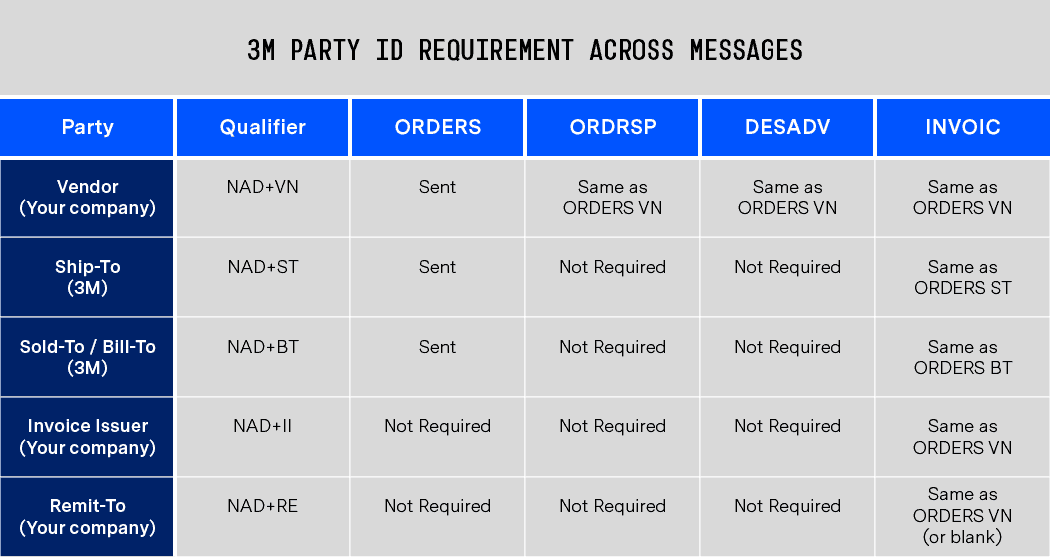
In such cases it is even easier for users to confuse EDIFACT parties.
The impact of master data errors
Without trained personnel and processes and procedures in place to protect the integrity of your master data (such as conducting a full master data sync before onboarding a new partner), data quality is likely to deteriorate over time. In such situations, the only solution is a time-consuming audit and correction process.
Meanwhile, in the short term even the smallest error can have significant repercussions. For example, large consumers will often reject an invoice, no matter how big, if the data on it does not align with their records.
To help you avoid making expensive mistakes, in the following sections we will explore the subject of EDIFACT parties in detail, looking at the three popular EDIFACT subsets (EANCOM, EDITEC and VDA).
Before diving into these subsets, however, let’s first look quickly at EDIFACT as a whole…
Understanding EDIFACT and EDIFACT parties
UN/EDIFACT stands for the United Nations rules for Electronic Data Interchange for Administration, Commerce, and Transport. It is a set of internationally agreed standards that was created to facilitate the exchange of structured data between business partners.
As UN/EDIFACT is used across many different industries, the list of UN/EDIFACT parties (also known as “party function code qualifiers” and by the code “3035”) that can be used in B2B exchanges is very long. The full list of UN/EDIFACT party codes in the D01B version of the standard, which are used for the NAD (name and address) segments of EDI messages, can be found here.
As no company would ever need to use all of these party codes (and maintaining so many master data fields accurately would be virtually impossible), UN/EDIFACT users rely on standard subsets instead. These subsets are tailored towards specific industries and reduce the various EDI messages to essential fields that are mandatory to specific business processes or for specific message types. As a result, companies are only required to recognise and use a fraction of the available EDIFACT party codes.
Now let’s look at the key parties in each of these subsets and how they differ from one another, using the example of an INVOIC (invoice) transaction in each case.
EDIFACT subset 1: EANCOM (D01B INVOIC)
EANCOM is arguably one of the most popular subset of the UN/EDIFACT standard. Initially created for the retail industry, EANCOM is now also used by some other industries too.
The EANCOM standard currently includes about 50 different message types. For the purposes of this article look at one of these – the D01B INVOIC – as an example.
From the hundreds of parties available under the extensive UN/EDIFACT standard, the EANCOM D01B INVOIC guideline uses just 35. The most commonly used of these, and their descriptions, are listed below…
| Party code | Party | Party description |
| BY | Buyer | The party to which the merchandise/service is sold |
| DP | Delivery party | The party to which the goods should be delivered (if not the same as consignee/buyer) |
| IV | Invoicee | The party to which the invoice is issued |
| OB | Ordered by | The party that issued the order |
| PE | Payee | The credit party when not the beneficiary |
| PR | Payer | The party initiating payment |
| SF | Ship from | The party from where goods will be (or have been) shipped |
| SU | Supplier | The party supplying the goods or services |
| UC | Ultimate consignee | The party designated on the invoice or packing list as the final recipient of the stated merchandise |
In most EANCOM D01B INVOIC transactions you are unlikely to need to refer to any party outside the nine listed above. However, there are a number of others that may be required from time to time.
These less commonly used EDIFACT parties are listed below:
| Party code | Party | Party description |
| AB | Buyer’s agent / representative | The third party that arranged the purchase of merchandise on behalf of the buyer |
| BF | Beneficiary’s bank | The account servicer for the beneficiary or payee |
| CA | Carrier | The party undertaking or arranging transport of goods |
| CN | Consignee | The party to which goods are consigned |
| CO | Corporate office | The head office of a company |
| DL | Factor | A company offering a financial service whereby a firm sells or transfers title to its accounts receivable to the factoring company |
| DS | Distributor | The party distributing goods, financial payments or documents |
| FW | Freight forwarder | The party arranging the forwarding of goods |
| II | Issuer of invoice | The party issuing the invoice |
| ITO | Invoice recipient party (GS1 Code) | The party to which the invoice is sent and which processes the invoice on behalf of the invoicee (the invoicee can be different to the processing party) |
| LC | Party declaring the Value Added Tax (VAT) | The party responsible for declaring the Value Added Tax (VAT) on the sale of goods or services |
| LF | Buyer’s corporate office | The buyer’s head office |
| LG | Supplier’s corporate office | The supplier’s head office |
| LSP | Logistic Service Provider (GS1 Code) | A party providing logistic services for another party (e.g re-packing suppliers products) on products which may lead to added value for the product |
| MF | Manufacturer of goods | The party that manufactures the goods |
| MR | Message recipient | The party that receives a message |
| MS | Document / message issuer / sender | The party issuing a document and/or sending a message |
| N1 | Notify party no. 1 | The first party to be notified |
| N2 | Notify party no. 2 | The second party to be notified |
| NI | Notify party | The party to be notified of arrival of goods |
| PB | Paying financial institution | The financial institution designated to make payment |
| PW | Despatch party | The party where goods are collected or taken over by the carrier (if other than consignor) |
| RB | Receiving financial institution | The financial institution designated to receive payment |
| SF | Ship from | The party from where goods are being or have been shipped |
| SN | Store number | The number allocated to identify the store in question |
| SR | Supplier’s agent / representative | The party representing the seller for the purpose of the trade transaction |
| UD | Ultimate customer | The final recipient of the goods |
EDIFACT subset 2: EDITEC (INVOIC 4.1)
The EDITEC subset offers standards for the communication between the plumbing/heating/air conditioning industry (in German: SHK for Sanitär-Heizung-Klima) and the respective wholesale sector. This is also known as the Heating, Ventilation & Air Conditioning industry – better known as HVAC (although this does not include plumbing).
EDITEC’s INVOIC 4.1 standard uses six party function code qualifiers. These are listed below:
| Party code | Party | Party description |
| AB | Central regulator | The party, who settles the payment. Usually a central payment settlement company. |
| DP | Ship-to party | The party to which the goods should be shipped |
| IV | Invoice recipient | The party to which the invoice is issued |
| ST | Delivery address | The address the goods should be delivered to |
| SU | Manufacturer / Supplier (Industry) / Invoicing party | The supplier of the invoiced goods |
| WS | Wholesaler | The wholesaler |
EDIFACT subset 3: VDA (VDA 4938)
VDA stands for “Verband der deutschen Automobilindustrie” (German Automobile Industry Association). Unsurprisingly, given its name, VDA is almost used exclusively by the German automotive industry.
Within VDA’s INVOIC standard (VDA 4938) the ten most commonly used EDIFACT parties, or party function code qualifiers, are…
| Party code | Party | Party description |
| BY | Buyer | The party to which the goods are sold |
| II | Invoice issuer | The party that issues the invoice |
| IV | Invoicee | The party to which the invoice is issued |
| LC | Party declaring the Value Added Tax (VAT) | The party responsible on the supplier’s side for declaring the Value Added Tax (VAT) on the sale of goods |
| LD | Party recovering the Value Added Tax (VAT) | The party responsible on the customer’s side for recovering the Value Added Tax (VAT) on the sale of goods |
| MF | Manufacturer | The manufacturer of goods |
| PE | Payee | The credit party |
| SE | Seller | The party selling the goods |
| SF | Ship from | The party from where goods will be (or have been) shipped |
| ST | Ship to | The party to which the goods should be shipped |
Want more information?
If you would like help or advice on using EDIFACT parties correctly, avoiding master data issues or any other EDI topics, please get in touch. We are always happy to help!
You can also find a wide selection of articles, webinars, white papers and infographics in our resources section.
Der Beitrag Using EDIFACT Parties Correctly – A Breakdown erschien zuerst auf ecosio.
]]>Der Beitrag Electronic Invoicing in Hungary – Transmission to the NAV System erschien zuerst auf ecosio.
]]>Due to the increasing spread of electronic invoices, the Republic of Hungary is now also relying on the use of electronic invoices (via the NAV system). The aim is to facilitate the reporting of VAT-related data to companies, increase transparency for invoice issuers, invoice recipients and the Republic of Hungary and, finally, fight sales tax fraud.
Those affected by the new law in Hungary are:
- Hungarian companies
- Foreign companies with a branch in Hungary
- From July 2020, anyone who issues an invoice to another domestic taxable person where the transaction is carried out in Hungary (regardless of VAT content)
For businesses, this means that invoices must be reported electronically through a centralized system. Invoicing data are transmitted electronically in XML format to the Hungarian NAV system. For companies that cannot generate XML documents, there is also a web-based interface available, via which the invoicing data can be entered manually. Due to the manual processing, the web interface is only convenient with a very small invoice volume.
The notification to the Republic of Hungary must be made within three days – and ideally directly after the invoice is created.
Technical Realisation
Invoices are sent to the NAV system in Hungary via a web service, whereby the invoice data must be transmitted in XML format. The official NAV website of the Republic of Hungary provides a detailed technical description of the web service as well as the XML schemas.
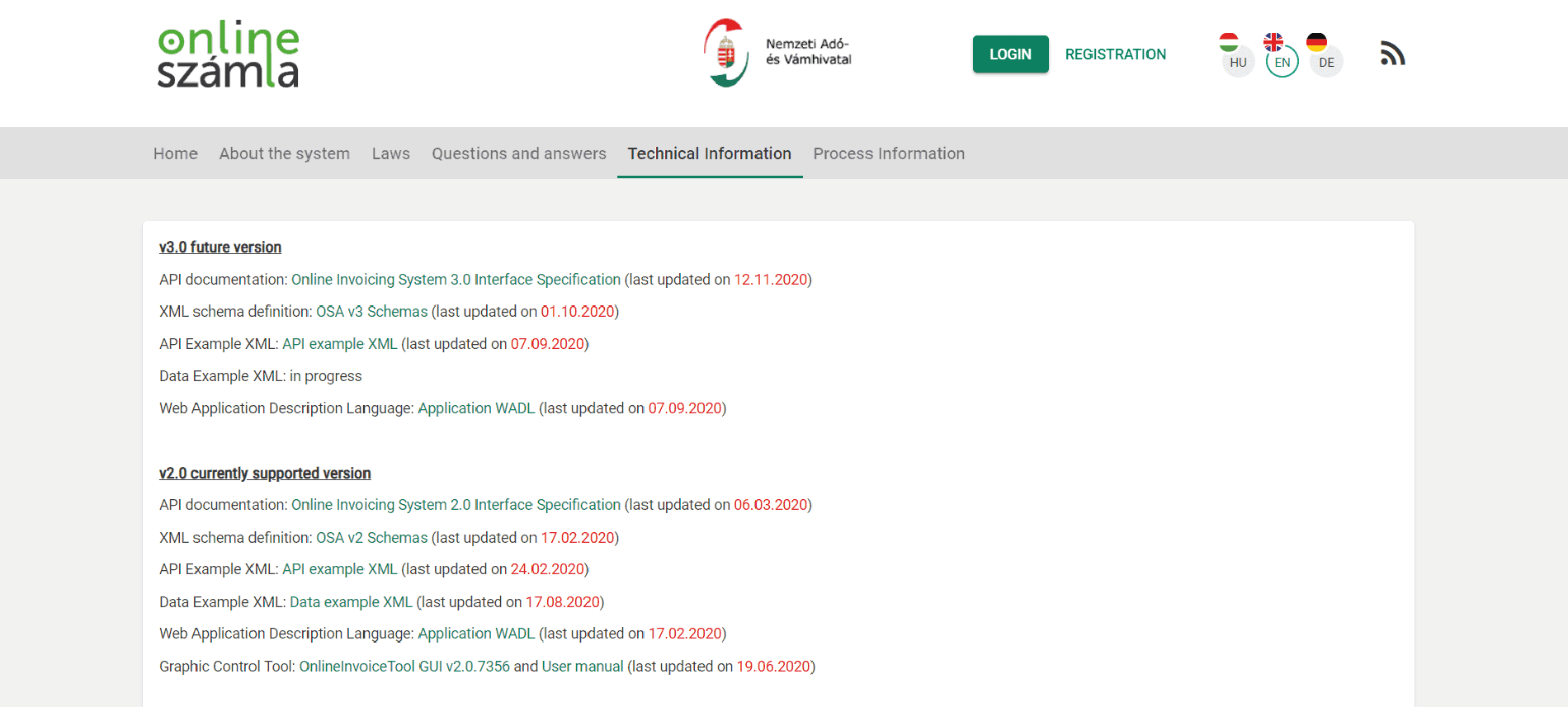
Website of the NAV system
The information is available in Hungarian, English and German, although not all parts of the website have been translated into English and German.
A look at the WADL file shows the methods offered by the Web service:
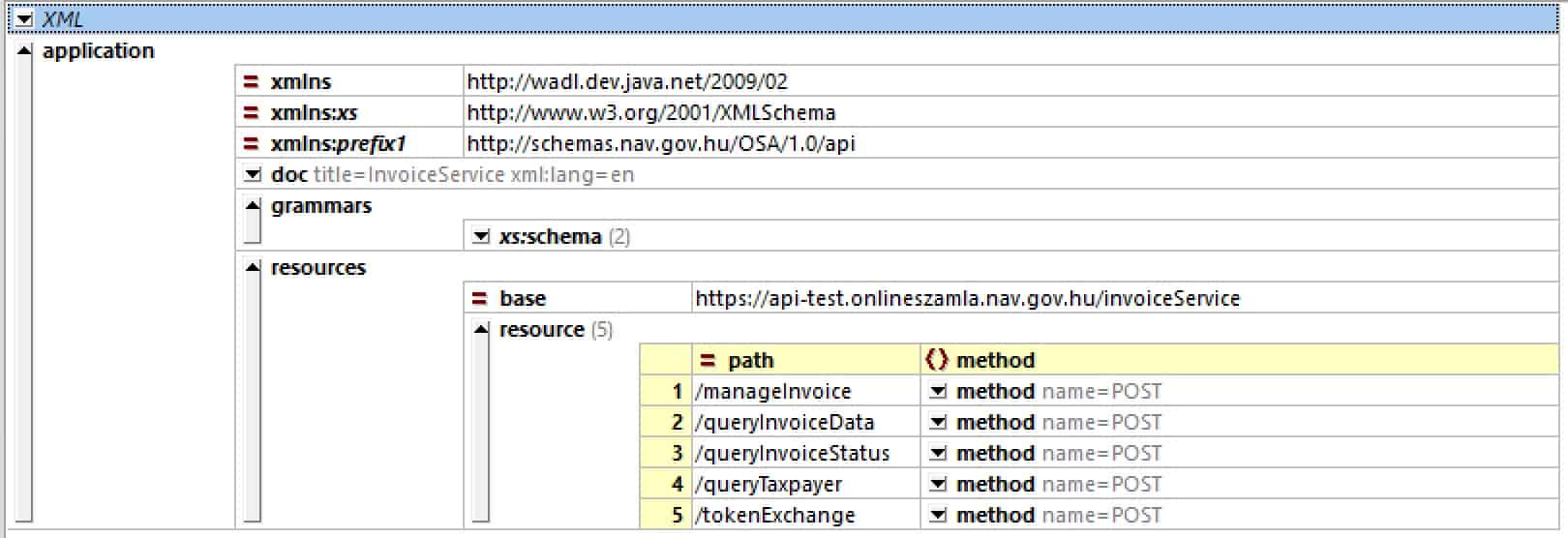
Web service operations of the NAV system
As can be seen, all communication is handled using HTTP POST operations. RESTful purists may raise their eyebrows at this.
The exact sequence of the individual web service calls and the code examples in Java can be found in the Technical Guide on the NAV website.
Transmission from the ERP System
When automatically transferring invoice data to the NAV system, the invoice data is taken directly from the ERP system. This means that in addition to issuing a regular invoice, an invoice artefact for the NAV system must be generated. For this, a corresponding copy control must be set up in the ERP system.
As shown in the following figure, the invoice document is transferred to ecosio in the ERP export format (e.g. IDoc in the case of SAP). ecosio converts the ERP export format into the desired target format of the NAV system, according to the official OSA XML schema. Subsequently, the invoice document is transmitted.
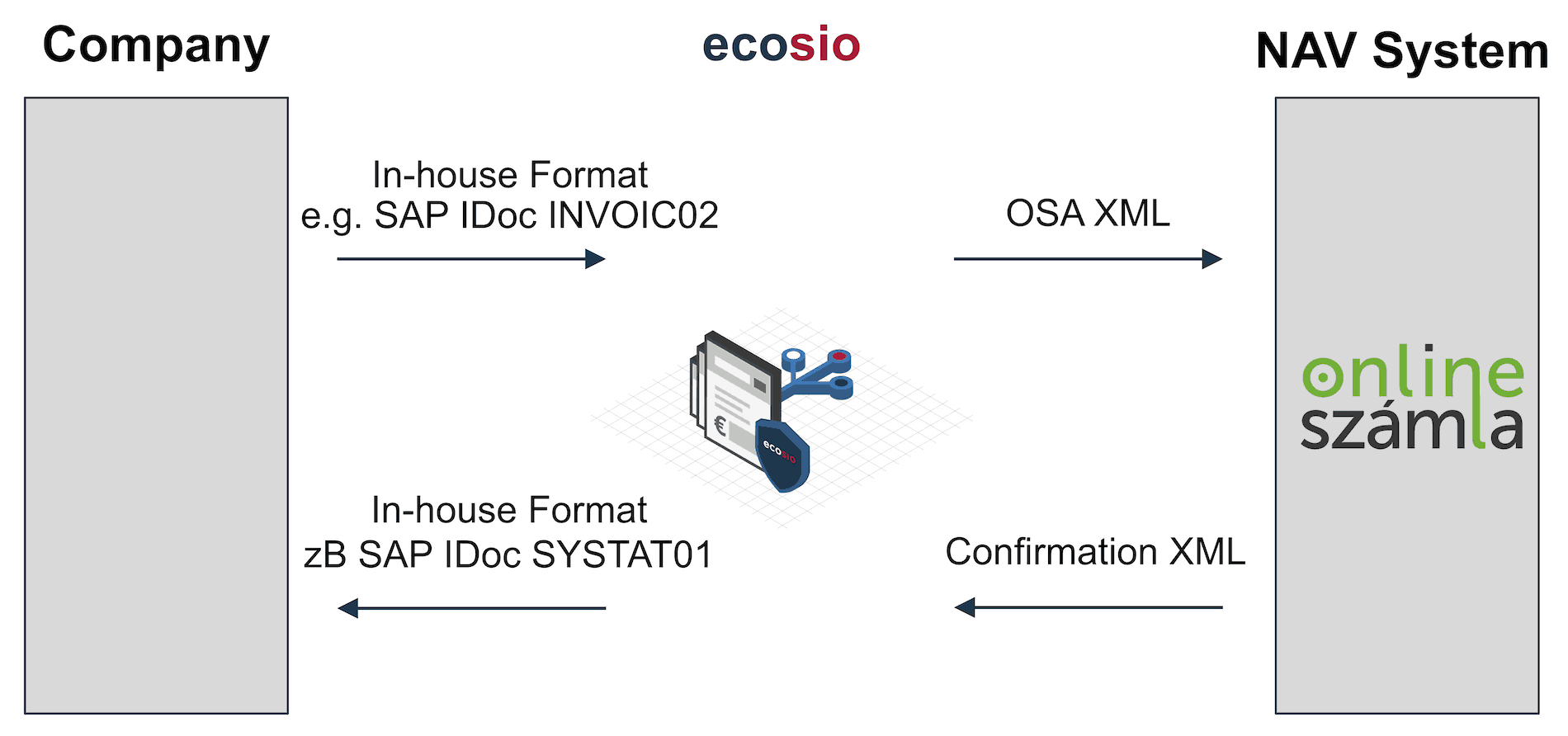
Transfer of data from the ERP system
The Web Service returns a confirmation message about the processing of the delivered invoice as an XML document. This XML document is converted by ecosio into a message state (invoice successfully transmitted, or invoice not successfully transmitted) and, if desired, can also be sent back to the ERP system as a separate XML document.
In the case of an SAP system, a confirmation can, for example, be based on a SYSTAT01 IDoc, which can be used to change the status of the originally transmitted invoice IDoc (for example, to status 41 – application document created in the target system).
Depending on the ERP system, the integration can be implemented as desired, allowing feedback in Microsoft Navision / Dynamics, Oracle, abas ERP, etc.
Registration
To file invoices in accordance with the Hungarian legislation, registration via the NAV system is necessary.
For companies from the DACH area, this means that the representative of the Hungarian branch must complete this registration and then create a technical administrator in the system. Using the access data of this technical administrator, an EDI service provider such as ecosio can then carry out the next setup steps and start the tests.
Developers have their own test platform available.
Questions?
Do you still have questions about e-invoicing in Hungary or are you looking for a solution to automatically transfer invoicing data to the NAV system? Please contact us or check out our chat – we are happy to help!
Are you aware of our free XML/Peppol document validator?
To help those in need of a simple and easy way to validate formats and file types, from CII (Cross-Industry Invoice) to UBL, we’ve created a free online validator. Try our free Peppol tool out yourself.
Der Beitrag Electronic Invoicing in Hungary – Transmission to the NAV System erschien zuerst auf ecosio.
]]>Der Beitrag EDIFACT PRI Segment – Calculation Net vs. Calculation Gross erschien zuerst auf ecosio.
]]>The PRI segment is used in EDIFACT to provide price information. It is used in EDIFACT documents such as ORDERS or INVOIC. The structure of the PRI segment is as follows. The example was taken from a UN / CEFACT INVOIC D07A INVOIC.
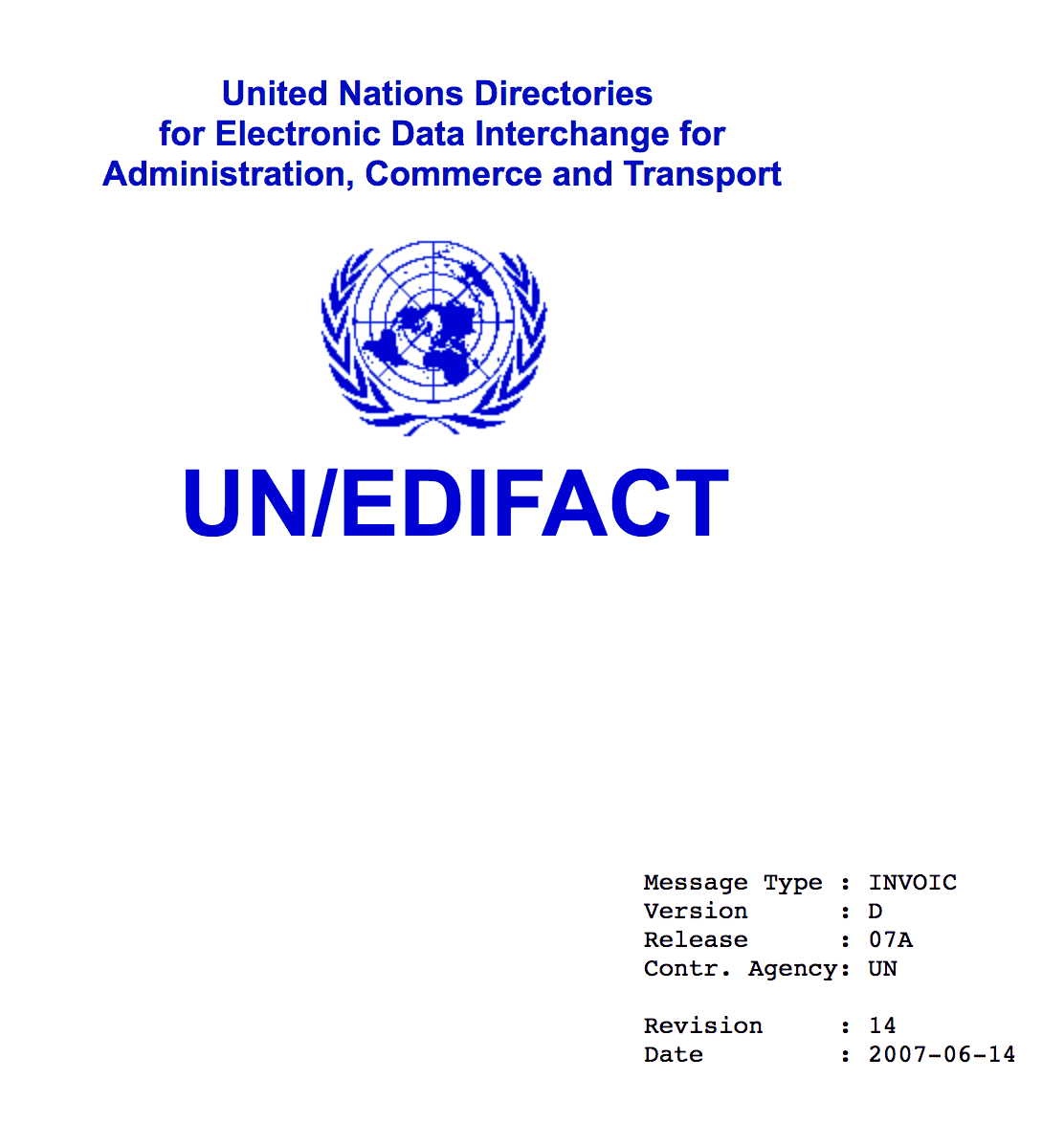
UN/CEFACT INVOIC D07A Standard
To highlight the price type, the first composite data element 010 is rather important.
PRI  PRICE DETAILS

Function: To specify price information.

010    C509 PRICE INFORMATION                          C    1
       5125  Price code qualifier                      M      an..3
       5118  Price amount                              C      n..15
       5375  Price type code                           C      an..3
       5387  Price specification code                  C      an..3
       5284  Unit price basis quantity                 C      n..9
       6411  Measurement unit code                     C      an..8

020    5213 SUB-LINE ITEM PRICE CHANGE OPERATION CODE  C    1 an..3
Example:
PRI+AAB:14.3330:::100:PCE'
This means that the gross price for 100 pieces of product xyz (not specified here, since the other segments, such as IMD, PIA, etc. are not listed) is 14.3330 Euro.
The data element 5125 can be used to define the type of price, which is then specified in the data element 5118.
The two most important Price Code qualifiers are AAA (Calculation Net) and AAB (Calculation Gross).
Gross vs. net price
The interpretation of gross and net price in a PRI segment can easily lead to confusion.
Gross and net in this case have nothing to do with taxes. Prices are always stated in EDIFACT exclusive tax. The gross price is the regular price of a product, while the net price is the price that the customer pays.
Here the EDIFACT definition:
5125  Price code qualifier                                    [C]


Desc: Code qualifying a price.

Repr: an..3

Code Values:

AAA   Calculation net
         The price stated is the net price including allowances/
         charges. Allowances/charges may be stated for
         information only.

AAB   Calculation gross
         The price stated is the gross price to which allowances/
         charges must be applied.

 ...
Calculation Gross is therefore the price without discounts / surcharges and Calculation Net the price with discounts / surcharges.
Unfortunately, this is not universally valid. While there is agreement on discounts, the Message Implementation Guide (MIG) determines whether the net price includes surcharges or not.
For example, in the INVOIC EDILEKTRO-MIG of the German Association of Electric Wholesale (VEG) e.V. metal surcharges are explicitly not included in the net price.
Do you still have questions about EDIFACT or EDIFACT INVOIC?
Do you still have questions about EDIFACT or EDIFACT INVOIC? Please contact us or check out our chat – we are happy to help!
Are you aware of our free XML/Peppol document validator?
To help those in need of a simple and easy way to validate formats and file types, from CII (Cross-Industry Invoice) to UBL, we’ve created a free online validator.
Der Beitrag EDIFACT PRI Segment – Calculation Net vs. Calculation Gross erschien zuerst auf ecosio.
]]>Der Beitrag The 7 EDI Documents Typically Found in a Trading Partner Cycle erschien zuerst auf ecosio.
]]>The exchange of business documents is part of a procurement process between suppliers and buyers, whether in retail, automotive or other production industries transacting goods and services on a regular basis. The following figure represents the typical flow of the seven most common EDI documents between a buyer and seller in a trading partner cycle, which I will explain further below.
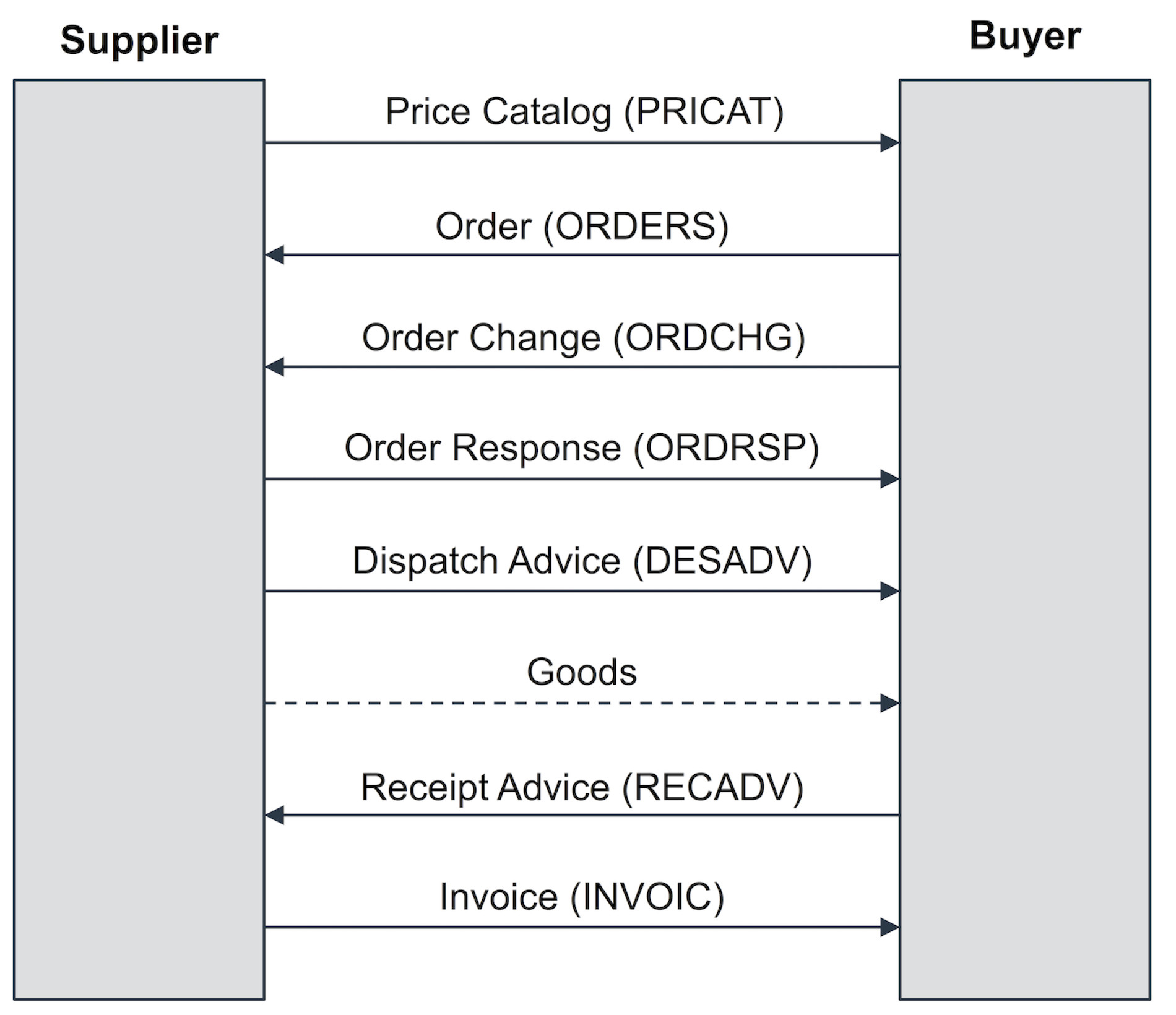
buyer and seller in a trading partner cycle
Price Catalog (PRICAT)
The first step of the exchange process between trading partners, is the price catalog and is required when the supplier provides the buyer with a current list of its products, product details, as well as price information. This process is commonly referred to as the product master data exchange, however, is not that common in modern trading partner cycles.
Purchase Order (ORDERS)
Once a buyer decides on the parameters of purchase from its supplier, the buyer must send a purchase order in order to receive those good. As such, this document is a necessary EDI transaction used by a customer, e.g. Sainsbury’s or Skanska, to place an order with one of its suppliers, e.g. Nestle or Tata Steel. This will contain the same information included in a traditional paper purchase order (PO), such as specific items and quantities to be produced, pricing and applicable discounts and shipping details. With EDI, the message includes coded information about the buyer, supplier, delivery point, products, etc. This means that unique identifiers such as global location numbers (GLNs) or global trade identification numbers (GTINs) are used for the identification of the involved trading partners and their goods. GLNs and GTINs are mostly found in retail and wholesale – manufacturing and the automotive industry often build on supplier’s or customer’s article numbers for material identification. In regard to partner identification bilaterally agreed IDs (e.g. JLR for Jaguar Landrover) or DUNS numbers are often used.
The benefit of using purchase orders via EDI allows businesses to avoid data entry errors associated with manually entering data into your system. It also reduces time delays and speeds up the process of sending and receiving documents, as well as, eliminating duplicates.
Order Change (ORDCHG)
A buyer may wish to request to change the quantity of goods ordered or the requested delivery date by emitting an order change message, indicating to the supplier a change of the initial purchase order.
Order Response (ORDRSP)
The supplier may acknowledge a received order message or a received order change message using an order response message. The order response can also be used as an Order Confirmation so as to recap and confirm what was in the purchase order. The supplier is essentially telling the customer that the order was received and they will take the job. It closes the loop and confirms the order electronically, without a follow up call or fax. The document can also indicate that the purchase order was accepted or rejected. It can even indicate any changes in pricing or quantity, alert the customer of product availability (in stock or backorder) and provide ship and delivery dates.
An automatic update of confirming an order or response will prevent confusion or mistakes when the invoice is sent later down the line. Time and money is saved by not having to follow up manually and check.
Dispatch Advice (DESADV)
A supplier notifies the buyer of the shipped good the buyer can expect to receive. Using the dispatch advice message, the supplier provides the buyer with information about the shipment including number of pallets, pallet identification numbers such as serial shipping container codes (SSCC), net and gross weight, identification of the transport vehicle such as license plate number of the truck, etc.
The benefit of this is that the buyer may coordinate the arrival and processing of the goods-to-arrive, e.g., in case of cross-docking-scenarios, frozen goods, etc. Furthermore, the buyer may verify the completeness of the shipment by comparing the received goods with the information provided in the previously received dispatch advice message.
Receipt Advice (RECADV)
After the goods have been received by the buyer, the buyer may emit a receipt advice message, confirming the amount of received goods. The amount of confirmed goods in the receipt advice may be different from the amount communicated by the supplier in the dispatch advice. Reasons for such a deviation may for instance be damaged goods the buyer refuses to accept or a wrong number of goods shipped by the supplier.
Invoice (INVOIC)
An outbound EDI document that replaces the traditional paper invoice. This document basically says that your order is complete and has shipped, so now we are billing you. Invoice details typically include goods provided, shipping particulars and payment terms. If your EDI is embedded, the invoice data is usually translated directly out of your accounts receivable module into the EDI document and subsequently into the accounts payable module of the customer.
Questions about the trading partner cycle of document types?
If you’d like more help with gathering your requirements from your supply chain, you can reach out – we’d be happy to help. or check out our chat.
Der Beitrag The 7 EDI Documents Typically Found in a Trading Partner Cycle erschien zuerst auf ecosio.
]]>Der Beitrag SAP SD (Sales and Distribution) Reference Processes for EDI erschien zuerst auf ecosio.
]]>Sales and Distribution guides the sales processes from the first order request to the delivery and invoicing of the sold goods and services. Important modules of SAP SD are, for example: Master Data, Sales, Shipping, Transportation, Foreign Trade, Billing and Sales Support. They also happen to strongly depend on other modules such as FI/CO (Finance/Controlling), MM (Materials Management) or PP (Production Planning). This article will show you the type of documents that are exchanged using SD processes.
There are two main scenarios, which can be differentiated within SD. The first scenario is a sales process based on a scheduling agreement and the second a sales process based on purchase orders.
SD processes based on scheduling agreements
The automotive industry and its associated suppliers very often make use of scheduling agreements. The process diagram below shows the document exchange sequence when using scheduling agreements.
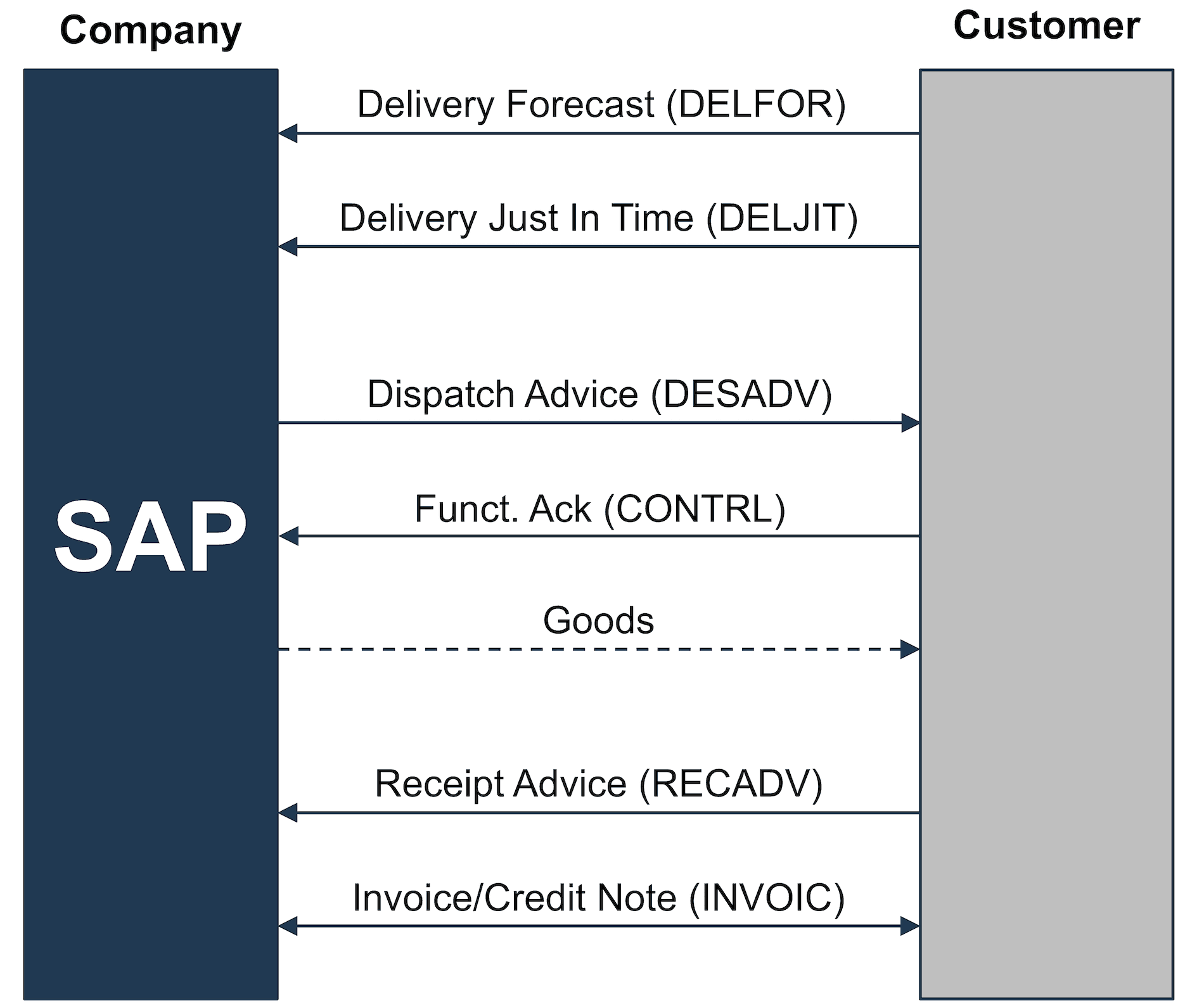
SD Reference Process based on a Scheduling Agreement
This process can be extended with additional transactions, such as the exchange of master data (based on PRICATs) or offer requests/offers.
However, the most important SAP SD processes for a delivery plan are:
- Customer sends a delivery forecast (DELFOR)
- Customer sends a just in time delivery forecast (DELJIT)
- Customer receives a dispatch advice (DESADV)
- Customer sends a receipt advice (RECADV)
- Customer sends a credit note (GSVERF)
- Customer receives an invoice (INVOIC)
Depending on the situation, confirmations can also be exchanged at business level, e.g., the client can send CONTRL files after receiving a dispatch advice.
SAP SD processes based on purchase orders
Regular purchase orders are typically used in the retail industry. In the manufacturing industry order changes and order confirmations are also frequently used. The process below shows the corresponding document exchange sequence.
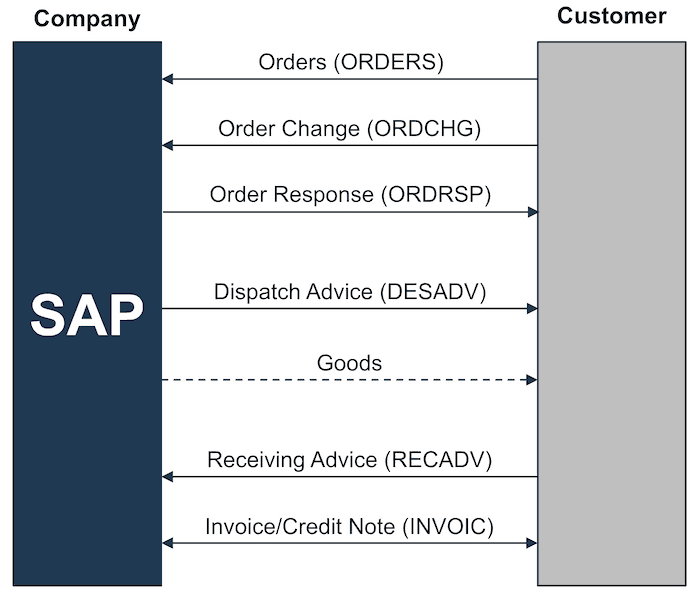
SD Reference Process based on Purchase Orders
Additional IDoc types such as PRICATs can also be used. The most important SD processes based on purchase orders are:
- Customer sends a purchase order (ORDERS)
- Customer sends a purchase order change (ORDCHG)
- Customer receives an order response (ORDRSP)
- Customer receives a dispatch advice (DESADV)
- Customer sends a goods receipt advice (RECADV)
- Customer sends a credit note (GSVERF)
- Customer receives an invoice (INVOIC)
Do you still have questions about SAP SD or EDI?
Do you still have questions about SAP SD and the EDI processes which go with it? Feel free to contact us, we would love to help you!
SAP ERP and SAP S/4HANA are the trademarks or registered trademarks of SAP SE or its affiliates in Germany and in several other countries.
Der Beitrag SAP SD (Sales and Distribution) Reference Processes for EDI erschien zuerst auf ecosio.
]]>Der Beitrag Structure and segments of an INVOIC IDoc in SAP ERP erschien zuerst auf ecosio.
]]>- IDocs are intermediate formats used to exchange structured data like invoices between SAP and external systems
- An INVOIC02 IDoc consists of control, data, and status records, built from segments like E1EDK01 (header), E1EDP01 (line items), and E1EDS01 (totals)
- SAP provides documentation via transaction WE60, where users can view detailed segment descriptions and download HTML schemas
- IDocs can be exported in XML or text format, and are typically validated against XML schemas to ensure structural correctness
Motivation for IDocs
IDoc is the short form of Intermediate Document. As the word intermediate suggests, it is an intermediate format, for the data exchange with an SAP ERP system. Using IDocs, a third-party system is able to export and import data from and to an SAP ERP system. This data might originate from systems containing master data such as debtor data, creditor data, material master records etc. Other examples include dynamic data records such as timesheets, orders or invoices.
The SAP ERP system delivers a wide range of predefined IDoc base types, which can be used for data exchange. These predefined IDocs may not fully satisfy all requirements, in which case new IDoc types can be created, exactly meeting specific customer requirements.
Do you have questions about IDocs or e-invoices in SAP? Feel free to contact us, we would love to help you! You can also chat directly with one of our experts online.
Understanding the IDoc contents
In order to be able to read the contents of an IDoc, the first step is to understand its structure. Unlike other XML-based standards, Universal Business Language (UBL) for example, IDocs use short and at first sight, incomprehensible element names. One will not be able to understand them without a supporting document that explains what these abbreviations mean. As the experience with IDocs increases, the abbreviated element names will become more familiar and their meaning will unfold – even without the documentation constantly at hand.
An IDoc can exist in different forms, but usually an IDoc can be found as database entry in an SAP system, where the following tables are being used: EDIDC, EDID4, EDIDS. The EDIDC table contains the data of the control record, the EDID4 table for the data records, and the EDIDS table for the status records. Transaction SE16N may be used to take a closer look at these tables.
However, users normally use their specific transactions to view IDocs, for example transaction BD87. The picture below shows a tree representation of an INVOIC02 IDoc in transaction BD87.

Tree view of an INVOIC02 IDoc (click for a bigger picture
© 2020. SAP SE or an SAP affiliate company. All rights reserved. Used with permission of SAP SE.
As one can see on the left side of this picture, IDocs use abbreviations to name each element, E1EDK01, E1EDKA1, etc.
To check what these elements mean, the documentation of the corresponding IDoc base type must be used, which can be found in transaction WE60. This previous article explains the details in regard to the IDoc documentation.
The IDoc documentation can be downloaded as HTML file and displayed in any Web browser. The SAP ERP system always exports three data types, ending with _d, _f and _i. In order to get the best representation of the data, we recommend opening the file ending with _f, e.g., INVOIC02_f.htm. Below is an extract from the HTML documentation for an INVOIC02 IDoc.
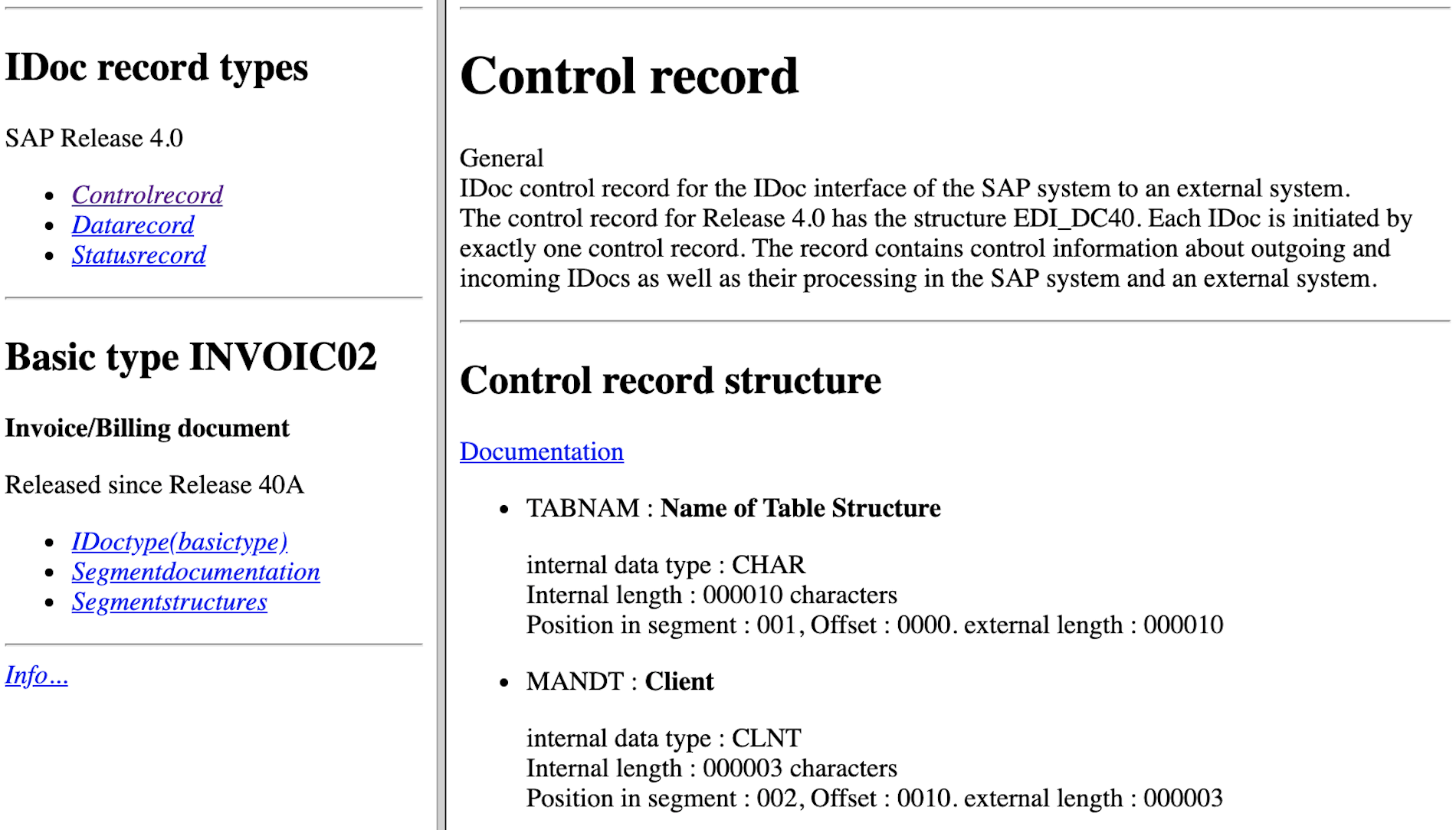
Extract of an INVOIC02 documentation
© 2020. SAP SE or an SAP affiliate company. All rights reserved. Used with permission of SAP SE.
With help from the HTML documentation, each element can easily be deciphered and the exact sequence the elements are in can be identified.
When an IDoc leaves the SAP system, an exchange file is created using the data in the IDoc tables. This exchange file comes in two formats: a text-based version and an XML-based version. Modern integration scenarios typically use the XML-based version only.
An overview of the INVOIC02 IDoc
XML knows two fundamental concepts: XML Schema and XML instance. An XML instance is a concrete form of an IDoc, for example the XML representation of the invoice with the number 4711. An XML Schema describes the exact structure and composition of an XML instance. It defines which element and attribute sequences are allowed, which data types can be used for some elements, etc.
The following figure shows an extract of the composition of an INVOIC02 XML Schema.

XML Schema of an INVOIC02 IDoc (click for a bigger version)
© 2020. SAP SE or an SAP affiliate company. All rights reserved. Used with permission of SAP SE.
With the help of an XML Schema one can check if the XML instance fulfills the requirement of schema conformity and is thus valid or not. Schema conformity is imperative if an INVOIC02 invoice shall be processed using software.
INVOIC02 IDoc in detail
An INVOIC02 can be used in various SAP modules, e.g., on the sales and distribution side (to represent an invoice that needs to be sent to a client) or on the materials management side (to represent an invoice that is received from a supplier). Invoices also play an important part in the finance module of SAP, where the actual accounting of the invoice takes place.
Using the data below as an example, we demonstrate the different elements of an INVOIC02 IDoc.
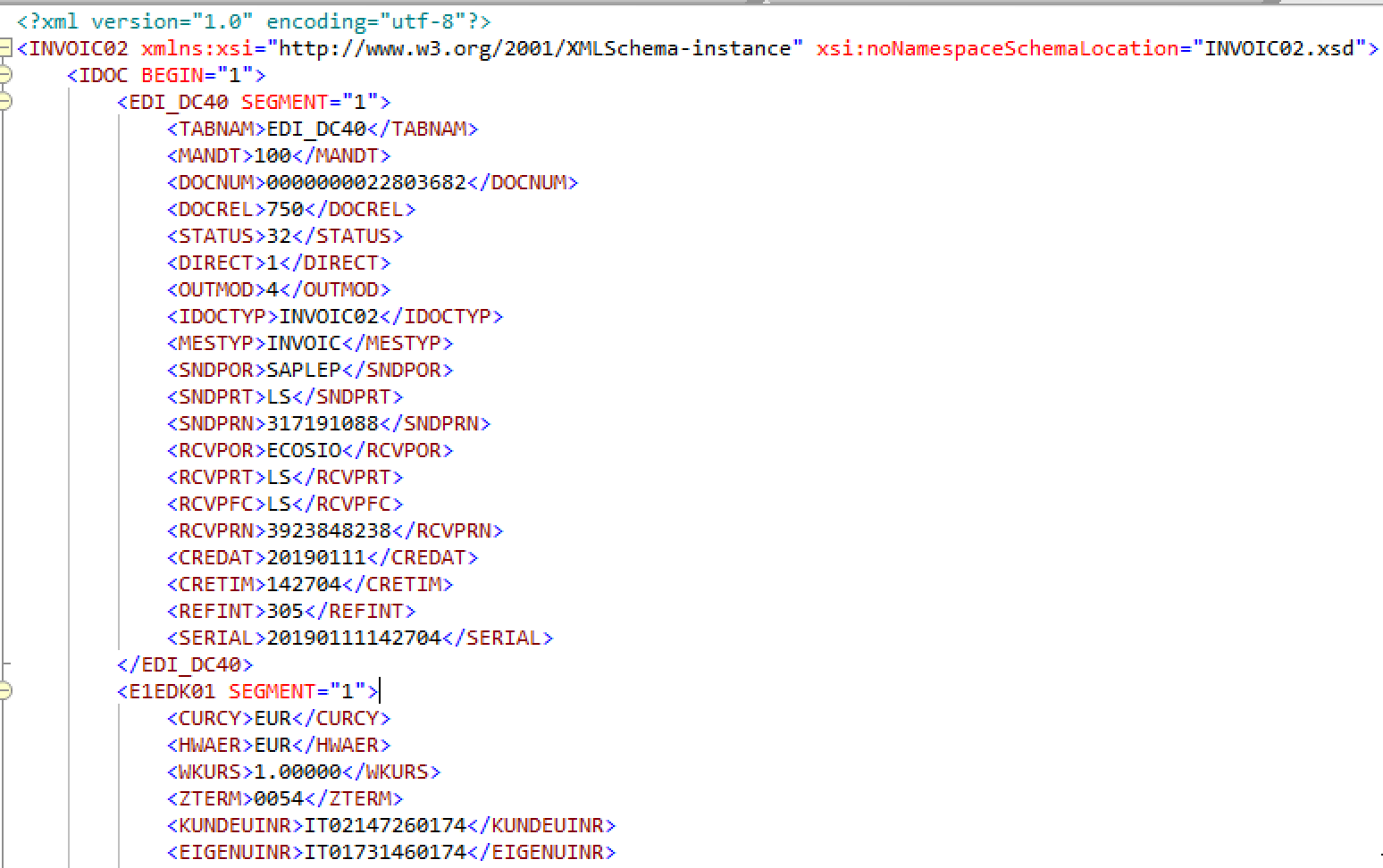
The structure of the INVOIC02 IDoc is built below the central root node INVOIC02. The following extract shows the composition of an INVOIC02 in a shorter version.
 <INVOIC02 xmlns:xsi="http://www.w3.org/2001/XMLSchema-instance" xsi:noNamespaceSchemaLocation="INVOIC02.xsd">
 	<IDOC BEGIN="1">
 		<!-- Control record -->
 		<EDI_DC40 SEGMENT="1">
 			<TABNAM>EDI_DC40</TABNAM>
 			...
 		</EDI_DC40>
 		<!-- Document header general data -->
 		<E1EDK01 SEGMENT="1">
 			<CURCY>EUR</CURCY>
 			 ...
 		</E1EDK01>
 		<!-- Document Item General Data -->
 		<E1EDP01 SEGMENT="1">
 			<POSEX>000010</POSEX>
 			...
 		</E1EDP01>
 		<!-- Summary segment general -->
 		<E1EDS01 SEGMENT="1">
 			<SUMID>001</SUMID>
 			<SUMME>11</SUMME>
 		</E1EDS01>
 		...
 	</IDOC>
 </INVOIC02>
The composition of an IDoc can be divided into three large sections:
- Control record
- Data records
- Status records
When exporting an IDoc from an SAP ERP system, only the control record and data records are being exported. Since the status record normally contains internal information from the system about the processing status, it is usually not exported.
The composition of the tree structure of an INVOIC02 IDoc is as follows:
- INVOIC02
- IDOC
- EDI_DC40 – Control Record
- E1EDK01 – Document Header General Data
- E1EDKA1 – Document Header Partner Information
- E1EDK02 – Document Header Reference Data
- E1EDK03 – Document Header Date Segment
- E1EDK05 – Document Header Conditions
- E1EDK04 – Document Header Taxes
- E1EDK17 – Document Header Terms of Delivery
- E1EDK18 – Document Header Terms of Payment
- E1EDK23 – Document Header Currency Segment
- E1EDK28 – Document Header Bank Data
- E1EDK29 – Document Header General Foreign Trade Data
- E1EDKT1 – Document Header Text Identification
- E1EDKT2 – Document Header Texts
- E1EDK14 – Document Header Organizational Data
- E1EDP01 – Document Item General Data
- E1EDP02 – Document Item Reference Data
- E1EDP03 – Document Item Date Segment
- E1EDP19 – Document Item Object Identification
- E1EDP26 – Document Item Amount Segment
- E1EDPA1 – Document Item Partner Information
- E1EDP05 – Document Item Conditions
- E1EDP04 – Document Item Taxes
- E1EDP28 – Document Item – General Foreign Trade Data
- E1EDP08 – Package Data Individual
- E1EDP30 – Document Item Account Assignment Intercompany Billing
- E1EDPT1 – Document Item Text Identification
- E1EDPT2 – Document Item Texts
- E1EDS01 – Summary Segment General
- IDOC
EDI_DC40 – control record
The control record EDI_DC40 contains meta information about the IDoc itself (sender, receiver, type of IDoc, etc.) and is mostly relevant for the correct processing of the IDoc message by third-party services. Using the control record, third-party services such as EDI providers are able to identify the sender and receiver of the IDoc, the exact IDoc type and date, etc.
Data records
After the control record, there are data records, which contain all the data about the invoice. The data records themselves are divided into the header and the line item. Elements which have a K in their name belong to the header data, those with a P belong to the line item data. Elements with an S belong to the sum data.
E1EDK01 – document header general data
The E1EDK01 invoice header contains general data of the invoice, such as currency, UID number of the biller and invoice recipient, weight etc.
<E1EDK01 SEGMENT="1">
  <CURCY>GBP</CURCY>
  <HWAER>GBP</HWAER>
  <WKURS>1.00000</WKURS>
  <ZTERM>0054</ZTERM>
  <KUNDEUINR>GB39392392323</KUNDEUINR>
  <EIGENUINR>GB39238248343</EIGENUINR>
  <BSART>INVO</BSART>
  <BELNR>0130106273</BELNR>
  <NTGEW>423.472</NTGEW>
  <BRGEW>472.616</BRGEW>
  <GEWEI>KGM</GEWEI>
  <FKART_RL>ZLR</FKART_RL>
  <RECIPNT_NO>0000035703</RECIPNT_NO>
  <FKTYP>L</FKTYP>
</E1EDK01>
The element E1EDK01 can only be present once in an INVOIC02 IDoc.
E1EDKA1 – document header partner information
The E1EDK01 element is followed by several invoice headers of type E1EDKA1, containing partner information about the customer, biller, goods receiver etc. The PARVW element (partner function) identifies the type of partner.
<E1EDKA1 SEGMENT="1">
  <PARVW>RS</PARVW>
  <LIFNR>0000035703</LIFNR>
  <NAME1>Company John Doe Ltd.</NAME1>
  <STRAS>40 Chancery Lane</STRAS>
  <ORT01>London</ORT01>
  <PSTLZ>WC2A 1EN</PSTLZ>
  <LAND1>GB</LAND1>
  <SPRAS>E</SPRAS>
  <BNAME>Anne Doe</BNAME>
  <PAORG>1312</PAORG>
</E1EDKA1>
RS for example stands for invoice issuer. The complete list of the allowed partner roles can be viewed in the IDoc documentation in transaction WE60.
The element E1EDKA1 is optional and can be found up to 99 times in an INVOIC02 IDoc.
E1EDK02 – document header reference data
In the header E1EDK02 the reference data of the invoice is found. To identify the type of partner, the element QUALF (qualifier reference document) must be examined.
<E1EDK02 SEGMENT="1">
  <QUALF>009</QUALF>
  <BELNR>239238232</BELNR>
  <DATUM>20190111</DATUM>
</E1EDK02>
<E1EDK02 SEGMENT="1">
  <QUALF>001</QUALF>
  <BELNR>592382323</BELNR>
  <DATUM>20190104</DATUM>
</E1EDK02>
<E1EDK02 SEGMENT="1">
  <QUALF>002</QUALF>
  <BELNR>292847342</BELNR>
  <DATUM>20190104</DATUM>
</E1EDK02>
In the example above, the following documents are being referred to:
- Invoice number (009)
- Customer Purchase Order (001)
- Order number of the supplier (002)
The element E1EDK02 is optional and can be found up to 20 times in an INVOIC02 IDoc.
E1EDK03 – document header date segment
After the reference data, different date values are provided using the element E1EDK03. The IDDAT element (qualifier date segment) allows to identify what type of date is provided.
<E1EDK03 SEGMENT="1">
  <IDDAT>026</IDDAT>
  <DATUM>20190111</DATUM>
</E1EDK03>
<E1EDK03 SEGMENT="1">
  <IDDAT>001</IDDAT>
  <DATUM>20190108</DATUM>
</E1EDK03>
<E1EDK03 SEGMENT="1">
  <IDDAT>022</IDDAT>
  <DATUM>20190104</DATUM>
</E1EDK03>
The example above contains the following date values:
- Billing date for billing index and printout (026)
- Delivery date from the supplier (001)
- Purchase order date (022)
The element E1EDK03 is optional and can be found up to 20 times in an INVOIC02 IDoc.
E1EDK05 – document header conditions
This element lists the individual condition types of an invoice, depending on which condition records are stored in the invoice at header level in SAP.
<E1EDK05 SEGMENT="1">
  <ALCKZ>+</ALCKZ>
  <KOTXT>Net price</KOTXT>
  <BETRG>5148.06</BETRG>
  <KRATE>0</KRATE>
  <KOEIN>GBP</KOEIN>
</E1EDK05>
<E1EDK05 SEGMENT="1">
  <ALCKZ>+</ALCKZ>
  <KSCHL>ZZDV</KSCHL>
  <KOTXT>Shipping costs</KOTXT>
  <BETRG>22.85</BETRG>
  <KPERC>10.000</KPERC>
  <MWSKZ>AA</MWSKZ>
</E1EDK05>
+ in the ALCKZ element indicates a surcharge and - a deduction. The other elements are as follows:
KSCHL – Condition type (coded)
KOTXT – Condition text
BETRG – Fixed surcharge/discount on total gross
KRATE – Condition record per unit
KPERC- Condition percentage rate
MWSKZ – VAT indicator
KOEIN – Currency
The element E1EDK05 is optional and can be found up to 99 times in an INVOIC02 IDoc.
E1EDK04 – Document Header Taxes
The information pertaining to the taxes specified in the invoice can be found in element E1EDK04.
<E1EDK04 SEGMENT="1">
  <MWSKZ>A1</MWSKZ>
  <MSATZ>22.000</MSATZ>
  <MWSBT>1132.57</MWSBT>
</E1EDK04>
The VAT abbreviation MWSKZ stands for the VAT indicator. The element MSATZ indicates the VAT rate and MWSBT the value added tax amount.
The element E1EDK04 is optional and can be found up to 999 times in an INVOIC02 IDoc.
E1EDK17 – Document Header Terms of Delivery
Element E1EDK17 indicates the delivery terms of the invoice.
<E1EDK17 SEGMENT="1">
  <QUALF>001</QUALF>
  <LKOND>FH</LKOND>
  <LKTEXT>Ms. Smith</LKTEXT>
</E1EDK17>
The element QUALF indicates whether it is Incoterms 1 or Incoterms 2. The delivery condition code can be retrieved from the LKOND element and the delivery condition text from the element LKTEXT.
The element E1EDK17 is optional and can be found up to 10 times in the INVOIC02 IDoc.
E1EDK18 – Document Header Terms of Payment
This element contains information about the payment conditions of the invoice.
<E1EDK18 SEGMENT="1">
  <QUALF>001</QUALF>
  <TAGE>14</TAGE>
  <PRZNT>2</PRZNT>
  <ZTERM_TXT>Payment due in 14 days</ZTERM_TXT>
</E1EDK18>
In the example above, the invoice needs to be paid within 14 days without deductions. Should the invoice be paid right away, a 2% discount can be deducted.
The element E1EDK18 is optional and can be found up to 10 times in an INVOIC02 IDoc.
E1EDK23 – Document Header Currency Segment
This element is used to specify the currency information of the invoice.
<E1EDK23 SEGMENT="1">
  <QUALF>001</QUALF>
  <WAERZ>EUR</WAERZ>
  <WAERQ>EUR</WAERQ>
  <KURS>1.00</KURS>
  <DATUM>20190102</DATUM>
</E1EDK23>
The qualifier 001 indicates that the currency mentioned above is the document currency.
The element E1EDK23 is optional and can be found up to 4 times in an INVOIC02 IDoc.
E1EDK28 – Document Header Bank Data
All bank data which are relevant for the invoice, such as IBAN, BIC, bank name, etc. will be mentioned in element E1EDK28.
<E1EDK28 SEGMENT="1">
  <BCOUN>GB</BCOUN>
  <BNAME>Santander Bank</BNAME>
  <ACNUM>GB39232383493401ß59352434</ACNUM>
  <ACNAM>Supermarket Penny Price</ACNAM>
</E1EDK28>
The element E1EDK28 is optional and can be found up to 20 times in an INVOIC02 IDoc.
E1EDK29 – Document Header General Foreign Trade Data
Data in regard to foreign trade is shown in element E1EDK29 of the invoice.
<E1EDK29 SEGMENT="1">
  <EXNUM>2392382823</EXNUM>
  <ALAND>GB</ALAND>
  <EXPVZ>3</EXPVZ>
  <ZOLLA>5901</ZOLLA>
  <GRWCU>GBP</GRWCU>
  <LAND1>GB</LAND1>
  <LANDX>Great Britain</LANDX>
  <LANDA>GB</LANDA>
  <XEGLD>X</XEGLD>
  <ALANX>Great Britain</ALANX>
  <ALANA>GB</ALANA>
  <ALSCH>GB</ALSCH>
  <ALSRE>900</ALSRE>
  <IEVER>3</IEVER>
  <EXPVZTX>Road transport</EXPVZTX>
  <IEVER_TX>Road transport</IEVER_TX>
</E1EDK29>
The IDoc documentation describes which values are allowed in each field. For example, the value table for EXNUM is EIKP and the one for ALAND is table T005. Transaction SE16 or SE16N allows to find out what the values of this table are.
The element E1EDK29 is optional and can be found up to 20 times in an INVOIC02 IDoc.
E1EDKT1 – Document Header Text Identification
This element specifies the header texts from the SAP document in an IDoc and has the sub element E1EDKT2. The qualifier TDID identifies what type of text is provided.
<E1EDKT1 SEGMENT="1">
  <TDID>Z100</TDID>
  <TSSPRAS>D</TSSPRAS>
  <TSSPRAS_ISO>GB</TSSPRAS_ISO>
  <E1EDKT2 SEGMENT="1">
    <TDLINE>Please note that the vacation period
    </TDLINE>
    <TDFORMAT>*</TDFORMAT>
  </E1EDKT2>
  <E1EDKT2 SEGMENT="1">
    <TDLINE>during the Easter Holidays.</TDLINE>
    <TDFORMAT>*</TDFORMAT>
  </E1EDKT2>
</E1EDKT1>
The text language is specified with the TSSPRAS and the TSSPRAS_ISO key. The sub element E1EDKT2 is used for the actual text.
The element E1EDKT1 is optional and can be found up to 20 times in an INVOIC02 IDoc.
E1EDKT2 – Document Header Texts
The sub element E1EDKT2 contains the actual text information in different text lines. The maximum length of a text line TDLINE is 70 characters, longer texts are therefore divided in several TDLINE elements.
The element E1EDKT2 is optional and can be found up to 999 times in an INVOIC02 IDoc.
E1EDK14 – Document Header Organizational Data
SAP relevant organization data such as sales organization or distribution channel are contained in element E1EDK14. The element QUALF (qualifier organization) helps to identify what type of organization data is provided.
<E1EDK14 SEGMENT="1">
  <QUALF>008</QUALF>
  <ORGID>1310</ORGID>
</E1EDK14>
<E1EDK14 SEGMENT="1">
  <QUALF>007</QUALF>
  <ORGID>01</ORGID>
</E1EDK14>
<E1EDK14 SEGMENT="1">
  <QUALF>006</QUALF>
  <ORGID>01</ORGID>
</E1EDK14>
The example above shows the following organization data:
- Sales organization (008)
- Distribution channel (007)
- Division (006)
The element E1EDK14 is optional and can be found up to 10 times in the INVOIC02 IDoc. The header finishes with the element E1EDK14 and the line items of the invoice start.
E1EDP01 – Document Item General Data
This element contains the general data of the line items and other sub elements.
The most important elements on the first level are:
<E1EDP01 SEGMENT="1">
  <POSEX>000010</POSEX>
  <MENGE>16.000</MENGE>
  <MENEE>PCE</MENEE>
  <NTGEW>16.720</NTGEW>
  <GEWEI>KGM</GEWEI>
  <BRGEW>18.064</BRGEW>
  <PSTYV>TAN</PSTYV>
  <WERKS>1016</WERKS>
  <E1EDP02 SEGMENT="1">
    <QUALF>001</QUALF>
      ...
These elements have the following meaning.
POSEX – Item number. Line items are numbered consecutively. The sequence of the entries (e.g. in 10s or 100s) can be customized in SAP. In most cases POSEX entries have leading zeros.
MENGE – Quantity
MENEE – Unit of measure
NETGEW – Net weight of the line item
GEWEI – Weight unit
BRGEW – Total weight of the line item
PSTYV – Sales document item category
WERKS – Plant
The elements mentioned above are only an extract of the possible elements. Overall, the line item E1EDP01 has 52 different elements, such as net sales price (VPREI), price unit (PEINH) etc. Which element is found in 02 is dependent on the ABAP output module in SAP, the predefined customizing, and the type of invoice. When in doubt, the INVOIC02 IDoc documentation helps to determine the meaning of the elements.
The element E1EDP01 is optional and can be found up to 999999 times in an INVOIC02 IDoc.
E1EDP02 – Document Item Reference Data
This element specifies references to other items and documents, which are relevant for given position record.
<E1EDP02 SEGMENT="1">
  <QUALF>001</QUALF>
  <BELNR>3493493434</BELNR>
  <DATUM>20190104</DATUM>
</E1EDP02>
<E1EDP02 SEGMENT="1">
  <QUALF>002</QUALF>
  <BELNR>2393439343</BELNR>
  <ZEILE>000010</ZEILE>
  <DATUM>20190104</DATUM>
</E1EDP02>
In the example above, the following reference data is provided:
- Customer purchase order (001)
- Vendor order (002)
As indicated by these entries, the document number, the document date (if there is one) and the reference to the corresponding line item of the document are being provided. This is mostly relevant for collective bills, as the positions do not necessarily refer to the same purchase order or delivery document.
The element E1EDP02 is optional and can be found up to 25 times in the INVOIC02 IDoc.
E1EDP03 – Document Item Date Segment
Date references, which apply to the position record, are provided in element E1EDP03. The Qualifier IDDAT allows to identi what type of date is being used.
<E1EDP03 SEGMENT="1">
  <IDDAT>029</IDDAT>
  <DATUM>20190104</DATUM>
</E1EDP03>
<E1EDP03 SEGMENT="1">
  <IDDAT>001</IDDAT>
  <DATUM>20190115</DATUM>
</E1EDP03>
In this example the following date values are provided:
- Sales order date (029)
- Delivery date of the supplier (001)
The element E1EDP03 is optional and can be found up to 25 times in an INVOIC02 IDoc.
E1EDP19 – Document Item Object Identification
The element E1EDP19 contains information about identification data of the invoiced product or service, e.g. article number, GTINs or similar. Again, the element QUALF helps to identify the type of identification number being used.
<E1EDP19 SEGMENT="1">
  <QUALF>001</QUALF>
  <IDTNR>2133424</IDTNR>
</E1EDP19>
<E1EDP19 SEGMENT="1">
  <QUALF>002</QUALF>
  <IDTNR>000000000000067080</IDTNR>
  <KTEXT>Electronic unit 15kg</KTEXT>
</E1EDP19>
The following values are provided in the example above.
- Material number used by customer (001)
- Material number used by vendor (002)
The element E1EDP03 is optional and can be found up to 10 times in an INVOIC02 IDoc.
E1EDP26 – Document Item Amount Segment
The element E1EDP26 contains information about the price on item level. Depending on the SAP ERP customization and the activated calculation schema, different amounts are provided. This means that not only the gross calculation (the amount without surcharges or deductions) and the net calculation (the amount with surcharges and deductions) are provided, but also every surcharge and deduction as well as any subtotals.
The element QUALF helps to identify the type of amount.
<E1EDP26 SEGMENT="1">
  <QUALF>004</QUALF>
  <BETRG>378.56</BETRG>
</E1EDP26>
<E1EDP26 SEGMENT="1">
  <QUALF>003</QUALF>
  <BETRG>378.56</BETRG>
</E1EDP26>
The following amounts are provided in the example above:
- Amount qualifying for cash discount (004)
- Net value (003)
The element E1EDP26 is optional and can be found up to 20 times in an INVOIC02 IDoc.
E1EDPA1 – Document Item Partner Information
This element is used to provide partner information on item level. This partner information is in addition to the one found at header level (E1EDKA1). For example, in the case of a collective invoice, one can enter a different consignee on item level.
<E1EDPA1 SEGMENT="1">
  <PARVW>WE</PARVW>
  <PARTN>0000037023</PARTN>
  <NAME1>Supermarket Penny Price Manchester</NAME1>
  <STRAS>32 Penny Lane</STRAS>
  <ORT01>Manchester</ORT01>
  <PSTLZ>M1 1BZ</PSTLZ>
  <LAND1>GB</LAND1>
  <TELF1>032-23923238</TELF1>
  <TELFX>032-23923882</TELFX>
  <SPRAS>E</SPRAS>
  <SPRAS_ISO>EN</SPRAS_ISO>
</E1EDPA1>
The composition of this element is similar to the one of element E1EDKA1 and the qualifiers used in element PARVW are identical.
The element E1EDPA1 is optional and can be found up to 20 times in an INVOIC02 IDoc.
E1EDP05 – Document Item Conditions
The element E1EDP05 specifies the individual condition data records, which are relevant to determine the price of each position. The composition of this element is similar to element E1EDK05, which helps to indicate the conditions at header level.
<E1EDP05 SEGMENT="1">
  <ALCKZ>+</ALCKZ>
  <KSCHL>ZPRB</KSCHL>
  <KOTXT>Gross price</KOTXT>
  <BETRG>175.35</BETRG>
  <KRATE>175.35</KRATE>
  <UPRBS>1</UPRBS>
  <MEAUN>PCE</MEAUN>
  <KOEIN>GBP</KOEIN>
  <KOBAS>1</KOBAS>
</E1EDP05>
<E1EDP05 SEGMENT="1">
  <ALCKZ>-</ALCKZ>
  <KSCHL>ZM00</KSCHL>
  <KOTXT>Base rebate amount</KOTXT>
  <BETRG>78.91</BETRG>
  <KPERC>45.00</KPERC>
  <KOBAS>175.35</KOBAS>
</E1EDP05>
The element E1EDPA1 is optional and can be found up to 99 times in an INVOIC02 IDoc.
E1EDP04 – Document Item Taxes
This element is used for the specification of the taxes, which are relevant to the position. Its composition is similar to the one of element E1EDK04, which specifies the taxes at document header level.
<E1EDP04 SEGMENT="1">
  <MWSKZ>AA</MWSKZ>
  <MSATZ>19.000</MSATZ>
  <MWSBT>18.32</MWSBT>
</E1EDP04>
The element E1EDP04 is optional and can be found up to 25 times in an INVOIC02 IDoc.
E1EDP28 – Document Item – General Foreign Trade Data
The data relevant for foreign trading is specified in element E1EDP28 at item level.
<E1EDP28 SEGMENT="1">
  <EXNUM>0002250830</EXNUM>
  <EXPOS>000010</EXPOS>
  <STAWN>84231010000</STAWN>
  <EXPRF>10000</EXPRF>
  <EXART>11</EXART>
  <HERKL>CN</HERKL>
  <HERTA>CN</HERTA>
  <HERTI>China</HERTI>
  <STXT1>General appliances</STXT1>
  <BEMAS>PCE</BEMAS>
  <TRATY>031</TRATY>
  <TRAID>20057076</TRAID>
  <BRULO>18.064</BRULO>
  <NETLO>16.720</NETLO>
  <VEMEH>KGM</VEMEH>
  <BMGEW>16.000</BMGEW>
  <VERLD>GB</VERLD>
  <VERLD_TX>123 Great Britain</VERLD_TX>
  <EXPRF_TX>Export without charges</EXPRF_TX>
  <EXART_TX>Direct sales</EXART_TX>
  <VERFA>10000</VERFA>
  <BESMA>PCE</BESMA>
  <WKREG>08</WKREG>
</E1EDP28>
The element E1EDP28 is optional and can be found up to 9 times in an INVOIC02 IDoc.
E1EDP08 – Package Data Individual
If the invoice contains a reference to the product packaging, the packaging information is shown in element E1EDP08. Usually this element is missing in invoices, as the packaging is not relevant for invoices in most cases.
<E1EDP08 SEGMENT="1">
  <HLNUM>1</HLNUM>
  <EXIDV>00000000000536543605</EXIDV>
  <VENUM>0000026545</VENUM>
  <VEMEH>PCE</VEMEH>
  <PCKAR>000000000028041353</PCKAR>
  <PCKNR>3115</PCKNR>
  <ANZAR>80.000</ANZAR>
  <VBELN>0080000269</VBELN>
  <POSNR>000010</POSNR>
  <BTGEW>5430.000</BTGEW>
  <NTGEW>4800.000</NTGEW>
  <TARAG>630.000</TARAG>
  <GEWEI>GRM</GEWEI>
  <BTVOL>0.000</BTVOL>
  <NTVOL>0.000</NTVOL>
  <TAVOL>0.000</TAVOL>
  <LAENG>0.000</LAENG>
  <BREIT>0.000</BREIT>
  <HOEHE>0.000</HOEHE>
  <MEINS>ST</MEINS>
  <VSTEL>DEF2</VSTEL>
  <PKNRS>S</PKNRS>
</E1EDP08>
The element E1EDP08 is optional and can be found up to 999999 times in an INVOIC02 IDoc.
E1EDP30 – Document Item Account Assignment Intercompany Billing
This element displays account-relevant information such as cost centers, action numbers, delivery schedule numbers, etc.
<E1EDP30>
  <QUALF>001</QUALF>
  <IVKON>239239234</IVKON>
</E1EDP30>
The element E1EDP30 is optional and can be found up to 99 times in an INVOIC02 IDoc.
E1EDPT1 – Document Item Text Identification
Similar to the text specified at header level with elements E1EDKT1 and E1EDKT2, E1EDPT1 and E1EDPT2 can be used to display text at item level.
<E1EDPT1 SEGMENT="1">
  <TDID>ZM02</TDID>
  <TSSPRAS>GB</TSSPRAS>
  <TSSPRAS_ISO>GB</TSSPRAS_ISO>
  <E1EDPT2 SEGMENT="1">
    <TDLINE>External specification-: </TDLINE>
    <TDFORMAT>*</TDFORMAT>
  </E1EDPT2>
  <E1EDPT2 SEGMENT="1">
    <TDLINE>086 LC1-MD393</TDLINE>
    <TDFORMAT>*</TDFORMAT>
  </E1EDPT2>
</E1EDPT1>
The element E1EDPT1 is optional and can be found up to 99 times in an INVOIC02 IDoc.
E1EDPT2 – Document Item Texts
This element provides the actual text information. Text lines are limited to 70 characters – longer texts can be split into different E1EDPT2 elements.
The element E1EDPT2 is optional and can be found up to 999 times in an INVOIC02 IDoc.
E1EDS01 – Summary segment general
This element provides information about the total amount of an invoice, such as whole net amount, whole gross amount, tax amount etc. The qualifier SUMID identifies the type of amount.
<E1EDS01 SEGMENT="1">
  <SUMID>005</SUMID>
  <SUMME>1132.57</SUMME>
  <WAERQ>EUR</WAERQ>
</E1EDS01>
<E1EDS01 SEGMENT="1">
  <SUMID>011</SUMID>
  <SUMME>6280.63</SUMME>
  <WAERQ>EUR</WAERQ>
</E1EDS01>
In the example above the following amount types are provided:
- Sales tax total (005)
- Billed value (011)
The element E1EDS01 is optional and can be found up to 30 times in an INVOIC02 IDoc.
Do you have any questions?
Do you have questions about IDocs or e-invoices in SAP? Feel free to contact us, we would love to help you! You can also chat directly with one of our experts online.
Are you aware of our free XML/Peppol document validator?
To help those in need of a simple and easy way to validate formats and file types, from CII (Cross-Industry Invoice) to UBL, we’ve created a free online validator. Try our free Peppol tool out yourself.
SAP ERP and SAP S/4HANA are the trademarks or registered trademarks of SAP SE or its affiliates in Germany and in several other countries.
Der Beitrag Structure and segments of an INVOIC IDoc in SAP ERP erschien zuerst auf ecosio.
]]>Der Beitrag Cloud-based EDI solutions: A silver lining for your business erschien zuerst auf ecosio.
]]>At first sight, managing your own EDI may seem like the cheaper option compared to outsourcing to a cloud-based service, keeping up with the wide range of software, hardware and compliance necessities. But this can quickly become expensive.
Specialist software, dedicated staff, regular updates, maintenance and scaling, all add up and remain ongoing expenses, even once your system is up and running.
Outsourcing your EDI management eliminates many of these expenditures, allowing for lower-cost EDI deployment and operation than on-premise hosting.
Boost performance and agility
Purchased software solutions may offer some customization in terms of functionality, but they are predominantly one-size-fits-all and it’s unlikely that any will suit your business precisely.
An outsourced cloud-based solution can be tailored to your needs and easily updated — with no additional effort on your part — to meet additional document types, partners and protocols as your business expands or shifts direction.
Additionally, unlike in-house hosting where you are restrained by the limits of your hardware and software, cloud-based solutions are flexible and perfect for higher traffic loads.
Our decision guide compares on-premise v cloud managed EDI services in detail
Free up your staff with cloud-based EDI
Operating EDI management systems takes significant specialist knowledge, which your IT team may not possess, and a large number of daily tasks to ensure optimal operation. This often means that you’ll have to hire new IT members, pay for expensive training, and reduce the amount of time that your IT team spends on other essential, or more strategic, activities for your business.
Adopting a cloud-based EDI solution gives you immediate access to trained and highly competent experts, saving your business on staff costs and your IT team on valuable time and resources to work on other key projects.
For a detailed breakdown of how much work is done by different EDI solution types, download our infographic on this topic.
Stay safe and secure
While you may have some concerns about the security of cloud-based EDI systems, they are actually highly secure,featuring sophisticated encryption and monitoring. In fact, we monitor our EDI traffic 24/7, allowing one of our specialists to intervene immediately in the event of any sort of breach and disruption.
Even better, because your precious data is being stored on the cloud, it’s also safe from unexpected catastrophes such as hardware and software failures. That means your business can still keep on track, even in the event of a crisis.
Get in touch
Despite all of these positive aspects, moving to a cloud-based EDI service is a big step for many businesses. In fact, over 70% of companies are still holding back from embracing cloud-first EDI providers and we understand the reasons. After all, you’re handing over a huge aspect of your business into someone else’s hands.
At Ecosio, we’re here to help. We’re experts at providing bespoke EDI solutions to businesses of all shapes and sizes. Talk to us today to find out how you can cut your overheads, unlock resources and empower your business for the future with an EDI technology partner you can trust to deliver.
Any questions?
Do you have questions or would you like to implement an EDI based process? Please contact us – we look forward to hearing from you!
Der Beitrag Cloud-based EDI solutions: A silver lining for your business erschien zuerst auf ecosio.
]]>Der Beitrag Overview of the EDIFACT EANCOM format erschien zuerst auf ecosio.
]]>EDIFACT stands for Electronic Data Interchange for Administration, Commerce and Transport and has been in constant development by the United Nations since 1986. This standard is known under the name UN/EDIFACT. Whilst working on standardising the UN/EDIFACT format, numerous requirements from all industries needed consideration. However, although this may have helped broaden the UN/EDIFACT standard and make it more flexible, it also complicated its actual use.
A simple invoice may, for instance, include many optional elements and different identifiers may be used for the identification of the involved companies and products, etc. Before they can create an actual EDIFACT invoice, the sender and receiver need to agree on the subset of segments they will be invoked when exchanging files. If it were the case, that both parties always needed to agree on a specific subset, this would inevitably lead to a huge and unnecessary number of different subsets, and therefore reduce the benefits of EDI through the time needed to make the subsets compliant.
It is therefore advisable to agree on certain standard EDIFACT-subsets. These EDIFACT subsets are derived from the EDIFACT standard and were tailored to suit a specific user group. Mandatory elements are defined according to the EDIFACT subset and additional specifications laid down (e.g. identifiers to use, date formats, code lists, etc.).
These subsets apply to whole industries (e.g. paper, steel or consumer goods industry), including at the corporate level.
The diagram below illustrates the subset approach.
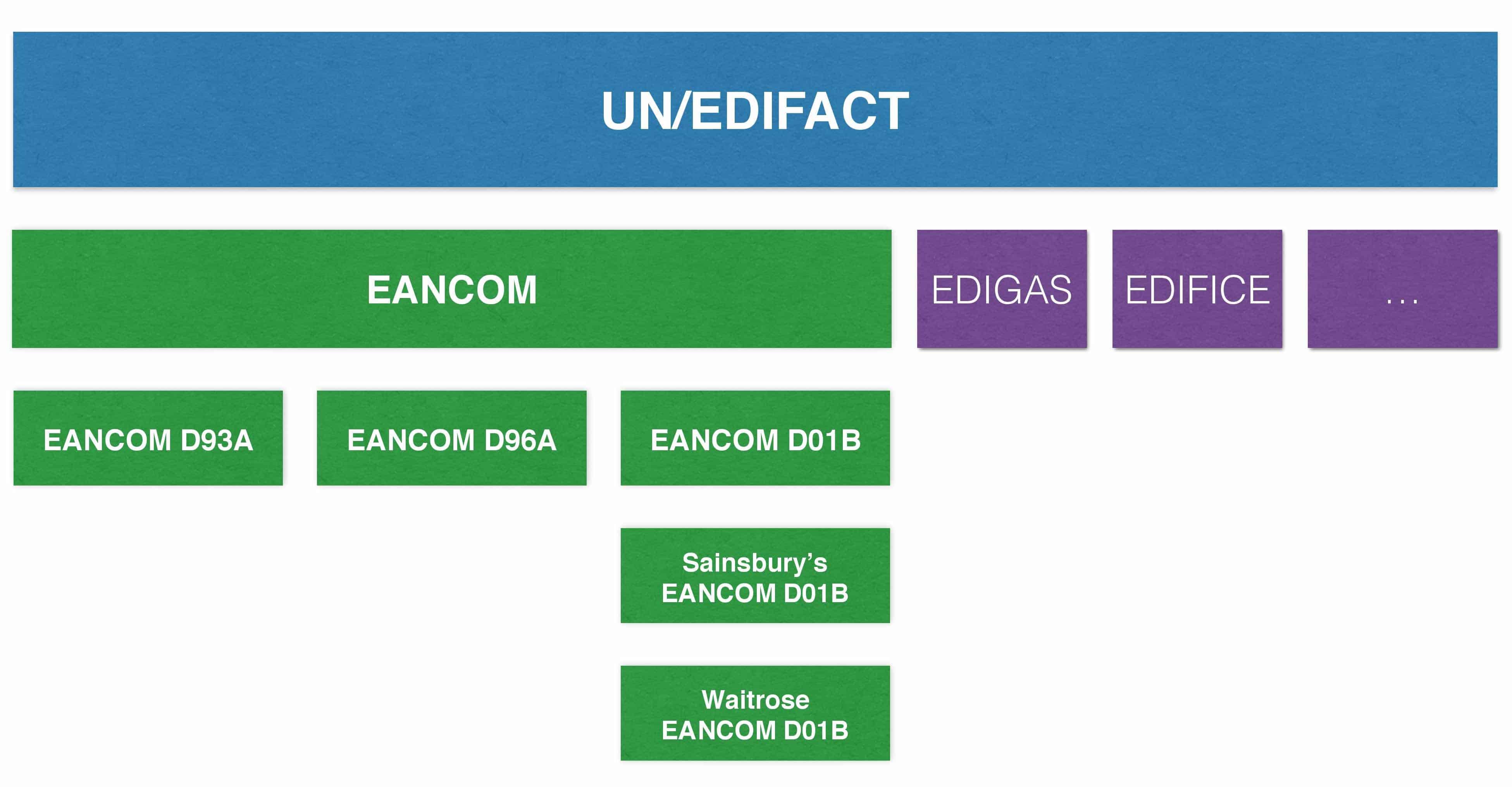
Individual subsets based on the UN/EDIFACT standard were defined for different industries. The globally most used EDIFACT subset is EANCOM (abbreviation of EAN + Communication) and GS1 is continuing its development for the consumer goods industry. Other subsets include, for instance, EDIGAS (gas industry) or EDIFICE (high-tech industry).
EANCOM exists today in three different versions (D93A, D96A and D01B). Major companies such as REWE or Metro are also defining their own subsets based on the EANCOM subset.
EANCOM-Subset
EANCOM is being developed by the GS1 organisation for global standards and is a 100% subset of the UN/EDIFACT standard for the consumer goods industry. Since the EANCOM standard is highly popular, it is by now also used in other industries, such as the health sector. As opposed to the very extensive UN/EDIFACT standard, EANCOM reduces the various EDI messages to essential fields that are mandatory to specific business processes or for specific message types. The EANCOM standard currently includes about 50 different message types.
As the name suggests already, the EANCOM standard is based on the GS1 identification system (GLN, GTIN,SSCC, etc.). The use of globally unique GS1 identification allows effective and uniform processing of EDI messages. Every sender and recipient will, for instance, be uniquely identified by it’s GLN – thus excluding confusion caused by proprietary identifiers. The same applies to product identification using GTINs and identification of packages using SSCCs.
EANCOM also defines the logical sequence of messages used in a specific business area. The diagram below illustrates message flows that may be depicted with EANCOM. In addition to buyers and sellers, communication between logistics service providers and banks is also included.
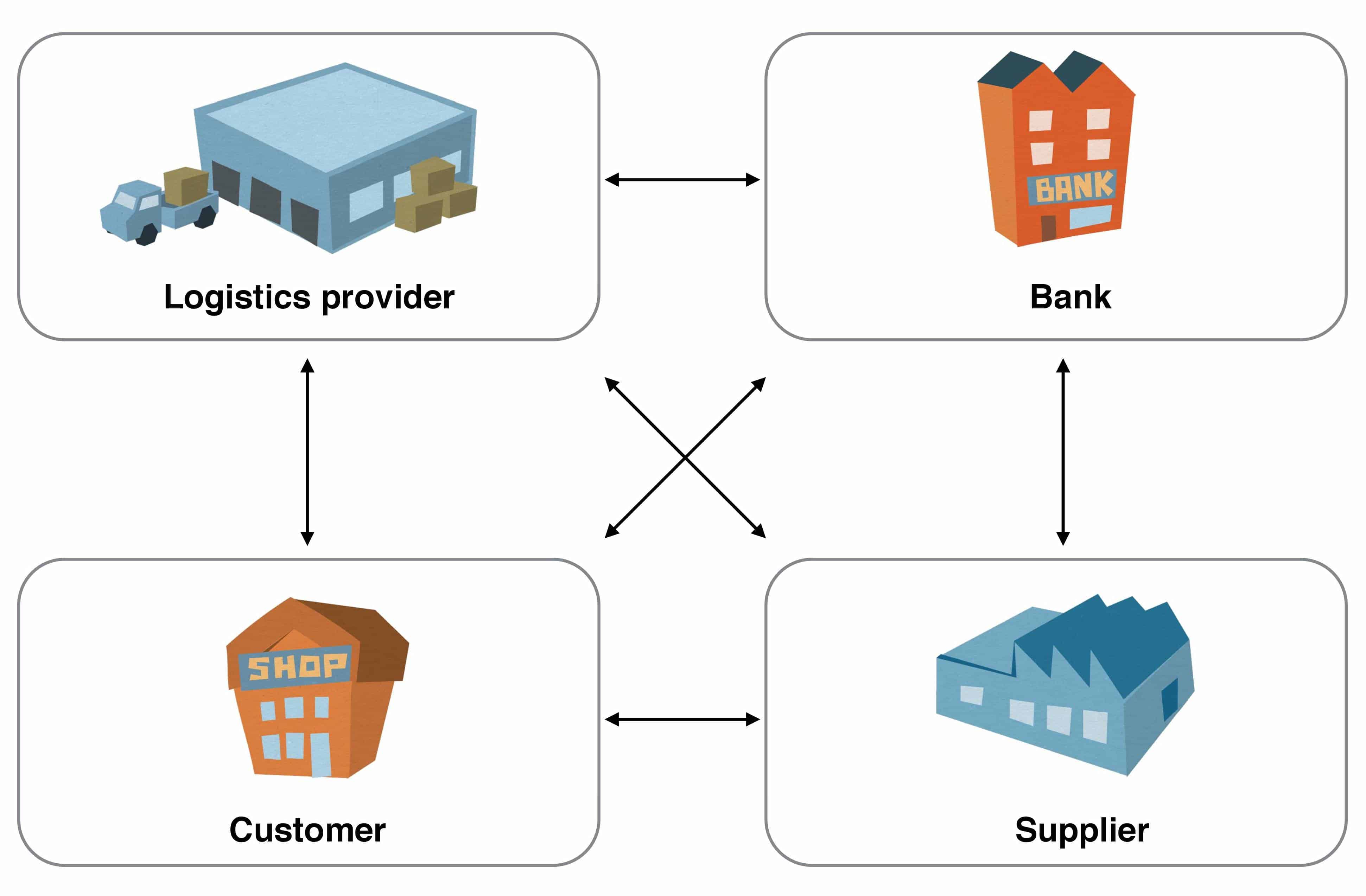
EANCOM – Participating Companies
The individual EANCOM message types may be roughly classified into the following four categories:
- Master data reconciliation
These message types are used for the exchange of master data for products and for involved trading partners. The master data is therefore stored in the systems of the involved partners and used for message transactions afterwards. This will, for instance, ensure that only the most recent product identifiers and prices will be used. - Transactions
These message types are used to order goods, organise their transportation and pay for goods received. - Reporting and planning
These message types are used for the exchange of data allowing future planning. Examples include Sales Reports or Inventory Reports, used to communicate current product sales figures to a supplier. The supplier may use this information to plan his own production. - Miscellaneous
The message types in this category serve various purposes, such as the exchange of additional information required by the different industries.
Overview of EANCOM message types
The diagram below offers an overview of the most important EANCOM message types and the order of the message exchange.
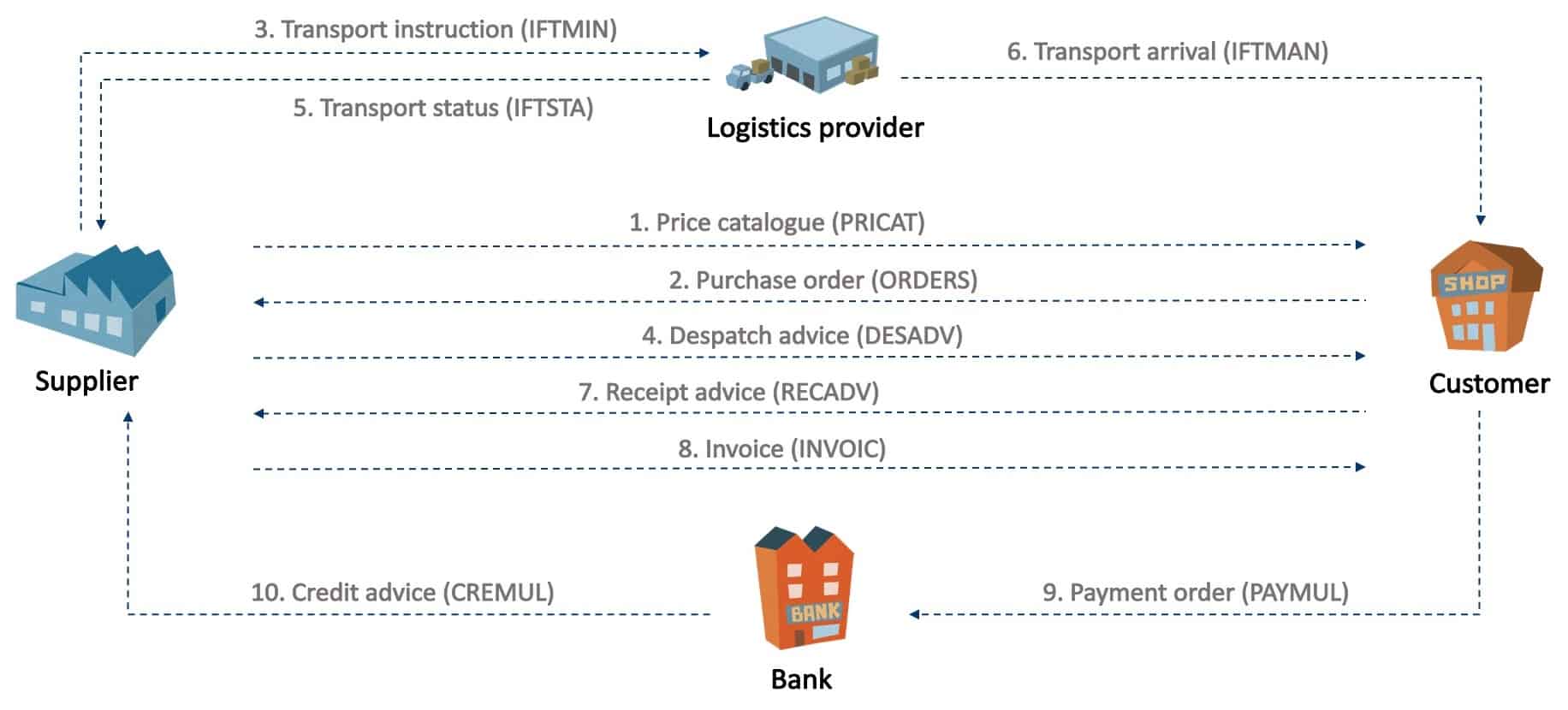
The three most important message types by far are ORDERS (order), DESADV (despatch advice) and INVOIC (invoice).
Price list/Catalogue (PRICAT)
A supplier will send a PRICAT message with a list of all relevant product data to his customers. A supplier will send a PRICAT message to customers whenever the product range changes.
Order (ORDERS)
A customer will transmit an ORDERS message to a supplier to order products and services. An order will typically also include the required quantity, date and place of delivery. The GTIN codes for the ordered products and services and the GLNs used will typically have been received via a previous PRICAT message.
It is also possible to leave out the master data reconciliation using PRICAT, if the parties have exchanged beforehand the lists with the product codes, e.g. on an Excel sheet. However, this might present a few drawbacks, such as input errors due to media faults, etc…
Transport order (IFTMIN)
A supplier will transmit an IFTMIN message to a logistics service provider to order transportation of goods.
Despatch message (DESADV)
Suppliers will send a DESADV message to notify customers of impending deliveries, prior to arrival of the goods at the customer. DESADV messages are particularly relevant to large companies since DESADV messages will allow coordination of their own goods receipt logistics (such as cross-docking warehouses).
Transport status (IFTSTA)
Logistics service providers will use IFTSTA messages to confirm shipment of an order to their client (in this case the supplier). The time of sending this message will be agreed on between the shipping agent and supplier. An IFTSTA message may, for instance, be sent once every day, at the time a shipment is executed, etc.
Arrival message (IFTMAN)
A shipping agent may send an IFTMAN message to the recipient of the goods (in this case the customer) to notify of imminent delivery. Similar to a DESADV, the purpose would be better planning of goods receipt logistic by the customer.
Goods receipt notification (RECADV)
Customers may send a RECADV message to confirm receipt of a specific shipment. This will allow the customer to, for instance, notify the supplier of deviations of quantities supplied or of his rejection of specific shipments.
Invoice (INVOIC)
The supplier may use an INVOIC message to transmit an invoice to his customer.
Banker’s order (PAYMUL)
The customer may use a PAYMUL message to transmit payment instructions to his bank. The bank will on receipt of this message pay the invoice amount to the account of the supplier.
Credit note (CREMUL)
A bank will use a CREMUL message to inform the supplier of payments made by his customer.
Questions?
Do you have any more questions about EANCOM? Please do contact us or use our chat – we’re more than happy to help!
Der Beitrag Overview of the EDIFACT EANCOM format erschien zuerst auf ecosio.
]]>