Der Beitrag ecosio to Host SAP/EDI Workshop at UKISUG Connect 2021 erschien zuerst auf ecosio.
]]>What is UKISUG Connect?
UKISUG stands for the UK and Ireland SAP User Group. UKISUG Connect is this group’s large annual conference. At the conference SAP customers, consultants, employees and partners from across the UK & Ireland come together to discuss relevant topics, listen to expert talks and collaborate.

About UKISUG Connect 2021
This year’s event will welcome over 500 SAP customers, 200 SAP experts and 70 exhibitors. Delegates will be able to choose from 80+ sessions across the conference’s three days, as well as enjoy the many opportunities to network. The full schedule can be found here.
At this year’s event ecosio will be exhibiting and will therefore be available throughout the conference to answer any SAP or EDI-related questions.
At the 2021 event ecosio will also be running a workshop, entitled “Electronic Data Interchange (EDI) and e-Invoicing with SAP ERP and SAP S/4HANA – Technical Foundations and Best Practices”.
What ecosio’s workshop will cover
In ecosio’s workshop SAP expert Philipp Liegl will explore how a cost-effective, efficient and sustainable EDI solution can be implemented in SAP systems, detailing several positive steps you can take to ensure your SAP/EDI project is a success – no matter what the target SAP system is or whether it’s yours or a client’s.
Thanks to the number of different SAP systems and EDI integration options out there, identifying which solution makes the most sense for your specific situation can be difficult. Available solutions are numerous, including local EDI converters, SAP PI/PO, SAP Integration Suite with its Cloud Integration component, and fully managed solutions from external service providers. This session will help you identify which of these represents the best option.
Attendees will discover how to access full EDI functionality via their SAP system’s existing user interface and turn their SAP into their own EDI control centre with a seamlessly integrated and customisable solution. They will also learn what the different options for EDI and e-invoicing integration in SAP are, how to reduce the strain on in-house resources and the secrets to long term EDI success.
Interested in attending?
Registration for the event is still open and tickets can be purchased here.
We look forward to seeing you there!
Der Beitrag ecosio to Host SAP/EDI Workshop at UKISUG Connect 2021 erschien zuerst auf ecosio.
]]>Der Beitrag What SAP ERP or SAP S/4HANA version are you using? erschien zuerst auf ecosio.
]]>- Open SAP GUI → “Status” → zoom into SAP System data to check your installed version
- SAP ERP 6.0 (Business Suite 7) versions are shown via SAP_BASIS and SAP_APPL values
- SAP S/4HANA versions use a YYMM format (e.g. 1909 = September 2019), visible via the S4CORE component
- Knowing your version is key for EDI integration and upgrade planning
How to find your SAP version number
To find out which SAP ERP or SAP S/4HANA system you are using, open the SAP GUI and select “Status” in the menu.

SAP Menu
© 2020. SAP SE or an SAP affiliate company. All rights reserved. Used with permission of SAP SE.
Then click on the zoom button in the SAP System data section.
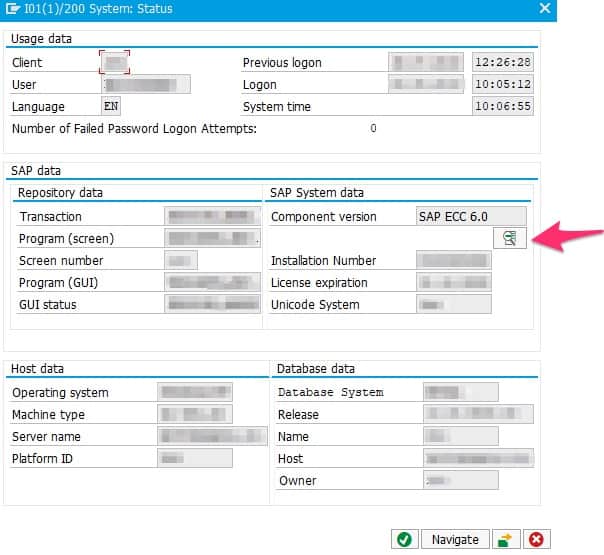
SAP Details
© 2020. SAP SE or an SAP affiliate company. All rights reserved. Used with permission of SAP SE.
Depending on the SAP version and depending on whether you run SAP Business Suite 7 or SAP S/4HANA, details may be shown in different ways.
SAP Business Suite 7
SAP ERP 6.0 is the central core component of SAP Business Suite 7 and the predecessor of SAP S/4HANA. Over the years new capabilities have been added to SAP ERP 6.0, which are called Enhancement Packages (or EHP in short). The latest EHP is EHP 8.0, which was released in 2016. The following screenshot has been taken from SAP Business Suite 7. The Installed Product Versions tab gives an overview of the currently used product versions.
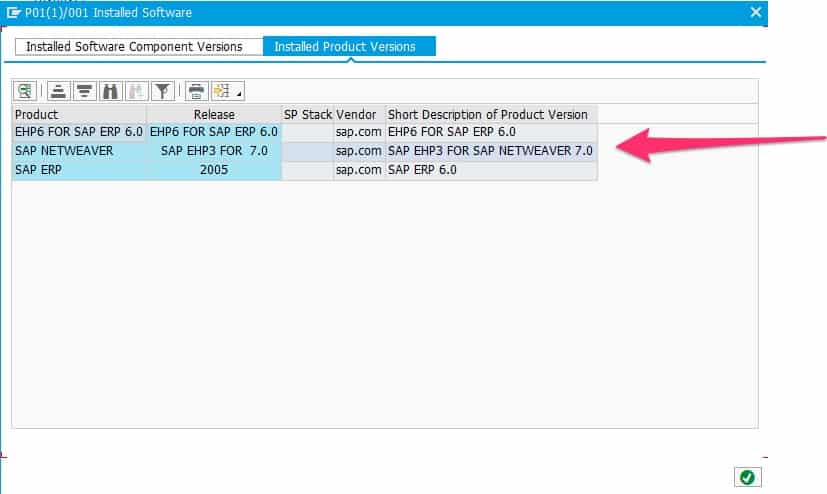
SAP product versions
© 2020. SAP SE or an SAP affiliate company. All rights reserved. Used with permission of SAP SE.
Where no tab exists, the version may be obtained by inspection of the two SAP_BASIS and SAP_APPL types. SAP_BASIS indicates the version of the underlying NetWeaver server and SAP_APPL the version of the used SAP ERP 6.0 component.
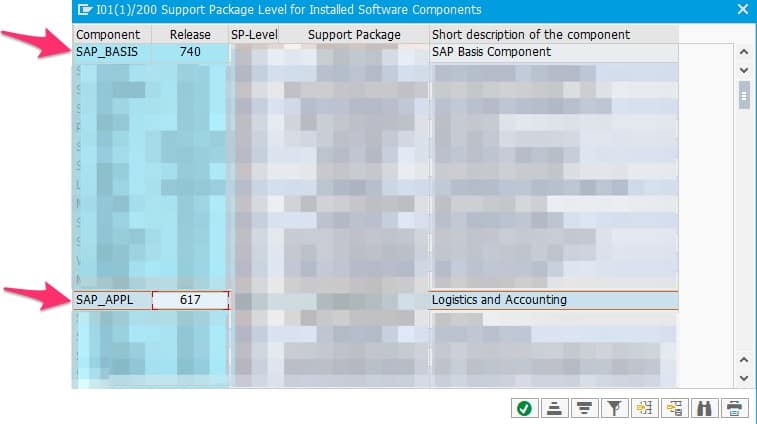
SAP product details
© 2020. SAP SE or an SAP affiliate company. All rights reserved. Used with permission of SAP SE.
A SAP_BASIS type 740 indicates a SAP NetWeaver Server Version 7.4, SAP_BASIS 750 would indicate SAP NetWeaver Server Version 7.5 and SAP_BASIS 702 would indicate SAP NetWeaver 7.0 with Enhancement Package 2. Thus, the first two digits of SAP_BASIS indicate the SAP NetWeaver version and the last digit the NetWeaver enhancement package (if applicable).
A SAP_APPL type 617 indicates a SAP ERP 6.0 with EHP7. A middle digit 1 indicates that the system is enabled for HANA databases. A SAP_APPL 605 indicates a SAP ERP 6.0 with EHP 5. Since the middle digit is 0, the system is not enabled for HANA.
SAP S/4HANA
SAP S/4HANA is short for SAP Business Suite 4 HANA and is the newest ERP system of SAP. In SAP S/4HANA versions are named after the year and the month they were released (YYMM). Users of Microsoft Windows will find that naming convention quite familiar, as the same concept is used there.
Thus, an SAP S/4HANA system version 1909 indicates the release date of September 2019.
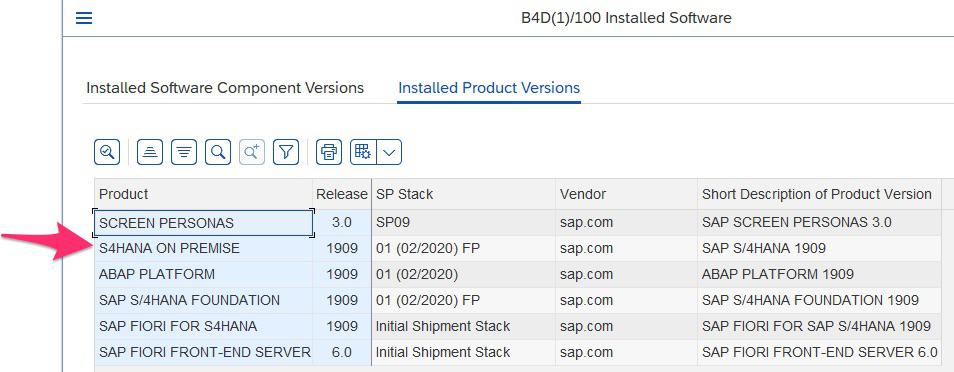
S/4HANA systems have a dedicated component called S4CORE (common questions regarding this component can be found in the SAP Community). The S4CORE version also indicates the used S/4HANA version.
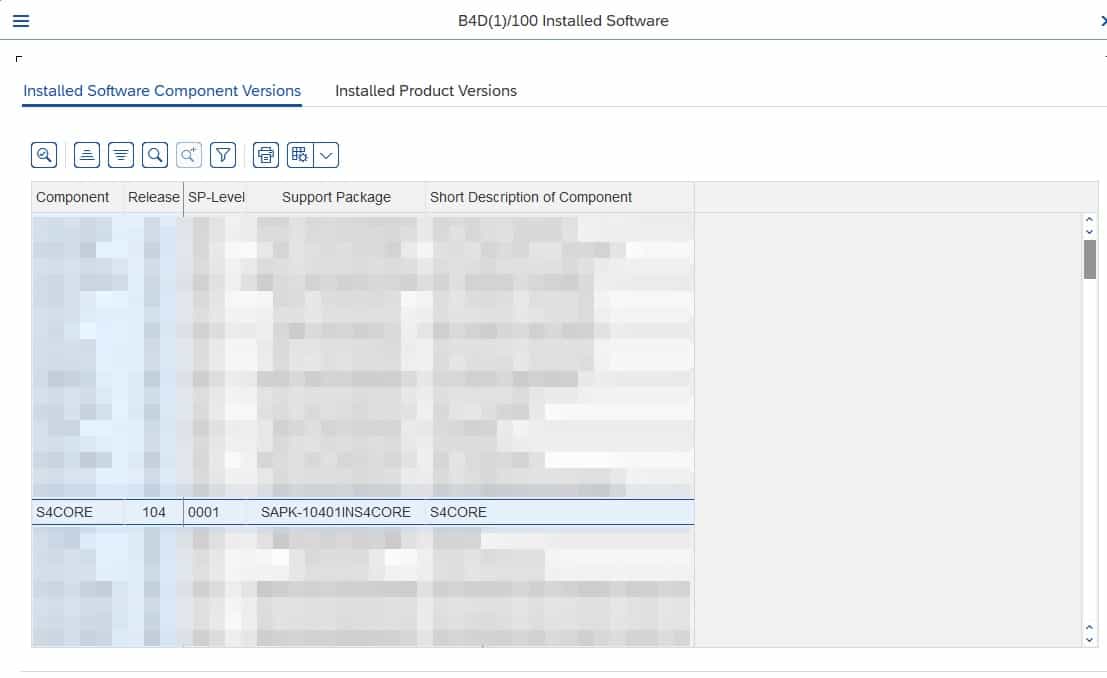
© 2020. SAP SE or an SAP affiliate company. All rights reserved. Used with permission of SAP SE.
S4CORE 102 means you are running an SAP S/4HANA 1709, S4CORE 103 means 1809, S4CORE 104 means 1909, etc.
Any questions about SAP ERP?
Got any questions about SAP and electronic data interchange (EDI)? Please contact us – we look forward to assisting you! You can also chat directly with one of our experts online.
SAP ERP and SAP S/4HANA are the trademarks or registered trademarks of SAP SE or its affiliates in Germany and in several other countries.
Der Beitrag What SAP ERP or SAP S/4HANA version are you using? erschien zuerst auf ecosio.
]]>